Working with Simple Queues
A Simple (linear) Queue is FIFO order enforced by maintaining exactly two mutable pointers — front and rear — so both insertion and removal touch only the ends of the structure, never the middle, giving O(1) work per operation regardless of how many elements sit between them.
Recognize the pattern
- Problem talks about processing items "in the order they arrived" — task scheduling, BFS frontier, print spoolers, request buffering.
- You only ever need the oldest unprocessed item and only ever add new items at one end.
- No need to access or reorder the middle of the collection — if you needed that, it's not a queue problem.
Brute force vs optimal
Brute force: back a queue with a plain dynamic array and always insert at index 0 for enqueue (or always remove index 0 for dequeue). Whichever end you don't special-case forces every remaining element to shift by one slot: O(n) per operation.
Optimal: keep two pointers/references — enqueue writes at rear and advances it; dequeue reads at front and advances it. No shifting. O(1) amortized per operation, achieved either with a singly linked list (pointers) or a circular array (indices).
Complexity from first principles
Time. Enqueue: allocate/write one node, update rear, increment size — a fixed number of pointer assignments independent of n → O(1). Dequeue: read front.data, reassign front = front.next, decrement size — again a fixed count of steps → O(1). Peek/IsEmpty read one field → O(1). Doing k operations costs Θ(k) total, never Θ(k·n) — that's the entire point of holding both ends: drop the rear reference and every enqueue must walk the whole list from front, Θ(n) each.
Space. Linked-list backing: O(n) for n stored elements, plus O(1) per node for the next pointer overhead (constant factor over a raw array). Circular-array backing: O(capacity) pre-allocated, O(1) extra pointers (front index, rear index, count).
Traced example
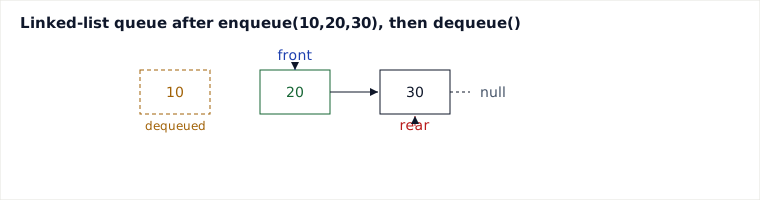
Operations: enqueue(10), enqueue(20), enqueue(30), dequeue(), peek(), dequeue().
| Step | Op | front | rear | Queue (front→rear) | Returns |
|---|---|---|---|---|---|
| 1 | enqueue(10) | 10 | 10 | [10] | - |
| 2 | enqueue(20) | 10 | 20 | [10,20] | - |
| 3 | enqueue(30) | 10 | 30 | [10,20,30] | - |
| 4 | dequeue() | 20 | 30 | [20,30] | 10 |
| 5 | peek() | 20 | 30 | [20,30] | 20 |
| 6 | dequeue() | 30 | 30 | [30] | 20 |
Java implementation
class Queue<T> {
    private static class Node<T> {
        T data;
        Node<T> next;
        Node(T data) { this.data = data; }
    }

    private Node<T> front, rear;
    private int size;

    public void enqueue(T value) {
        Node<T> node = new Node<>(value);
        if (rear == null) {
            front = rear = node;
        } else {
            rear.next = node;
            rear = node;
        }
        size++;
    }

    public T dequeue() {
        if (front == null) // underflow: fail loudly, like java.util.Queue.remove()
            throw new NoSuchElementException("dequeue on empty queue");
        T data = front.data;
        front = front.next;
        if (front == null) rear = null;
        size--;
        return data;
    }

    public T peek() {
        // null-on-empty is the documented contract here (like Queue.peek());
        // callers who want a loud failure use dequeue()
        return front == null ? null : front.data;
    }

    public boolean isEmpty() { return size == 0; }
    public int size() { return size; }
}
Pitfalls
- Forgetting to null out
rearwhen the last element is dequeued — leaves a dangling reference and the next enqueue silently attaches after a rear that no longer sits in the queue. - Array-backed queue without wraparound: repeatedly enqueueing/dequeueing marches the front index rightward until it hits capacity, reporting "full" while most slots are actually empty — needs a circular index (
(i+1) % capacity). - Not checking underflow/overflow before dequeue/enqueue — throws NPE or silently corrupts state instead of failing loudly.
- Confusing queue (FIFO) with stack (LIFO) semantics when translating pseudocode — off-by-one bugs in BFS often trace back to this.
When to use / when not — vs. Deque and Priority Queue
Use a simple queue when processing order must exactly match arrival order and you never need to peek/remove from the rear or reorder by priority — BFS level-order traversal, task/job buffering, rate-limited request handling.
Use a Deque instead when you need to push/pop from both ends (sliding-window maximum, undo/redo, palindrome checks) — a plain queue can't do this without O(n) rebuilds.
Use a Priority Queue instead when "next" is defined by importance/weight, not arrival time — e.g. Dijkstra's algorithm, task scheduling with deadlines. It costs O(log n) per operation instead of O(1), trading speed for ordering flexibility.
Takeaways
- FIFO order is achieved purely by never touching the middle: enqueue writes at
rear, dequeue reads atfront. - Both operations are O(1) because each does a fixed number of pointer updates, independent of queue size.
- Always guard overflow (bounded array backing) and underflow (empty queue) explicitly — don't let them manifest as silent corruption.
- Reach for Deque or Priority Queue instead of Simple Queue the moment you need rear access or priority-based ordering.
Recall: Why is enqueue/dequeue O(1) with a linked-list-backed queue, but O(n) if you always insert at index 0 of an array?
Synthesized from CS curriculum standards on linear data structures (queue ADT, FIFO discipline) and common interview-preparation treatments of queue implementations.
🤖 Don't fully get this? Learn it with Claude
Stuck on Working with Simple Queues? Open Claude, copy a block below, and it'll teach you this exact concept — visually and interactively.
Build the mental picture, not memorization.
I just read a lesson on **Working with Simple Queues** (DSA) and want to truly understand it. Explain Working with Simple Queues from first principles using ONE vivid real-world analogy and a visual mental model — draw it as ASCII art or a clear step-by-step diagram — with a concrete example using real numbers. Then ask me one question to check I got the mental picture, and wait for my reply. If you're unsure or a claim isn't standard, say so and reason from first principles instead of guessing.
Socratic — adapts to where you're stuck.
Teach me **Working with Simple Queues** interactively. Ask me ONE guiding question at a time, wait for my answer, and adapt to my confusion — build the idea with me step by step instead of explaining it all at once. If you're unsure or a claim isn't standard, say so and reason from first principles instead of guessing.
Active recall exposes what you missed.
Quiz me on **Working with Simple Queues** with 5 questions, easy to tricky, ONE at a time. Tell me if each answer is right; at the end, explain clearly what I got wrong and why. If you're unsure or a claim isn't standard, say so and reason from first principles instead of guessing.
Intuition + hook + flashcards for long-term memory.
Help me remember **Working with Simple Queues** for the long term: give the one-sentence intuition, a memorable hook/mnemonic, a tiny worked example, and 3 active-recall flashcards (Q -> A). If you're unsure or a claim isn't standard, say so and reason from first principles instead of guessing.