InMemory Database vs OnDisk Database
The only difference that matters is where the authoritative copy of the data lives relative to the CPU: an in-memory database keeps the whole working set in RAM and treats disk as an optional backup, so every read is a pointer dereference (~100 ns); an on-disk database keeps the source of truth on SSD/HDD and treats RAM as a bounded cache (a buffer pool), so a cold read pays a disk seek (~100 µs–10 ms). Everything else — cost, durability, scaling ceiling — falls out of that one placement decision.
Because RAM is volatile, an in-memory engine that wants durability must explicitly copy writes to stable storage and fsync them; an on-disk engine gets durability almost for free because the primary copy is already on disk. That trade — raw speed vs. free durability — is the whole lesson.
The access-time floor (why RAM wins on latency)
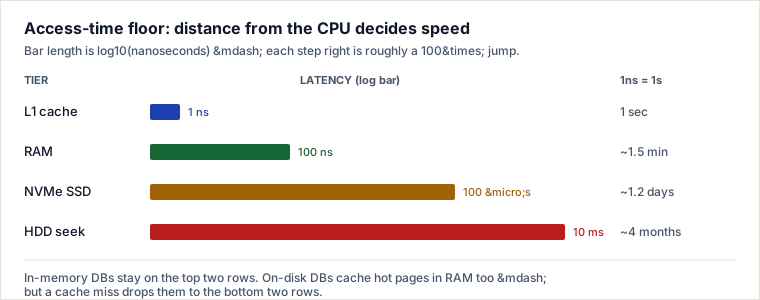
The gap is not "a bit faster" — it is orders of magnitude. The classic trick to feel it: pretend one nanosecond is one second, then re-read the last column.
| Tier | Random access | If 1 ns = 1 second |
|---|---|---|
| L1 cache | ~1 ns | 1 second |
| Main memory (RAM) | ~100 ns | ~1.5 minutes |
| NVMe SSD read | ~100 µs | ~1.2 days |
| HDD seek + read | ~10 ms | ~4 months |
Reading a value from RAM vs. seeking it on a spinning disk is roughly a 100,000× difference; vs. NVMe SSD it is still ~1,000×. An in-memory database is fast for one reason: it never leaves the top of this ladder on the hot path.
Worked trace: how Redis makes RAM survive a crash
RAM loses its contents on power failure, so "in-memory but durable" is a contradiction the engine must actively resolve. Redis offers two mechanisms; follow a single write through both.
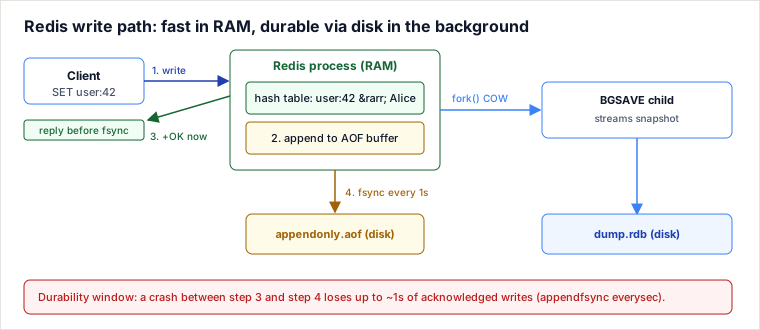
Command issued by the client: SET user:42 "Alice", with appendonly yes and the default appendfsync everysec.
| # | Step | Where | Cost |
|---|---|---|---|
| 1 | Redis writes user:42 → "Alice" into its in-memory hash table (dict) | RAM | ~1 µs |
| 2 | The RESP-encoded command is appended to the in-memory AOF buffer | RAM | ~1 µs |
| 3 | +OK is sent back to the client — before the write is on disk | network | client unblocked |
| 4 | A background job calls fsync() on the AOF, at most once per second | disk | ~1–10 ms, off the hot path |
The durability window is the punchline: with everysec, a crash between steps 3 and 4 can lose up to 1 second of acknowledged writes. Switch to appendfsync always and every write is fsynced before the +OK — zero loss, but throughput now collapses to a few thousand writes/sec because it is bounded by disk fsync latency, not RAM. That single config knob is a durability-vs-throughput dial.
The second mechanism, RDB snapshots (BGSAVE): Redis fork()s a child process. The child inherits a copy-on-write view of memory and streams the entire dataset to a temporary .rdb file, then atomically renames it. The parent keeps serving traffic; a page is physically duplicated only when it is written during the snapshot. RDB gives a compact point-in-time backup and fast restart; AOF gives a finer-grained, replayable log. Production Redis typically runs both.
The mirror image: how on-disk databases use RAM
A common misconception is that on-disk databases "read from disk every time." They don't. InnoDB (MySQL) and PostgreSQL keep a buffer pool — a large slab of RAM caching recently-touched pages. A hot row served from the buffer pool is nearly as fast as Redis. The distinction is architectural, not about whether RAM is used:
- In-memory DB: RAM is the database. The working set must fit in RAM (with headroom). Disk exists only for the durability copy (AOF/RDB, WAL).
- On-disk DB: disk is the database; RAM is a bounded cache. The dataset can be 100× larger than RAM, and durability comes from a write-ahead log (WAL/redo log)
fsynced at commit — the page itself can be flushed lazily.
So the real question is never "do I want speed?" — it is "does my working set fit in RAM, and can I afford to lose the RAM copy?"
Pitfalls
- Treating
everysecRedis as a system of record. It acknowledges writes beforefsync; a crash silently drops up to a second of data. Fine for a cache or leaderboard, catastrophic for payments. - RDB fork memory spike (OOM at 2× RAM). Copy-on-write means that if the parent mutates many pages during
BGSAVE, the fork's memory can approach double the dataset size. A box sized for the dataset can be killed by the OOM killer mid-snapshot. Leave headroom or usevm.overcommit_memory=1. - Working set silently outgrowing RAM. Without a
maxmemory-policy, Redis either errors on writes or starts evicting keys you assumed were permanent; on an on-disk DB, a working set that no longer fits the buffer pool falls off the latency cliff (100 ns → 100 µs+) and p99 latency quietly explodes. - Cold buffer pool after restart. An on-disk DB that just booted serves every read from disk until the buffer pool warms up — expect a minutes-long latency spike after failover or deploy.
- AOF disk-full / rewrite stalls. If the AOF disk fills or an AOF rewrite lags under write pressure, Redis can block or refuse writes even though "it's in-memory."
When to use it / when NOT to
Decision signals for in-memory (Redis, Memcached, SAP HANA): the working set fits in RAM with room to grow; you need single-digit-millisecond or sub-millisecond p99; the data is derived, ephemeral, or loss-tolerant (cache, session store, rate-limiter, leaderboard, real-time analytics); throughput is very high (100k+ ops/sec).
Prefer on-disk (PostgreSQL, MySQL, MongoDB) when: the dataset is much larger than affordable RAM; you need per-commit durability with zero acknowledged-write loss; you run complex relational queries, joins, or long-lived transactions; cost per GB matters (SSD is ~10–50× cheaper than RAM per byte).
Trade-offs vs. named alternatives
- In-memory vs. on-disk: you gain 100–100,000× lower access latency; you pay in $/GB (RAM is expensive), a hard capacity ceiling at RAM size, and durability that must be engineered rather than assumed.
- Redis vs. Memcached (both in-memory caches): Memcached is a multithreaded, pure key-value cache — simpler, scales across cores for flat blob caching, but has no persistence and no data structures. Redis is (mostly) single-threaded but offers rich types (sorted sets, streams), persistence (AOF/RDB), pub/sub, and Lua. Choose Memcached for a large, simple, throwaway cache that must saturate many cores; choose Redis when you need data structures, optional durability, or messaging.
- SAP HANA vs. a traditional row store: HANA is an in-memory, column-oriented store that scans analytical aggregates blazingly fast in RAM; you pay enormous hardware cost and it is overkill for simple OLTP. Choose it for HTAP/real-time analytics on data that fits in a big-memory appliance, not for a general CRUD app.
Crisp rule: choose in-memory when the working set fits in RAM and you need speed more than free durability; prefer on-disk when the dataset outgrows RAM or every committed write must survive a crash.
Takeaways
- The dividing line is where the authoritative copy lives — RAM (in-memory) vs. disk (on-disk) — and every other property follows from that access-time floor (~100 ns vs. ~100 µs–10 ms).
- On-disk databases also cache hot pages in RAM (buffer pool); the difference is that their dataset can exceed RAM and durability is free via the WAL.
- In-memory durability is a spectrum you tune: Redis
everysectrades a ~1s loss window for RAM-speed writes;alwaysgives zero loss but throttles to diskfsyncspeed. - Size for RAM headroom and a memory policy — the failure modes (OOM during fork, eviction, cold cache) all trace back to the working set vs. RAM ceiling.
Re-authored and deepened for this guide. Sources: Redis official documentation on persistence (AOF, RDB, appendfsync, BGSAVE copy-on-write); the widely-cited "Latency Numbers Every Programmer Should Know" (Jeff Dean / Peter Norvig, updated by Colin Scott) for the access-time hierarchy; Martin Kleppmann, Designing Data-Intensive Applications, ch. 3 (storage engines, buffer pools, write-ahead logs); MySQL InnoDB and PostgreSQL documentation on the buffer pool and WAL; and product references for Memcached and SAP HANA.
🤖 Don't fully get this? Learn it with Claude
Stuck on InMemory Database vs OnDisk Database? Open Claude, copy a block below, and it'll teach you this exact concept — visually and interactively.
Build the mental picture, not memorization.
I just read a lesson on **InMemory Database vs OnDisk Database** (System Design) and want to truly understand it. Explain InMemory Database vs OnDisk Database from first principles using ONE vivid real-world analogy and a visual mental model — draw it as ASCII art or a clear step-by-step diagram — with a concrete example using real numbers. Then ask me one question to check I got the mental picture, and wait for my reply. If you're unsure or a claim isn't standard, say so and reason from first principles instead of guessing.
Socratic — adapts to where you're stuck.
Teach me **InMemory Database vs OnDisk Database** interactively. Ask me ONE guiding question at a time, wait for my answer, and adapt to my confusion — build the idea with me step by step instead of explaining it all at once. If you're unsure or a claim isn't standard, say so and reason from first principles instead of guessing.
Active recall exposes what you missed.
Quiz me on **InMemory Database vs OnDisk Database** with 5 questions, easy to tricky, ONE at a time. Tell me if each answer is right; at the end, explain clearly what I got wrong and why. If you're unsure or a claim isn't standard, say so and reason from first principles instead of guessing.
Intuition + hook + flashcards for long-term memory.
Help me remember **InMemory Database vs OnDisk Database** for the long term: give the one-sentence intuition, a memorable hook/mnemonic, a tiny worked example, and 3 active-recall flashcards (Q -> A). If you're unsure or a claim isn't standard, say so and reason from first principles instead of guessing.