What are Indexes
Indexes are well known when it comes to databases. Sooner or later there comes a time when database performance is no longer satisfactory. One of the very first things you should turn to when that happens is database indexing.
The goal of creating an index on a particular table in a database is to make it faster to search through the table and find the row or rows that we want. Indexes can be created using one or more columns of a database table, providing the basis for both rapid random lookups and efficient access of ordered records.
Example: A library catalog
A library catalog is a register that contains the list of books found in a library. The catalog is organized like a database table generally with four columns: book title, writer, subject, and date of publication. There are usually two such catalogs: one sorted by the book title and one sorted by the writer name. That way, you can either think of a writer you want to read and then look through their books or look up a specific book title you know you want to read in case you don’t know the writer’s name. These catalogs are like indexes for the database of books. They provide a sorted list of data that is easily searchable by relevant information.
Simply saying, an index is a data structure that can be perceived as a table of contents that points us to the location where actual data lives. So when we create an index on a column of a table, we store that column and a pointer to the whole row in the index. Let's assume a table containing a list of books, the following diagram shows how an index on the 'Title' column looks like:
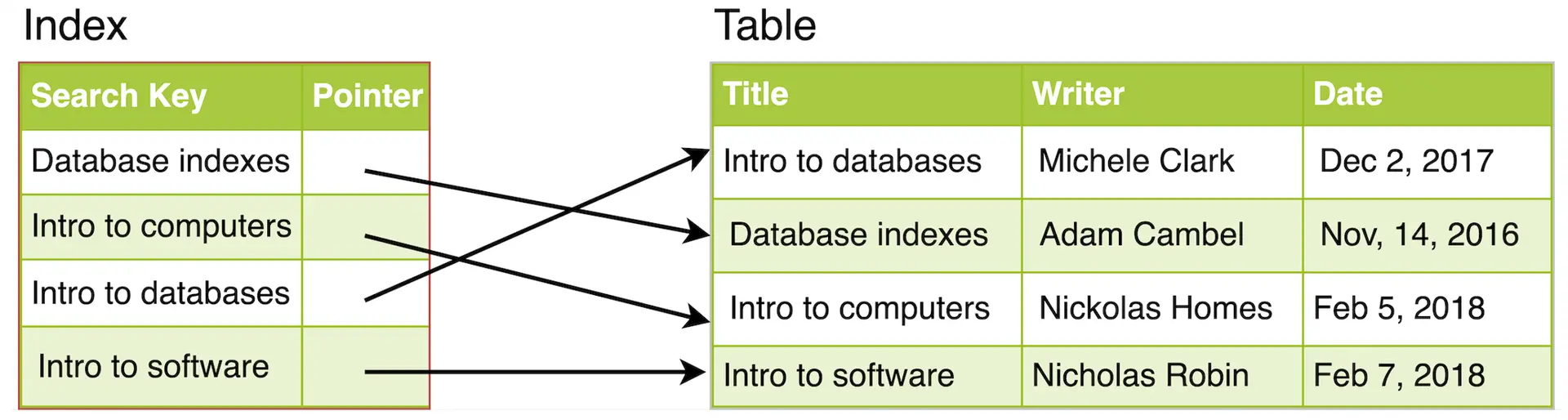
Just like a traditional relational data store, we can also apply this concept to larger datasets. The trick with indexes is that we must carefully consider how users will access the data. In the case of data sets that are many terabytes in size, but have very small payloads (e.g., 1 KB), indexes are a necessity for optimizing data access. Finding a small payload in such a large dataset can be a real challenge, since we can’t possibly iterate over that much data in any reasonable time. Furthermore, it is very likely that such a large data set is spread over several physical devices—this means we need some way to find the correct physical location of the desired data. Indexes are the best way to do this.
Selectivity: the number that decides whether your index is used
An index helps only when it filters hard. Selectivity — the fraction of rows a predicate matches — is what the query planner actually weighs, so work it out on one concrete table: Customers, 2,000,000 rows, with an index on Country (150 distinct values, the biggest holding ~30% of the rows) and an index on Email (unique).
WHERE Email = 'alice@example.com' matches exactly 1 row — selectivity 1/2,000,000. The index wins overwhelmingly: 6 page reads instead of ~25,000 (the read-by-read trace is below).
WHERE Country = 'IN' matches ~600,000 rows — selectivity 0.3. Fetching 600,000 rows through the index means up to ~600,000 scattered page reads, because each matching entry points at a different table page — worse than the ~25,000-page sequential full scan. The planner correctly ignores the index and scans, yet every write still pays to maintain it.
Selectivity, not existence, decides whether an index is used. One further benefit survives even for wider results: because a B-tree index stores keys in sorted order, it can serve ORDER BY and range queries without a separate sort step.
How Indexes decrease write performance?
It's important to note that while indexes can significantly improve query performance, they also come with some overhead. Indexes require additional storage space and can slow down write operations, such as INSERT, UPDATE, and DELETE, since the indexes must be updated along with the table data. Therefore, it's essential to strike a balance between the number of indexes and their impact on query performance and storage requirements.
When adding rows or making updates to existing rows for a table with an active index, we not only have to write the data but also have to update the index. This will decrease the write performance. This performance degradation applies to all insert, update, and delete operations for the table. For this reason, adding unnecessary indexes on tables should be avoided and indexes that are no longer used should be removed.
To summarize, adding indexes is about improving the performance of search queries. If the goal of the database is to provide a data store that is often written to and rarely read from, in that case, decreasing the performance of the more common operation, which is writing, is probably not worth the increase in performance we get from reading.
How an index lookup actually runs
The "table of contents" analogy is a start, but the real structure is usually a B-tree: a shallow tree of sorted keys where each node is one disk page. Because the keys are sorted, the engine can binary-search a page in memory and jump straight to the one child that must contain the key.
Concrete numbers: with 16 KB pages and ~16 bytes per key+pointer a page could in principle hold ~1,000 entries, but page headers plus a typical ~70% B-tree fill factor bring the effective fanout to about 500 children. For 1 billion rows, the height is ⌈log₅₀₀(1e9)⌉ = 4 levels, so any lookup touches at most 4 pages. In practice the root and level-2 pages sit in RAM, so a warm lookup often costs only 1–2 disk reads.
Trace SELECT * FROM Customers WHERE Email = 'alice@example.com' on a table with a secondary index on Email and a clustered primary key on CustomerID:
- Descend the secondary B-tree for
Email(root → internal → leaf) — 3 page reads. - The leaf contains not the full row, but the
CustomerIDvalue for Alice. - Descend the clustered B-tree for that
CustomerIDto fetch the full row — another 3 page reads.
Total: 6 page reads to return one row. A full scan of a 2-million-row table (~80 rows per 16 KB page) touches ~25,000 pages. That is why indexes matter. If the secondary index already carries every column the query selects — a covering index, e.g. an index on (Email, Name) for SELECT Name … WHERE Email = ? — the engine answers straight from the secondary leaf and skips the clustered descent entirely: 3 reads, not 6 (MySQL's EXPLAIN reports Using index; Postgres reports an Index Only Scan). The trade is a wider index that costs more on every write.
The B-tree's ordering is load-bearing: it serves =, <, BETWEEN, and ORDER BY from the same structure. A hash index can do equality in O(1), but because it stores no order it cannot help with ranges or sorting.
When an index hurts more than it helps
Every index is a standing tax on every INSERT, UPDATE, and DELETE on that table. Add them deliberately, not reflexively.
- Low-selectivity columns. A boolean or a two-value status column matches half the table. The planner will usually prefer a sequential scan, but every write still pays to maintain the index.
- Non-sargable predicates. Wrapping the indexed column in a function defeats the index.
WHERE YEAR(created_at) = 2024scans every row; rewrite asWHERE created_at >= '2024-01-01' AND created_at < '2025-01-01'. - Leading-wildcard LIKE.
WHERE name LIKE '%alice%'cannot use a B-tree because the engine cannot narrow the sorted range. Use full-text or trigram indexes for substring search. - Write-heavy tables. A table that is rarely read but heavily updated gains no benefit from indexes while paying the write-amplification cost on every change.
The rule of thumb: index the queries you actually run, verify the plan with EXPLAIN, and drop indexes that are never chosen by the planner.
Index types at a glance
This page covers the core idea. The companion lesson Types of Indexes walks through the full catalog — primary, unique, clustered, composite, full-text, and hash — with a concrete double-lookup trace and the leftmost-prefix rule.
🤖 Don't fully get this? Learn it with Claude
Stuck on What are Indexes? Open Claude, copy a block below, and it'll teach you this exact concept — visually and interactively.
Build the mental picture, not memorization.
I just read a lesson on **What are Indexes** (System Design) and want to truly understand it. Explain What are Indexes from first principles using ONE vivid real-world analogy and a visual mental model — draw it as ASCII art or a clear step-by-step diagram — with a concrete example using real numbers. Then ask me one question to check I got the mental picture, and wait for my reply. If you're unsure or a claim isn't standard, say so and reason from first principles instead of guessing.
Socratic — adapts to where you're stuck.
Teach me **What are Indexes** interactively. Ask me ONE guiding question at a time, wait for my answer, and adapt to my confusion — build the idea with me step by step instead of explaining it all at once. If you're unsure or a claim isn't standard, say so and reason from first principles instead of guessing.
Active recall exposes what you missed.
Quiz me on **What are Indexes** with 5 questions, easy to tricky, ONE at a time. Tell me if each answer is right; at the end, explain clearly what I got wrong and why. If you're unsure or a claim isn't standard, say so and reason from first principles instead of guessing.
Intuition + hook + flashcards for long-term memory.
Help me remember **What are Indexes** for the long term: give the one-sentence intuition, a memorable hook/mnemonic, a tiny worked example, and 3 active-recall flashcards (Q -> A). If you're unsure or a claim isn't standard, say so and reason from first principles instead of guessing.