medium Designing Gmail

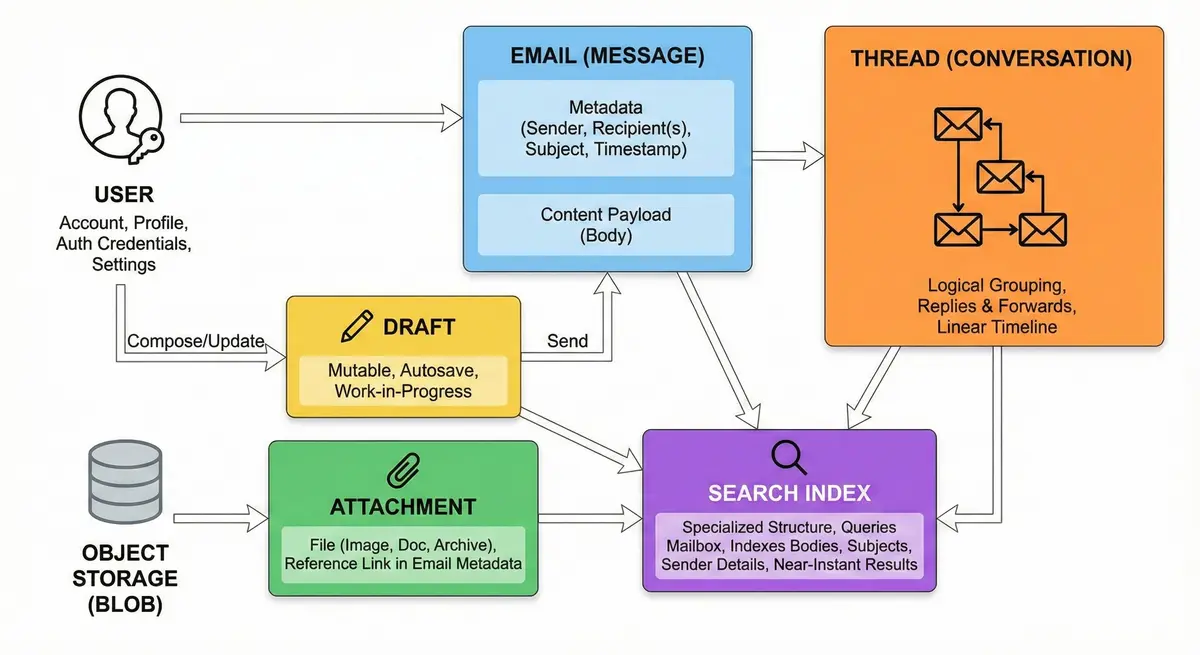
Let’s design a distributed email service similar to Gmail that allows millions of users to send, receive, and organize messages asynchronously. In essence, this service acts as a massive digital post office: it accepts incoming mail, routes it to the correct recipient’s storage, and provides a user-friendly interface for reading, searching, and managing conversations. Key entities in the system include:
- User – An account holder identified by a unique email address. Each user has a profile, authentication credentials, and personalized settings (e.g., signature, theme, language).
- Email (Message) – The core unit of communication. It contains metadata (Sender, Recipient(s), Subject, Timestamp) and the content payload (Body). Once sent, an email is immutable; it cannot be changed, only deleted.
- Thread (Conversation) – A logical grouping of related emails. Instead of viewing messages in isolation, the system groups replies and forwards sharing the same subject or "In-Reply-To" headers. This allows users to view the entire context of a conversation in a linear timeline.
- Draft – A message currently being composed but not yet sent. Unlike sent emails, drafts are mutable. The system must support frequent updates (autosave) to ensure no data is lost while the user types.
- Attachment – A file (image, document, archive) sent along with an email. Attachments are usually stored in a separate object storage system (blob storage) to keep the database lightweight, with only a reference link stored in the email metadata.
- Search Index – A specialized structure that allows users to query their mailbox. Since users rarely scroll through years of email, the system must index email bodies, subjects, and sender details to provide near-instant search results.
Step 1: Clarify and Define Requirements
Functional Requirements:
-
Email Composition & Delivery: Users must be able to send and receive emails reliably using standard protocols (SMTP for sending, IMAP/POP3 for retrieval, plus web/mobile clients). The system should support rich text emails and common features like reply, forward, etc. Real-time delivery is expected so that emails appear in the recipient’s inbox quickly after sending.
-
Attachments: The service should support file attachments with size limits (e.g., Gmail allows up to ~25 MB for outgoing emails and can receive ~50 MB including attachments). Larger files may be handled via integrations (for example, Gmail uses Google Drive for files beyond the email attachment limit). Efficient storage and retrieval of attachments (possibly via a separate storage layer or CDN) is required to handle large files without degrading email performance.
-
Spam Filtering: Advanced spam and malware detection is essential. The system should automatically filter junk/spam emails to a separate folder and block malware/phishing content. This likely involves machine learning models and rule-based filters (e.g., Gmail uses AI like TensorFlow to catch more spam, blocking over 99.9% of spam emails). The spam filtering pipeline should analyze incoming emails in real-time without adding significant latency.
-
Threading (Conversation View): Emails should be grouped into threads by subject or conversation for better user experience (Gmail - Wikipedia). The system needs to maintain metadata linking replies with original messages. This requires storing conversation IDs or references in each email’s metadata and efficiently querying related emails.
-
Search Functionality: Users must be able to quickly search their emails by keywords, senders, dates, etc. This requires a robust indexing system to provide near-instant search results across potentially thousands of emails per user. Given Gmail’s success, the search should be as fast as a web search, leveraging indexes over email subjects, bodies, and metadata.
-
Real-Time Synchronization: If a user reads or deletes an email on one device, it should reflect on all other devices almost immediately. The service should support real-time sync via push notifications or persistent connections so that new emails and status changes (read/unread, etc.) propagate to web clients, mobile apps, and desktop clients in real time. This ensures a seamless experience as users switch devices.
Non-Functional Requirements:
-
High Availability: The service must be reliable and accessible 24/7, targeting five nines (99.999%) uptime. This translates to at most only a few minutes of downtime per year. Achieving this requires redundancy at every level (multiple servers, data centers, network paths) and fast failover mechanisms. Even during maintenance or failures, the system should remain operational from the users’ perspective.
-
Scalability: The design should handle enormous scale of users and emails. We anticipate on the order of a billion users (like Gmail’s 1.5+ billion users) and hundreds of billions of emails per day globally. The system must scale horizontally (by adding servers) to accommodate growth in users or email volume without major redesign. Both the storage and processing layers must handle increasing load gracefully.
-
Low Latency: Common operations should be very fast. Sending or receiving an email should feel instantaneous (sub-second processing on the backend before an email is accepted or delivered). Reading emails and listing an inbox should be quick even if the mailbox has thousands of messages. Search queries should return results in a few seconds at most. This calls for optimized I/O, caching of frequent queries, and efficient database indexes.
-
Consistency & Reliability: Users expect that once they see an email delivered, it won’t be lost. The system should not lose emails even in case of failures – durability is critical. While strong consistency is ideal (especially for a single user’s view of their mailbox), the system might use eventual consistency in some areas (for example, search index updates or cross-datacenter replication) as long as it doesn’t confuse the user. Any transient inconsistency (like an email not immediately appearing in search) should resolve quickly.
-
Security & Privacy: Emails often contain sensitive information. The system must enforce secure access (authentication, TLS encryption in transit) and protect data at rest (encryption on disk). Multi-factor authentication support, detection of suspicious login attempts, and robust authorization checks (ensuring one user cannot access another’s data) are all important. Compliance with privacy laws (like GDPR) and offering tools for data export or deletion also falls under this category as the system grows.
With these requirements clarified, we can proceed to capacity estimates to ensure the design meets the scale.
Step 2: Back-of-the-Envelope Capacity Estimation
Before choosing specific technologies, it's important to gauge the scale of the system:
-
User Base: Assume on the order of 1 billion total registered users, similar to Gmail’s scale. Out of these, ~500 million are daily active users (DAU) who regularly log in and check or send emails. Peak concurrent users could be tens of millions at any given moment, given global usage across time zones.
-
Email Volume: Globally, around 300 billion emails are sent per day (by all services) as of the early 2020s. If our service is as popular as Gmail, it might handle a significant fraction of that. For estimation, assume our service handles 100 billion emails per day (accounting for both incoming and outgoing, including internal and external communications). This would break down to ~1 billion emails delivered per day per 10 million users (just a rough metric). For 1 billion users, that could average ~100 emails per user per day, though actual usage varies widely (some receive only a few emails, others hundreds).
-
Throughput: 300 billion emails/day translates to about 3.47 million emails per second globally. If our service handles a third of that (100 billion/day), that's ~1.16 million emails per second on average. Peak rates might be higher (e.g., during certain hours the traffic could be double the average). The system’s messaging pipeline (SMTP ingress, processing, delivery) needs to handle this throughput distributed across data centers.
-
Storage per User: Each user might have gigabytes of email storage. Gmail currently offers 15 GB free per account, though that is shared with Drive/Photos. Many users won't use the full quota, but some will. Suppose the average used email storage is ~5 GB per user (accounting for many light users and some heavy users). For 1 billion users, that’s roughly 5 billion GB, or 5 exabytes of stored email data service-wide. Even if this estimate is high, we are certainly in the petabyte to exabyte range of storage. We must design a storage system that is distributed and scalable to these sizes (likely using distributed file systems or object storage with many shards).
-
Email Size and Attachment Storage: Not every email is large; many are just a few kilobytes of text. But attachments (images, documents, videos) can use a lot of space. If on average each user’s mailbox has a few thousand emails and a portion have attachments, the object storage for attachments might constitute a large fraction of the total storage. Efficiently storing attachments (possibly de-duplicating common files and compressing data) can save space.
-
Metadata Storage: In addition to raw email content, we store metadata: message IDs, headers, timestamps, sender/recipient lists, labels/folders, thread IDs, read/unread status, etc. Even if each email’s metadata is a few hundred bytes, multiplied by trillions of emails, this is enormous. It suggests using highly scalable databases for metadata (billions of rows or key-value entries).
-
Read vs Write Workload: Reading email (via IMAP/Web or searching) is typically more frequent than writing new email. A single received email (one write to store it) might be read many times (by the user opening it, or viewed on multiple devices, etc.) and also listed in the inbox view multiple times. If we estimate a read:write ratio, it might be on the order of 10:1 or higher in favor of reads. For example, 100 billion new emails (writes) per day might generate several hundred billion read events (inbox views, content reads, search queries). The design should optimize for read throughput (caching, indexing) while still sustaining high write rates.
-
Search Queries: If 500 million users are active daily and even, say, 10% of them perform a search each day, that’s 50 million search queries per day. This is about 578 searches per second on average. Peak search traffic could be higher, but search is still less frequent than basic read operations. However, search is resource-intensive (must scan indexes), so we need a powerful indexing service to handle tens or hundreds of searches per second per data center.
-
Network Bandwidth: With millions of emails per second, many carrying attachments, the network throughput is massive. We might estimate that an average email size (with attachments) is 100KB (some are 1MB+, many are just a few KB). 100 billion emails * 100KB = 10^11 * 10^5 bytes = 10^16 bytes per day, which is 10 petabytes per day of data transferred just for emails. This is about 116 GB per second on average across the system. Of course, this is distributed, but it underlines the need for efficient networking and possibly localized delivery (sending emails within the same data center when possible, using CDN for attachments, etc.).
These rough estimates highlight the immense scale of a Gmail-like service. The system must distribute load across thousands of servers. It also emphasizes certain design focuses: the storage system must handle exabytes; the throughput of email processing must handle millions per second; and read-heavy patterns mean caching and fast indexes are crucial. With capacity in mind, we can proceed to the high-level system design.
3. RESTful APIs
Designing a RESTful email service (similar to Gmail) involves creating clear, stateless endpoints that cover core email operations. Each API uses standard HTTP methods and JSON data formats for ease of use on web and mobile clients.
I. Send Email API (POST /emails/send)
This endpoint allows the client to compose and send an email.
Request Structure
- Endpoint:
POST /emails/send - Body: JSON object with email details:
to(array of string) – Recipient email addresses (required).cc/bcc(array of string) – Carbon-copy / blind-copy addresses (optional).subject(string) – Email subject line (optional, can be empty).body(string) – Email body content (could be plain text or HTML; for HTML content, include an indicator or format type).attachments(array of objects) – (Optional) Files to attach. Each object may includefilename,contentType, and either ancontent(base64-encoded file data) or anurl/idif the file was uploaded elsewhere.
Example Request:
POST /emails/send
{
  "to": ["alice@example.com"],
  "cc": ["bob@example.com"],
  "subject": "Meeting Notes",
  "body": "Hi Alice,\nPlease find the notes attached.\nRegards,\nBob",
  "attachments": [
    {
      "filename": "Notes.pdf",
      "contentType": "application/pdf",
      "content": "<base64-encoded file data>"
    }
  ]
}
Response Structure
On success, the API returns a confirmation that the email was sent (or at least queued for sending). A typical response is 201 Created (since a new email resource is created in the Sent mailbox) along with the new email’s metadata (e.g. its email_id). For faster client feedback, the server might queue the email for sending and return 202 Accepted instead – the email will be sent asynchronously, which improves responsiveness for the mobile/web app. The response body could include the email_id and status:
Example Success Response:
HTTP/1.1 201 Created
{
  "email_id": "12345",
  "status": "sent",
  "sent_at": "2025-02-07T23:08:00Z"
}
If the request is missing required fields or is malformed, the server returns 400 Bad Request with an error message. For example, forgetting the to field or providing an invalid email address would yield a 400 error. The error response body might look like:
HTTP/1.1 400 Bad Request
{ "error": "Recipient list is required." }
II. Fetch Emails API (GET /emails/inbox)
This endpoint retrieves a list of emails in the user’s inbox. It returns a paginated collection, typically sorted by date (newest first by default). The response contains summary information for each email, allowing a client to show an inbox overview (sender, subject, snippet, read/unread status, etc.) without downloading full email bodies. By paginating results, the service avoids sending potentially thousands of emails in one response, which would be slow and resource-intensive. The client can request subsequent pages as the user scrolls or navigates, which is crucial for performance on mobile networks.
Request Structure
- Endpoint:
GET /emails/inbox - Query Parameters: for pagination and optional filters:
page(integer) – Page number to retrieve (e.g. 1, 2, 3...). Some APIs use apageTokenoroffsetinstead. A simple approach is a page number with a fixed page size.page_size(integer) – Number of emails per page (optional, default could be 50). To prevent overly large responses, a maximum page size (like 100 or 200) is enforced.- (Optional filters) – Although the endpoint primarily lists all inbox emails, you could include filters like
is_read=falseto get only unread messages; more complex filtering is generally handled by the search API.
Example Request:
GET /emails/inbox?page=1&page_size=50
Authorization: Bearer <token>
This would fetch the first 50 emails in the inbox. The Authorization header (e.g., an OAuth2 token) is used to identify the user’s account.
Response Structure
A successful response returns 200 OK with a JSON body containing an array of email summaries and pagination info (such as a next page token or page number). For example:
HTTP/1.1 200 OK
{
  "emails": [
    {
      "email_id": "12345",
      "from": "charlie@example.com",
      "subject": "Project Update",
      "snippet": "Hi, here is the update on project X...",
      "date": "2025-02-07T20:15:00Z",
      "is_read": false,
      "has_attachments": true
    },
    {
      "email_id": "12344",
      "from": "david@example.com",
      "subject": "Re: Meeting Notes",
      "snippet": "Thanks for the notes. I have a question about...",
      "date": "2025-02-07T18:02:00Z",
      "is_read": true,
      "has_attachments": false
    }
    // ... up to page_size emails
  ],
  "page": 1,
  "page_size": 50,
  "total_count": 1240,
  "total_pages": 25,
  "next_page": 2
}
Each email item is a summary that includes fields like email_id, sender (from), subject, a short snippet of the body, the sent/received date, read status, and a flag for attachments. By not including the full body and attachments in this list, the payload stays small and quick to transfer on mobile devices. If the client needs more details, it will call the Get Email Details API for a specific email.
III. Get Email Details API (GET /emails/{email_id})
This endpoint returns the full content of a specific email, identified by its email_id. A client (web or mobile) would call this when a user opens an email to read it. It returns all relevant details: headers (from, to, cc, date), subject, the body (which may have HTML and/or plain text), and attachment metadata. Attachments themselves can be included or provided via separate links. The goal is to provide everything needed to display or process the email message.
Request Structure
- Endpoint:
GET /emails/{email_id}(e.g.,GET /emails/12345) - Path Parameter:
email_id– the unique ID of the email to retrieve. - Query Parameters: (optional) A query parameter like
formatmight be supported with values such asfull(default),metadata(headers only), orraw. For standard use, no query parameters are needed. - Headers: The usual authentication header to ensure the user has access to this email.
Example Request:
GET /emails/12345
Authorization: Bearer <token>
Response Structure
On success (200 OK), the response is a JSON object containing the email’s details. For example:
HTTP/1.1 200 OK
{
  "email_id": "12345",
  "from": "charlie@example.com",
  "to": ["me@example.com"],
  "cc": ["alice@example.com"],
  "subject": "Project Update",
  "date": "2025-02-07T20:15:00Z",
  "body_text": "Hi,\nHere is the update on project X...\nRegards,\nCharlie",
  "body_html": "<p>Hi,<br>Here is the update on <b>project X</b>...<br>Regards,<br>Charlie</p>",
  "attachments": [
    {
      "attachment_id": "att-98765",
      "filename": "ProjectX-Report.pdf",
      "contentType": "application/pdf",
      "size": 502400,
      "download_url": "https://api.example.com/emails/12345/attachments/att-98765"
    }
  ],
  "is_read": false,
  "folder": "INBOX"
}
IV. Search Emails API (GET /emails/search)
This endpoint allows the client to search for emails matching certain criteria. Users can find emails by subject keywords, sender, recipients, or date ranges. The API accepts query parameters as filters and returns a list of emails (in the same summary format as the inbox list) that match.
Request Structure
- Endpoint:
GET /emails/search - Query Parameters: to specify search criteria (any combination of these can narrow results):
queryorq(string) – Free-form search text, applying to subject and body (and possibly sender/recipient names). For example,q=project reportmight find emails where those words appear in the subject or body.subject(string) – Search term to match in the subject line (case-insensitive substring match).from(string/email) – Filter by sender email address (e.g.from=alice@example.com).to(string/email) – Filter by recipient.before(date/time string) – Return only emails sent/received before a certain date (e.g.before=2025-01-01).after(date/time string) – Return only emails sent/received after a certain date.has_attachment(boolean) – If true, only return emails that have attachments.- (Other possible filters include
is_readstatus or specific folder/label.) - Pagination parameters:
pageandpage_sizeas described earlier, since search results might be numerous and should be paginated similarly to the inbox listing.
The client can mix these parameters. For example:
GET /emails/search?from=alice@example.com&after=2025-01-01&q=report&page=1&page_size=20
This search would look for emails from Alice, after January 1, 2025, that contain the word “report”, returning the first 20 results. The server should handle the combination of filters gracefully (treating them as AND conditions). If no filters are provided, the API could default to returning an empty result or all emails, though typically at least one filter is used.
Response Structure
A successful search returns 200 OK with a JSON body similar to the inbox listing, but containing only emails matching the query. For example:
HTTP/1.1 200 OK
{
  "emails": [
    {
      "email_id": "12700",
      "from": "alice@example.com",
      "subject": "Project Report Q4",
      "snippet": "Attached is the Q4 project report you requested...",
      "date": "2025-01-15T09:24:00Z",
      "is_read": true,
      "has_attachments": true
    },
    {
      "email_id": "12710",
      "from": "alice@example.com",
      "subject": "RE: Project Report Q4",
      "snippet": "Thanks for the report. I have some comments...",
      "date": "2025-01-16T11:00:00Z",
      "is_read": false,
      "has_attachments": false
    }
    // ... up to page_size results
  ],
  "page": 1,
  "page_size": 20,
  "next_page": 2,
  "total_matches": 35
}
Step 4: High-Level System Design
At a high level, the email service will use a distributed, microservices-based architecture. Different components handle different functions (sending mail, storing mail, searching, spam filtering, etc.), and they communicate over well-defined APIs. Below are the major components and an overview of how an email flows through the system:
Major Components:
-
API Gateway / Load Balancers: Entry point for all client connections. For web or mobile clients, this could be an HTTPS API gateway that routes requests (for inbox fetch, sending an email, searching) to the appropriate internal service. For standard email protocols, load balancers distribute incoming SMTP, IMAP, and POP3 connections across a fleet of mail servers. Global load balancing might direct users to the nearest data center for lower latency. These ensure no single server is overwhelmed and help achieve reliability.
-
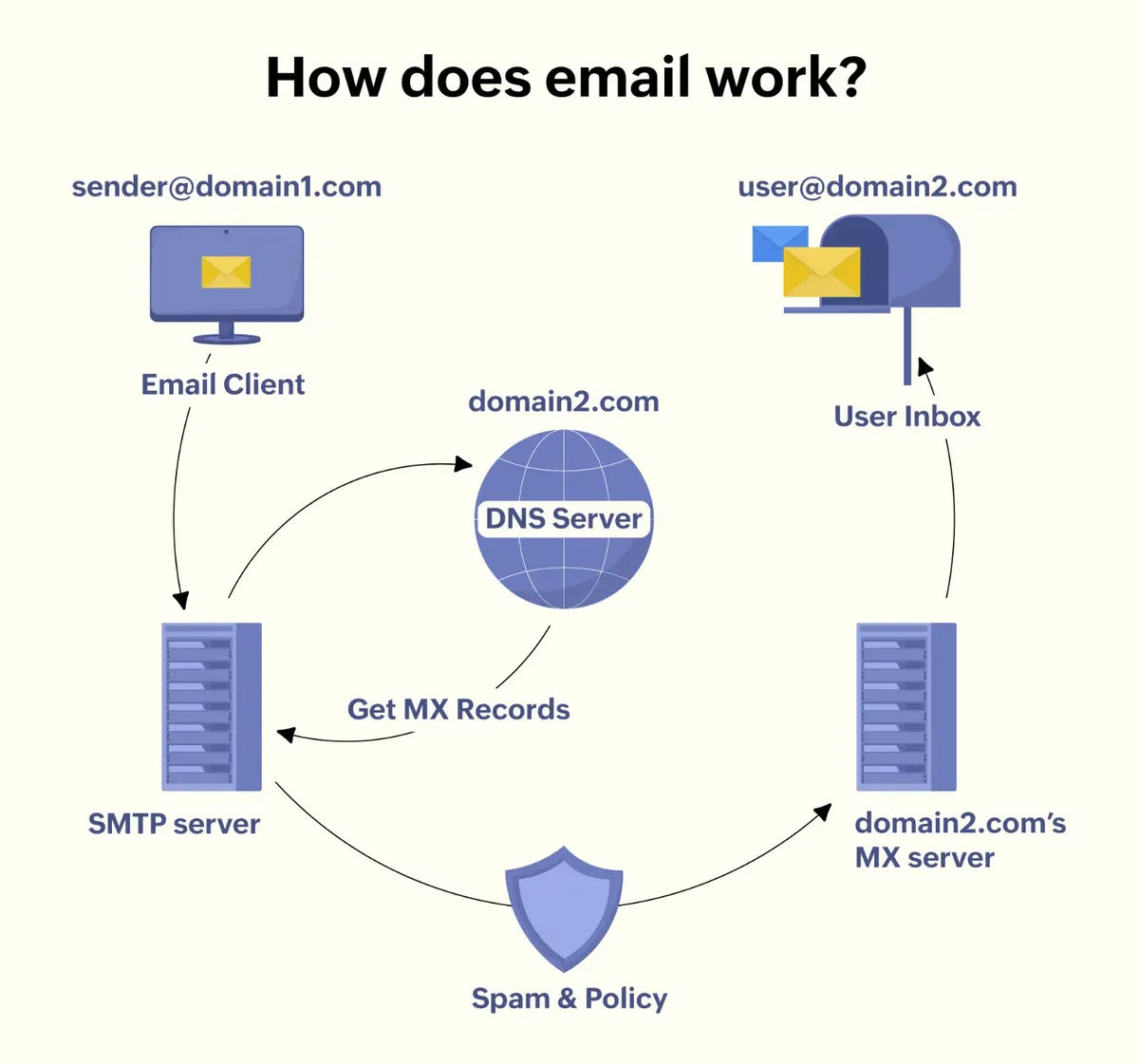
Mail Reception Service (SMTP servers): This layer handles incoming email via SMTP (Simple Mail Transfer Protocol). When someone from outside sends an email to a user on our service, it arrives at our SMTP endpoint. The SMTP service is responsible for accepting the message, performing initial validations (correct recipient domain, etc.), and then passing it to the processing pipeline. It often first hits the spam filtering subsystem (as an inbound email should be checked before delivery). After processing, the SMTP service will hand off the message to be stored in the recipient’s mailbox.
-
Mail Sending Service (SMTP outbound): When a user of our system sends an email to an external address, the sending service takes the message and uses SMTP to route it out to the recipient’s mail server. This component handles queuing and retrying for outbound messages (in case the destination server is temporarily unavailable). It also adds necessary headers (like DKIM signatures for authentication) and respects outbound rate limits or policies (to avoid being flagged as spam sender).
-
Mail Access Services (IMAP/POP3 and Web APIs): These services allow users to retrieve their emails. IMAP and POP3 servers let users connect with traditional email clients (Outlook, Thunderbird, mobile mail apps) to read/send mail. They fetch mail data from storage and present it over those protocols. Additionally, a Web/App Backend serves the Gmail web interface and mobile app requests via HTTPS APIs. This backend handles actions like listing the inbox, opening an email, marking as read, moving to folders (labels), etc., by interacting with the mail storage and metadata. Real-time updates to the client (e.g., new mail notification) could be pushed via a WebSocket or long-poll channel from this backend or via a separate push service.
-
Storage System (Mailbox Storage): A distributed storage layer holds all email data. This is typically split into:
- Metadata Store: Contains structured information such as user account data, email headers (to, from, subject, dates), labels/folder assignments, threading info, flags (read/unread, important), etc. This could be implemented with a distributed NoSQL database or a relational database that is sharded by user. Google’s Gmail is known to use Bigtable (a distributed NoSQL key-value store) along with their Colossus distributed file system for storage. Metadata needs fast read/write for listing emails and updating flags.
- Email Blob Store: Stores the body of emails and attachments, likely as blobs. This could be an object storage service or file system. Each email’s body could be stored as a document or file, possibly compressed.

-
Indexing & Search Service: To enable fast search, emails need to be indexed. This service could be akin to a search engine that maintains an inverted index of all keywords in emails. Likely, each user’s emails are indexed separately for privacy and query speed (a search only needs to scan that user’s index). The indexer can be updated in near real-time: when a new email arrives or an email is modified, the indexing service updates the index for that user (potentially via an asynchronous task queue). The search service then handles user queries by looking up the user’s index and returning matches quickly. At Gmail’s scale, this could be built on Google’s internal search technology; in a generic design, we might use something like Elasticsearch or a custom Lucene-based service, carefully sharded by user or by keyword.
-
Spam Filtering & Security Layer: All incoming emails should pass through spam detection, virus scanning, and other security checks before being stored in the mailbox. This layer can be a pipeline that includes:
- Anti-Spam Engine: uses machine learning models (trained on spam examples) and rule-based heuristics to score emails. Gmail uses advanced ML to catch spam, including image-based or hidden content spam. If an email is identified as spam, it will be flagged and routed to the user’s Spam folder (or even rejected if it’s a high-confidence phish).
- Virus/Malware Scan: attachments are scanned (with antivirus engines or sandboxing techniques) for malware. Malicious attachments might be stripped or the email quarantined.
- Authentication Checks: verify the sender is not forged – check SPF/DKIM/DMARC on incoming mail to ensure the sender’s domain is legitimate. This helps prevent phishing attempts where attackers spoof email addresses.
- Rate limiting and IP reputation: The system may throttle or reject connections from known spammy IPs or if a sending pattern looks abusive. This is especially important for not getting our own service blacklisted when sending emails. Outbound emails should also be scanned if users send something malicious (to protect recipients and our IP reputation).
-
Notification Service (Real-Time Sync): This component handles real-time updates to clients. For example, when a new email arrives in a user’s mailbox, it triggers a notification. On web clients, this could be through a server push (like a WebSocket event or Server-Sent Event) that tells the browser to fetch the new message. On mobile, this could integrate with push notification services (like Firebase Cloud Messaging for Android or APNs for iOS) to wake up the app. The notification service subscribes to events (like “new email stored” events from the storage layer) and then broadcasts updates to the user’s active clients.
Data Flow Overview:
Let’s walk through key scenarios: receiving an email, sending an email, and reading/searching an email.
- Receiving Email (Inbound flow):
- An external sender (or another user) sends an email to abc@gmail.com. Their mail server uses DNS to find our service’s MX (mail exchange) records and connects to our SMTP receiving service.
- The SMTP server accepts the connection. It performs initial handshake and receives the email data (SMTP “DATA” command which includes headers and body). As it receives the message, it streams it to the spam/security filter.
- The Spam Filter/Virus Scan processes the email content. For example, it checks SPF/DKIM to verify the sender domain, scans for spam patterns or malware. If the email is deemed spam, it might tag it and set a spam flag.
- Assuming the email passes checks (or is only marked as spam), the system determines the destination mailbox (User X in our domain). It then hands the message to the Mail Storage service to save it. The email’s text body and attachments are stored in the blob store (e.g., distributed file system or object storage). Metadata like “new email with ID, from Y, subject Z, time T, in inbox (or spam folder)” is written to the metadata store (e.g., a NoSQL table keyed by user). The email might be assigned a unique MessageID and possibly a ThreadID (if it’s a reply, the ThreadID might be extracted from headers or matched to an existing conversation).
- The Indexing service is notified of the new email (perhaps via an event or message queue). It will parse the email (extract text, headers) and update the user’s search index to include this email. This allows the email to be found by queries like keyword search or by sender.
- The Notification service is also notified of the new email event. It will then push a notification to any active clients for User X – for instance, the Gmail web interface will get a signal to show a new mail, or the mobile app gets a push alert “New mail from Y”.
- User X sees the new email in their inbox (if not spam) in real-time. If it was spam, it lands in the spam folder with appropriate label.

- Sending Email (Outbound flow):
- User X composes an email to def@gmail.com (some external recipient, or could be internal to our service as well) using either the web interface or an email client. When they hit “Send,” the client (app or web) sends the message via our service’s endpoint. For a web client, it would be an API call to our backend; for a SMTP client (e.g., Outlook using our SMTP), it goes directly to our SMTP sending service.
- The Mail Sending service (SMTP) receives the outgoing email. If via API, our backend will forward it to the SMTP outbound component. The service might immediately give the user feedback that the email is accepted for delivery (at least into our queue).
- The outgoing email is then queued for delivery. A component checks the recipient’s domain. If the recipient is also on our service (same domain), then we short-circuit: it becomes an “internal deliver” and we essentially treat it like an inbound mail to our own user (goes into their mailbox directly). If the recipient is external (another email provider), the SMTP service performs an MX lookup for that domain and attempts to deliver the mail to the external mail server.
- As the email is handed off externally, our system may add security signatures (DKIM signing the message to prove it comes from our domain, etc.). We also log the outgoing mail in a Sent Mail storage for User X. Typically, the email content is stored in their mailbox under a “Sent” label/folder – possibly the storage service reuses the same storage pipeline to save a copy. This ensures the user’s sent mail is viewable in their outbox.
- The Indexing service updates User X’s search index with the sent mail as well, so they can search their sent items. (If the mail was internal, the recipient’s index gets updated too via the inbound flow).
- The SMTP outbound service will try to send to the external server. If it fails (remote server down), it will retry with backoff, and if ultimately undeliverable, it generates a bounce email back to User X. This whole process happens in the background asynchronously; the user doesn’t need to wait online after hitting send.
- Reading Email & Searching (User actions):
- When User X opens their inbox (e.g., logs into the web UI or refreshes the mobile app), the client connects to the Mail Access service (via HTTPS API or IMAP). A request is made for, say, “fetch latest 50 emails in inbox.” The service (after authenticating the user’s session) queries the Metadata store for User X’s mailbox, likely retrieving email metadata sorted by date or by unread status. For example, it might query a table of messages for that user (possibly already sorted or indexed by folder and date). Because this is a read-heavy operation, there might be a cache layer in front of the DB – e.g., recent emails’ metadata cached in memory (Redis or memcached) – to serve frequent inbox views quickly.
- The service returns the list of emails (subjects, senders, snippet, etc.) to the client. The user may click on one email to read it; at that point the client requests the email content. The Mail service fetches the email body from the blob store. If the user has read this email before, it might have been cached, but often we fetch from storage and possibly cache it on the server or even client side. Attachments might not be downloaded until the user chooses to view or download them, in which case the client might fetch directly from a content delivery server or via a secure link to the blob storage.
- If the user performs a search query (e.g., searches “project report”), the client sends the query to the Search service. The search service will look up User X’s search index (likely a specialized data structure or search engine index). Because each user’s data is separate, the query can be executed quickly on that subset. The result is a list of message IDs that match the keywords or filters. These IDs are then fetched (the metadata for those messages, like snippet, folder, etc., from the metadata store) and returned to the client as search results. Given Google’s expertise, this is expected to be very fast and can handle complex queries (like has:attachment, from:someone, etc.).
- The user may take actions like deleting an email or moving it to a folder. These actions are write operations on metadata (update the message’s folder label, or a deletion flag). The Mail service updates the metadata store accordingly. Such changes should also reflect in the index (if a message is deleted, the indexer can later drop it from the search index to avoid stale results). The real-time notification system might also inform other devices of the change (e.g., if you delete an email on your phone, your laptop’s inbox view should soon update and remove that email).
Trade-offs in High-Level Design:
-
Monolithic vs Microservices: We choose a microservices approach, which adds complexity in orchestration but allows each component to scale independently and be developed/optimized separately (e.g., we can scale out more SMTP servers without necessarily scaling the web frontends). A monolithic design (all-in-one server handling SMTP, IMAP, web, and storage together) would be simpler to start, but would quickly become unmanageable at this scale.
-
Separation of Storage and Compute: By separating the storage layer (which just stores/retrieves data) from the application logic (SMTP handling, client handling), we can scale and optimize them independently. Storage can focus on durability and performance of data access, while SMTP/IMAP servers handle protocol specifics. This also improves reliability (stateless servers for SMTP/IMAP can fail and restart without losing data, since data is in the storage system).
With the high-level design in mind, let’s dig deeper into data schema choices, data management, and detailed component design for each part of the system.
Step 5: Database Design
In this section, we explore how data is structured and managed within the system and design details of core components. We also discuss trade-offs in choosing certain technologies or approaches.
Email Storage Model
To handle billions of emails, we will separate our storage into a Metadata Store, a Document Store, and an Object Store:
We have two types of data to be stored: 1) Structured: This is small, structured info about users and emails (like sender, date sent, etc.), and 2) Unstructured: Large data consisting of email body and attachments.
We can use SQL or NoSQL for structured data. NoSQL stores offer flexibility and easier scalability whereas relational SQL stores are easier for complex queries and ensure consistency (ACID transactions for updates). However, at the scale of billions of messages, a single relational instance won’t suffice – we would need to partition it.
One reasonable choice is to go with a relational SQL database for structured metadata and a NoSQL store for unstructured content. The SQL part holds critical metadata (user accounts, email headers, indexes, relationships) with ACID compliance for consistency, while the NoSQL part holds email bodies and attachments to scale horizontally to billions of records. This hybrid approach leverages the strengths of each system – structured queries and strong consistency from SQL, and flexibility and scalability from NoSQL. Below, we will discuss the SQL schema and how it meets requirements for efficient retrieval, fast search, sharding, and multi-region distribution.
SQL Schema for Metadata (Relational)
The following SQL schema defines tables for users, emails, recipients, and attachments metadata. These tables use primary/foreign keys to enforce relationships (e.g. each email is linked to a user and recipients). We also define indexes on key fields like subject, sender, and date for fast lookup. All data types are chosen to balance storage and performance (e.g. using BIGINT for IDs, text types for subject and addresses, etc.). The schema ensures strong consistency for critical data – for example, inserting a new email’s metadata and linking it to a user and recipients can be done transactionally in SQL.
Users Table (SQL):
This table stores user account information.
| Field | Data Type | Description |
|---|---|---|
| user_id (PK) | BIGINT | Unique user identifier (primary key) |
| username | VARCHAR(100) | Username or email address (unique) |
| created_at | DATETIME | Account creation timestamp |
| status | VARCHAR(20) | Account status (e.g., active) |
Emails Table (SQL)
Stores structured email header data (one row per email). Indexed columns are noted for fast search by subject, sender, or date.
| Field | Data Type | Description |
|---|---|---|
| email_id (PK) | BIGINT | Unique email identifier (primary key) |
| user_id (FK) | BIGINT | Owner/recipient user’s ID (foreign key to Users) |
| sender | VARCHAR(255) | Sender email address (or user ID if internal) |
| subject | VARCHAR(255) | Subject line of email (indexed) |
| date_sent | DATETIME | Sent/received date and time (indexed) |
| has_attachments | BOOLEAN | Whether email has attachments (for quick filtering) |
| folder_label | VARCHAR(50) | Folder/label (e.g. "Inbox", "Sent") |
Indexes: An index on subject, sender, and date_sent allows fast queries by these fields. For example, a B-tree index on subject and sender enables quick lookups without scanning the entire table. A composite index on (user_id, date_sent) could optimize retrieving all emails for a user sorted by date.
Email_Recipients Table (SQL)
Maps emails to their recipients (to handle multiple recipients per email). This table captures the relationship between emails and users (or external addresses).
| Field | Data Type | Description |
|---|---|---|
| email_id (FK) | BIGINT | Email ID (foreign key to Emails table) |
| recipient_address | VARCHAR(255) | Recipient’s email address (internal or external) |
| recipient_user_id | BIGINT (nullable) | If recipient is a registered user, their user_id |
(Primary key is a combination of email_id and recipient_address to ensure uniqueness per recipient.) This structure lets us query which emails were sent to a given address if needed. For internal users, recipient_user_id links to the Users table; otherwise, the email address is stored as text.
Attachments Table (SQL)
Stores metadata for email attachments (the files themselves live in the NoSQL/object store).
| Field | Data Type | Description |
|---|---|---|
| attach_id (PK) | BIGINT | Attachment ID (primary key) |
| email_id (FK) | BIGINT | Email ID that this attachment belongs to |
| file_name | VARCHAR(255) | Original filename of the attachment |
| content_type | VARCHAR(100) | MIME type (e.g. "image/png", "application/pdf") |
| file_size | BIGINT | Size of the attachment in bytes |
| storage_key | VARCHAR(255) | Key/URL for the attachment in NoSQL storage |
The storage_key is a pointer to where the actual attachment binary is stored in the NoSQL system (e.g. an object storage URI or document ID). This allows the relational DB to hold needed info for listing attachments without storing large blobs.
Note: All the above tables use foreign keys to maintain referential integrity (e.g., an email’s user_id must exist in Users). The SQL database’s transaction support ensures that when a new email is received, all related inserts (email metadata, recipient rows, attachment metadata) can be committed atomically, preserving consistency.
Email Body and Attachment Storage
As mentioned above, we will choose a document-oriented NoSQL database for email bodies and a distributed object storage for large attachments, achieving flexibility and scale:
-
Email Bodies: Stored as documents (e.g., in a JSON document store like MongoDB or a wide-column store like BigTable). Each document represents one email’s content. It is identified by the same
email_idas in SQL (used as a key or document ID). The document contains fields for the email body, and possibly metadata duplicates like subject or sender for convenience (though not strictly needed since those are in SQL). For example, a document might look like:{ "_id": 123456, "body": "<html>Hello, ...</html>", "attachments": [ { "attach_id": 987, "storage_key": "attachments/987.pdf" }, { "attach_id": 988, "storage_key": "attachments/988.jpg" } ], "metadata": { "sender": "alice@example.com", "to": ["bob@example.com"], "subject": "Meeting Updates", "date_sent": "2025-02-07T10:00:00Z" } }This JSON structure is flexible: new fields (for example, a flag for encryption or additional headers) can be added without altering a rigid schema. We keep a copy of key metadata (subject, sender, etc.) in the document for easier standalone use and potential NoSQL-side querying, but the authoritative source for those fields is the SQL database.
-
Attachments: Large attachments (binary files) are stored in an object storage service (like Amazon S3 or Google Cloud Storage) or blob store (which is a type of NoSQL storage specialized for large unstructured files). Each attachment is saved with a unique key (as referenced by
storage_keyin the SQL Attachments table). For example, an attachment might be stored under a key likeuser123/2025/02/07/email4567/attachment1.pdfin a distributed file store. Object storage is highly scalable for big files and serves them via URLs or streams efficiently. Attachments and email bodies, being large objects, can be further optimized by doing the following:- We might compress text bodies to save space. Compressing and uncompressing would require more computing though, which is a trade-off.
- We likely deduplicate attachments by content hash: If the same file is sent to 100 recipients, store one copy and have pointers from each email record to that blob. This saves significant space at the cost of a bit more complexity in referencing counts.
- A CDN (Content Delivery Network) can be layered for attachments: when a user wants to download an attachment, it can be served from edge servers (after proper authentication) to reduce load on core storage and speed up delivery.
- Trade-off: Some designs might embed attachments within emails as base64 (which increases email size). It's simpler but inflates storage and bandwidth. We choose to handle attachments as separate objects for efficiency. The trade-off is complexity in storage and retrieval (keeping track of multiple objects per email), but the benefits in space and speed are worth it.
-
Logs: Email system logs (such as delivery logs, open/click tracking, or system events) are written to a NoSQL store as well. A wide-column store or time-series optimized database could be used for logs. For instance, a column-family NoSQL (like Cassandra) could store logs with a partition key (such as user or date) and various columns for log details. This allows appending billions of log records across a cluster without stressing the SQL store. Logs are typically written frequently and read in aggregate (for analytics), which NoSQL handles well due to high write throughput and eventual consistency tolerance.
NoSQL Data Model Choice: A document store suits email content since an email (body + attachments list) is naturally a self-contained document. It provides flexibility to store variable fields (different emails can have different headers or structure) and can be indexed on certain JSON fields if needed. For attachments, an object storage is ideal as it’s optimized for large binary objects and easy to scale (the database only needs to store references to these files). This combination ensures we can scale horizontally without a fixed schema limiting the email content structure.
Efficient Retrieval by Subject, Sender, or Date
To retrieve emails quickly by common attributes like subject, sender, or date, we rely on the SQL metadata store and its indexing:
-
Metadata Query: When a user searches or filters emails by subject, sender, or date, the query is executed on the SQL database (for example, a SQL query like
SELECT email_id, subject, sender, date_sent FROM Emails WHERE sender='alice@example.com' AND date_sent > '2025-01-01' ORDER BY date_sent DESC)The relational engine can use the indexes on these columns to quickly locate matching rows instead of scanning the whole table. This yields a list of email IDs (and maybe brief info like subject preview). -
Join/Relationship Usage: If needed, the SQL query can join with the Users or Recipients table (for example, to find all emails sent by a certain user or to a certain recipient). Because these relationships are in SQL, the query benefits from relational set operations and foreign key relationships. For instance, to get all emails a particular user received in January, one could query the Emails table by
user_idand a date range, which is efficient due to the index on date and filtering by user_id (often the primary key or part of a composite index). -
Fetching Content: Once the relevant email IDs (and metadata) are obtained from SQL, the application fetches the full content from NoSQL. Using the
email_idas a key, it retrieves the email document (body and attachments info) from the document store, and fetches any attachment files from object storage as needed. Because the email content is keyed by ID (often a direct lookup in a key-value sense), this retrieval is very fast – typically O(1) lookups on the NoSQL side. The combination ensures that searching by field uses the power of SQL indexes, and reading the content uses the speed of NoSQL key-based access.
Why this is efficient: The heavy filtering and searching is done on a strongly consistent, indexed SQL store optimized for such queries, while the bulk data transfer (email body, files) is done directly from a storage optimized for throughput. This separation means we can handle queries like “find all emails from Bob in 2025 with subject containing ‘Project’” quickly via metadata, then pull the needed bodies. Users experience quick search results, as the system avoids scanning large email texts during search – it only loads the text for the results the user needs to open.
Indexing for Fast Search
Proper indexing is critical for performance. In the SQL schema, we create indexes on the columns involved in frequent queries:
-
Subject Index: An index on the
Emails.subjectcolumn allows fast text matching for subject queries. For example, looking up a specific subject or doing prefix/LIKE searches can use this index to narrow down results rapidly. If full-text search on subject lines is needed (for keywords anywhere in the subject), a full-text index or search engine integration could be used, but for exact or prefix matching the normal index suffices. -
Sender Index: An index on
Emails.sender(or a composite index on sender+date for combined queries) means queries filtered by sender will quickly retrieve all email IDs from that sender. Since sender addresses are often repeated, the index lets the database jump to all entries for a given sender without scanning others. -
Date Index: An index on
Emails.date_sentsupports efficient retrieval of emails in a date range or sorting by date. For instance, listing a user’s mailbox by date or finding emails in a particular month will use this index to fetch a contiguous range of entries by timestamp (which is much faster than comparing every row’s date). -
Composite Indexes: We can add composite indexes to speed up multi-criteria queries. A composite index on
(user_id, date_sent)helps when listing emails for a user by date (common for showing a mailbox view sorted by newest). Similarly, an index on(user_id, subject)might help find a keyword in subject within a specific user’s mailbox. -
Indexing in NoSQL: For the NoSQL document store, we primarily use key-based access (by email_id) for retrieval, which is inherently fast and doesn’t require a secondary index for that key. However, if we needed to query within the NoSQL store (say, find all emails with a certain attachment type or a certain tag in the body), many document databases allow indexing of fields within documents. For example, an index on the
metadata.senderfield in the email document store could allow querying the NoSQL directly by sender. In our design, this is usually unnecessary because SQL covers those queries. Instead, the NoSQL indexes (if any) might be used for different tasks, such as ensuring unique keys or supporting text search in email bodies. Also, the full-text search on email bodies is offloaded to a search engine like Elasticsearch, rather than handled by the primary data stores.
By thoughtfully indexing the SQL metadata, we optimize search performance. Indexes allow the database to find the matching records via tree lookups or hash lookups rather than scanning all rows. The trade-off is some extra storage and slightly slower writes (as the index must be updated on inserts), which is acceptable given the read-heavy nature of email retrieval. Fast search is further ensured by keeping the amount of data scanned small – we never scan through entire email bodies during a search-by-subject or sender, we only scan the indexed fields.
Sharding Strategy for NoSQL Storage
To handle billions of emails, the NoSQL data store must be distributed across many servers. We use sharding to split data into partitions across nodes:
-
Shard by User (Partition Key): A common strategy is to shard based on a user identifier. For example, we could use the user_id (or a hash of it) as the partition key for the email documents. This means all emails for a given user reside on the same shard (or a controlled small set of shards). The benefit is locality – retrieving all emails for one user hits a specific shard, reducing cross-node queries. It also simplifies consistency per user (all of a user’s data can be handled in one place). With millions of users, the load is naturally spread across shards. Each shard might handle (for example) users with certain hash ranges of user_id. This avoids a “hot spot” since no single shard stores all emails, and active users are distributed. If one user has a very large number of emails, we could even sub-partition by time (e.g., shard key = hash(user_id) + year) to split their data by year across shards, but this may not be necessary initially.
-
Alternative Shard by Email ID: Another approach is to use the email’s unique ID (which could be a globally unique GUID or an auto-increment combined with user) hashed to a shard. This yields an even distribution of emails across shards regardless of user. The system would then assemble a user's mailbox from multiple shards. This approach balances storage perfectly, but reading one user’s entire mailbox would involve querying multiple shards (slower for that use-case). In contrast, sharding by user localizes per-user queries at the cost of some imbalance if certain users store significantly more email than average. For an email service, per-user locality is typically preferred since users generally access their own messages, and extremely large mailboxes can be handled by splitting as noted.
-
Sharding in Practice: If using a document database like MongoDB, we would define a shard key (e.g.,
user_idoremail_idhashed) and the cluster automatically routes reads/writes accordingly. If using a wide-column store like Cassandra, we’d design the primary key with a partition component (e.g., partition by user) so that the cluster spreads those partitions across nodes. Each shard (node or group of nodes) holds a subset of data roughly equal in size. As data grows, we can add shards (servers), and the system redistributes partitions. Sharding allows the database to scale horizontally, both in storage capacity and in write/read throughput, since different shards can handle operations in parallel. -
Metadata and SQL Sharding: The SQL metadata store can also be sharded or partitioned if needed. For instance, we might partition the Emails table by user_id ranges or use separate database instances per region. However, often the metadata volume (headers) is much smaller than bodies, so a single SQL cluster with replication can handle it. If scaling demands it, partitioning the SQL database by user or using a distributed SQL database would be considered.
Summary: By sharding the NoSQL store, we ensure that no single server handles all email data. This design can handle billions of emails since each shard manages a slice of the data. It improves performance (queries hit only relevant shards) and allows us to add more shards to increase capacity. The key is choosing a shard key that balances load and aligns with access patterns. Sharding by user strikes a good balance for email – it’s how many large email providers distribute data – because it isolates each user’s workload and naturally spreads users across the cluster.
Multi-Region Data Distribution
For global availability and redundancy, the data is replicated across multiple regions (data centers). The goal is to keep the service running and responsive even if one region goes down or if users are geographically distributed:
-
NoSQL Multi-Region Replication: The NoSQL data store is configured to replicate data to multiple regions. Many NoSQL systems support multi-datacenter replication or “global” tables. For example, Amazon DynamoDB’s global tables or Cassandra’s multi-dc replication allow updates in one region to propagate to others automatically. In our email service, this means an email stored in the primary region is asynchronously copied to secondary regions. Users in different continents can be served reads from the nearest replica for low latency, and if an entire region experiences an outage, the data is still available elsewhere. We would typically use eventual consistency across regions to keep performance high (writes don’t have to wait for every region), but tune the system to resolve any conflicts (for example, if a user moves an email to a folder in one region, that update will eventually replicate to others; conflicts are rare for email content since each email is mostly written once).
-
Relational DB Distribution: The SQL metadata can be replicated using a primary-replica model across regions. One region (or a few) might act as primary for writes, and other regions have read replicas. This way, read-heavy operations like listing emails can be satisfied locally, while writes (like receiving a new email or updating flags) go through the primary to maintain consistency. In case of a region failure, a replica can be promoted to primary. Modern SQL solutions and cloud databases also offer multi-region clusters or distributed SQL that can give a single logical database spanning regions. For strong consistency, one might use a distributed SQL database that replicates synchronously (at the cost of some latency). Alternatively, assigning each user a “home region” for their metadata is an approach: user data is stored in one region (and replicated to others for backup). The application directs the user to their home region for any write operations. This limits cross-region calls and keeps each user’s critical metadata strongly consistent in one place.
-
Object Storage Distribution: Attachments in object storage can leverage geo-replication provided by the storage service. For instance, an S3 bucket or similar can be configured to replicate objects to another region. This ensures that file data is not lost if one region’s storage is unavailable. Additionally, using a CDN (Content Delivery Network) for attachments can cache files globally, improving download speeds for attachments worldwide.
-
Availability and Failover: By having both SQL and NoSQL data in multiple regions, we achieve high availability. If a region goes offline, the system can failover to a replica in another region. Because the NoSQL store holds the bulk of data, its multi-region replication means users can still retrieve email bodies from another site. The SQL metadata being replicated means we don’t lose the index of emails. The system might use a consensus or leader election to decide which region’s SQL is authoritative at a given time (to avoid split-brain). In NoSQL’s case, some systems allow multi-master writes in different regions (with conflict resolution). Others use a primary region approach for writes and read-only replicas elsewhere.
Overall, multi-region distribution provides redundancy and low latency. Users in, say, North America, Europe, and Asia can all experience fast access with local data copies, and the service can tolerate a data center outage without data loss. This design aligns with the principle of no single point of failure: data is distributed across servers and regions, making the system more resilient.
Trade-offs Between SQL and NoSQL Usage
Using a hybrid SQL+NoSQL design introduces trade-offs. We deliberately use each technology where it’s strongest, but we must balance consistency, complexity, and performance:
-
Data Integrity vs. Flexibility: Relational SQL databases enforce schemas and relationships, which guarantees structured data integrity (e.g., no orphaned records, valid references) and supports ACID transactions. This is crucial for metadata like “which user owns this email” or ensuring an email header isn’t saved without its recipients. NoSQL, on the other hand, offers schema flexibility – we can store emails with varying fields or large texts without predefined columns. This flexibility comes at the cost of not automatically enforcing relationships. In our design, we mitigate that by keeping critical references in SQL (ensuring, for example, an email’s metadata exists before a body is stored).
-
Scalability: NoSQL databases are designed to scale out horizontally across many nodes easily, handling huge volumes of data and traffic by adding servers. This is why we trust NoSQL for the unstructured email content and logs. Relational databases can be scaled, but typically via vertical scaling or careful sharding which is more complex and has limits. By using NoSQL for the email bodies, we avoid pushing the relational DB beyond its comfort zone. The SQL part still can scale with replicas and maybe sharding, but it’s smaller in size (metadata only) and load (indexed lookups). In short, SQL gives us an easy way to model relationships until it hits scale limits, and NoSQL picks up where scale is paramount.
-
Performance and Query Capabilities: SQL excels at complex queries and joins on structured data – for example, combining tables to answer queries like “find users who received emails from X and have setting Y”. Such logic is hard or inefficient in many NoSQL stores. NoSQL excels at simple queries on big data sets, like key-value lookups or large scans, and provides fast read/write throughput with eventual consistency. We use SQL for the types of queries that need precision and relationships, and NoSQL for heavy lifting of storing/retrieving large content blobs quickly. There is a trade-off that some data is duplicated (e.g., email_id exists in both systems, subject might be in both) which means we must ensure updates propagate. But this duplication is minimal and by design for performance (a known approach: duplicate or denormalize data in NoSQL for speed.
-
Consistency vs. Availability: By using SQL for metadata, we get strong consistency on that part – e.g., when an email is saved, the metadata is immediately available and consistent for all queries. The NoSQL store (depending on choice) might use eventual consistency for replication, which means there is a tiny window where, say, an email’s body might not yet be replicated to a secondary region even though its metadata is there. We accept this because the primary region will have it, and eventual consistency allows the system to be highly available and partition-tolerant in a distributed setup. In practice, for a given user’s normal operations in one region, they will always see consistent metadata and content. The trade-off is that building a truly strongly-consistent cross-region system would require more complex consensus protocols (which can slow things down). We prioritize availability and performance for the content storage, while using SQL to ensure key relationships and indices never get into a wrong state.
-
System Complexity: Running two different databases (SQL and NoSQL) increases complexity in development and operations. There’s overhead in keeping them in sync – e.g., generating a new email_id in SQL and using it as the key in NoSQL, handling failures if one write succeeds and the other fails (we might need a retry or compensation strategy to avoid inconsistency). However, using both is sometimes necessary at large scale (“polyglot persistence”). We mitigate complexity by clearly separating responsibilities: SQL only stores minimal info needed for indexing and relationships, NoSQL stores the rest. This clear boundary means each system can be managed and tuned independently. The benefit gained is worth it: we get the query power of SQL and the scale of NoSQL in one system.
In summary, the hybrid design tries to capture the best of both worlds: SQL provides structured, consistent metadata management, and NoSQL provides scalable, high-throughput storage for the bulk of data. The main trade-off is complexity and the need to ensure consistency between the two layers, but with careful schema design (using a common key, and reliable messaging or transactions when linking the two), these challenges are manageable. This design ensures that the email service can scale to billions of messages and global usage without sacrificing the reliable indexing and relationships that users (and the application logic) rely on.

Caching Layer
To ensure low latency for common operations, we add caching:
- In-Memory Cache for Metadata: Recently accessed emails or user mailbox info could be cached. For example, when a user’s inbox is fetched, cache the list of the latest N message headers. If the user refreshes or another device requests it soon, it can be served from cache. We might use a distributed cache like Memcached or Redis for this.
- Cache Invalidation: Whenever new mail arrives or mail is moved/deleted, we must invalidate relevant cache entries (or use short TTLs) to avoid showing stale info. This adds complexity – a careful design is needed so that cache always either has up-to-date data or we detect and fetch fresh data when needed.
Threading (Conversation) Implementation
To support email threading (conversation view):
- We assign a ThreadID to related emails. Often, email replies include an “In-Reply-To” or references header pointing to the original message ID. We can use that to group messages. If an email is new and not a reply, generate a new ThreadID (which could just be the message ID of the first message in the thread). If it’s a reply, try to find the thread of the email it's replying to. We may need to look up the original message’s ThreadID and use that.
- The metadata store can have a mapping from ThreadID to list of MessageIDs (or we infer by querying all messages with that ThreadID). To show a conversation, the system fetches all emails in that thread (could be multiple participants).
- We need to be careful to limit threads (some very long email chains can have dozens of replies). But typically this is manageable.
- Trade-off: Not all email services use threading; implementing it adds overhead in storing and retrieving grouped messages. However, it’s a key feature for user experience (Gmail pioneered it - Gmail - Wikipedia), so we consider the complexity worth it.
Security and Privacy Measures
- Encryption in Transit: All client connections use TLS (HTTPS for web/mobile, SMTPS, IMAPS, POP3S). Also, when sending emails to other servers, use TLS if the other server supports it (opportunistic encryption via STARTTLS). This prevents eavesdropping. Internally, between services in data centers, encryption may also be used, or at least secure networks, given the sensitive content.
- Encryption at Rest: Store emails encrypted on disk. This could mean disk-level encryption or application-level encryption. Google, for instance, encrypts data at rest on their storage systems. We might use encryption keys per disk or per service. Truly per-user encryption (where even the service provider can’t see the content without user’s key) is not done by Gmail by default (except in their secure email initiatives) because it complicates features like search and spam filtering (which rely on reading the content). But for privacy, we ensure at least that if someone got hold of the raw storage, it’s not plain text.
- Rate Limiting: To prevent abuse, the system should rate-limit various actions:
- Incoming connection limits per IP to SMTP (to mitigate spam attacks).
- Outgoing send limits for a user (to stop a compromised account from spamming out thousands of emails and hurting our IP reputation).
- API usage limits to prevent someone from hammering the search or other APIs and causing denial of service.
- Monitoring and Anomaly Detection: Use monitoring to detect unusual patterns, like a sudden spike in outgoing emails from one account (could be spam), or a sudden drop in traffic (maybe an outage). Security teams might integrate anomaly detection to auto-lock accounts that appear compromised (e.g., if login from new country followed by mass emailing).
Indexing Strategies for Fast Search
- Use inverted indexes: Map keywords -> list of message references. The search service likely maintains multiple indexes: one for email bodies, one for headers, maybe one for senders/recipients for faster specific searches. Querying combines these as needed.
- Possibly use prefix indexes for things like email addresses (so auto-complete or search by sender is fast).
- Storage of index: If using something like Lucene/Elasticsearch, the indexes are stored on local disk of search servers or on an attached storage. They need to be replicated for fault-tolerance (each index shard could have a replica).
- Updating index: Since the system is huge, doing indexing in real-time synchronously would slow down email delivery. Instead, use asynchronous workers. But ensure if the indexing backlog grows, we have enough capacity or we shed some load.
- Search query optimization: Use caching for frequent searches (though in email, the variety of queries is large, but maybe some common ones like filtering unread or by label might be optimized via metadata rather than full text search each time).
Putting It Together – Data Management Summary:
All components must coordinate to maintain data consistency. For example, when an email is delivered, multiple writes happen: one to blob store, one to metadata DB, one to search index, one to notification system, etc. We have to design transactions or idempotent operations carefully. In such a large system, a fully ACID transaction spanning all these is not feasible, so we use eventual consistency and carefully handle failures:
- If storage succeeds but indexing fails, we might retry indexing later (the email is still stored, so not lost, but search is temporarily incomplete).
- If storage to primary fails, we must not let the email vanish — perhaps the SMTP service will retry delivery to a secondary storage node or log it for later retry.
- Using a message queue between components can buffer surges and decouple components so that a slow search index doesn’t slow down email receipt, etc.
We also consider backup strategies: regular backups of metadata, possibly storing multiple copies of data across regions in real-time (so disaster recovery is seamless, discussed more in reliability section).
Now that we have a clear picture of data design and component details, we should address how to scale this system and keep it performant under heavy load.
Step 7: Scalability and Performance Strategies
To meet the scale requirements, the system must employ various strategies for load balancing, partitioning, caching, and asynchronous processing. We outline these strategies and how they ensure the system runs efficiently as it grows.
-
Horizontal Scaling & Load Balancing: Every stateless service (SMTP receivers, web frontends, IMAP servers, etc.) can be scaled out by adding more instances behind load balancers. For example, if the incoming email rate increases, we can deploy more SMTP server instances in each data center. The load balancer can distribute connections based on least load or round-robin. Similarly, web API servers can scale out to handle more concurrent user sessions. Hardware or software load balancers ensure that if one server becomes unresponsive, traffic is routed to others, aiding both performance and reliability. We might use global load balancers (anycast DNS or IPs) to route users to the closest region, which also distributes the global load.
-
Partitioning & Sharding of Data: As discussed, user mailboxes are sharded across many storage servers. This means queries for different users naturally go to different servers in parallel. If one shard gets too large or hot, we can further split it (resharding). Partitioning by user is a key technique to achieve scale: it localizes operations (most operations involve one user’s data) and reduces contention. For the rare operations that need to scan across users (like an admin searching across an organization, or data analytics), we have to either support distributed queries or maintain separate aggregated data, but those are not typical end-user actions.
-
Caching for Read Performance: Caching was touched on in design; it’s vital for performance:
- Frequently accessed emails or lists (like the latest emails in Inbox) can be cached in memory near the application servers. By avoiding a database hit for every refresh, we reduce latency and DB load.
- The search service might also cache recent query results or maintain an in-memory index of very recent emails not yet on disk.
- We may also use browser caching/hints for static content (email attachments downloaded once, etc.) to reduce repeated load.
- However, caching must be balanced with consistency. We might mostly cache read-only or append-mostly data (like never modify an email’s content after storing, just mark flags), which simplifies caching (since an email content cache can be invalidated only if the email is deleted or edited, which is rare aside from flag changes).
-
Asynchronous Processing: Many tasks in email can be done asynchronously to keep user-facing interactions snappy:
- Spam filtering and virus scan: Could be synchronous on the critical path of receiving email, but if it’s slow, we might accept the email and deliver to spam folder later. However, it’s usually done quickly during receipt. In some systems, heavy spam checks might be offloaded – e.g., accept the email, deliver to inbox immediately, then a few seconds later realize it was spam and pull it out. Gmail typically tries to place it correctly from the start using fast ML models.
- Index updates: As described, indexing is done in the background. The user doesn’t wait for their email to be indexed on delivery.
- Notifications: Sending a push notification can be done outside the main transaction of storing the mail. If a notification fails, the user’s mail is still there (they might just not get a push, but will see it on refresh).
- Email sending pipeline: When a user sends an email, we don’t need to wait until it’s delivered to the external party. We just enqueue it and let the worker handle the actual send. This way the frontend responds quickly “Email sent” (or at least queued) to the user.
-
Multi-Region Distribution: To scale globally and reduce latency, deploy service instances and storage in multiple geographic regions (Americas, Europe, Asia, etc.). Typically a user’s data will reside in a primary region (maybe based on their sign-up or closest location) to optimize access speed for them. If they travel or if others access their email from far away, it’s still accessible but possibly a bit slower unless we replicate data (which we often do for backup). Multi-region also spreads out load; the 1.16 million emails/sec is a global number that would be partitioned by region, e.g., 300k/sec in US region, 300k in EU, etc., depending on user distribution.
-
Sharding of Auxiliary Services: The search cluster, caching layer, and spam filter can all be partitioned. For example, we might partition the spam filtering tasks by sending IP or by recipient domain. The search index is partitioned by user as discussed. The key is no single process or server should have to handle all traffic or data.
-
Backpressure and Flow Control: In a distributed system, some components might get slower under heavy load. We implement queues and backpressure signals. For example, if the storage is falling behind, the SMTP servers can queue incoming messages longer (or use a publish/subscribe system and let the storage workers pull at their rate). We must monitor queue sizes and if they grow, consider throttling input (which might mean telling sending servers to slow down via SMTP codes, or in worst case, temporarily deferring less important emails). This is to avoid overload and crashing under peak load.
-
Efficient Protocol Use: Using modern protocols or extensions can improve performance. For instance, IMAP IDLE allows the server to push new message notifications to clients rather than clients polling constantly. This reduces unnecessary load. HTTP/2 or HTTP/3 for the web interface can multiplex requests efficiently. Also, using compression (for text data in transit) saves bandwidth (IMAP/SMTP might not compress data by default, but for web API we can compress responses).
-
Hardware and OS tuning: At scale, using high-performance hardware (SSD storage for indexes and metadata, lots of RAM for caching, 10/40 Gbps network interfaces) is needed. We would also tune OS parameters for handling many concurrent connections (since e.g., thousands of IMAP/SMTP connections might be open). Google’s infrastructure likely uses custom optimizations in their RPC and storage layers; for our design we acknowledge that using well-optimized middleware (e.g., gRPC or similar for internal calls) and keeping latencies low at each hop is important.
-
Scalability Testing and Incremental Expansion: The system should be designed to allow adding capacity without downtime. New servers can join load balancer pools seamlessly. Data stores can add new shards and rebalance (for example, using consistent hashing to move some users to the new shard). Regular capacity testing (load tests) would inform when to add hardware before performance suffers.
Partitioning/Shard Strategy (Example): Suppose we have 1 billion users and we decide each storage shard should handle ~1 million users for manageability. That would require 1000 shards. Each shard could be a set of machines (for replication). We might group shards into bigger groups (like 10 sets of 100 shards, each group in a region). The directory service maps user to shard. If one shard becomes too loaded (maybe users on that shard collectively store more data than expected), we can split it: user IDs could be re-hashed into a new scheme or we migrate some users to another shard in the background. Tools to move users’ data between shards would be essential for operations.
Trade-offs in Scalability:
-
Consistency vs Partition Tolerance: According to the CAP theorem, in a distributed system we might have to trade strict consistency for availability under partition. For example, if a network partition occurs between data centers, do we allow email delivery to continue (possibly diverging copies) or do we stop? We aim for an AP system (available and partition-tolerant) for email delivery, with eventual consistency for replication across sites. Within a single user’s mailbox, we strive for consistent view (so they don't see half-delivered states). This may involve having a primary region per user so that writes are consistent there, then asynchronously replicating to secondary regions.
-
Caching vs Freshness: Heavy caching improves speed but might show slightly stale data (e.g., an unread count might be off for a moment). We trade a bit of real-time accuracy for performance, but we design so that critical information (like a new email) triggers invalidation or bypasses cache to show up immediately.
-
Precomputing vs On-the-fly: We could precompute things like search indexes, or per-user analytics (like "your weekly email stats"), which uses background cycles to reduce front-end work. The trade-off is using storage and compute to store those precomputations vs doing it live. Generally, for expensive operations like search, precomputation (indexing) is necessary.
By leveraging these scalability strategies, the system can handle growing load while maintaining performance. Next, we address how to ensure high reliability and availability in such a distributed system.
Step 8: Reliability and Availability Considerations
Designing for 99.999% uptime and high reliability requires eliminating single points of failure and preparing for disasters. Here are the key reliability strategies:
-
Redundant Instances (No SPOF): Every component should have multiple instances running. No single server failure should bring down a service. For example, multiple SMTP receiver servers as mentioned, multiple web frontends, multiple database nodes, etc. If one fails, others take over the load. Load balancers/routers detect failures (via health checks) and stop sending traffic to the down instance. Similarly, multiple push notification servers, multiple search index replicas, etc., ensure redundancy.
-
Data Replication: All data is stored redundantly:
- Within a data center, the storage system (Bigtable, etc.) usually keeps 3 copies of data on different nodes or racks. This protects against disk/server failure.
- Across data centers, we keep at least one additional copy in a distant location (geo-replication). For example, a user’s emails stored in primary DC A are asynchronously replicated to backup DC B. If A suffers a catastrophic failure, B can take over serving data after a short delay. Some systems might even do multi-master replication (data updates in both sites, but that is complex; an easier approach is one master and one replica site).
- Attachments in object storage can similarly be geo-replicated or stored in erasure-coded form across locations.
- We need to ensure consistency of replicas. Often an eventual consistency model is used for cross-data-center replication due to latency. In practice, this might mean a few seconds delay. The benefit is if an entire data center goes down, worst-case a few seconds or minutes of recent emails might not have made it to the replica, but we could also attempt to recover those from logs once things restore.
-
Automatic Failover: Implement mechanisms to automatically switch to backups on failure:
- For databases, if a node fails, a replica is promoted to primary. In a distributed NoSQL, this is handled by the system (other replicas take over serving data).
- For services, use container orchestration (like Kubernetes or similar) to restart failed instances and perhaps use canary deployments to ensure new changes don't bring everything down.
- Use health checks and heartbeats between components. If a web server can’t reach a certain dependency (like a cache), it might log an alert or switch to a degraded mode (maybe serve data without cache).
-
Disaster Recovery & Multi-Region Active-Active: Ideally, run active-active across data centers. That means users are served from one primary region normally, but in a failover, another region can take over. Some large services even distribute user data such that two regions are always in sync (or at least one is primary for a set of users and another region is primary for another set). If one region fails, the traffic can be routed to the other region which holds the data. Achieving near real-time sync between regions is challenging but doable with modern databases or custom replication. The aim is to reduce RTO (recovery time objective) to near zero for users.
- If active-active is too complex, at least have a cold or warm standby region with up-to-date data that can be switched to within a few minutes. This might involve DNS changes or redirecting users to a different API endpoint.
- Also ensure backups of critical data (in case both primary and replicas corrupt something logically, we might need to restore). Regular backups to long-term storage (like daily snapshots of metadata DB, perhaps stored on tape or cold storage) are insurance against severe bugs or data corruption.
-
High Availability of DNS & Networking: Email relies on DNS (MX records, etc.). Use redundant DNS servers globally. Also, provide multiple MX records for the service (so if one entry’s servers are down, senders can try another). Use well-provisioned network infrastructure with redundant routers and links to avoid outages from network issues.
- Perhaps use anycast IP for SMTP endpoint so that even if one data center is down, the anycast routes to another automatically.
-
Graceful Degradation: In case part of the system is unhealthy, degrade functionality instead of total failure. For instance, if the search service is down, users should still be able to access their emails (just search won’t work). If the real-time push system fails, fall back to the client polling for new mail. This way, core email reading/sending still works under partial outages.
-
Monitoring & Alerting: Extensive monitoring is a must. We track metrics like:
- Request rates, error rates for each service.
- Latency distributions (to catch if things are slowing down).
- Queue lengths (for any asynchronous queues).
- Resource usage (CPU, memory, disk, etc. on servers).
- Custom app metrics like “emails delivered per minute”, “spam detection rate”, “cache hit rate”, etc.
- Automated alerts (pager notifications) if errors or latencies exceed thresholds, if a data center becomes unreachable, or if replication lag is growing (which could indicate issues).
- Also, monitor user-level outcomes like emails in delay queues, undelivered messages, etc., to ensure service quality.
-
Logging and Auditing: All critical actions should be logged. In case of issues, logs help diagnose (e.g., tracing an email’s journey). Audit logs are also important for security – e.g., tracking admin access, unusual data access patterns (someone accessing too many accounts?). For compliance, keep logs of email deliveries (message IDs, timestamps) which help in troubleshooting missing emails or disputes ("I sent this, did it deliver?").
-
Testing Failures (Chaos Engineering): To truly achieve reliability, one might simulate failures regularly. For example, randomly kill processes (to ensure auto-restart works), simulate data center outages to verify failover, etc. This was popularized by practices like Chaos Monkey. It ensures the system is resilient and any single failure mode is tested before it happens unexpectedly.
-
Transactional Integrity: Email systems often rely on at-least-once processing semantics. For example, an email might be delivered twice in rare cases (if an ack was lost and we retried). The system (and user experience) should tolerate that (maybe deduplicate if the same message ID appears twice). We’d rather duplicate than lose an email. Therefore, our pipeline should be idempotent where possible. Use unique identifiers (MessageIDs) so if the same email is processed twice, we recognize it and don’t store two copies.
-
Capacity Over-Provisioning: To handle spikes and failovers, run servers at less than full capacity normally. For instance, each data center could handle maybe 2x its typical load so that if one data center fails, the remaining can absorb the extra traffic (albeit with possibly slightly reduced performance until scaling up). Also, have some buffer in disk storage, database throughput, etc., so that usage growth or traffic spikes don’t immediately break the system.
By implementing these reliability measures, we aim to meet the 99.999% uptime goal. Users should very rarely experience an outage or email loss. Now, we conclude with considerations for future improvements and evolution of the system.
Step 9: Evolution, Extensions, and Future Optimizations
Designing a system like this is not a one-time task; it will evolve. Here are some future considerations and improvements that can be made as the service grows and user needs change:
-
Scaling Search for Larger Datasets: As storage per user grows (some users might reach hundreds of GB of emails), the search infrastructure must scale too. We might consider more advanced distributed search techniques, such as tiered indexing (keeping recent emails in memory indices and older in disk indices), or even using ML to prioritize search results. Keeping search fast as data grows will require adding more index nodes and possibly partitioning an individual user’s mail search by time (e.g., searching last year vs older might hit different indexes). Continuous tuning of indexing (like what to index or maybe dropping very old, rarely accessed data from the main index into an archive that’s searchable more slowly) could help manage costs.
-
Improved Spam Detection using AI/ML: Spam and phishing attacks constantly evolve. The system’s spam filter should continuously learn. We may deploy more complex machine learning models (deep learning, transformer-based content analysis) to catch subtle phishing attempts or novel spam content. Google has done this by using TensorFlow models that catch an additional 100 million spam emails per day. In the future, integrating real-time learning (on-device ML that personalizes spam filtering per user, for example) could improve accuracy. However, more complex models may consume more CPU – to scale, we might use dedicated ML inference servers or hardware (TPUs/GPUs) for spam filtering tasks. We should monitor precision/recall of spam classification to avoid false positives (blocking real mail) while blocking as much junk as possible.
-
Feature Extensions (Collaboration and Integration): Email is a hub for productivity. We can integrate collaborative features:
- Real-time document collaboration: e.g., if an email has a document, allow co-authoring it directly (similar to how Gmail integrates Google Docs). This might involve linking the email service with a document service and possibly live updates in threads.
- Calendar Integration: If an email looks like an invite or discusses dates, suggest creating a calendar event (Gmail already does similar). This requires processing email content with NLP to extract structured info.
- Chat and Video Integration: Merging with instant messaging for quick discussions (Google has integrated Chat and Meet in Gmail). Architecturally, this means additional services but could reuse the same general framework (ensuring multi-tenancy for chat as well, etc.).
- These extensions put additional load (and require new services), but the core email system design is largely unaffected; they are separate components integrated at the UI or via APIs.
-
Optimizations for Mobile and Offline Access: As many use mobile devices, we might optimize data usage and performance for mobile:
- Implement email sync protocols that are efficient (maybe use compression and bundling of multiple messages in one response).
- Provide an offline mode (caching emails on device) for patchy connectivity. That means the server might support partial syncing (e.g., IMAP supports fetching headers first, or only new emails since last sync).
- Push notifications should be battery-efficient — use platform push services rather than maintaining too many persistent connections on mobile.
-
Continuous Scaling and Microservice Refinement: As usage patterns change, we might break services further. For example, separate the spam filtering into its own microservice cluster (so it can be scaled or updated independently of SMTP servers). Or create a dedicated service for managing user settings and preferences (which might be currently part of a general API service). This modularization helps teams work independently and scale each function as needed.
-
Compliance and Privacy Enhancements: As laws evolve (GDPR, CCPA, HIPAA for health info, etc.), the system might need new capabilities:
- Data Residency: Some countries require data to be stored locally. Multi-region might have to ensure certain users’ data never leaves their region except with encryption.
- Retention Policies: Offering users the ability to auto-delete or archive emails older than X years to comply with regulations. This requires a policy engine and background jobs to purge data and indexes accordingly.
- End-to-End Encryption options: Some future enhancement could allow users to have encrypted emails that even our service can’t read (zero-access encryption). This is tricky because it disables server-side search/spam capabilities, but as an opt-in for highly sensitive communication it could be provided (with client-side encryption tools).
-
Observability and User Feedback Loops: As the system grows, using analytics to identify pain points is useful. For example, if search queries are often not returning what users want, maybe enhance the search algorithm. If certain UI actions cause heavy load, optimize those endpoints. This ties into continuous improvement—monitoring not just system health but user behavior to guide optimizations.
Finally, any large-scale system must be prepared to evolve. The architecture we designed is modular, which should accommodate replacing or upgrading components as needed. Continuous deployment practices will help roll out improvements with minimal disruption.
🤖 Don't fully get this? Learn it with Claude
Stuck on Designing Gmail? Open Claude, copy a block below, and it'll teach you this exact concept — visually and interactively.
Progressively stronger hints — you still solve it.
I'm working on the problem **Designing Gmail** (System Design). Give me a HINT LADDER: start with the tiniest nudge, then wait. Only reveal the next, stronger hint when I ask. Do NOT show the full solution unless I type 'show solution'. Keep me doing the thinking. If you're unsure or a claim isn't standard, say so and reason from first principles instead of guessing.
See the technique, not just code.
Explain the optimal approach to **Designing Gmail** with a VISUAL walkthrough: trace it on a small concrete example using ASCII art / a step-by-step diagram, narrate what changes each step, then give time & space complexity with a one-line derivation. If you're unsure or a claim isn't standard, say so and reason from first principles instead of guessing.
Catch bugs, edge cases, sub-optimality.
I'll paste my solution to **Designing Gmail**. Review it for correctness, missed edge cases, and time/space complexity, then coach me toward the optimal — don't just rewrite it. Ask me to paste my code now. If you're unsure or a claim isn't standard, say so and reason from first principles instead of guessing.
Lock in recognition with look-alikes.
Give me 2 problems that use the SAME underlying pattern as **Designing Gmail**. For each, let me attempt first, then review my answer and name the trigger signal that reveals the pattern. If you're unsure or a claim isn't standard, say so and reason from first principles instead of guessing.