medium Design a Recommendation System

Step 1. System Definition
The recommendation system is a core service for a large-scale streaming platform (e.g., Netflix, Amazon Prime, Hulu) that suggests personalized video content to users. Its purpose is to enhance user engagement by helping users discover movies and shows they are likely to enjoy, thereby increasing watch time and satisfaction. The system delivers two types of recommendations: real-time recommendations (dynamically generated as users browse, to reflect their immediate context or latest actions) and batch-processed recommendations (periodically computed in bulk, e.g,. daily or weekly, to capture long-term preferences and trends). It must serve hundreds of millions of users reliably with low latency.
Key Entities:
- User – A viewer with a profile. Each user has attributes like an ID, account/profile info, viewing history, ratings or likes, and possibly explicit preferences. The system tracks user interactions (views, searches, ratings) as inputs to personalize content.
- Content Item – A movie, show, or episode in the catalog. Each content item has metadata (ID, title, genre, cast, tags, release year, etc.) and popularity metrics. This metadata and statistics (e.g., average rating, view count) feed into recommendation algorithms.
- Recommendation Engine – The service (or collection of services) that generates recommendations. It includes an online component for on-demand recommendations and an offline component for batch computation. This encompasses the algorithms (e.g., collaborative filtering or content-based filtering) and the logic for combining various signals.
- Data Stores – The databases and storage systems holding all persistent data. This includes user data (profiles, histories), content metadata, and precomputed recommendation results or model data. There may be specialized storage for different data types (e.g,. a NoSQL store for fast key-value access to recommendations, a relational or document DB for content info, and distributed storage for big data logs).
- User Interaction Events – The stream of events generated by user actions (plays, pauses, likes, etc.). These events are collected (often via a logging/analytics system or message queue) and fed to both real-time processors (for immediate updates like trending counts) and batch processors (for periodic model updates). They are not a standalone service but a crucial data feed that the system ingests.
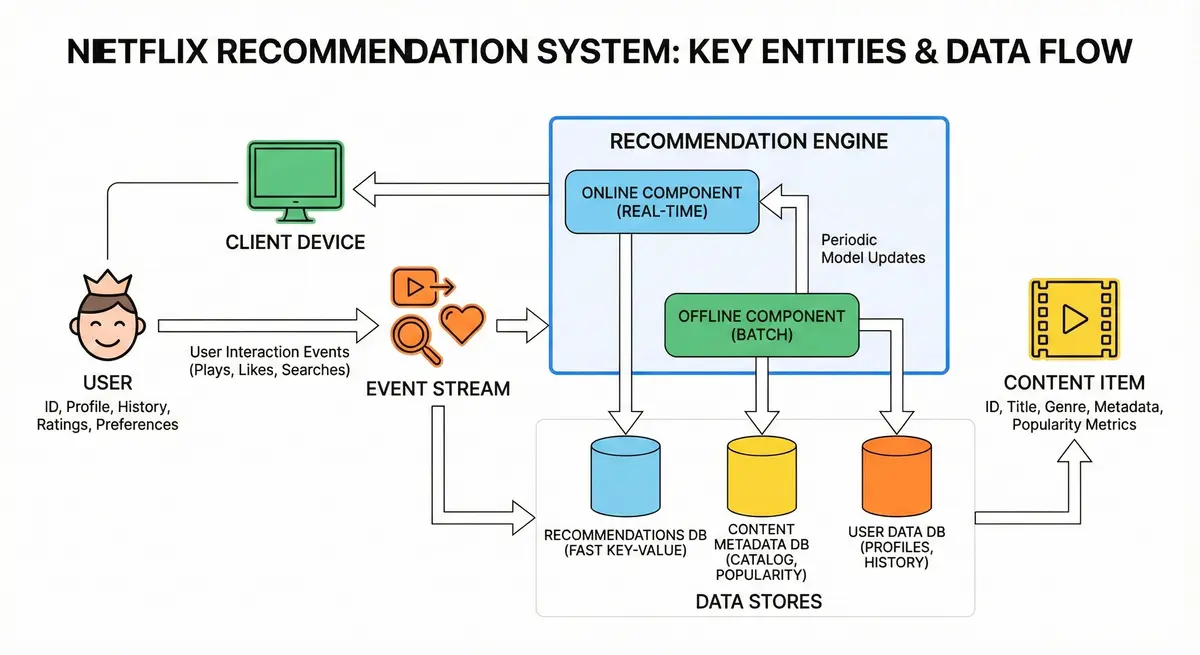
Step 2. Requirements
Functional Requirements
-
Personalized Recommendations: The system should provide each user with a tailored list of content recommendations. This includes a personalized home screen with rows like “Recommended for You” and “Because You Watched X,” ensuring high relevance for each user. The recommendations should consider the user’s past behavior and preferences to surface content they are likely to engage with. Notably, a large portion of consumption (on Netflix, 75–80% of viewing) is driven by these personalized recommendations, so accuracy is crucial.
-
Content Discovery and Novelty: Beyond obvious picks, the system should help users discover new content (e.g., new releases or less-known titles) that they might love. This means balancing recommendations between accuracy (known user interests) and discovery of diverse or fresh content. The platform should introduce some novelty so the experience remains engaging and not monotonous. For example, occasionally include a new genre or a trending show if it aligns somewhat with the user’s profile.
-
Real-Time Ranking Updates: The recommendation ranking should update in (near) real-time as fresh data comes in. When a user just watched or interacted with a title, the system should quickly adjust their recommended list (or at least not show that item again and promote related content). Similarly, if a show suddenly becomes very popular, the system can reflect that trend promptly. This requires an online component of the system that can incorporate recent events and recalculate or reorder recommendations on the fly (within seconds or minutes) rather than waiting for the next day’s batch update.
-
Batch (Periodic) Recommendations: Regularly compute recommendations in bulk (daily or weekly) using comprehensive data. These batch jobs can generate fresh recommendation lists or model parameters for every user. This ensures the system captures long-term trends and new data (like an overnight update incorporating yesterday’s viewing data). The batch updates feed into what the user sees the next day (morning refresh of “top picks”) or week.
-
Avoid Past Content & Inappropriate Suggestions: Do not recommend content the user has already watched or explicitly disliked. Als,o filter out any content that doesn’t fit the user’s profile settings (for instance, do not show R-rated content to a kid’s profile). These constraints need to be applied when generating or post-processing recommendations.
-
A/B Testing and Experimentation: Support an experimentation framework to continuously improve the algorithms. The platform should support A/B testing in which a subset of users receive recommendations from a new algorithm or model variant, while others see the standard model, to compare engagement metrics. This implies the architecture can run multiple recommendation strategies in parallel and log outcomes for analysis. Netflix, for example, emphasizes rapid experimentation – if a new algorithm is slower, they simply allocate more servers to test it rather than fully optimizing it upfront. The system should be flexible to deploy new models or ranking logic and evaluate them, enabling data-driven evolution of the recommender.
-
Multi-Device Consistency: Ensure a consistent personalized experience across devices (smart TVs, web, mobile, etc.). A user should see a coherent set of recommendations, and their state (e.g., “Continue Watching” or the effect of giving a thumbs-up) should persist across all platforms. This means the backend uses a unified user profile and recommendation logic, so whether the user opens the app on their phone or TV, the suggestions come from the same profile data. Any action on one device (like rating a movie or watching an episode) updates the profile in the backend, and the changes are reflected in recommendations on other devices in near real-time. Consistency builds trust that the system “knows” the user uniformly regardless of access point.
Non-Functional Requirements
- Scalability: The system must scale to a global user base of millions. We anticipate on the order of 200+ million registered users, with 100+ million daily active users worldwide. The design should handle high throughput – potentially billions of recommendation requests and feedback events per day – without performance degradation. Data volume is huge: Netflix collects billions of ratings and many millions of daily viewing events and clicks. The architecture should scale horizontally (adding servers/instances) to accommodate growth in users and content library. Algorithms and data stores must be distributed and partitioned to handle this load.
- Low Latency: Response times for generating recommendations should be very fast, ideally < 200 milliseconds for the online portion, to avoid UI delays. When a user opens the app or refreshes a page, the personalized recommendations should appear almost instantly. This requires efficient retrieval and ranking, caching of precomputed results, and optimized algorithms so that even under heavy load the 95th percentile latency stays under the 200ms target for the API response. Keeping latency low is critical for user experience and is a strict service-level agreement (SLA) for the recommendation service.
- High Availability: The recommendation service should be highly available and fault-tolerant, as it is a core feature of the platform’s experience. The system should have no single point of failure, using redundant instances and data replication so that if one server or data center goes down, others can seamlessly take over. We aim for “five nines” or at least >99.5% uptime. Even if some non-critical component (like a batch updater) fails, the system should degrade gracefully (e.g., fall back to slightly stale but available recommendations rather than none). Techniques include deploying in multiple regions, automatic failover, and using proven cloud infrastructure practices.
- Read-Write Characteristics: This is a read-heavy system. Each user might fetch recommendations multiple times per session (home page, different rows, after certain actions), whereas writes (user events) occur less frequently per user. The system should be optimized for fast reads (e.g., via caching and precomputing) while still efficiently capturing writes. Write operations (like logging a view or updating a model) can often be done asynchronously to not slow down the user.
Step 3: Capacity Estimations
Before finalizing the design, let's estimate the scale to ensure components can handle the load:
Summary:
- User Scale: ~200M registered users and 100M Daily Active Users (DAU), requiring horizontal sharding by UserID.
- Content Catalog: Small dataset (~100k titles, < few GB), allowing full caching in memory or replication across servers.
- Data Volume: Massive watch history (~10 billion events, Terabytes) necessitates a Hot/Cold architecture (recent data in fast DB, historical in cold storage).
- Read Traffic: High load (~300M requests/day, peak 10k+ QPS), requiring aggressive caching and pre-computation.
- Write Traffic: Moderate load (~50M events/day), handled asynchronously via buffers; Read-to-Write ratio is ~100:1.
- Storage Requirements: Precomputing top 50 recommendations per user generates ~5 billion entries, fitting into a distributed Key-Value store.
- Latency SLAs: Strict <100ms target for online recommendations; batch processing windows (model updates) can take hours.
Details:
- User Base: Assume on the order of 200 million registered users (for a global service). Let’s say 100 million are active in a given day (just as a rough figure). Peak concurrent usage might be tens of millions of users online during prime hours.
- Content Catalog Size: The number of content items (movies, series, episodes) might be around tens of thousands. For example, 50,000–100,000 total titles (Netflix’s library is in that range, excluding individual episodes). This is relatively small compared to user count, which means any algorithm that scales with content size (like scanning all items) is feasible, but anything scaling with user count needs to be distributed. Each content item’s metadata might be a few kilobytes (title, description, images, etc.), so storing the catalog might be on the order of a few hundred MB to a few GB.
- User Watch History Data: Each user might have a watch history of dozens or hundreds of items. If we assume on average 100 items watched per user, for 100M users that’s 10 billion watch events recorded in total. Storing all these events (as records with userID, itemID, timestamp, rating, etc.) is a big data problem, potentially several terabytes of data. However, we might not need all history online; recent history could be in a fast database and older logs in archival storage for batch processing. Daily new events could be tens of millions: e.g., if 100M users watch on average 1 item every 2 days, that’s ~50 million watch events per day.
- Recommendation Outputs: If we precompute, say, a top 50 recommendations for each active user, that would be 50 * 100M = 5 billion recommendation entries. Storing these might require on the order of tens of gigabytes (if each entry is just an item ID or a small structure). This suggests using a distributed store (like a key-value store partitioned by user) to hold these lists in memory or fast storage. Not all users are active daily, so we might prioritize storing for active users; still, in worst case it’s large but manageable with horizontal scaling.
- Traffic – Reads: For recommendation queries, assume each active user triggers ~2–3 recommendation fetches on average per day (e.g., opening app and maybe refreshing or exploring). That’s about 200–300 million recommendation requests per day. In peak hours, this could be roughly 5–10k requests per second hitting the recommendation service. We should design for perhaps >10k rps capacity on the recommendation API. Additionally, each of those requests might fetch multiple items (e.g., 20 recommendations), but that’s handled in one API call. The content images and details would be fetched via CDN or content service separately, but those are read-heavy too (outside our immediate scope).
- Traffic – Writes: User interaction events (views, ratings) are writes. As estimated, tens of millions of events per day (hundreds per second on average, spikes when many people watch popular new show episodes, etc.). These writes initially land in a logging/stream system or a database. There are also occasional writes for new content added (not as frequent, maybe a few hundred titles a week) and updates to models or caches. The read-to-write ratio is therefore very high – possibly 100:1 or 1000:1 (for every write event, there are hundreds of read requests for recommendations). This implies we can afford to handle writes in a slightly slower, buffered manner (e.g., batching them) as long as reads remain fast.
- Latency Targets: As noted, each recommendation API call should ideally respond within ~50–100ms from the service (so that with network and client rendering the total perceived time is small). The batch jobs have a different “latency” – e.g., the daily batch might take several hours to run through all users. If we do a full re-computation of recommendations once a day, we might allow, say, a 4-6 hour window with a big cluster to finish it. If using incremental updates, the near-real-time component might update a user’s recs within minutes of an event.
- Storage and Memory: We anticipate using scalable storage solutions: e.g., a user profile database of size on the order of hundreds of GB, a content DB of a few GB, a large distributed file system for logs in the order of TBs. Caches will consume a good amount of memory – for instance, caching top recommendations or popular items might use tens of GB of RAM across a cluster. Each server in the recommendation service might also have some in-memory cache for fast access. We should ensure storage can scale horizontally (adding nodes/disks as data grows).
These estimates guide the choice of technologies (NoSQL databases, distributed caches, etc.) and ensure the architecture can scale to these volumes.
We will use a REST API for client interactions.
1. Get Home Feed
GET /v1/recommendations/home- Parameters:
user_id(from auth token),device_type(Mobile/TV). - Response:
{
  "rows": [
    {
      "type": "continue_watching",
      "title": "Continue Watching for Jane",
      "items": [ { "video_id": "vid_123", "progress_sec": 450, "thumbnail": "..." } ]
    },
    {
      "type": "top_picks",
      "title": "Top Picks for You",
      "items": [ { "video_id": "vid_555", "match_score": 0.98 } ]
    }
  ]
}
2. Record User Event
POST /v1/events- Body:
{
  "user_id": "u_999",
  "event_type": "heartbeat", // or play, pause, rate
  "video_id": "vid_123",
  "timestamp": 1679000000,
  "position_sec": 455
}
- Response:
202 Accepted(We accept the event for async processing; no body returned).
Step 4: High-Level System Design
Architecture Overview: The system is composed of online serving components (to handle live user requests) and offline processing components (to crunch data and update recommendations periodically), along with data storage and integration layers. Below is an overview of key components and how they interact:
- Client Applications: The user-facing apps (web, mobile, TV) that request and display recommendations. When a user opens the app or navigates, the client will call the backend (via APIs) to get personalized lists of content. The client then renders those (showing titles, thumbnails, etc.). Clients will also send user actions back (like “user watched movie X”) to the backend.
- API Gateway / Backend-for-Frontend: A thin layer that all client requests pass through. It can handle authentication, rate limiting, and then route requests to the appropriate internal service. For example, a call to
/getRecommendationswould be routed to the Recommendation Service. This layer provides a unified entry point and can also help with versioning and aggregating responses (some platforms might bundle multiple recommendation lists in one call). - Recommendation Service (Online Serving): This is the heart of the online system. It’s a stateless service (deployed on many servers) that handles requests like “give me recommended items for user U right now.” Upon request, it will retrieve the relevant data (user’s precomputed recommendations from a database or cache, plus any real-time adjustments), apply business logic (e.g., filter out already watched items, maybe mix in trending items), and return a ranked list of content IDs. This service is designed for low latency and high QPS. It primarily does lookups and light computations rather than heavy ML crunching (those are offloaded to offline jobs).
- User Profile Service / Database: A service or database for user-related data. This holds persistent user information needed for recommendations, such as watch history, user demographic info or preferences, and maybe the user’s current session context. This could be split into multiple storage systems: for instance, recent watch history might be in a fast key-value store, while older history is in a data warehouse. The Recommendation Service may query this to get a user’s latest interactions if needed for on-the-fly logic. However, frequently the needed preference signals are precomputed and stored as part of the recommendation model to avoid too many lookups at request time.
- Content Metadata Service / Catalog DB: Stores all details about content (movie/show info). It will be a database that the service queries to get details like title names, descriptions, genres, images, etc., or to filter content by criteria. For example, if a recommendation list is generated by IDs, the client or an aggregation layer may need to fetch the metadata for those IDs from this service. Caching is typically used so that popular content info is quickly available. This component ensures that the recommendations have up-to-date content info and can apply content-based filters (for example, don’t recommend a title that’s not available in the user’s region or is age-inappropriate).

- Recommendations Data Store (Precomputed Results): A high-speed storage (often NoSQL or key-value store) that holds precomputed recommendation lists or model data for each user. For instance, after an offline batch run, it might store a list of top N recommendations for user U. The Recommendation Service can directly fetch this list by userID as a starting point for what to show. This store needs to support a high volume of reads with low latency and be partitionable by user. Examples might include Cassandra, DynamoDB, or even a specialized in-memory store if feasible.
- Logging & Event Ingestion System: This captures all user interaction events (watch completions, ratings, etc.) and other signals (like app opens, clicks). For large-scale, this is often implemented with a distributed log system like Apache Kafka or cloud messaging queues. When a user finishes watching something, an event is produced to this pipeline. These events serve two purposes: (1) Real-time processing – some consumers may update real-time metrics (e.g. increment the view count for that movie for trending calculation, or trigger a quick update to that user’s session recommendations); and (2) Batch processing – events are also stored for offline analysis (e.g. in HDFS or a data lake for the nightly jobs). The ingestion layer ensures durability and order of events (important for correct training data).
- Batch Processing Pipeline: The offline component that periodically computes recommendations in bulk. This could be implemented using big data processing frameworks (Hadoop MapReduce, Spark, or a distributed ML system). It will consume historical data (from databases or log files), run algorithms to generate new recommendation data, and output the results back into the serving stores. For example, every night it might run a collaborative filtering job over all user-item interactions to produce updated similarity scores or user preference models. The pipeline might involve multiple stages: data prep (aggregations, filtering data), model training (if using an ML model), and result generation (e.g., top N list per user). This is usually done on a cluster separate from the live serving systems, as it’s a heavy computation. The output of these jobs (e.g., a file or table of recommendations) is then published to the Recommendations data store or a model repository.
- Trending/Analytics Service: (Optional separate component) A subsystem focused on computing global or regional trends and simple analytics that feed into recommendations. For example, it might continuously compute the top 10 most-watched titles in the last hour, day, or week. It could also compute aggregates like average ratings or what’s popular in a genre. This can be done by consuming the event stream in real-time (using streaming processors that update counters) or by frequent batch jobs (e.g,. an hourly job that scans recent events). The results (trending lists) are stored in a fast cache or DB. The Recommendation Service can then retrieve these when needed (for instance, to show a “Trending Now” row, or to use popularity as a factor in ranking).
- Cache Layer: Caching is applied at various points to improve performance. At the edge, responses to recommendation API calls might be cached for a short time for each user (though personalization makes long caching tricky). More commonly, the Recommendation Service might cache frequently requested data, like the top trending list or metadata for popular content, or even cache the last served recommendations for a user for a few minutes. A distributed cache (like Redis or Memcached cluster) could store these.
- Infrastructure for Scale: Load balancers distribute incoming API traffic across multiple instances of the recommendation service. Auto-scaling groups ensure enough servers are running to handle peak load. Also, multiple data center regions might host these services to be close to users (reducing latency) and provide redundancy. Data replication between regions (for user data and content data) would be set up so that a user can get recommendations from the nearest server without all requests hitting a single region.
Data Flow (from data ingestion to serving recommendations):
- User Interaction & Logging: When a user interacts with the platform (watches a video, rates something, adds to watchlist, etc.), the client sends this event to the backend. For example, after finishing a movie, an event “User U watched Movie M at time T” is sent. The backend logs this event to the Event Ingestion System (e.g. a Kafka topic or analytics service). This event is appended to a durable log for offline processing. It may also update some real-time counters: for instance, increment a view count for Movie M in a cache or trigger a quick recalculation of U’s recommendations (in a streaming/nearline processor). The user’s immediate session state might also be updated (so the “Continue Watching” list on their home page is updated instantly).
- Real-Time Processing: The event can have immediate effects. A streaming computation layer (or even the Recommendation Service itself when it receives the event) might handle quick updates. For example, upon “User U watched M”, the system could: update U’s profile (mark M as watched so it’s not recommended again), and fetch a few similar movies to M to recommend next. This could be done by a lightweight Real-Time Recommender component that consumes events. Alternatively, the Recommendation Service when next called will notice that U watched M and use that context. Also, the Trending Service might consume all “watched” events to update the current top-N popular list continuously. These real-time operations ensure freshness between batch runs.
- Batch Processing (Offline): The bulk of heavy recommendation computation happens asynchronously. At scheduled intervals (e.g. every night), the Batch Processing Pipeline kicks off jobs. These jobs read large datasets: user watch histories (from the event logs or a data warehouse), content information, and possibly prior model data. For instance, a collaborative filtering algorithm might build a big user-item matrix from all watch history and factorize it to learn latent features, or compute item-to-item similarity by analyzing co-watches. This can produce either a model (like embeddings for each user and item) or directly a list of top recommendations for each user. The batch jobs might produce intermediate data too (such as an item similarity index, which the online system can use). After computation, the batch job writes the results to the appropriate store, e.g., update the Recommendations Data Store with new top-N recommendations per user, update model parameters, and store any popularity stats or derived data. This batch process is not real-time, so it can use complex algorithms and crunch through the entire dataset with the luxury of a few hours of processing.
- Publishing Results: Once the batch job finishes generating recommendations (or model), there is a step to publish or load these results into the serving layer. For example, if the results are written to a file or Hadoop storage, a process will load them into the live NoSQL DB that the Recommendation Service uses. This could be done via a bulk upload or through a publish-subscribe mechanism that notifies the serving store of new data (Netflix’s internal tool “Hermes” or simply a script, for instance). Alternatively, the batch job might directly write to the serving database if it has access. The important part is that by the time users start their day, the Recommendation Service has the latest precomputed data available.
- Serving Recommendations (Online Query): When the user opens the app or navigates to a section that requires recommendations (e.g. the homepage or a “because you watched X” list), the client calls the Recommendation Service API. For example, a request goes to
/recommendations?user=U&context=home. The API Gateway passes this to an instance of the Recommendation Service. The service will then gather necessary data: it will typically fetch the precomputed recommendation list for user U from the Recommendations store (a fast key-value lookup by userID). If the context is specific (say user is on a details page for Movie M and asks for similar titles), the service might instead fetch the similar-items list for M (which could be precomputed as well, like an item-to-item index). The service then may combine results from multiple sources, e.g., it might start with the stored personalized list, then adjust it. Adjustments could include filtering out any items the user has seen or that are not currently available, merging in a few currently trending items or new releases (especially if the user’s list is short or stale), and possibly re-ranking slightly based on very recent behavior (if not already accounted for). - Returning the Response: The Recommendation Service prepares the final list of recommended content (say top 20 items). It might attach scores or just the ordered list of content IDs. It then either returns those IDs to the client, or it may call the Content Metadata Service to fetch details (title names, etc.) so that the client gets a fully populated response. This choice is a design trade-off: returning just IDs keeps the Recommendation Service simple and the payload small, but then the client has to call another service to get details (or the gateway does it). Often, an aggregation layer or the Recommendation Service itself will join in the metadata for convenience, especially if it’s cached, so the client gets one response with everything needed to display the recommendation carousels.
- Client Display and Feedback: The client receives the recommendations, displays them to the user (e.g., showing a row of movie thumbnails “Top Picks for You”). If the user interacts (scrolls, clicks one), those actions can generate further events (e.g,. clicking a title might trigger an impression log or a “more like this” request). The cycle continues with new events flowing in and (eventually) influencing the next round of recommendations.
Throughout this flow, multiple layers of caching and fallback ensure performance and reliability. For instance, if the Recommendation Service cannot reach the precomputed data store for some reason, it might fall back to a cached response or a default trending list so that the user still sees something. Similarly, if the batch job hasn’t yet updated today, the system can use yesterday’s results. In essence, data flows from users into logs and databases, gets transformed into recommendation knowledge (models, lists), and then flows back to users as personalized suggestions, with continuous feedback.
Step 6: Database Schema
This schema uses a hybrid approach combining relational tables for structured, consistent data and NoSQL stores for high-scale, real-time recommendation data. The relational (SQL) database ensures data integrity and easy joining of user, content, and interactions. The NoSQL stores (Cassandra/DynamoDB for key-value and wide-column data, plus Elasticsearch for search) handle large volumes and fast lookups/updates for recommendations, similarity, trends, and search.
Relational Database (SQL) Schema
Users Table
Purpose: Stores user profile information.
| Field Name | Data Type | Description |
|---|---|---|
| user_id | INT (PK) | Unique user identifier (primary key). |
| name | VARCHAR(100) | User’s full name or display name. |
| VARCHAR(100) | Email address (unique, used for login). | |
| signup_date | DATETIME | Timestamp when the user registered. |
| country | VARCHAR(50) | Country or region of the user (for locale/trending). |
Indexes / Keys:
- Unique Index on
emailfor fast lookups and to prevent duplicates. - The
countryfield can be indexed if queries by region are needed (e.g., listing users by region for analytics).
Content Metadata Table
Purpose: Stores details of movies/shows (content catalog metadata).
| Field Name | Data Type | Description |
|---|---|---|
| content_id | INT (PK) | Unique content identifier (primary key). |
| title | VARCHAR(200) | Title of the movie or show. |
| description | TEXT | Synopsis or description of the content. |
| genre | VARCHAR(50) | Primary genre of the content (e.g., "Action"). |
| content_type | VARCHAR(20) | Type of content ("Movie", "Series", etc.). |
| release_year | INT | Year the content was released. |
| language | VARCHAR(50) | Language of the content (optional, for filtering). |
Indexes / Keys:
- Index on
genreand/orcontent_typefor queries like filtering content by genre or type. - (Optional) Full-text index on
titleanddescriptionin SQL for basic search, though detailed search is handled by Elasticsearch. - This table’s data will be mirrored in the search index for text queries.
User Watch History Table
Purpose: Logs each content viewing event per user. This is a normalized log of what users watched, used for collaborative filtering signals and history-based recommendations.
| Field Name | Data Type | Description |
|---|---|---|
| history_id | BIGINT (PK) | Unique identifier for this watch event (primary key). |
| user_id | INT (FK) | ID of the user who watched (foreign key to Users table). |
| content_id | INT (FK) | ID of the content watched (foreign key to Content table). |
| watch_date | DATETIME | Date and time when the content was watched. |
| duration | INT | Watch duration in minutes (or minutes watched, optional). |
Indexes / Keys:
- Index on
user_idfor fast retrieval of a user’s watch history (e.g., to generate personalized recommendations). - Index on
content_idfor analytics (e.g., finding all users who watched a given content). - Partitioning: If this table grows very large, consider partitioning by date (e.g., monthly partitions) to manage old data and improve query performance on recent history.
User Preferences Table
Purpose: Stores explicit user preferences like preferred genres or other categories the user likes, as stated by the user (e.g., during onboarding or in profile settings).
| Field Name | Data Type | Description |
|---|---|---|
| user_id | INT (FK) | ID of the user (foreign key to Users table). |
| preference_type | VARCHAR(50) | Type of preference (e.g., "Genre"). |
| preference_value | VARCHAR(100) | Value of the preference (e.g., "Comedy", "Drama"). |
Indexes / Keys:
- Queries for a user’s preferences use the
user_idindex. For example, quickly retrieving all preferred genres for a user to tailor recommendations. - This table is relatively small per user, so indexing is straightforward; no special partitioning needed.
Ratings Table
Purpose: Stores user-provided ratings for content they have watched. These explicit ratings feed into collaborative filtering algorithms.
| Field Name | Data Type | Description |
|---|---|---|
| user_id | INT (FK) | ID of the user who rated the content (FK to Users). |
| content_id | INT (FK) | ID of the content that was rated (FK to Content). |
| rating | TINYINT | Rating given by the user (e.g., 1–5 stars or 1–10 scale). |
| rating_date | DATETIME | Date and time when the rating was made. |
Indexes / Keys:
- Index on
content_idif we need to query all ratings for a particular content (to compute average ratings, etc.). - This table can be joined with Users and Content to gather training data for recommendation models.
NoSQL Collections / Tables (High-Scale & Real-Time)
The NoSQL components handle large-scale data and real-time updates that are less suited for the relational model. These systems use keys and partitioning to ensure fast reads/writes across distributed nodes. Below, each NoSQL store is outlined with key fields and data types (using Cassandra/DynamoDB terminology or Elasticsearch for the search index).
Precomputed Recommendations (User → Top-N Items)
Purpose: Stores precomputed top-N recommendations for each user for fast retrieval (e.g., “Recommended for You” list). This is typically updated by offline batch jobs or real-time pipelines and read frequently when the user opens the app.
| Field Name | Data Type | Description |
|---|---|---|
| user_id | TEXT (Partition Key) | Key – Unique user identifier (partition key for fast lookup). |
| recommended_items | LIST | List of top N recommended content IDs for this user, in ranked order. |
Design Notes:
- Partitioning:
user_idis the partition key (each user’s recommendations are stored together). This ensures a constant-time read by user ID. In a system like DynamoDB,user_idis the primary key; in Cassandra,user_idis the partition key (with no clustering needed since we store the list as a single field). - Data Storage: The recommended_items could be a list/array of content IDs. Optionally, each item in the list could be a map with additional info (e.g., a score or reason). For simplicity, a list of IDs is stored, which can be used to fetch full details from the Content table or cache.
- Updates: Updates occur when new recommendations are computed (e.g., nightly batch or triggered by user events). The design favors fast reads (to show recommendations) over writes.
- Scaling: This table/collection can handle high read throughput by scaling out partitions. Each user_id access is isolated to one partition, avoiding hot spots (unless a few users have disproportionate traffic, which is usually not the case).
Item-to-Item Similarity Index
Purpose: Captures content-to-content similarity for item-based recommendations (e.g., “Because you watched X, you might like Y”). For each content item, it stores a list of similar items.
| Field Name | Data Type | Description |
|---|---|---|
| item_id | TEXT (Partition Key) | Key – Content ID for which we store similar items (partition key). |
| similar_items | LIST | List of similar content IDs related to item_id. Could be a simple list of IDs or structured with similarity scores. |
Design Notes:
- Partitioning:
item_id(content ID) is the partition key. All items similar to a given content are stored in the same partition. This allows quick retrieval of “related items” when a user is viewing contentitem_id. - Data Storage:
similar_itemsmight be a list of content IDs sorted by similarity score (most similar first). In some designs, this could be stored as multiple rows (each similar item as a separate row withitem_idas partition key and similarity as clustering key), but here it's denormalized into a list for simplicity and fast single-key access. - Usage: When generating "Because you watched X" recommendations, the system looks up
item_id = Xand retrieves the top similar items from this table. These can then be filtered by the user's viewing history or subscription status before presenting. - Scaling: Like the user recs, this is partitioned by item, which typically distributes well (content IDs spread across many partitions). If some blockbuster content is extremely popular, its similar list is still a single partition read, which NoSQL can handle quickly.
Trending Content
Purpose: Tracks globally and regionally trending content, updated frequently (e.g., hourly or daily) based on view counts, likes, and other metrics. This provides quick access to "What's popular" for all users or by region.
| Field Name | Data Type | Description |
|---|---|---|
| region | TEXT (Partition Key) | Key – Region identifier. Could be country code (e.g., "US") or "GLOBAL" for worldwide trending. |
| trending_items | LIST | List of top trending content IDs in that region, ordered by popularity. |
| last_updated | TIMESTAMP | (Optional) Timestamp of last update for this region’s trending list. |
Design Notes:
- Partitioning:
regionserves as the partition (and primary key). For example, one entry for"GLOBAL"trends, and one for each region or market. This way, retrieving the trending list for a region is a single key lookup. - Updates: This collection is frequently updated by an analytics job that computes trending rankings. The entire list for a region may be overwritten or updated in place. Writes are heavy but can be managed since the number of regions is limited (each region entry is relatively small).
- Scaling: Because there are relatively few regions, the number of partitions is limited. However, reads are distributed by region key (and most users might fetch the global plus their own region). To scale, this data could be cached in memory/CDN given it’s read by many users. Using a wide-column store here is still suitable for fast writes/reads and simple key-based access.
- Indexing: The primary key on region is sufficient. If we needed to support different categories of trending (e.g., by genre or time-window), we could include those as part of a composite key (e.g., partition by region, clustering by category or timeframe).
User Real-Time Events
Purpose: Captures live user interactions (play, pause, likes, etc.) in real-time. This firehose of events can be used to immediately adjust recommendations (e.g., boosting an item right after a user likes it, or recording an in-progress watch). Storing these in a NoSQL table allows fast, high-volume writes and flexible querying for recent events.
| Field Name | Data Type | Description |
|---|---|---|
| user_id | TEXT (Partition Key) | Key – User identifier for the event (partition key to group events by user). |
| event_time | TIMESTAMP (Clustering Key) | Timestamp of the event (also part of the key to sort by time). |
| content_id | INT | ID of the content the event pertains to (if applicable). |
| event_type | TEXT | Type of event (e.g., "PLAY", "PAUSE", "LIKE", "DISLIKE", "SEARCH"). |
| details | TEXT/JSON | (Optional) Additional details (e.g., duration watched at pause, device info, etc.). |
Design Notes:
- Partitioning & Keys:
user_idis the partition key, so all events for a user reside in the same partition (making it efficient to fetch a user's recent events).event_timecan serve as a clustering/sort key (in Cassandra) or sort key (in DynamoDB), ordering events chronologically and ensuring uniqueness combined with user_id. This allows range queries like "get events for user X in the last 1 hour". - Scaling Writes: Using a NoSQL store enables ingesting a continuous stream of events with low latency. Partitions by user ensure write load is spread across users (though a very active user’s events go to one partition, the system can handle it unless one user generates an extreme rate of events). If needed, a composite partition (like hashing user_id) or using a time bucket in the key could further distribute writes, but typically user_id is sufficiently high-cardinality.
- TTL (Time to Live): Real-time events may not need to be stored indefinitely (to save space, we might only care about the last week or month of events for immediate recommendations). The table can be set with a TTL (in Cassandra) or old items purged via a job so that outdated events expire automatically.
- Usage: A streaming pipeline or the recommendation service can consume these events to adjust recommendations on the fly. For instance, if a user likes a particular movie, the system could immediately push similar movies into their precomputed recommendations (or adjust the ordering). This table provides a source of truth for recent user actions.
Step 7: Detailed Component Design
Recommendation Computation Workflow
1. Offline Batch Recommendation Generation
The offline pipeline is where the heavy lifting is done to compute personalized recommendations using the full history of data. Here’s how it typically works:
- The pipeline job (running on a cluster) retrieves aggregated data. For example, it might query the data warehouse for a table of user-item interactions (this could be built from the event logs). This is a large-scale data operation. Using a distributed framework (Hive/Spark), the system might get a matrix of which users watched which items, or a list of each user’s recent watches, and item popularity metrics.
- Using this data, the job applies a recommendation algorithm. Going with simple ML complexity, we would choose algorithms that are well-understood and relatively straightforward to implement: for instance, item-based Collaborative Filtering or a form of matrix factorization for collaborative filtering (many libraries exist for MF). We could also incorporate simple content-based filtering (like if a user has watched a lot of Sci-Fi, include some unseen Sci-Fi titles). In practice, a hybrid is often best. For example:
- Compute similarity between items based on user co-watch patterns (if many users who watched item X also watched Y, then Y is similar to X). Store top similarities in the Item-to-Item Similarity Index.
- For each user, look at their watched items and pick top recommendations by looking at similar items to those they liked. This is an item-based CF approach: for each item the user liked, take the similar items (from the index) that the user hasn’t seen, score them (perhaps sum of similarity from multiple liked items), and pick the highest scoring ones as recommendations.
- Additionally, factor in item popularity or newness: e.g., the algorithm can give a slight boost to newer or trending items so that they appear for users who have vaguely relevant taste, even if pure similarity wouldn’t surface them.
- The output of the batch algorithm is typically a list of recommended item IDs for each user (and possibly a score or ranking). This can be huge to materialize (hundreds of millions of users * tens of items), but it’s partitionable. The job might directly write this into a partitioned key-value store, or write to files which are then used to load a database. Alternatively, the job might output model parameters (like user factors and item factors). In that case, the serving system would use those factors to compute recommendations on the fly. However, computing on the fly is complex and slow without ML infra, so in our design we lean towards precomputing the final results to make serving simple.
- Once computed, these results are stored in the Recommendation Store. For example, for each user U, store the top 50 items (IDs) in sorted order of relevance. If using multiple categories of recs (like “top picks” vs “because you watched X”), the batch process might actually produce multiple lists or label them appropriately. We might also store the top similar items for each item (the Item-to-Item index) as a byproduct if we did item-similarity.
- The batch process can also update global data like item popularity counts, user cluster segments, etc., which can be used in recommendations. Because the batch job runs with relaxed time constraints, we can incorporate complex logic here, combining collaborative filtering with content features, ensuring diversity by rule (e.g., don’t include more than 3 items from the same series), etc. These rules are easier to implement in batch than in a real-time service.

Real-Time Recommendation Serving and Updates
The online part of the system uses the precomputed data but also reacts to new information in real time to fine-tune recommendations for immediacy:
- When a request comes in, the Recommendation Service uses primarily the precomputed recommendation list for that user (from the latest batch). This gives a strong personalized baseline with minimal computation. However, that list might need adjustment. The service will typically perform filtering: remove any items the user has already watched (in case the batch data was slightly outdated or the user watched something on another device after the batch run). It also might filter by availability (if a title got removed or is not in the user’s region).
- The service can then incorporate real-time context. For instance, if the user is currently looking at a particular genre or just finished a show, the service might want to bias recommendations towards that context. It could do this by merging results from the Item-to-Item Similarity Index: e.g., “because you watched that comedy, here are similar comedies” – pulling a few items from the similar-items list and mixing them into the overall recommendations. These on-the-fly similar items come from precomputed similarity data, so the computation is just a lookup and maybe a score merge, which is fast.
- Trending/New Content injection: The service may also call the Trending Service or look at a cached trending list. If the user’s own recommended list is short or the user is new (cold start), trending items will be used. Even for existing users, we might include 1–2 trending or editorial picks to promote popular content. This is often done by simply taking the top of the trending list (that the user hasn’t seen yet) and inserting it into their results (perhaps in a separate section like “Trending Now” on the UI).
- The Recommendation Service then scores or ranks the combined candidates. If using a very simple approach, we might just have a priority (e.g. personalized list items first, unless trending is being forced into top slots for business reasons). Or we could have a simple linear combination: for example, a candidate item might have a base score from the personal model and a small bonus if it’s currently trending or very new.
- Finally, the service produces the list of item IDs in the desired order. It then either returns those or fetches the necessary metadata for each (like title, image URL) from the Content Metadata store (which likely is cached heavily). The results are sent back to the client.
- Cold Start Solutions: For new users, since we have no interaction data, the system must rely on other strategies initially. One common approach (used by Netflix) is to perform an onboarding survey – ask new users to pick a few titles or genres they like. This explicit input immediately gives some data to the content-based part of the model (e.g., user likes “Stranger Things” implies they enjoy sci-fi thriller content). With this, we can generate initial recommendations using content similarity and popularity. Additionally, even without a survey, we can use default popular/trending items, possibly localized by region or globally, as a safe bet for first recommendations (e.g., show the currently popular series since many new users might also like them). As the new user starts interacting (clicking or watching something), those events are fed into the nearline pipeline to update their profile quickly.
- Implicit and Explicit Feedback Utilization: The model takes into account both implicit behavior (e.g., a user watching 80% of a movie implies they liked it somewhat, or fast-forwarding a lot might imply disinterest) and explicit signals (like a thumbs-up). Explicit ratings are straightforward indications of preference, so they can directly influence the user’s profile (e.g., if a user rates 5 stars for a comedy, boost their affinity for the comedy genre). However, explicit feedback is typically sparse and sometimes biased (not all users rate content, or they might rate only extremes). Implicit feedback is abundant – every play, pause, search, or even hover can be logged – but it’s noisy (watching something fully could mean enjoyment or just inertia). Our system weights these signals appropriately. For example, we might convert implicit feedback into numeric “preference” scores (watching >80% of a movie = +1 implicit rating; aborting after 5 minutes = -0.5, etc.). The collaborative filtering model training will use a combination of actual ratings and derived implicit ratings. The content-based profile of a user is also updated by both: explicit likes might directly add weight to certain attributes, while implicit watch data slowly shifts the profile. All feedback is fed into model updates: the batch retraining will use the cumulative data (e.g., all implicit feedback over months), whereas the real-time system might react instantly to certain signals (e.g., if a user thumbs down a recommendation, immediately remove similar items from the candidate list in this session). Logging is comprehensive: Netflix, for instance, logs billions of rating events and detailed viewing statistics (duration, clicks, etc.) to fuel its algorithms. Our design ensures this feedback loop is robust so that every interaction can potentially refine future recommendations.
Nearline Processing
In between, we have a nearline or streaming layer, as mentioned. This operates in quasi real-time but off the request path (asynchronous). For example, when a user finishes watching something, a nearline processor might within a minute update some of that user’s recommendations or trigger partial model updates (like updating that user’s factor vector with a simple formula rather than waiting for tonight’s full retraining). This gives a compromise: it can handle event-by-event updates with a bit more computation than the strict online path, but since it doesn’t need to respond to the user immediately, it can take a few seconds and aggregate work. The nearline system often writes to the same storage that the online system reads from (like updating the user’s profile store or a cache of their top picks). For instance, Netflix’s architecture uses a nearline pipeline to update “recently watched” and similar signals via a distributed computation framework.
Interaction of Real-Time and Batch Components
The batch and real-time parts work together to provide a balanced solution. The batch system ensures deep analysis of large data (for accuracy and breadth), while the real-time system ensures freshness and context-awareness. Key interaction points and strategies include:
- Data Handoff: The batch job outputs feed the online service. We ensure a reliable handoff: e.g. after computing, the new recommendations are in a database that the online service queries. We might version these (to avoid partial updates issues, possibly update in a staging table and then atomically switch). The online service always uses the latest available batch data but if it’s mid-update, it can temporarily serve slightly older data rather than nothing.
- Real-Time Updates to Batch Data: If a user performs an action that significantly changes their profile (like watching something in a new genre), waiting for the next day’s batch might be too slow to reflect this. One approach is nearline updates: as soon as the event happens, trigger a targeted update for that user. For example, a lightweight job could recompute that one user’s top recommendations by leveraging the item similarity index or by adjusting their existing list (dropping items too similar to what they just watched and adding some new ones). This could be done via a message queue: the event “U watched M” goes to a small service that recalculates U’s recommendations (perhaps only if U is currently active). The recalculated list could then be written to the Recommendations store, updating it out-of-cycle. This provides a quasi real-time refresh for active users. The complexity here is ensuring this doesn’t overwhelm the system (we might do it for key events or a subset of most active users). If such complexity is not desired, an alternative is to simply rely on the item-sim lookup at request time (which we already do) to handle immediate needs, and let the batch catch up later.
- Fallback Mechanism: Because the online service depends on the batch data for heavy lifting, a failure of the batch pipeline or the unavailability of fresh data should not take down recommendations. The system should have fallbacks: if the latest personalized list is not present, fall back to a slightly older list (perhaps stored with a timestamp or kept in cache). If even that’s not available (e.g., new user or something went wrong), fall back to a generic set of popular content. This ensures the service is robust.
- Model Simplicity vs. Freshness Trade-off: We intentionally choose to precompute as much as possible offline. The trade-off is that those results can become stale with respect to a user’s latest actions or the newest content. The real-time component addresses this by overlaying fresh info (like just-watched item influences, or adding new content). This hybrid approach (sometimes called Lambda architecture in big data) leverages both worlds. All approaches (offline, nearline, online) are combined for the best result. We avoid having to do heavy computations during the user request, which keeps latency low, but we still respond to recent events in a timely way.
In summary, the detailed design ensures that all user and content data is organized in the right storage, the batch algorithms can efficiently crunch through the big picture and store results, and the online service can quickly assemble a recommendation list by combining precomputed insights with real-time context. Simpler algorithms are used, but smart use of data (like item similarities and trending info) ensures recommendations remain relevant and timely.
Caching Layers
Caching is everywhere to ensure speed. We specifically use:
- In-memory cache for user profile: When a user is active (online), their profile data can be cached in memory on the recommendation service node or in a distributed cache. This saves repeated DB hits for each request (especially if the user navigates through multiple pages). The cache entry might store the user’s feature vector, recent watch list, etc. If an update comes (via event), we invalidate or update the cache.
- Cache for precomputed recommendations: If we precompute a list of recommendations offline for each user, those lists can be kept in a fast key-value cache (like Redis). The online service simply does
GET user_recs:userIDto retrieve it. This is very fast (sub-millisecond). We might store multiple lists per user (e.g., one list of “top picks overall”, another of “because you watched X”), each as a sorted list of item IDs. - Content cache: Frequent item metadata (like the details of the top 1000 popular items) can be cached in memory so that the service doesn’t query the metadata DB repeatedly. Also, things like “list of trending now items” or “new releases this week” might be cached results that get periodically refreshed.
- CDN: While not a database, using a Content Delivery Network is crucial for delivering images (thumbnails, cover art) and maybe even JSON for static rows. For instance, artwork and previews are cached at edge servers near the users. This offloads a huge bandwidth from the core system. The recommendation system might instruct the client what images to fetch (via URLs), which the CDN handles.
Recommendation Request Workflow (End-to-End)
To illustrate how everything comes together, consider what happens when a user opens their Netflix home page (i.e., a recommendation request):
- Request Arrival: The user’s device (client) hits the API Gateway with an authenticated request like “GET /recommendations/home” with the user’s ID or token. The API gateway authenticates and forwards this to the Recommendation Service (which is part of our Recommendation Engine). Suppose the user is in region US-EAST, the DNS/load balancer directs it to a nearby cluster of servers for low latency.
- Fetching User Context: The recommendation service instance handling this request will first gather the necessary data about the user. It calls the User Profile Service (or reads from a cache) to get the user’s profile info, e.g., their viewing history, explicit ratings, maybe demographic info if available, and any precomputed user features (like their embedding or genre affinity scores). This is typically a quick lookup (thanks to caching or a fast NoSQL query).
- Fetching Candidates: Based on the user’s profile, the service generates recommendation candidates:
- It might query the precomputed recommendations store: e.g., check if we have a ready-to-use list of top items for this user from the last batch job. If so, those items form an initial candidate set.
- It will likely augment this with fresh candidates from algorithms. For collaborative filtering: it could take the user’s top N similar users (which might be stored from an offline job) and gather items those users rated highly. Or use the user’s embedding to do a nearest-neighbor search in the item embedding space (via the ANN index). For content-based: it could take the top 2–3 genres the user watches and fetch a few popular new items in those genres, or find items with high similarity to the last thing the user watched. In practice, we might have separate modules, e.g., UserCF module yields 50 items, ItemCF module yields 50 items, Content module yields 50, Popularity module yields 10, etc. We take a union of them. If there are duplicates (the same item came from two methods), we handle that by merging or increasing its score.
- This candidate retrieval phase might involve calls to an Item Similarity Service (to get similar items by content or collaborative similarity) and to a Trending Service (to get currently popular items). Those services either compute quickly or look up cached lists.
- Also, some candidates are rule-based: e.g., “Continue Watching” items (if the user has incomplete videos) are directly pulled from the user’s profile; these will be placed in a special row on the UI rather than the algorithmic list, but it’s part of the overall logic to decide what rows to show.
- Feature Preparation: For each candidate item, the service gathers features needed for ranking. This could include:
- Item features: from the Content Metadata Service (like item genre, year, etc., if not already present in an earlier lookup).
- User-item interaction features: e.g., has the user watched other seasons of this show (for a series recommendation)? Did the user search for this title recently? Some of these features may come from the user’s profile (which might store that info). Others might require a quick query (though we try to avoid any heavy per-item queries at request time).
- Context features: current time, device type, etc., which are straightforward. These features might be assembled into a vector per (user, item) pair for input to the ranking model. The system likely does this in-memory for speed, since the data needed is mostly local or already fetched.
- Ranking & Filtering: Now the Ranking module applies the machine learning model to score each candidate. It runs the model for each candidate and sorts the candidates by score.
- We also incorporate any business rules at this stage: e.g., diversity constraints. If the top 10 all happen to be very similar (say all are from the same franchise), the system might enforce some spreading out (demote some and promote the next best different item). This can be done via reranking algorithms or by adding diversity as part of the scoring function.
- Filtering: Ensure we remove any content that should not be shown. For example, items that the user has “thumbs-downed” in the past might be filtered out regardless of score. Or if the user is a kid profile, filter out R-rated content. These rules are applied post-scoring or by setting their score to -inf effectively.
- Return Results: The top K items (say top 20 for the first row of the homepage) are selected. The service formats the response, which typically includes item IDs and possibly some metadata like the title or a synopsis snippet. However, often the client will retrieve the detailed info (like images) separately or from a CDN. The response goes back through the API Gateway to the user’s device. Now the user sees the recommendations.
- Caching and Logging: The service might cache the result of this computation for a short time (couple of minutes) keyed by (user, context) so that if the user refreshes quickly, it doesn’t redo all steps. But if any new event comes in (like user watched something), that cache would be invalidated. All the details of what was recommended are also logged (which items in what order) to the event pipeline. This is important for training data – we need to know “we recommended item X, and the user did/didn’t click it” to learn from implicit feedback which recommendations worked. So a “impression” or recommendation-served event is generated.
- Continuous Feedback: As the user interacts (maybe clicks one of the recommended items), that goes into the feedback loop as described. Suppose they watch one of the recommended movies – an event for “play start” and later “play complete” will fire. The nearline system might pick that up and update their profile immediately (so if they go back to the home screen after watching, the recommendations account for it). The next day’s batch retraining will also include that data point in refining the models.
The above workflow ensures real-time personalization while leveraging precomputed data. Multi-device consistency is naturally handled because no matter which device makes the request, it hits the same backend and the profile is centralized. If a user starts a show on their TV, a “continue watching” candidate will be added to their profile; later if they open the app on mobile, the workflow will include that candidate because the profile knows the show is in progress. Consistency is maintained by updating the central profile and caches on each event, rather than storing state on the device.
Also, multi-profile support (like Netflix’s separate profiles on one account) is easily handled by treating each profile as a separate user in the recommendation system (with its own profile ID and data).
Throughout the workflow, performance optimizations like caching, parallelism (fetching user profile and item features in parallel), and not blocking on non-essential data (e.g., if an external metadata service is slow, we might proceed with whatever data we have and fill that item later or exclude it) are applied to meet the latency target.
🤖 Don't fully get this? Learn it with Claude
Stuck on Design a Recommendation System? Open Claude, copy a block below, and it'll teach you this exact concept — visually and interactively.
Progressively stronger hints — you still solve it.
I'm working on the problem **Design a Recommendation System** (System Design). Give me a HINT LADDER: start with the tiniest nudge, then wait. Only reveal the next, stronger hint when I ask. Do NOT show the full solution unless I type 'show solution'. Keep me doing the thinking. If you're unsure or a claim isn't standard, say so and reason from first principles instead of guessing.
See the technique, not just code.
Explain the optimal approach to **Design a Recommendation System** with a VISUAL walkthrough: trace it on a small concrete example using ASCII art / a step-by-step diagram, narrate what changes each step, then give time & space complexity with a one-line derivation. If you're unsure or a claim isn't standard, say so and reason from first principles instead of guessing.
Catch bugs, edge cases, sub-optimality.
I'll paste my solution to **Design a Recommendation System**. Review it for correctness, missed edge cases, and time/space complexity, then coach me toward the optimal — don't just rewrite it. Ask me to paste my code now. If you're unsure or a claim isn't standard, say so and reason from first principles instead of guessing.
Lock in recognition with look-alikes.
Give me 2 problems that use the SAME underlying pattern as **Design a Recommendation System**. For each, let me attempt first, then review my answer and name the trigger signal that reveals the pattern. If you're unsure or a claim isn't standard, say so and reason from first principles instead of guessing.