Designing Instagram
1. What is Instagram?
Instagram is a social networking service that enables its users to upload and share their photos and videos with other users. Instagram users can choose to share information either publicly or privately. Anything shared publicly can be seen by any other user, whereas privately shared content can only be accessed by the specified set of people. Instagram also enables its users to share through many other social networking platforms, such as Facebook, Twitter, Flickr, and Tumblr.
We plan to design a simpler version of Instagram for this design problem, where a user can share photos and follow other users. The 'News Feed' for each user will consist of top photos of all the people the user follows.
Try it yourself
Before looking at the solution, try designing it:
Designing Instagram (video)
Here is a video discussing how to design Instagram:
2. Requirements and Goals of the System
We'll focus on the following set of requirements while designing Instagram:
Functional Requirements
- Users should be able to upload/download/view photos.
- Users can perform searches based on photo/video titles.
- Users can follow other users.
- The system should generate and display a user's News Feed consisting of top photos from all the people the user follows.
Non-functional Requirements
- Our service needs to be highly available.
- The acceptable latency of the system is 200ms for News Feed generation.
- Consistency can take a hit (in the interest of availability) if a user doesn’t see a photo for a while; it should be fine.
- The system should be highly reliable; any uploaded photo or video should never be lost.
Not in scope: Adding tags to photos, searching photos on tags, commenting on photos, tagging users to photos, who to follow, etc.
3. Some Design Considerations
The system would be read-heavy, so we will focus on building a system that can retrieve photos quickly.
- Practically, users can upload as many photos as they like; therefore, efficient management of storage should be a crucial factor in designing this system.
- Low latency is expected while viewing photos.
- Data should be 100% reliable. If a user uploads a photo, the system will guarantee that it will never be lost.
4. Capacity Estimation and Constraints
- Let's assume we have 500M total users, with 1M daily active users.
- 2M new photos every day, 23 new photos every second.
- Average photo file size => 200KB
- Total space required for 1 day of photos
- Total space required for 10 years:
5. High Level System Design
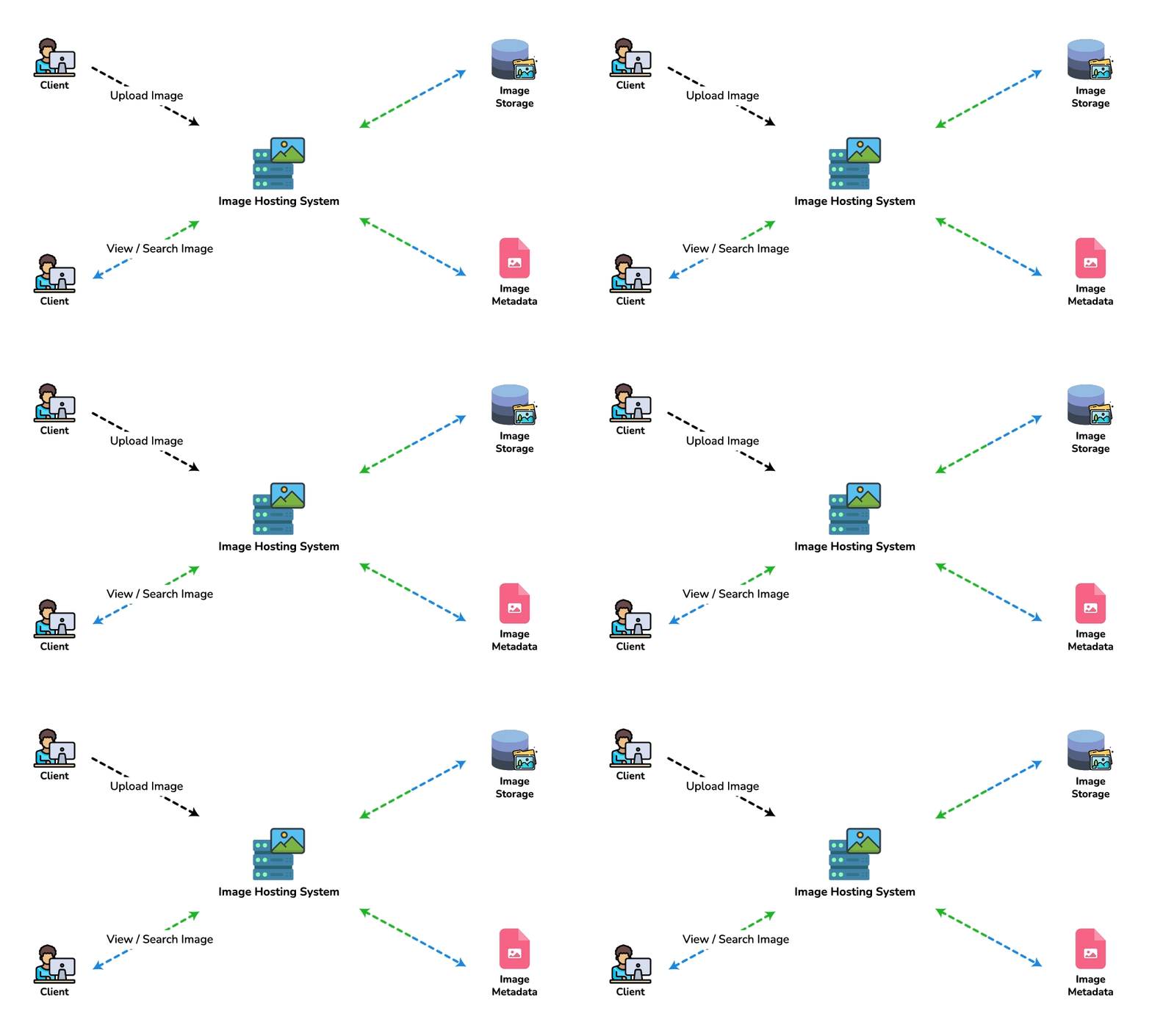
At a high-level, we need to support two scenarios, one to upload photos and the other to view/search photos. Our service would need some object storage servers to store photos and some database servers to store metadata information about the photos.
6. Database Schema
💡 Defining the DB schema in the early stages of the interview would help to understand the data flow among various components and later would guide towards data partitioning.
We need to store data about users, their uploaded photos, and the people they follow. The Photo table will store all data related to a photo; we need to have an index on (PhotoID, CreationDate) since we need to fetch recent photos first. (Note: once the epoch-embedded PhotoID design later on this page is adopted, creation time is baked into the key itself — PhotoID is already unique and time-ordered, so the primary-key index alone returns newest-first and this composite index becomes redundant.)
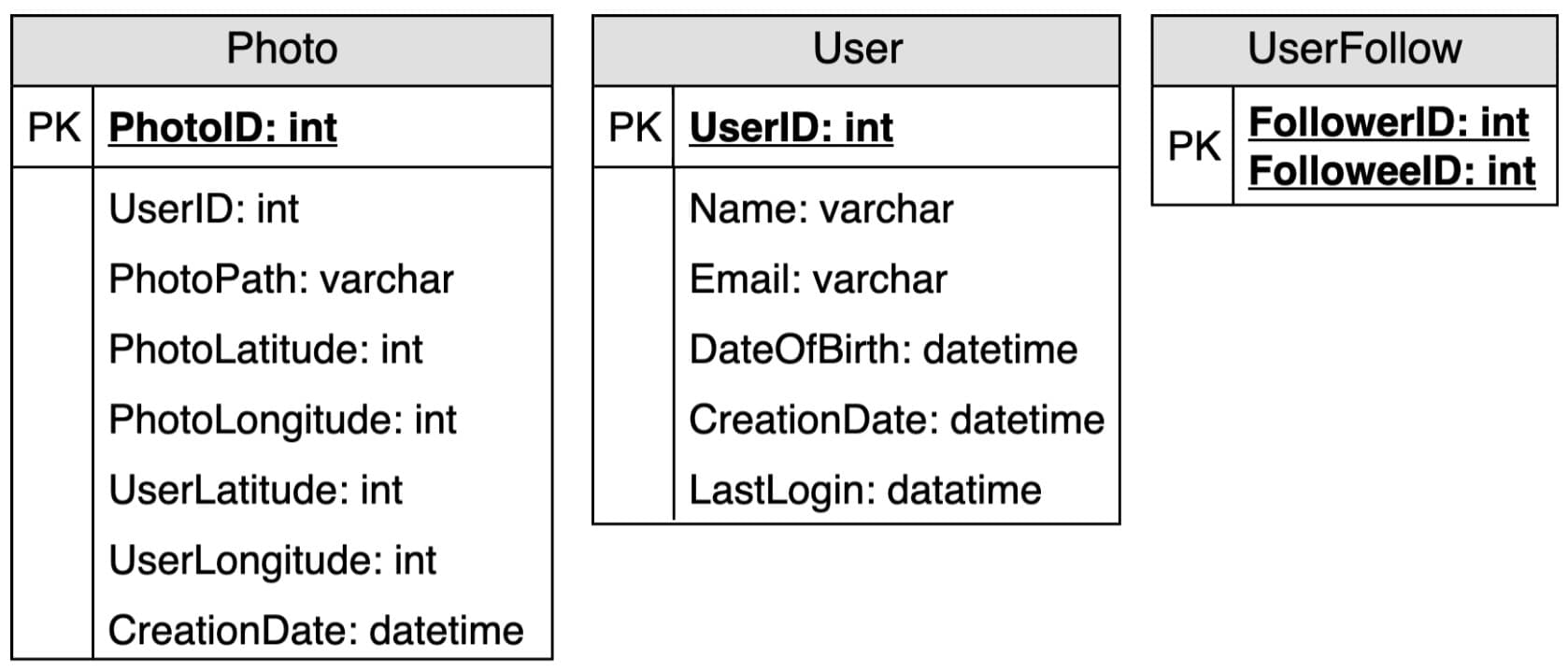
A straightforward approach for storing the above schema would be to use an RDBMS like MySQL since we require joins. But relational databases come with their challenges, especially when we need to scale them. For details, please take a look at SQL vs. NoSQL chapter.
We can store photos in a distributed file storage like HDFS or S3.
We can store the above schema in a distributed key-value store to enjoy the benefits offered by NoSQL. All the metadata related to photos can go to a table where the 'key' would be the 'PhotoID' and the 'value' would be an object containing PhotoLocation, UserLocation, CreationTimestamp, etc.
NoSQL stores, in general, always maintain a certain number of replicas to offer reliability. Also, in such data stores, deletes don't get applied instantly; data is retained for certain days (to support undeleting) before getting removed from the system permanently.
7. Data Size Estimation
Let's estimate how much data will be going into each table and how much total storage we will need for 10 years.
User: Assuming each "int" and "dateTime" is four bytes, each row in the User's table will be of 68 bytes:
If we have 500 million users, we will need 32GB of total storage.
Photo: Each row in Photo's table will be of 284 bytes:
If 2M new photos get uploaded every day, we will need 0.5GB of storage for one day:
For 10 years we will need 1.88TB of storage.
UserFollow: Each row in the UserFollow table will consist of 8 bytes. If we have 500 million users and on average each user follows 500 users. We would need 1.82TB of storage for the UserFollow table:
Total space required for all tables for 10 years will be 3.7TB:
8. Component Design
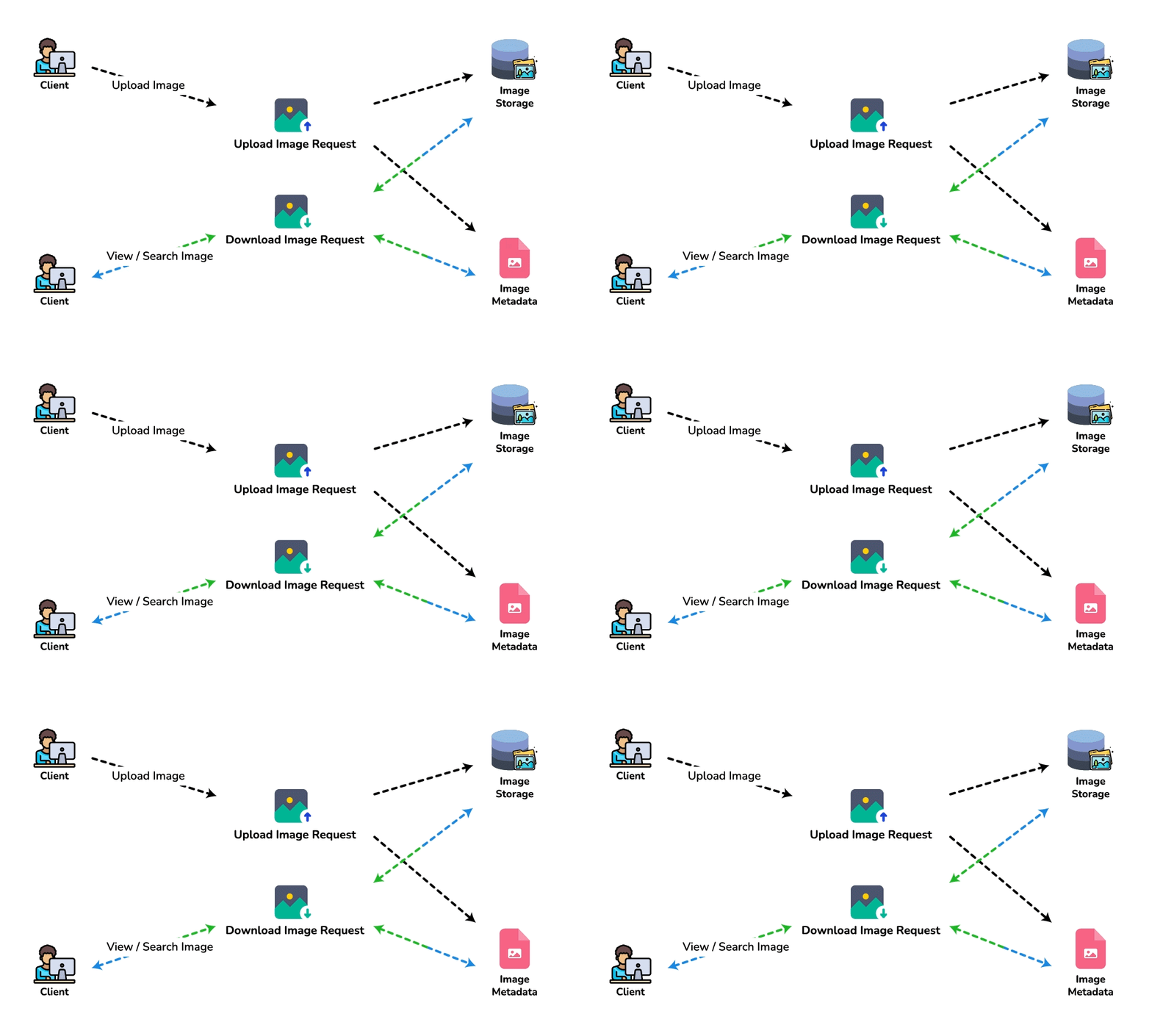
Photo uploads (or writes) can be slow as they have to go to the disk, whereas reads will be faster, especially if they are being served from cache.
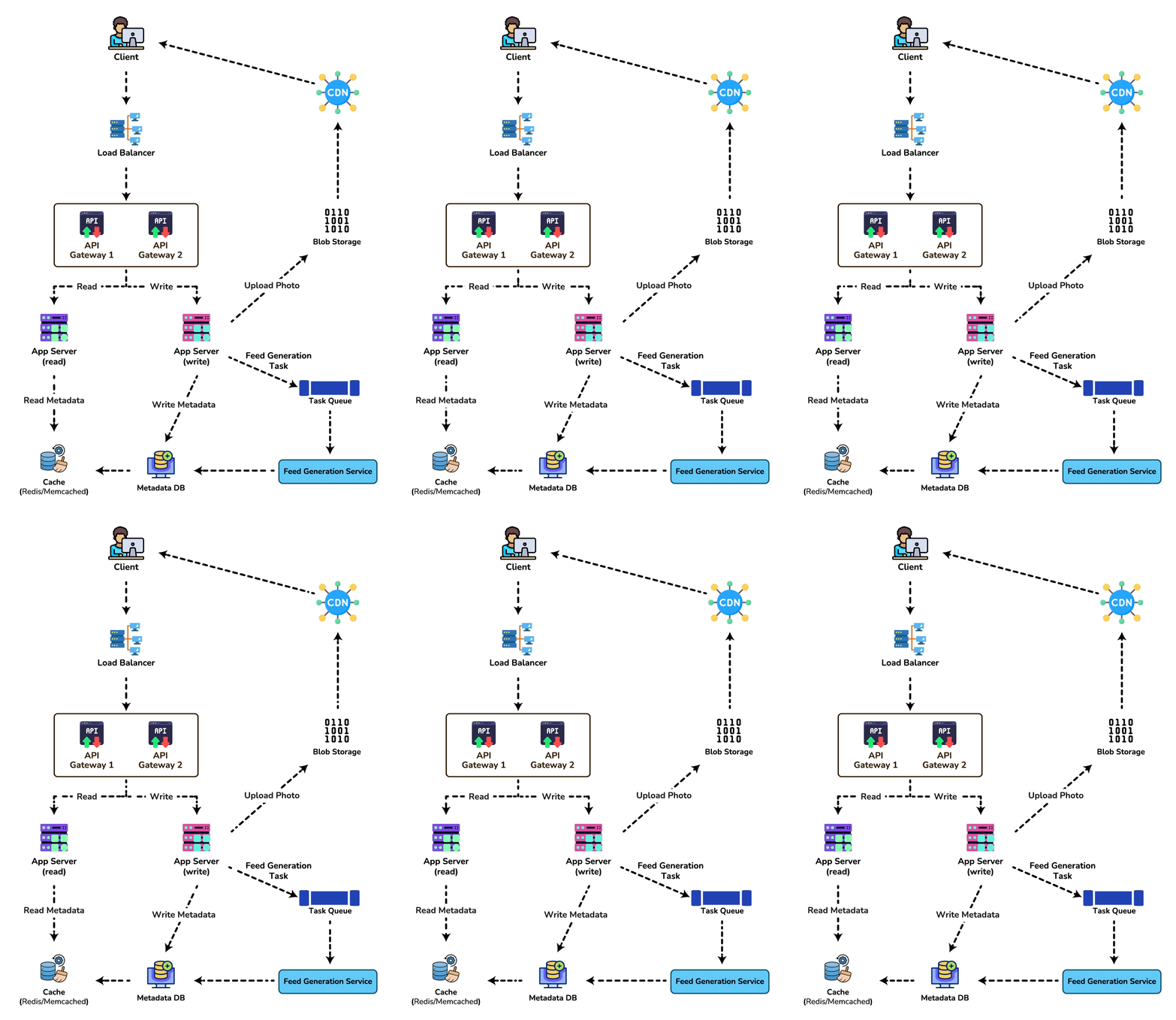
Uploading users can consume all the available connections, as uploading is a slow process. This means that 'reads' cannot be served if the system gets busy with all the 'write' requests. We should keep in mind that web servers have a connection limit before designing our system. If we assume that a web server can have a maximum of 500 connections at any time, then it can't have more than 500 concurrent uploads or reads. To handle this bottleneck, we can split reads and writes into separate services. We will have dedicated servers for reads and different servers for writes to ensure that uploads don't hog the system.
Separating photos' read and write requests will also allow us to scale and optimize each of these operations independently.
9. Reliability and Redundancy
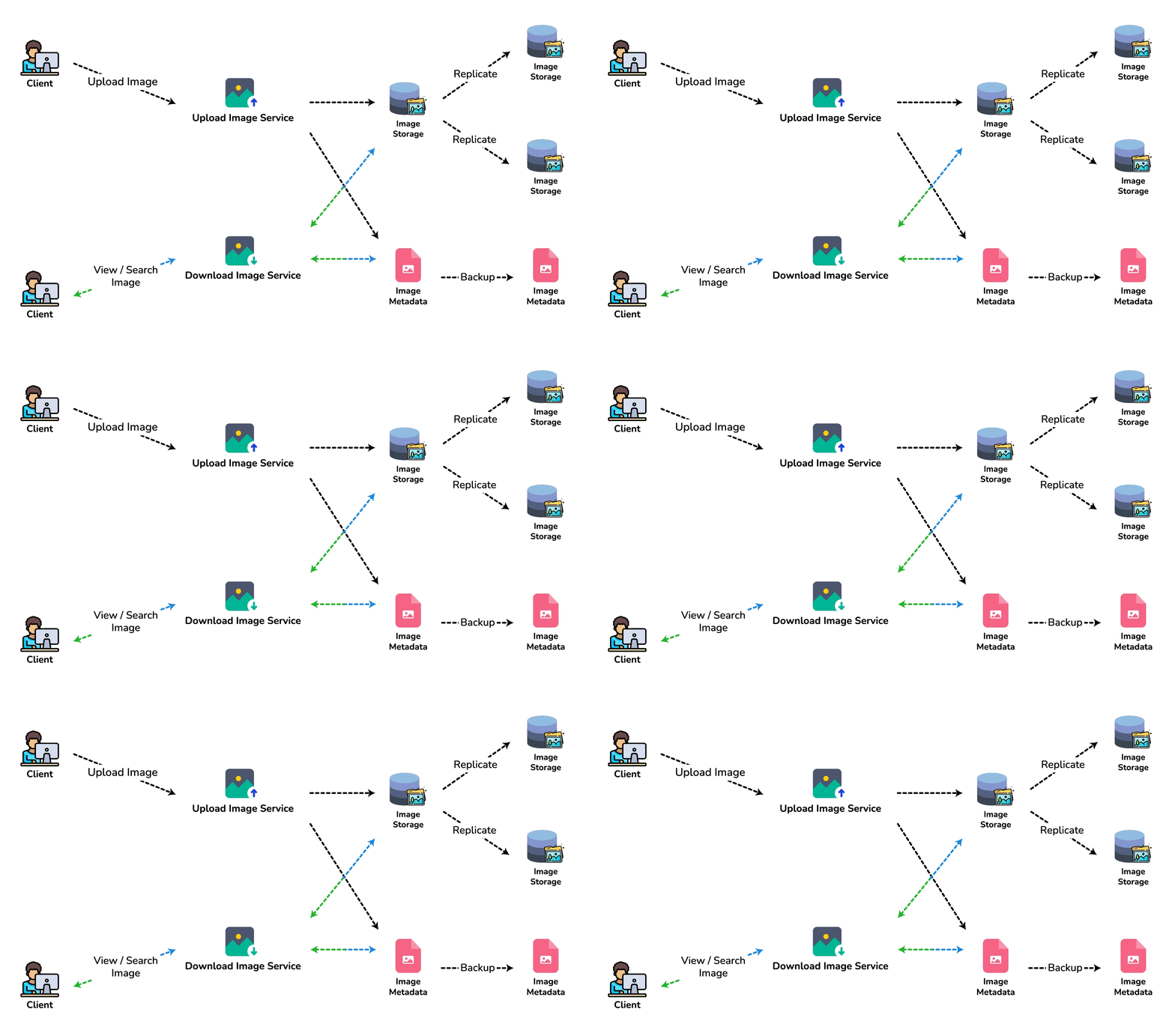
Losing files is not an option for our service. Therefore, we will store multiple copies of each file so that if one storage server dies, we can retrieve the photo from the other copy present on a different storage server.
This same principle also applies to other components of the system. If we want to have high availability of the system, we need to have multiple replicas of services running in the system so that even if a few services die down, the system remains available and running. Redundancy removes the single point of failure in the system.
If only one instance of a service is required to run at any point, we can run a redundant secondary copy of the service that is not serving any traffic, but it can take control after the failover when the primary has a problem.
Creating redundancy in a system can remove single points of failure and provide a backup or spare functionality if needed in a crisis. For example, if there are two instances of the same service running in production and one fails or degrades, the system can failover to the healthy copy. Failover can happen automatically or require manual intervention.
10. Data Sharding
Let's discuss different schemes for metadata sharding:
a. Partitioning based on UserID Let's assume we shard based on the 'UserID' so that we can keep all photos of a user on the same shard. If one DB shard is 1TB, we will need four shards to store 3.7TB of data. Let's assume, for better performance and scalability, we keep 10 shards.
So we'll find the shard number by UserID % 10 and then store the data there. To uniquely identify any photo in our system, we can append the shard number with each PhotoID.
How can we generate PhotoIDs? Each DB shard can have its own auto-increment sequence for PhotoIDs, and since we will append ShardID with each PhotoID, it will make it unique throughout our system.
What are the different issues with this partitioning scheme?
- How would we handle hot users? Several people follow such hot users, and a lot of other people see any photo they upload.
- Some users will have a lot of photos compared to others, thus making a non-uniform distribution of storage.
- What if we cannot store all pictures of a user on one shard? If we distribute photos of a user onto multiple shards, will it cause higher latencies?
- Storing all photos of a user on one shard can cause issues like unavailability of all of the user's data if that shard is down or higher latency if it is serving high load etc.
b. Partitioning based on PhotoID If we can generate unique PhotoIDs first and then find a shard number through "PhotoID % 10", write hot spots and uneven user photo counts are solved, and PhotoID is unique system-wide without embedding ShardID. Read path trade-off: a single user's photos are now scattered across all 10 shards. Loading a profile ("all photos for UserID=X") or building parts of a feed becomes a scatter-gather query: fan out to every shard, merge, sort — latency follows the slowest shard and does not scale as shard count grows.
Mitigations for PhotoID sharding:
- Maintain a secondary index table sharded by
UserIDmappingUserID → [PhotoID…](or(UserID, CreationDate) → PhotoID). Profile reads hit one user-shard, then fetch photo metadata by PhotoID (optionally batched / cached). - Cache hot user photo listings in Redis with a short TTL so the common path never scatter-gathers.
- For feeds, prefer fan-out-on-write / precomputed timelines rather than live scatter-gather across photo shards.
So PhotoID sharding fixes write balance; user-keyed secondary indexes (or caches) fix the read path. Saying only "PhotoID % 10 solves the problems" without naming scatter-gather is incomplete.
How can we generate PhotoIDs? Here, we cannot have an auto-incrementing sequence in each shard to define PhotoID because we need to know PhotoID first to find the shard where it will be stored. One solution could be that we dedicate a separate database instance to generate auto-incrementing IDs. If our PhotoID can fit into 64 bits, we can define a table containing only a 64 bit ID field. So whenever we would like to add a photo in our system, we can insert a new row in this table and take that ID to be our PhotoID of the new photo.
Wouldn't this key generating DB be a single point of failure? Yes, it would be. A workaround for that could be to define two such databases, one generating even-numbered IDs and the other odd-numbered. For MySQL, the following script can define such sequences:
KeyGeneratingServer1:
auto-increment-increment = 2
auto-increment-offset = 1

KeyGeneratingServer2:
auto-increment-increment = 2
auto-increment-offset = 2
We can put a load balancer in front of both of these databases to round-robin between them and to deal with downtime. Both these servers could be out of sync, with one generating more keys than the other, but this will not cause any issue in our system. We can extend this design by defining separate ID tables for Users, Photo-Comments, or other objects present in our system.
Alternately, we can implement a 'key' generation scheme similar to what we have discussed in 'Designing a URL Shortening service like TinyURL'.
How can we plan for the future growth of our system? We can have a large number of logical partitions to accommodate future data growth, such that in the beginning, multiple logical partitions reside on a single physical database server. Since each database server can have multiple database instances running on it, we can have separate databases for each logical partition on any server. So whenever we feel that a particular database server has a lot of data, we can migrate some logical partitions from it to another server. We can maintain a config file (or a separate database) that can map our logical partitions to database servers; this will enable us to move partitions around easily. Whenever we want to move a partition, we only have to update the config file to announce the change.
11. Ranking and News Feed Generation
To create the News Feed for any given user, we need to fetch the latest, most popular, and relevant photos of the people the user follows.
For simplicity, let's assume we need to fetch the top 100 photos for a user's News Feed. Our application server will first get a list of people the user follows and then fetch metadata info of each user's latest 100 photos. In the final step, the server will submit all these photos to our ranking algorithm, which will determine the top 100 photos (based on recency, likeness, etc.) and return them to the user. A possible problem with this approach would be higher latency as we have to query multiple tables and perform sorting/merging/ranking on the results. To improve the efficiency, we can pre-generate the News Feed and store it in a separate table.
Pre-generating the News Feed: We can have dedicated servers that are continuously generating users' News Feeds and storing them in a 'UserNewsFeed' table. So whenever any user needs the latest photos for their News-Feed, we will simply query this table and return the results to the user.
Whenever these servers need to generate the News Feed of a user, they will first query the UserNewsFeed table to find the last time the News Feed was generated for that user. Then, new News-Feed data will be generated from that time onwards (following the steps mentioned above).
What are the different approaches for sending News Feed contents to the users?
1. Pull: Clients can pull the News-Feed contents from the server at a regular interval or manually whenever they need it. Possible problems with this approach are a) New data might not be shown to the users until clients issue a pull request b) Most of the time, pull requests will result in an empty response if there is no new data.
2. Push: Servers can push new data to the users as soon as it is available. To efficiently manage this, users have to maintain a Long Poll request with the server for receiving the updates. A possible problem with this approach is a user who follows a lot of people or a celebrity user who has millions of followers; in this case, the server has to push updates quite frequently.
3. Hybrid: We can adopt a hybrid approach. We can move all the users who have a high number of followers to a pull-based model and only push data to those who have a few hundred (or thousand) follows. Another approach could be that the server pushes updates to all the users not more than a certain frequency and letting users with a lot of updates to pull data regularly.
Fan-out: the follower-count crossover
The three approaches above (pull / push / hybrid) are usually framed as a client-delivery choice, but the real decision is where the timeline is materialized — and it turns on a single number: the author's follower count.
- Fan-out-on-write (push). When a user posts, write that PhotoID into the precomputed timeline of every follower. Cost per post = O(followers) timeline writes; a feed read is then a single cache lookup (fast, cheap, meets the 200ms SLA trivially).
- Fan-out-on-read (pull). Store nothing per follower; at read time gather the recent photos of everyone the reader follows, merge and rank. Cost per read = O(followees); a write is one insert into the author's own timeline.
Average case (from our own numbers). With 23 photos/sec and an average of 500 followers per author, fan-out-on-write costs 23 × 500 ≈ 11,500 timeline writes/sec — negligible. Push is the obvious default.
Where it breaks. The cost is set by the tail, not the average. A celebrity with 100M followers posting once (a real-Instagram-scale aside — our stated 500M-total/1M-DAU model tops out far lower, but the mechanism is identical at any extreme-tail account) forces 100,000,000 timeline writes for a single photo. At even 1M writes/sec of fan-out capacity that is 100 seconds of work for one post — the followers cannot all see it inside 200ms, and 99%+ of those writes land in timelines nobody opens before the photo ages out.
The crossover, derived. Let a be the fraction of an author's followers who actually open their feed inside the window a post stays relevant. Push writes F entries but only a·F are ever read, so wasted writes = (1 − a)·F. Pick a per-post waste budget (say ≤ 10,000 wasted writes) and a realistic per-window active fraction a ≈ 1%:
So push pays off up to roughly 104 followers; teams commonly set the hybrid cutoff anywhere in the 10k–100k band depending on how much wasted fan-out they tolerate. Above the cutoff the account is switched to pull, and this is where the asymmetry becomes decisive: pushing scatters F writes across F different follower timelines (uncacheable), whereas pulling a celebrity is one shared read — millions of followers all read the same author-timeline list, which collapses to a single hot cache entry. One cached list versus 100M scattered writes is why every large photo/social feed is hybrid, never pure push.
Hybrid assembly: a reader's feed = their precomputed pushed timeline (all the sub-10k-follower accounts they follow) merged at read time with a live pull of the handful of celebrity accounts. Only the few high-fan-out authors cost a read; everyone else was already fanned out on write.
Ranking: from candidates to a cached ranked timeline
Recency alone ("latest 100 photos") is the naive feed. A ranked feed scores each candidate photo and keeps the top-N. The signals that matter here:
- Affinity — how strongly the reader interacts with this author (past likes/comments/DMs/profile visits).
- Engagement — the photo's own like/comment/save rate per impression so far (a proxy for quality).
- Recency — a time-decay factor so a great photo from last week doesn't outrank a good one from an hour ago.
- Predicted action — a model's estimate of P(like), P(comment), P(save) for this reader × this photo; the final score is a weighted blend of these predicted probabilities.
- Type & diversity — down-rank several consecutive photos from the same author so the feed isn't monotonous.
Assembly pipeline: (1) candidate generation — union of pushed timeline entries + pulled celebrity posts (a few hundred candidates); (2) feature fetch — affinity + photo-engagement counters (cached in Redis); (3) scoring — run the blend/model over the candidates; (4) truncate to the top ~100; (5) cache the ranked list in the UserNewsFeed table keyed by UserID. The read path then serves that cached ranked list directly — all ranking work happens at fan-out / refresh time, off the 200ms read path.
Consistency vs. staleness — spending the NFR
NFR #3 explicitly allows consistency to "take a hit": a reader need not see a brand-new photo instantly. That budget is exactly what makes the cached ranked feed affordable. The observable staleness window is:
With a p99 fan-out lag of a few seconds for normal accounts and a feed-cache TTL of, say, 30s, a follower may not see a new post for up to ~30–35s — well within an acceptable social-feed experience, and the price we pay to keep reads at a single cache hit. The pull path (celebrity posts) is always fresh because it reads live, so the content most likely to be "breaking" never goes stale. Wanting stronger freshness means shortening the TTL or pushing cache-invalidation events on new posts — at the cost of more feed recomputation. This is the exact lever the NFR frees us from having to pull.
For a detailed discussion about News-Feed generation, take a look at 'Designing Facebook’s Newsfeed'.
12. News Feed Creation with Sharded Data
One of the most important requirements to create the News Feed for any given user is to fetch the latest photos from all people the user follows. For this, we need to have a mechanism to sort photos on their time of creation. To efficiently do this, we can make photo creation time part of the PhotoID. As we will have a primary index on PhotoID, it will be quite quick to find the latest PhotoIDs.
We can use epoch time for this. Let's say our PhotoID will have two parts; the first part will be representing epoch time, and the second part will be an auto-incrementing sequence. So to make a new PhotoID, we can take the current epoch time and append an auto-incrementing ID from our key-generating DB. We can figure out the shard number from this PhotoID ( PhotoID % 10) and store the photo there.
What could be the size of our PhotoID? Let's say our epoch time starts today; how many bits we would need to store the number of seconds for the next 50 years?
We would need 31 bits to store this number. Since, on average, we are expecting 23 new photos per second, we can allocate 9 additional bits to store the auto-incremented sequence. So every second, we can store
We will discuss this technique under 'Data Sharding' in 'Designing Twitter'.
13. Cache and Load balancing
Our service would need a massive-scale photo delivery system to serve globally distributed users. Our service should push its content closer to the user using a large number of geographically distributed photo cache servers and use CDNs (for details, see 'Caching').
We can introduce a cache for metadata servers to cache hot database rows. We can use Memcache to cache the data, and Application servers before hitting the database can quickly check if the cache has desired rows. Least Recently Used (LRU) can be a reasonable cache eviction policy for our system. Under this policy, we discard the least recently viewed row first.
How can we build a more intelligent cache? If we go with the eighty-twenty rule, i.e., 20% of photos generate 80% of the daily read traffic — certain photos are so popular that most people read them — we can serve most reads by caching that hot 20% of photos and metadata. Sizing it from this page's own numbers: the hot set is dominated by recent photos, and 20% of a day's uploads is 0.2 * 2M photos * 200KB ≈ 80GB of photo bytes (metadata is under 1GB/day, so it rides along free) — one or two well-provisioned cache servers, or a modest CDN footprint.
Hostile review — bottlenecks, when-not, operability
| Decision | Why | Why not / when-not | Bottleneck @ 10× |
|---|---|---|---|
| PhotoID shard + UserID secondary index | Even writes; profile via secondary index | UserID-only shard: celebrity + uneven photo counts | Scatter-gather if you skip secondary index; hot secondary index for celebrities |
| Blob in object store + CDN; metadata in DB | PB media ≠ SQL rows | Storing images in DB rows | Origin egress without CDN; thumbnail pipeline lag |
| Hybrid feed push/pull | Celebrities break pure fan-out-on-write | Push to all 50M followers of a celebrity | Fan-out workers / timeline write QPS; celebrity pull path latency |
| Split read vs write web tiers | Uploads hold connections | One pool for all HTTP | Upload connection exhaustion → read starvation |
Operability: failed thumbnail worker
Trace: Upload accepts original → object store write succeeds → metadata row written with status=processing → thumbnail worker crashes mid-job. User sees broken image if the client only reads the “ready” URL.
- Detection: queue lag on
thumbnail-jobs; count of photos withstatus=processingolder than N minutes; 404 rate on thumb CDN paths. - Recovery: requeue incomplete jobs from metadata scan; worker is idempotent (overwrite same thumb keys); only flip
status=readyafter all sizes exist. Optional: serve original URL until thumbs ready. - SLIs: upload success rate; p99 time-to-ready (original + thumbs); feed cache hit ratio; fan-out lag for non-celebrity push.
🤖 Don't fully get this? Learn it with Claude
Stuck on Designing Instagram? Open Claude, copy a block below, and it'll teach you this exact concept — visually and interactively.
Build the mental picture, not memorization.
I just read a lesson on **Designing Instagram** (System Design) and want to truly understand it. Explain Designing Instagram from first principles using ONE vivid real-world analogy and a visual mental model — draw it as ASCII art or a clear step-by-step diagram — with a concrete example using real numbers. Then ask me one question to check I got the mental picture, and wait for my reply. If you're unsure or a claim isn't standard, say so and reason from first principles instead of guessing.
Socratic — adapts to where you're stuck.
Teach me **Designing Instagram** interactively. Ask me ONE guiding question at a time, wait for my answer, and adapt to my confusion — build the idea with me step by step instead of explaining it all at once. If you're unsure or a claim isn't standard, say so and reason from first principles instead of guessing.
Active recall exposes what you missed.
Quiz me on **Designing Instagram** with 5 questions, easy to tricky, ONE at a time. Tell me if each answer is right; at the end, explain clearly what I got wrong and why. If you're unsure or a claim isn't standard, say so and reason from first principles instead of guessing.
Intuition + hook + flashcards for long-term memory.
Help me remember **Designing Instagram** for the long term: give the one-sentence intuition, a memorable hook/mnemonic, a tiny worked example, and 3 active-recall flashcards (Q -> A). If you're unsure or a claim isn't standard, say so and reason from first principles instead of guessing.