Video Transcoding at Scale — DAG Pipeline, Scheduler & Resource Manager, Traced
Why "just run ffmpeg" stops working
Most YouTube designs stop at "upload to blob storage, transcode, serve from CDN." The transcode box is where the engineering actually is, and it is the part most candidates wave through. This page opens that box.
Three facts force the design:
- Raw video is enormous. An hour of high-definition video at 60 fps can occupy a few hundred GB. You cannot store or ship the original.
- Devices disagree. Browsers and phones support only certain containers and codecs, so one upload must become many outputs. A container (.mp4, .mov, .avi) is the basket holding video, audio and metadata; a codec (H.264, VP9, HEVC) is the compression algorithm inside it.
- Networks change mid-playback. To keep playback smooth you need multiple bitrate renditions ready so the player can switch quality as bandwidth moves.
So one upload fans out into many encoding jobs, each expensive and slow, and different creators want different work done — some supply their own thumbnails, some want watermarks, some upload HD and some do not. A hardcoded pipeline cannot express that variability, and a pipeline that runs every stage for every upload wastes enormous compute. That tension is what the DAG solves.
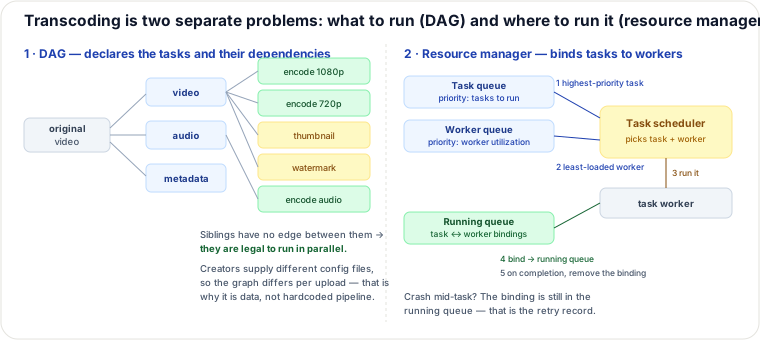
The DAG model: make the pipeline data, not code
Facebook's streaming video engine expresses video processing as a directed acyclic graph, and this design adopts the same model. Tasks are declared as stages with dependency edges; the engine derives what may run sequentially and what may run in parallel. Two properties matter:
- Client programmers define the graph in configuration files, so a creator needing a watermark gets a different graph than one who does not — without a code change.
- Acyclic means schedulable. Because there are no cycles, a topological order always exists, and tasks with no edge between them are provably independent — the parallelism is derived, not hand-managed.
The first split is video, audio and metadata. The video branch then fans out into the work you actually care about: encodings at several resolutions/bitrates, thumbnail generation, watermarking. Typical tasks:
- Inspection — verify the video is well-formed and good quality before spending money on it. Cheap gate first; this is the stage that turns a malformed upload into a fast rejection instead of a wasted encode.
- Video encodings — convert to the target resolutions, codecs and bitrates.
- Thumbnail — user-supplied or auto-generated.
- Watermark — an image overlay carrying identifying information.
The six components, and what each one is really for
Preprocessor — four jobs
- Video splitting into GOP alignment. A Group of Pictures is a chunk of frames, usually a few seconds, that is independently playable. This is the single most important primitive on the page: because a GOP decodes without reference to its neighbours, GOPs can be encoded in parallel, uploaded in parallel, retried individually, and streamed adaptively. Split at the wrong boundary and none of that holds.
- Split on behalf of old clients. Some older devices and browsers cannot split video themselves, so the server does it for them.
- DAG generation from the creator's configuration files.
- Cache the segments. GOPs and metadata are persisted to temporary storage so that a failed encode can be retried from the segments rather than from the original upload.
DAG scheduler — graph to queued work
The DAG scheduler splits the graph into stages of tasks and puts them into the resource manager's task queue. In the traced example, stage 1 is the split into video/audio/metadata; stage 2 takes the video file into video-encoding and thumbnail tasks and the audio file into audio-encoding. The scheduler's only job is translating dependency structure into "these tasks are runnable now."
Resource manager — three queues and a scheduler
This is the component most often missing from a candidate's answer, and it is where efficiency comes from:
- Task queue — a priority queue of tasks awaiting execution.
- Worker queue — a priority queue of worker utilization information.
- Running queue — the currently running tasks and which worker holds each.
- Task scheduler — picks the optimal task/worker pair and dispatches.
The loop: take the highest-priority task; take the best worker from the worker queue; instruct that worker to run it; bind task and worker into the running queue; remove the entry when the job completes. Note what the running queue buys you beyond bookkeeping — it is the crash-recovery record. A worker that dies mid-task leaves its binding behind, which is exactly the signal needed to re-dispatch that task rather than lose the upload silently.
Task workers, temporary storage, encoded video
Task workers execute the DAG's tasks, and different workers may specialize in different task types. Temporary
storage is deliberately plural — choose per data shape: metadata is small and accessed constantly by
workers, so cache it in memory; video and audio segments are large and streamed, so put them in blob storage. Data in
temporary storage is freed once processing completes, which is what keeps the staging tier from growing without bound.
The output is the encoded rendition, e.g. funny_720p.mp4.
Optimizations, and the trade each one makes
Speed
- Parallelize the upload by GOP. Uploading a video as one unit is inefficient and unresumable; splitting client-side by GOP alignment gives parallel transfer and resume-from-failure. The cost is client complexity and a client you must keep compatible — which is precisely why the preprocessor still splits for old clients.
- Upload centers close to users. Use CDN points of presence as upload centers so a creator in Asia does not push hundreds of GB across an ocean before processing begins. Improves the long-pole upload leg; adds cost and the operational burden of multi-region ingest.
- Parallelism everywhere via message queues. The naive flow is a chain where each step consumes the previous step's output, and that dependency prevents parallelism. Introducing message queues decouples the modules: the encoding module no longer waits on the download module, it just consumes events as they appear. The trade is the usual one for queues — you gain throughput and loose coupling, and you take on ordering, duplicate delivery and backlog visibility as new problems.
Safety
- Pre-signed upload URLs. The client asks the API server for a pre-signed URL, receives it, and uploads directly to storage with it. Only authorized users can write, and only to the exact object named in the URL — and crucially, the bytes never traverse your API tier. (S3's name; Azure calls the same thing a Shared Access Signature.)
- Protecting the video — three options, in decreasing strength: DRM (Apple FairPlay, Google Widevine, Microsoft PlayReady); AES encryption with an authorization policy, decrypted at playback; visual watermarking, which does not prevent copying at all and only asserts provenance. Pick by what you are defending against — watermarking deters casual reuse, DRM is what a studio contract demands.
Cost
Video streams follow a long-tail distribution: a few videos are watched constantly, most are watched rarely or never. Four consequences follow:
- Serve only popular videos from CDN; serve the tail from your own high-capacity storage servers.
- For unpopular content, do not pre-generate every rendition — short videos can be encoded on demand. This trades first-view latency for storage and encode cost, which is the right trade for a video with three lifetime views and the wrong one for a video about to trend.
- Some videos are popular only regionally — do not distribute them globally.
- At sufficient scale, build your own CDN and partner with ISPs, as Netflix does. A giant project, justified only when egress dominates your entire cost structure.
All four depend on knowing your access patterns, so analyze historical viewing before optimizing. Pre-generating every rendition for every upload is the default that quietly costs the most.
Which pipeline shape, when
| Approach | Best for | Why it wins | When it is wrong |
|---|---|---|---|
| Hardcoded pipeline | One uniform output profile | Simplest possible thing; no scheduler, no config | The moment two creators need different processing, or you must skip stages to save cost |
| DAG + resource manager | Heterogeneous, high-volume processing | Per-upload graphs, derived parallelism, per-task retry | Small scale — you have built a scheduler to run three tasks |
| Pre-encode all renditions | Content you know will be watched | Instant playback at any quality | Long-tail libraries — you pay encode + storage for views that never happen |
| Encode on demand | Rare, short videos | Zero cost for never-watched content | Popular or long videos — first viewer eats the encode latency |
| Serve everything from CDN | Uniformly hot catalogs | Lowest latency everywhere | Long-tail catalogs — egress on cold content dominates the bill |
Error handling — the distinction that drives the retry policy
- Recoverable (a segment fails to transcode): retry a few times; if it keeps failing, return an error code. Because the preprocessor cached the GOPs, retry is cheap and localized to one segment.
- Non-recoverable (malformed video format): stop all running tasks for that video and return an error immediately. Retrying is pure waste — and worse, it occupies workers that valid uploads need.
The specific playbook: upload errors retry a few times; a client that cannot split by GOP falls back to server-side splitting; transcoding errors follow the recoverable/non-recoverable split above.
Pitfalls
- Splitting on arbitrary byte boundaries instead of GOP alignment. The chunks are then not independently decodable, so parallel encode, per-chunk retry and adaptive switching all break at once.
- No inspection stage, or inspection last. A malformed upload consumes a full encode before anyone notices.
- Treating the running queue as a dashboard. If nothing reconciles stale bindings, a crashed worker means a video that silently never finishes — the upload appears to succeed and nothing is ever published.
- Uploading through the API tier. Without pre-signed URLs your API servers become a bandwidth bottleneck sized for video, not for JSON.
- Priority queue with no aging. Low-priority tasks (the long tail) can starve forever behind a steady stream of high-priority uploads.
Cost model — what dominates the bill
Transcoding has an unusual cost shape: it is CPU-dominated at ingest and egress-dominated at playback, with storage a distant third.
Rough BOTE. Take 5 million daily active users, 5 videos watched each, 10% of users uploading one video a day at ~300 MB average: that is ~500,000 uploads/day → ~150 TB/day of originals. Encoding into, say, five renditions typically costs on the order of the video's own duration in CPU-minutes per rendition, so an hour of video becomes several CPU-hours — hundreds of thousands of CPU-hours per day. At roughly $0.03/vCPU-hour, the encode fleet alone runs to tens of thousands of dollars per day. Playback then pays CDN egress at roughly $0.02/GB, and because every watched byte leaves the CDN, egress scales with views rather than uploads.
Dominant line items: CDN egress on the popular head of the catalog, and encode CPU for renditions — especially renditions of tail content nobody watches.
Levers, in order of leverage: (1) serve the tail from origin storage rather than CDN, cutting the most expensive line for the least-watched content; (2) encode the tail on demand, deleting the encode cost for videos with no viewers; (3) drop the highest-bitrate rendition for content whose audience never selects it; (4) region-scope distribution. Each of these is a popularity bet, which is why the historical-access analysis is not optional — guessing wrong on the head is far more expensive than guessing wrong on the tail.
Operability: the fingerprints of a broken transcode pipeline
Each failure leaves its own trace. A rising count of videos stuck in "processing" with an idle worker fleet means bindings are orphaned in the running queue — workers died and nothing reconciles, so the tasks were never re-dispatched. Encode retries clustered on one segment index across many unrelated videos points at GOP splitting, not at the videos: the splitter is producing one malformed chunk shape. Task-queue depth growing while worker utilization sits below capacity means the scheduler cannot place work — usually a specialized task type with no eligible workers, which looks like a capacity problem and is actually a placement problem. Tail-latency spikes on first playback of older videos is the on-demand encoding path being hit, i.e. your popularity classifier put something in the tail that viewers actually want.
The most expensive silent failure is temporary storage that never drains: if the cleanup that frees GOPs on completion fails, the staging tier grows monotonically and the bill climbs with no user-visible symptom until you run out of space mid-encode. The subtler one is low-priority starvation — measure the age of the oldest queued task, not just queue depth, because depth can look healthy while the bottom of the queue is days old. Signals worth having: oldest-binding age in the running queue, per-segment retry counts, task-queue age histogram by priority, staging-storage bytes versus in-flight video count, and on-demand-encode hit rate.
Re-authored for this guide from the Alex Xu Vol. 1 YouTube chapter (DAG model after Facebook's streaming video engine); DAG + resource-manager diagram hand-authored as SVG. Deep dive complementing the existing "Designing YouTube or Netflix" and "Designing YouTube/Netflix — Transcode, CDN & Adaptive Bitrate, Traced" pages — those cover streaming, ABR and CDN strategy; this one covers the processing pipeline itself.
🤖 Don't fully get this? Learn it with Claude
Stuck on Video Transcoding at Scale — DAG Pipeline, Scheduler & Resource Manager, Traced? Open Claude, copy a block below, and it'll teach you this exact concept — visually and interactively.
Build the mental picture, not memorization.
I just read a lesson on **Video Transcoding at Scale — DAG Pipeline, Scheduler & Resource Manager, Traced** (System Design) and want to truly understand it. Explain Video Transcoding at Scale — DAG Pipeline, Scheduler & Resource Manager, Traced from first principles using ONE vivid real-world analogy and a visual mental model — draw it as ASCII art or a clear step-by-step diagram — with a concrete example using real numbers. Then ask me one question to check I got the mental picture, and wait for my reply. If you're unsure or a claim isn't standard, say so and reason from first principles instead of guessing.
Socratic — adapts to where you're stuck.
Teach me **Video Transcoding at Scale — DAG Pipeline, Scheduler & Resource Manager, Traced** interactively. Ask me ONE guiding question at a time, wait for my answer, and adapt to my confusion — build the idea with me step by step instead of explaining it all at once. If you're unsure or a claim isn't standard, say so and reason from first principles instead of guessing.
Active recall exposes what you missed.
Quiz me on **Video Transcoding at Scale — DAG Pipeline, Scheduler & Resource Manager, Traced** with 5 questions, easy to tricky, ONE at a time. Tell me if each answer is right; at the end, explain clearly what I got wrong and why. If you're unsure or a claim isn't standard, say so and reason from first principles instead of guessing.
Intuition + hook + flashcards for long-term memory.
Help me remember **Video Transcoding at Scale — DAG Pipeline, Scheduler & Resource Manager, Traced** for the long term: give the one-sentence intuition, a memorable hook/mnemonic, a tiny worked example, and 3 active-recall flashcards (Q -> A). If you're unsure or a claim isn't standard, say so and reason from first principles instead of guessing.