Google Drive Metadata, Storage Tiering & Failure Handling, Traced
Where a file-sync design is actually decided
Chunking, dedup and delta sync are the famous parts of a Drive design, and this guide covers them elsewhere. What usually gets skipped is the layer that makes them work: the metadata schema, the consistency guarantee it must provide, and what happens when each component fails. Those three are the difference between a design that sounds right and one that survives.
The requirement that constrains everything: strong consistency
The system requires strong consistency by default, because it is unacceptable for the same file to be shown differently by two clients at the same moment. A stale feed is fine; a stale file means a user edits the wrong version and loses work.
That single requirement forces several choices that would otherwise look conservative:
- Memory caches default to eventual consistency, so replicas can disagree. To get strong consistency you must ensure data in cache replicas and the master stay consistent, and invalidate caches on every database write.
- Choose a relational database. ACID is native, so strong consistency comes for free. NoSQL stores do not support ACID by default, which means the synchronization logic must be implemented programmatically in your application — more code, in the place where a bug costs you a user's document. This is the rare design in this guide where the correct answer is "use a relational database", and the reason is the consistency requirement, not familiarity.
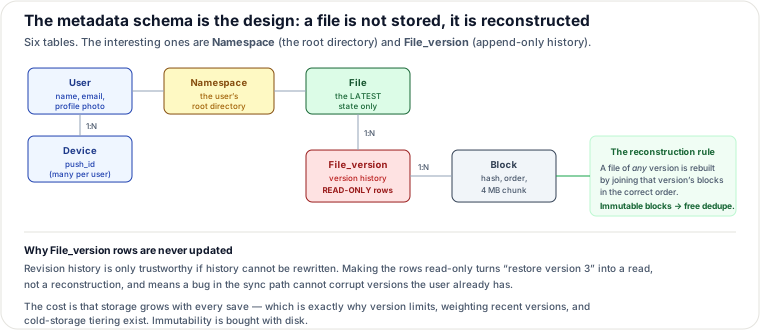
The six tables, and what each one is for
- User — username, email, profile photo.
- Device — device info including
push_idfor mobile push notifications. Note a user can have multiple devices, which is why this is a separate table and why sync must be per-device. - Namespace — the root directory of a user. Easy to overlook and structurally important: it is the anchor that makes a user's tree a self-contained subtree, which is what lets you share, migrate or quota an entire account as one unit.
- File — everything about the latest file.
- File_version — the version history. Existing rows are read-only, to keep the integrity of the revision history.
- Block — everything about a file block. A file of any version can be reconstructed by joining all its blocks in the correct order.
That last sentence is the whole storage model. A file is not a stored object; it is a recipe — an ordered list of immutable, content-addressed blocks. Three properties fall out at once: dedup is free (identical blocks have identical hashes, so they are stored once), delta sync is free (a change re-uploads only the changed blocks), and version history is nearly free (a new version is a new ordered list, mostly reusing existing blocks).
And the read-only rule on File_version is a genuine design decision, not bookkeeping: revision history is
only trustworthy if history cannot be rewritten. Immutable rows mean "restore version 3" is a read rather than a
reconstruction, and a bug in the sync path cannot corrupt versions the user already holds. The cost is that storage grows
with every save — which is precisely why the tiering strategies below exist.
Trace: upload, and why it is two parallel requests
Two requests are sent in parallel from the client — add the metadata, and upload the bytes. That parallelism is the reason the flow needs a status field.
Add file metadata:
- Client 1 requests to add the new file's metadata.
- Metadata is stored and the file's upload status is set to "pending".
- The notification service is told a new file is being added.
- The notification service informs relevant clients (client 2) that a file is being uploaded.
Upload to cloud storage:
- Client 1 uploads the file content to block servers.
- Block servers chunk the file into blocks, compress, encrypt, and upload them to cloud storage.
- Cloud storage triggers an upload-completion callback to the API servers.
- File status changes to "uploaded" in the metadata DB.
- The notification service is told the status changed.
- Relevant clients are informed the file is fully uploaded.
The pending → uploaded transition is what keeps the two parallel paths safe: other clients learn a file exists before its bytes have landed, and the status tells them not to try downloading yet. Without it, client 2 would fetch metadata for a file whose blocks do not exist. Editing a file follows the same flow.
Download flow
A client learns about a remote change in one of two ways: if online, the notification service tells it to pull; if offline, changes are saved to the cache and it pulls when it returns. Then:
- Notification service informs client 2 that a file changed elsewhere.
- Client 2 requests metadata.
- API servers fetch it from the metadata DB and return it.
- Client 2 requests the blocks from block servers.
- Block servers fetch blocks from cloud storage and return them.
- Client 2 downloads the new blocks and reconstructs the file.
Metadata first, blocks second — the client must know the recipe before it can fetch ingredients, and it only fetches the blocks it does not already have.
Why long polling, not WebSocket
Both work; long polling is chosen (as Dropbox does) for two specific reasons: the communication is not bi-directional (the server tells the client about changes, not the reverse), and notifications are infrequent with no bursts. WebSocket's advantage is real-time bi-directional traffic, which a chat app needs and a file-sync notification channel does not. Mechanically: each client holds a long-poll connection; when a change is detected the connection closes, prompting the client to fetch changes; after a response or a timeout the client immediately reopens it.
This is a good example of not reaching for the more powerful primitive. WebSocket would work and would cost more — more connection state, more complexity, for capability the problem does not use.
Saving storage space: three levers
Version history across multiple data centers fills disk quickly, so:
- De-duplicate blocks at the account level — two blocks are identical if their hashes match. The cheapest win, and free given content-addressed blocks.
- Intelligent backup strategy — two variants: set a limit on stored versions, replacing the oldest when full; and keep only valuable versions, since a heavily-edited document could be saved over a thousand times in a short period. Weight recent versions more heavily, and experiment to find the right number — there is no principled answer, only a measured one.
- Move cold data to cold storage — data untouched for months or years goes to an archival tier (Glacier-class), which is dramatically cheaper than standard object storage. The trade is retrieval latency measured in minutes to hours, which is acceptable precisely because the data is cold.
Failure handling, component by component
| Component | What happens | Why it works |
|---|---|---|
| Load balancer | Secondary becomes active and takes traffic | LBs monitor each other by heartbeat; a missed heartbeat means failed |
| Block server | Other servers pick up unfinished/pending jobs | Work is queued and resumable, not held in one server's memory |
| Cloud storage | Fetch from a different region | Buckets are replicated across regions |
| API server | LB redirects to other API servers | Stateless — any server can serve any request |
| Metadata cache | Read from another node; replace the failed one | Cache nodes are replicated |
| Metadata DB (master) | Promote a replica; bring up a new replica | Standard leader failover |
| Metadata DB (replica) | Use another replica for reads; replace it | Reads are spread across replicas |
| Notification service | Clients reconnect to a different server | Works, but see below — this is the slow one |
| Offline backup queue | Consumers re-subscribe to a backup queue | Queues are replicated |
The notification-service row deserves attention because it is the one failure that is genuinely painful. Each notification server holds a long-poll connection per online user — per a 2012 Dropbox talk, over 1 million connections per machine. When one dies, all those connections are lost at once, and while a server can hold that many connections, it cannot re-establish them all quickly: reconnecting the lost clients is a relatively slow process. This is the reconnect-storm problem, and it means the practical recovery time is set by reconnection throughput, not by how fast you can start a replacement server.
Two design alternatives worth knowing
Upload directly from client to cloud storage, skipping block servers. Faster — the file is transferred once instead of twice. Two real drawbacks: the chunking, compression and encryption logic must be reimplemented on every platform (iOS, Android, Web), which is error-prone and expensive; and putting encryption logic on the client is unwise because a client can be hacked or manipulated. Centralizing that logic in block servers is the safer trade, and it is a good illustration that "fewer hops" is not automatically better.
Split online/offline logic into a presence service. Moving it out of the notification servers lets other services reuse it — the same presence component a chat system needs.
Cost model — what dominates the bill
File sync is storage-dominated, and the multiplier is version history, which is the line item teams consistently underestimate.
Rough BOTE: 50 million signups with 10 million DAU and 10 GB of free space each is a nominal 500 PB of entitlement — obviously not all used, but note what versioning does to whatever is used. A user saving a 10 MB document 50 times stores 500 MB unless dedup and version limits intervene; with block-level dedup, an edit to one 4 MB block of a 10 MB file stores 4 MB, not 10. Block-level dedup plus delta sync is therefore not an optimization, it is what makes the product economically possible.
Bandwidth is the second line. Two files per user per day at 500 KB across 10 million DAU is 10 TB/day of upload, and every change notifies and re-syncs other devices, so egress multiplies by devices-per-user. Delta sync attacks this directly: sending only changed blocks can cut sync traffic by an order of magnitude for the edit-an-existing-document case, which is the common case.
Dominant line items: stored bytes × version count × cross-region replication; then sync egress × devices per user; then the long-poll connection fleet, which is sized by online users rather than by traffic.
Levers: block-level dedup (largest, and free); version limits and recency weighting; cold-storage tiering for months-old data; compression before upload; and delta sync to cut the bandwidth line. Note the notification fleet cannot be cut by traffic optimization at all — it scales with concurrent online users, so the only lever there is connections per machine.
Operability: the fingerprints of a broken sync
Files stuck in "pending" status is the parallel-upload flow half-completing: metadata landed, blocks did not, and no completion callback arrived. Users see a file that exists and cannot be opened, so pending-age is a customer-impact metric. Clients repeatedly re-downloading unchanged files means block hashes are being computed inconsistently across platforms — dedup is failing, so every sync looks like a full change, and the symptom is a bandwidth bill rather than an error.
Storage growing much faster than user-visible data points at version retention: the limit is not being enforced, or cold-tiering has stalled. Two clients showing different content for the same file is the consistency guarantee breaking — almost always a cache not invalidated on write, and it is the most serious correctness failure in this system because users lose work by editing the stale copy.
The subtlest is notification reconnect storms: after a notification server restarts, a million clients reconnect and the fleet's recovery is throttled by reconnection throughput. Without client-side jittered backoff, each recovery attempt can topple the next server. Watch also for long-poll connections that never close (change detection is broken, so clients are effectively offline while appearing connected) and offline-queue depth growing, which means returning clients are not draining their pending changes.
Signals worth having: count and age of files in pending status, dedup hit rate on uploaded blocks, storage bytes versus logical user bytes, cache-invalidation failures on write, long-poll connection count per server with reconnect rate and backoff compliance, and offline-queue depth per user.
Re-authored for this guide from the Alex Xu Vol. 1 Google Drive chapter (metadata schema, upload/download flows, long-polling rationale, storage-saving strategies, failure playbook, and the 2012 Dropbox figure of over 1 million long-poll connections per machine); metadata-schema diagram hand-authored as SVG. Complements the existing "Designing Dropbox" and "Designing Dropbox — Chunking, Dedup & Delta Sync, Traced" pages, which cover the chunking and sync mechanics.
🤖 Don't fully get this? Learn it with Claude
Stuck on Google Drive Metadata, Storage Tiering & Failure Handling, Traced? Open Claude, copy a block below, and it'll teach you this exact concept — visually and interactively.
Build the mental picture, not memorization.
I just read a lesson on **Google Drive Metadata, Storage Tiering & Failure Handling, Traced** (System Design) and want to truly understand it. Explain Google Drive Metadata, Storage Tiering & Failure Handling, Traced from first principles using ONE vivid real-world analogy and a visual mental model — draw it as ASCII art or a clear step-by-step diagram — with a concrete example using real numbers. Then ask me one question to check I got the mental picture, and wait for my reply. If you're unsure or a claim isn't standard, say so and reason from first principles instead of guessing.
Socratic — adapts to where you're stuck.
Teach me **Google Drive Metadata, Storage Tiering & Failure Handling, Traced** interactively. Ask me ONE guiding question at a time, wait for my answer, and adapt to my confusion — build the idea with me step by step instead of explaining it all at once. If you're unsure or a claim isn't standard, say so and reason from first principles instead of guessing.
Active recall exposes what you missed.
Quiz me on **Google Drive Metadata, Storage Tiering & Failure Handling, Traced** with 5 questions, easy to tricky, ONE at a time. Tell me if each answer is right; at the end, explain clearly what I got wrong and why. If you're unsure or a claim isn't standard, say so and reason from first principles instead of guessing.
Intuition + hook + flashcards for long-term memory.
Help me remember **Google Drive Metadata, Storage Tiering & Failure Handling, Traced** for the long term: give the one-sentence intuition, a memorable hook/mnemonic, a tiny worked example, and 3 active-recall flashcards (Q -> A). If you're unsure or a claim isn't standard, say so and reason from first principles instead of guessing.