Designing Dropbox
1. Why Cloud Storage?
Cloud file storage services have become very popular recently as they simplify the storage and exchange of digital resources among multiple devices. The shift from using single personal computers to using multiple devices with different platforms and operating systems such as smartphones and tablets each with portable access from various geographical locations at any time, is believed to be accountable for the huge popularity of cloud storage services. Following are some of the top benefits of such services:
Availability: The motto of cloud storage services is to have data availability anywhere, anytime. Users can access their files/photos from any device whenever and wherever they like.
Reliability and Durability: Another benefit of cloud storage is that it offers 100% reliability and durability of data. Cloud storage ensures that users will never lose their data by keeping multiple copies of the data stored on different geographically located servers.
Scalability: Users will never have to worry about getting out of storage space. With cloud storage you have unlimited storage as long as you are ready to pay for it.
If you haven’t used dropbox.com before, we would highly recommend creating an account there and uploading/editing a file and also going through the different options their service offers. This will help you a lot in understanding this chapter.
Try it yourself
Before looking at the solution, try designing it:
Designing Dropbox (video)
Here is a video discussing how to design Dropbox:
2. Requirements and Goals of the System
What do we wish to achieve from a Cloud Storage system? Here are the top-level requirements for our system:
- Users should be able to upload and download their files/photos from any device.
- Users should be able to share files or folders with other users.
- Our service should support automatic synchronization between devices, i.e., after updating a file on one device, it should get synchronized on all devices.
- The system should support storing large files up to a GB.
- ACID-ity is required for each file's metadata commit: advancing a file's version and its chunk list must be atomic, isolated, and durable. (Cross-device consistency is deliberately weaker — see requirement 6: offline editing makes replica divergence unavoidable, so conflicts are surfaced to the user, not prevented.)
- Our system should support offline editing. Users should be able to add/delete/modify files while offline, and as soon as they come online, all their changes should be synced to the remote servers and other online devices.
Extended Requirements
The system should support snapshotting of the data, so that users can go back to any version of the files.
3. Some Design Considerations
- We should expect huge read and write volumes.
- Read to write ratio is expected to be nearly the same.
- Internally, files can be stored in small parts or chunks (say 4MB); this can provide a lot of benefits i.e. all failed operations shall only be retried for smaller parts of a file. If a user fails to upload a file, then only the failing chunk will be retried.
- We can reduce the amount of data exchange by transferring updated chunks only.
- By removing duplicate chunks, we can save storage space and bandwidth usage.
- Keeping a local copy of the metadata (file name, size, etc.) with the client can save us a lot of round trips to the server.
- For small changes, clients can intelligently upload the diffs instead of the whole chunk.
4. Capacity Estimation and Constraints
- Let’s assume that we have 500M total users, and 100M daily active users (DAU).
- Let’s assume that on average each user connects from three different devices.
- On average if a user has 200 files/photos, we will have 100 billion total files.
- Let’s assume that average file size is 100KB, this would give us ten petabytes of total storage.
- Let’s also assume ~1M concurrently open client connections (long-poll/persistent) at any time — a level, not a rate; this is the number that sizes the notification tier.
- Traffic, not just storage: if each of the 100M DAU modifies ~2 files/day (average file 100KB, so most uploads are a single chunk), that is 200M chunk uploads/day ≈ ~2.3K uploads/s and ~230MB/s ingress — and roughly the same ~2.3K metadata commits/s, each fanning out sync notifications to ~3 devices (~7K messages/s). These are the numbers behind "metadata and sync fan-out melt first, not object storage."
5. High Level Design
The user will specify a folder as the workspace on their device. Any file/photo/folder placed in this folder will be uploaded to the cloud, and whenever a file is modified or deleted, it will be reflected in the same way in the cloud storage. The user can specify similar workspaces on all their devices and any modification done on one device will be propagated to all other devices to have the same view of the workspace everywhere.
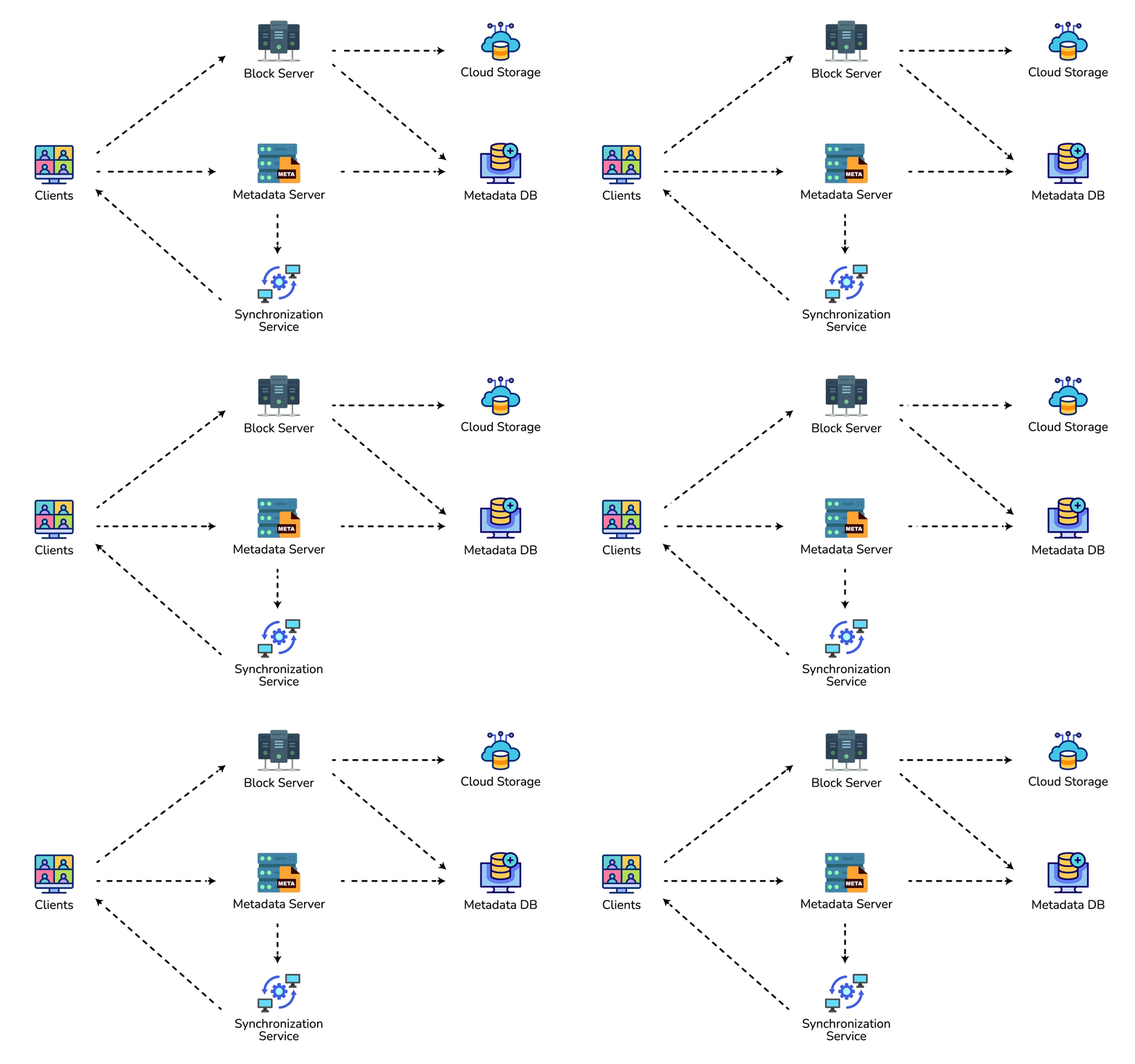
At a high level, we need to store files and their metadata information like File Name, File Size, Directory, etc., and who this file is shared with. So, we need some servers that can help the clients to upload/download files to Cloud Storage and some servers that can facilitate updating metadata about files and users. We also need some mechanism to notify all clients whenever an update happens so they can synchronize their files.
As shown in the diagram below, Block servers will work with the clients to upload/download files from cloud storage and Metadata servers will keep metadata of files updated in a SQL or NoSQL database. Synchronization servers will handle the workflow of notifying all clients about different changes for synchronization.
6. Component Design
Let's go through the major components of our system one by one:
a. Client
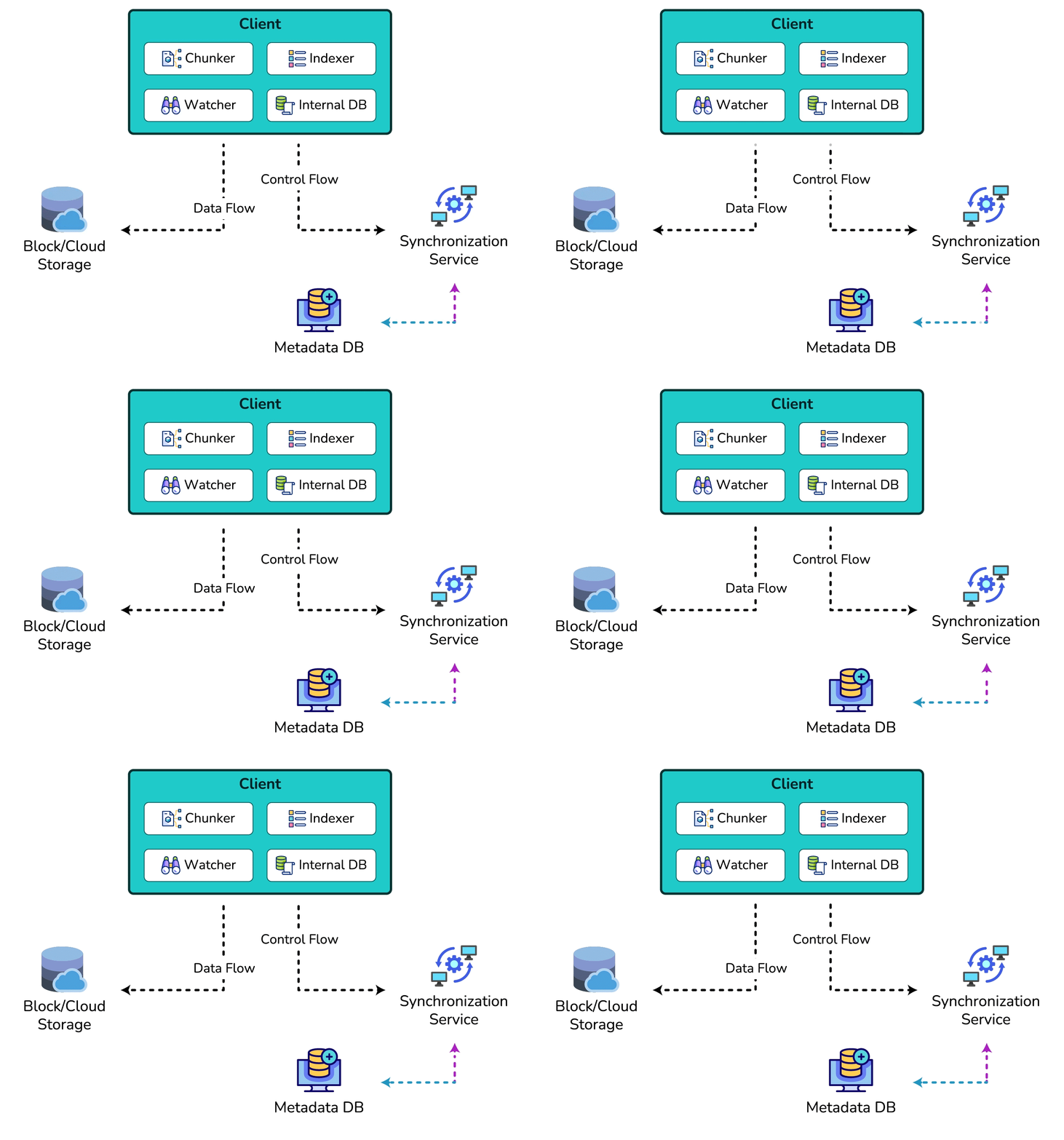
The Client Application monitors the workspace folder on the user's machine and syncs all files/folders in it with the remote Cloud Storage. The client application will work with the storage servers to upload, download, and modify actual files to backend Cloud Storage. The client also interacts with the remote Synchronization Service to handle any file metadata updates, e.g., change in the file name, size, modification date, etc.
Here are some of the essential operations for the client:
- Upload and download files.
- Detect file changes in the workspace folder.
- Handle conflict due to offline or concurrent updates.
Conflict resolution (version mismatch → conflicted copy): Every file (or chunk set) carries a monotonic version (or parent version / content hash) in the Metadata DB. When Client A and Client B both edit the same file offline:
- A comes online first and commits version
N → N+1. The server accepts because A's parent version matches the server's current head. - B then tries to commit from parent
N. The server sees an outdated parent version and rejects the commit (optimistic concurrency / compare-and-swap on version). - B's client downloads A's version, detects branch divergence (local hash ≠ server head), and creates a local conflicted copy such as
document (User B's conflicted copy).txtwhile keeping A's version as the synced file. The user merges manually; there is no silent last-write-wins on user documents.
This is the same idea as Google Drive / Dropbox "conflicted copy": detect with versions, never invent an automatic merge for arbitrary binary files unless the product explicitly supports OT/CRDT for that type.
How do we handle file transfer efficiently? As mentioned above, we can break each file into smaller chunks so that we transfer only those chunks that are modified and not the whole file. Let's say we divide each file into fixed sizes of 4MB chunks. We can statically calculate what could be an optimal chunk size based on 1) Storage devices we use in the cloud to optimize space utilization and input/output operations per second (IOPS) 2) Network bandwidth 3) Average file size in the storage etc. In our metadata, we should also keep a record of each file and the chunks that constitute it.
Should we keep a copy of metadata with Clients? Keeping a local copy of metadata not only enables us to do offline updates but also saves a lot of round trips to update remote metadata.
How can clients efficiently listen to changes happening with other clients? One solution could be that the clients periodically check with the server if there are any changes. The problem with this approach is that we will have a delay in reflecting changes locally as clients will be checking for changes periodically compared to a server notifying whenever there is some change. If the client frequently checks the server for changes, it will not only be wasting bandwidth, as the server has to return an empty response most of the time, but will also be keeping the server busy. Pulling information in this manner is not scalable.
A solution to the above problem could be to use HTTP long polling. With long polling, the client requests information from the server with the expectation that the server may not respond immediately. If the server has no new data for the client when the poll is received, instead of sending an empty response, the server holds the request open and waits for response information to become available. Once it does have new information, the server immediately sends an HTTP/S response to the client, completing the open HTTP/S Request. Upon receipt of the server response, the client can immediately issue another server request for future updates.
Based on the above considerations, we can divide our client into four parts:
I. Internal Metadata Database will keep track of all the files, chunks, their versions, and their location in the file system.
II. Chunker will split the files into smaller pieces called chunks. It will also be responsible for reconstructing a file from its chunks. Our chunking algorithm will detect the parts of the files that have been modified by the user and only transfer those parts to the Cloud Storage; this will save us bandwidth and synchronization time.
III. Watcher will monitor the local workspace folders and notify the Indexer (discussed below) of any action performed by the users, e.g. when users create, delete, or update files or folders. Watcher also listens to any changes happening on other clients that are broadcasted by Synchronization service.
IV. Indexer will process the events received from the Watcher and update the internal metadata database with information about the chunks of the modified files. Once the chunks are successfully submitted/downloaded to the Cloud Storage, the Indexer will communicate with the remote Synchronization Service to broadcast changes to other clients and update the remote metadata database.
How should clients handle slow servers? Clients should exponentially back-off if the server is busy/not-responding. Meaning, if a server is too slow to respond, clients should delay their retries, and this delay should increase exponentially.
Should mobile clients sync remote changes immediately? Unlike desktop or web clients, mobile clients usually sync on-demand to save user's bandwidth and space.
b. Metadata Database
The Metadata Database is responsible for maintaining the versioning and metadata information about files/chunks, users, and workspaces. The Metadata Database can be a relational database such as MySQL or a NoSQL database service such as DynamoDB. Regardless of the type of the database, the Synchronization Service should be able to provide a consistent view of the files using a database, especially if more than one user is working with the same file simultaneously. Be precise about what "ACID" has to cover here — "add ACID support programmatically in the service" is a hand-wave, not a mechanism. The transactional unit this design actually needs is small: a per-file metadata commit that atomically advances the file's version and its chunk list together. A relational database gives that natively; a NoSQL store gives it too provided commits stay single-key — a conditional write / compare-and-swap on the version (e.g., DynamoDB conditional puts) makes the version bump atomic and isolated without cross-item transactions, and that CAS-on-version is exactly the mechanism the conflict-resolution section above already relies on. What is deliberately not transactional is cross-device consistency: offline editing (requirement 6) means file replicas diverge and reconcile later, so the system is eventual across devices and surfaces conflicts as conflicted copies rather than pretending to global isolation.
The metadata Database should be storing information about following objects:
- Chunks
- Files
- User
- Devices
- Workspace (sync folders)
c. Synchronization Service
The Synchronization Service is the component that processes file updates made by a client and applies these changes to other subscribed clients. It also synchronizes clients' local databases with the information stored in the remote Metadata DB. The Synchronization Service is the most important part of the system architecture due to its critical role in managing the metadata and synchronizing users' files. Desktop clients communicate with the Synchronization Service to either obtain updates from the Cloud Storage or send files and updates to the Cloud Storage and, potentially, other users. If a client was offline for a period, it polls the system for new updates as soon as they come online. When the Synchronization Service receives an update request, it checks with the Metadata Database for consistency and then proceeds with the update. Subsequently, a notification is sent to all subscribed users or devices to report the file update.
The Synchronization Service should be designed to transmit less data between clients and the Cloud Storage to achieve a better response time. To meet this design goal, the Synchronization Service can employ a differencing algorithm to reduce the amount of data that needs to be synchronized. Instead of transmitting entire files from clients to the server or vice versa, we can just transmit the difference between two versions of a file. Therefore, only the part of the file that has been changed is transmitted. This also decreases bandwidth consumption and cloud data storage for the end-user. As described above, we will be dividing our files into 4MB chunks and will be transferring modified chunks only. Server and clients can calculate a hash (e.g., SHA-256) to see whether to update the local copy of a chunk or not. On the server, if we already have a chunk with a similar hash (even from another user), we don't need to create another copy; we can use the same chunk. This is discussed in detail later under Data Deduplication.
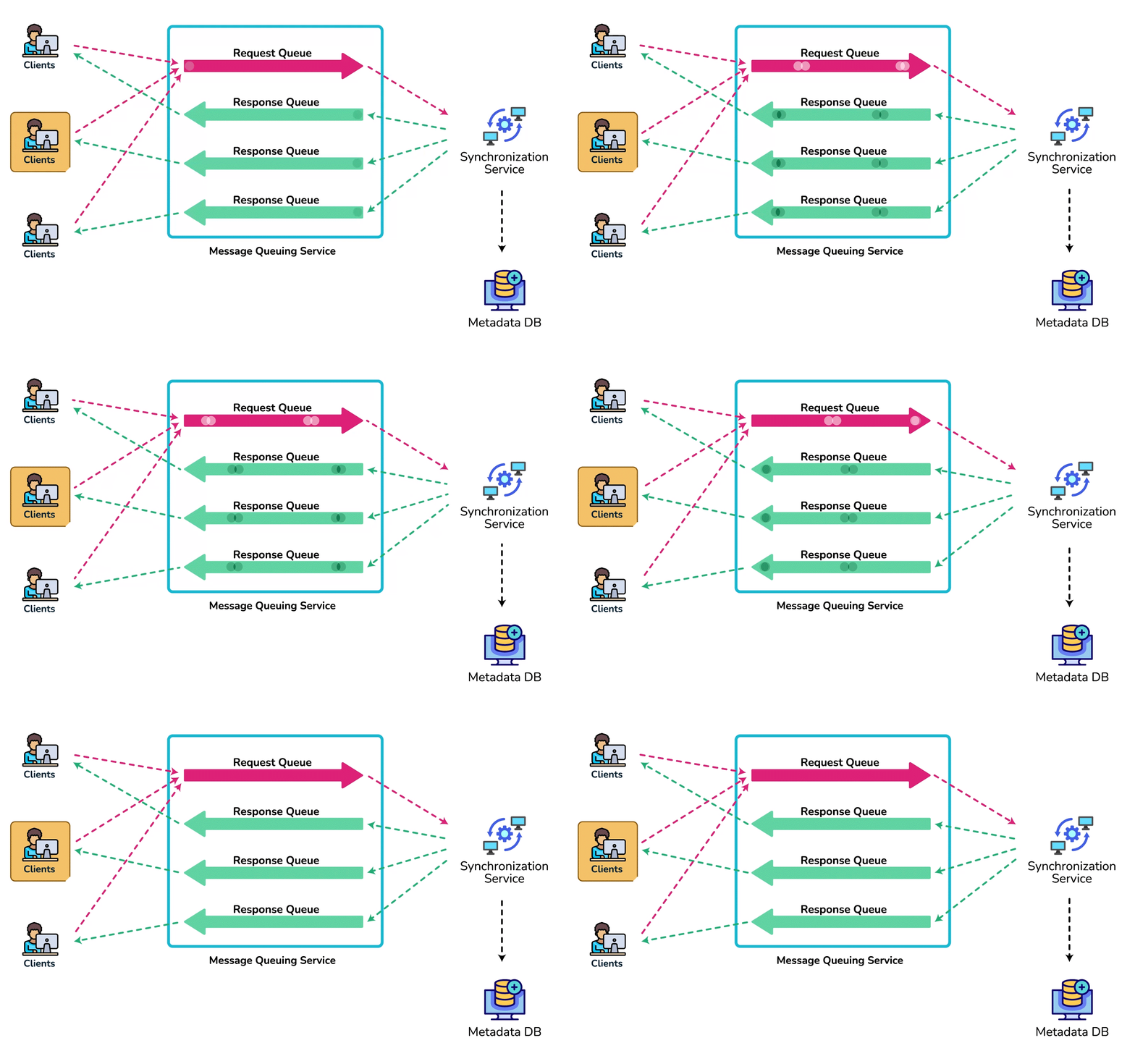
To be able to provide an efficient and scalable synchronization protocol, we can consider using a communication middleware between clients and the Synchronization Service. The messaging middleware should provide scalable message queuing and change notifications to support a high number of clients using pull or push strategies. This way, multiple Synchronization Service instances can receive requests from a global request Queue, and the communication middleware will be able to balance its load.
d. Message Queuing Service
An important part of our architecture is a messaging middleware that should be able to handle a substantial number of requests. A scalable Message Queuing Service that supports asynchronous message-based communication between clients and the Synchronization Service best fits the requirements of our application. The Message Queuing Service supports asynchronous and loosely coupled message-based communication between distributed components of the system. The Message Queuing Service should be able to efficiently store any number of messages in a highly available, reliable, and scalable queue.
The Message Queuing Service will implement two types of queues in our system. The Request Queue is a global queue and all clients will share it. Clients' requests to update the Metadata Database will be sent to the Request Queue first; from there, the Synchronization Service will take it to update metadata. The Response Queues that correspond to individual subscribed clients are responsible for delivering the update messages to each client. Since a message will be deleted from the queue once received by a client, we need to create separate Response Queues for each subscribed client to share update messages.
e. Cloud/Block Storage
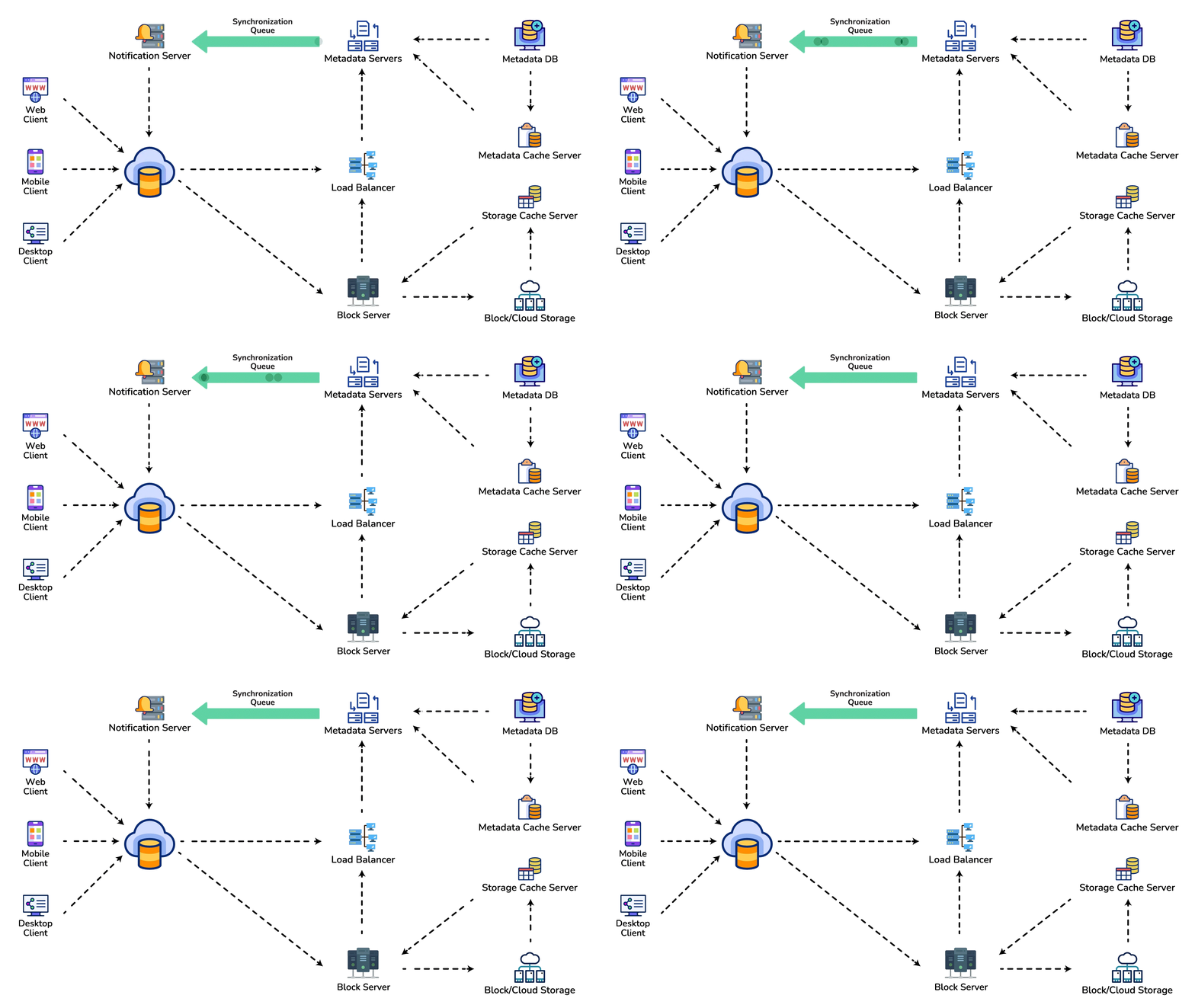
Cloud/Block Storage stores chunks of files uploaded by the users. Clients directly interact with the storage to send and receive objects from it. Separation of the metadata from storage enables us to use any storage either in the cloud or in-house.
7. File Processing Workflow
The sequence below shows the interaction between the components of the application in a scenario when Client A updates a file that is shared with Client B and C, so they should receive the update too. If the other clients are not online at the time of the update, the Message Queuing Service keeps the update notifications in separate response queues for them until they come online later.
- Client A uploads chunks to cloud storage.
- Client A updates metadata and commits changes.
- Client A gets confirmation and notifications are sent to Clients B and C about the changes.
- Client B and C receive metadata changes and download updated chunks.
Crash window between steps 1 and 2: a client that dies after uploading chunks but before the metadata commit strands those chunks with no referencing metadata. A background job garbage-collects unreferenced chunks older than a TTL by comparing block-store contents against the chunk metadata — and once deduplication (Section 8) adds reference counts, the same reconciliation pass is what keeps those counts honest.
8. Data Deduplication
Data deduplication is a technique used for eliminating duplicate copies of data to improve storage utilization. It can also be applied to network data transfers to reduce the number of bytes that must be sent. For each new incoming chunk, we can calculate a hash of it and compare that hash with all the hashes of the existing chunks to see if we already have the same chunk present in our storage.
We can implement deduplication in two ways in our system:
a. Post-process deduplication
With post-process deduplication, new chunks are first stored on the storage device and later some process analyzes the data looking for duplication. The benefit is that clients will not need to wait for the hash calculation or lookup to complete before storing the data, thereby ensuring that there is no degradation in storage performance. Drawbacks of this approach are 1) We will unnecessarily be storing duplicate data, though for a short time, 2) Duplicate data will be transferred consuming bandwidth.
b. In-line deduplication
Alternatively, deduplication hash calculations can be done in real-time as the clients are entering data on their device. If our system identifies a chunk that it has already stored, only a reference to the existing chunk will be added in the metadata, rather than a full copy of the chunk. This approach will give us optimal network and storage usage.
8a. Content-Defined Chunking (why fixed 4 MB chunks quietly defeat dedup)
Fixed-size chunking is simple but has a failure mode that destroys the dedup and diff-transfer wins above: it is not resilient to insertions. Chunk boundaries sit at fixed byte offsets (4 MB, 8 MB, 12 MB…). Insert or delete a single byte near the front of a file and every subsequent boundary shifts by one byte, so every downstream chunk now contains different bytes and hashes to a different value.
Worked example. Take a 100 MB file at 4 MB fixed chunks → 25 chunks C1…C25, each with a stored SHA-256. The user inserts one byte at the top of the file and re-saves:
- Fixed chunking re-cuts at the same offsets 4 MB, 8 MB, …. Because all content shifted right by 1 byte, chunk 1 now holds bytes [0, 4 MB) of the new file (the old bytes plus the inserted one), chunk 2 holds a window that used to straddle the C1/C2 boundary, and so on down the file. All 25 hashes change. Dedup finds zero matches; the client re-uploads the entire 100 MB for a 1-byte edit. The "transfer only modified chunks" promise is gone.
The fix: cut on content, not on offset (Rabin rolling hash). Content-defined chunking (CDC) slides a small window (e.g. 48 bytes) over the byte stream and computes a cheap rolling hash — a Rabin fingerprint — at every position. A chunk boundary is declared wherever the fingerprint satisfies a fixed predicate, e.g. fingerprint mod D == 0. Because the boundary is a function of the surrounding bytes, not the absolute offset, boundaries re-synchronize on their own after an edit.
The rolling hash is what makes this affordable. For a window of bytes b1…bk the Rabin fingerprint is
and sliding the window one byte forward is O(1) — drop the outgoing byte's contribution and fold in the new one:
So fingerprinting every byte of the file costs one multiply-add per byte, not a re-hash of the whole window.
Why CDC survives the inserted byte. Choose the predicate so the average gap between boundaries is the target chunk size — for a ~4 MB average set D = 2^22 (= 4,194,304), and clamp with a min/max chunk size to avoid pathological tiny or huge chunks. Now insert the same 1 byte: the chunk that contains the insertion changes (its content differs, so its hash differs), but the very next content pattern that triggered a boundary in the old file triggers it again in the new file — the cut points downstream land on the same byte patterns as before. Every chunk after the edit region is byte-for-byte identical, hashes to the same value, and dedup recognizes it. A 1-byte edit re-transfers ~1 chunk (~4 MB), not 100 MB.
Dedup ratio vs. chunk size vs. metadata overhead (the real trade-off). Smaller average chunks catch finer-grained duplication (a small shared region is more likely to fall inside one small chunk) and shrink the amount re-sent per edit — but they multiply the number of chunks, and every chunk costs a metadata row (its hash + fileID + offset + length + refcount ≈ 64 bytes). Price it against our 10 PB store:
| Avg chunk size | # chunks (10 PB) | Chunk-metadata @ 64 B/row | Re-sent per 1-byte edit |
|---|---|---|---|
| 4 MB | 10 PB / 4 MB ≈ 2.5 billion | ≈ 160 GB | ~4 MB |
| 256 KB | 10 PB / 256 KB ≈ 39 billion | ≈ 2.5 TB | ~256 KB |
Dropping the average chunk from 4 MB to 256 KB cuts the wasted re-transfer per small edit by 16× and improves dedup granularity, but it inflates chunk metadata ~16× (160 GB → 2.5 TB) and adds fingerprint/lookup work per chunk. That is why backup-style systems keep averages large (4–8 MB) while systems that dedup many near-identical documents push smaller (64 KB–1 MB): you tune D to the point where the extra metadata + hashing cost stops being worth the extra dedup it buys.
9. Metadata Partitioning
To scale out metadata DB, we need to partition it so that it can store information about millions of users and billions of files/chunks. We need to come up with a partitioning scheme that would divide and store our data in different DB servers.
1. Vertical Partitioning: We can partition our database in such a way that we store tables related to one particular feature on one server. For example, we can store all the user-related tables in one database and all files/chunks related tables in another database. Although this approach is straightforward to implement it has some issues:
- Will we still have scale issues? What if we have trillions of chunks to be stored and our database cannot support storing such a huge number of records? How would we further partition such tables?
- Joining two tables in two separate databases can cause performance and consistency issues. How frequently do we have to join user and file tables?
2. Range Based Partitioning: What if we store files/chunks in separate partitions based on the first letter of the File Path? In that case, we save all the files starting with the letter ‘A' in one partition and those that start with the letter ‘B' into another partition and so on. This approach is called range-based partitioning. We can even combine certain less frequently occurring letters into one database partition. We should come up with this partitioning scheme statically so that we can always store/find a file in a predictable manner.
The main problem with this approach is that it can lead to unbalanced servers. For example, if we decide to put all files starting with the letter ‘E' into a DB partition, and later we realize that we have too many files that start with the letter ‘E', to such an extent that we cannot fit them into one DB partition.
3. Hash-Based Partitioning: In this scheme we take a hash of the object we are storing and based on this hash we figure out the DB partition to which this object should go. In our case, we can take the hash of the ‘FileID' of the File object we are storing to determine the partition the file will be stored. Our hashing function will randomly distribute objects into different partitions, e.g., our hashing function can always map any ID to a number between [1…256], and this number would be the partition we will store our object.
This approach can still lead to overloaded partitions, which can be solved by using 'Consistent Hashing'.
10. Caching
We can have two kinds of caches in our system. To deal with hot files/chunks we can introduce a cache for Block storage. We can use an off-the-shelf solution like Memcached that can store whole chunks with its respective IDs/Hashes and Block servers before hitting Block storage can quickly check if the cache has desired chunk. Based on clients' usage patterns we can determine how many cache servers we need. A high-end commercial server can have 144GB of memory; one such server can cache 36K chunks.
Which cache replacement policy would best fit our needs? When the cache is full, and we want to replace a chunk with a newer/hotter chunk, how would we choose? Least Recently Used (LRU) can be a reasonable policy for our system. Under this policy, we discard the least recently used chunk first. Similarly, we can have a cache for Metadata DB.
11. Load Balancer (LB)
We can add the Load balancing layer at two places in our system: 1) Between Clients and Block servers and 2) Between Clients and Metadata servers. Initially, a simple Round Robin approach can be adopted that distributes incoming requests equally among backend servers. This LB is simple to implement and does not introduce any overhead. Another benefit of this approach is if a server is dead, LB will take it out of the rotation and will stop sending any traffic to it. A problem with Round Robin LB is, it won't take server load into consideration. If a server is overloaded or slow, the LB will not stop sending new requests to that server. To handle this, a more intelligent LB solution can be placed that periodically queries backend servers about their load and adjusts traffic based on that.
12. Security, Permissions and File Sharing
One of the primary concerns users will have while storing their files in the cloud is the privacy and security of their data, especially since in our system users can share their files with other users or even make them public to share them with everyone. To handle this, we will be storing the permissions of each file in our metadata DB to reflect what files are visible or modifiable by any user.
Hostile review — Decision / Why / Why-not / Bottleneck
| Decision | Why | Why not | Bottleneck @ 10× |
|---|---|---|---|
| Chunk files + content-hash dedup | Partial re-upload; dedup storage/bandwidth | Whole-file reupload of multi-GB blobs | Chunk metadata QPS; hash CPU on large uploads |
| Metadata DB separate from block/object store | ACID versioning vs bulk bytes | Storing file bytes in SQL | Metadata partition hotspots; sync fan-out |
| Hash partition FileID + consistent hashing | Even metadata load | Range-by-path letter (skew to common prefixes) | Hot workspace/tenant if keyed poorly |
| In-line dedup for network savings | Avoid shipping duplicate chunks | Post-process if client latency is sacred | Hash lookup service latency on write path |
| Least-conn LB for block servers | Variable upload duration | Blind RR under long uploads | Block server disk / network; cache miss storm |
First bottleneck under load: usually metadata + notification/sync fan-out, not raw object storage. Chunk store scales with object storage; the Indexer/Sync path and metadata DB write rate melt first when millions of clients poll or many devices share one workspace.
Operability: monitor chunk-upload success, metadata lag (local vs remote), conflict rate, dedup hit ratio, and device-sync backlog. Deep chunking traces: Designing Dropbox — File Sync, Traced if present in guide.
🤖 Don't fully get this? Learn it with Claude
Stuck on Designing Dropbox? Open Claude, copy a block below, and it'll teach you this exact concept — visually and interactively.
Build the mental picture, not memorization.
I just read a lesson on **Designing Dropbox** (System Design) and want to truly understand it. Explain Designing Dropbox from first principles using ONE vivid real-world analogy and a visual mental model — draw it as ASCII art or a clear step-by-step diagram — with a concrete example using real numbers. Then ask me one question to check I got the mental picture, and wait for my reply. If you're unsure or a claim isn't standard, say so and reason from first principles instead of guessing.
Socratic — adapts to where you're stuck.
Teach me **Designing Dropbox** interactively. Ask me ONE guiding question at a time, wait for my answer, and adapt to my confusion — build the idea with me step by step instead of explaining it all at once. If you're unsure or a claim isn't standard, say so and reason from first principles instead of guessing.
Active recall exposes what you missed.
Quiz me on **Designing Dropbox** with 5 questions, easy to tricky, ONE at a time. Tell me if each answer is right; at the end, explain clearly what I got wrong and why. If you're unsure or a claim isn't standard, say so and reason from first principles instead of guessing.
Intuition + hook + flashcards for long-term memory.
Help me remember **Designing Dropbox** for the long term: give the one-sentence intuition, a memorable hook/mnemonic, a tiny worked example, and 3 active-recall flashcards (Q -> A). If you're unsure or a claim isn't standard, say so and reason from first principles instead of guessing.