Designing a Web Crawler
1. What is a Web Crawler?
A web crawler is a software program that browses the World Wide Web in a methodical and automated manner. It collects documents by recursively fetching links from a set of starting pages. Many sites, particularly search engines, use web crawling as a means of providing up-to-date data. Search engines download all the pages to create an index on them to perform faster searches.
Some other uses of web crawlers are:
- To test web pages and links for valid syntax and structure.
- To monitor sites to see when their structure or contents change.
- To maintain mirror sites for popular Web sites.
- To search for copyright infringements.
- To build a special-purpose index, e.g., one that has some understanding of the content stored in multimedia files on the Web.
Try it yourself
Before looking at the solution, try designing it:
Designing Web Crawler (video)
Here is a video discussing how to design a Web Crawler:
2. Requirements and Goals of the System
Let's assume we need to crawl all the web.
Scalability: Our service needs to be scalable such that it can crawl the entire Web and can be used to fetch hundreds of millions of Web documents.
Extensibility: Our service should be designed in a modular way with the expectation that new functionality will be added to it. There could be newer document types that need to be downloaded and processed in the future.
3. Some Design Considerations
Crawling the web is a complex task, and there are many ways to go about it. We should be asking a few questions before going any further:
Is it a crawler for HTML pages only? Or should we fetch and store other types of media, such as sound files, images, videos, etc.? This is important because the answer can change the design. If we are writing a general-purpose crawler to download different media types, we might want to break down the parsing module into different sets of modules: one for HTML, another for images, or another for videos, where each module extracts what is considered interesting for that media type.
Let's assume for now that our crawler is going to deal with HTML only, but it should be extensible and make it easy to add support for new media types.
What protocols are we looking at? HTTP? What about FTP links? What different protocols should our crawler handle? For the sake of the exercise, we will assume HTTP. Again, it shouldn't be hard to extend the design to use FTP and other protocols later.
What is the expected number of pages we will crawl? How big will the URL database become? Let’s assume we need to crawl one billion websites. Since a website can contain many, many URLs, let's assume an upper bound of 15 billion different web pages that will be reached by our crawler.
What is 'RobotsExclusion' and how should we deal with it? Courteous Web crawlers implement the Robots Exclusion Protocol, which allows Webmasters to declare parts of their sites off-limits to crawlers. The Robots Exclusion Protocol requires a Web crawler to fetch a special document called robot.txt which contains these declarations from a Web site before downloading any real content from it.
4. Capacity Estimation and Constraints
If we want to crawl 15 billion pages within four weeks, how many pages do we need to fetch per second?
That fetch rate also sets the network budget: 6,200 pages/sec × ~100KB ≈ 620MB/s (~5Gbps) of sustained download bandwidth — a handful of well-connected fetcher nodes; in practice DNS resolution (Section 6's bottleneck) bites before raw bandwidth does.
What about storage? Page sizes vary a lot, but, as mentioned above since, we will be dealing with HTML text only, let's assume an average page size of 100KB. With each page, if we are storing 500 bytes of metadata, total storage we would need:
Assuming a 70% capacity model (we don't want to go above 70% of the total capacity of our storage system), total storage we will need:
5. High Level Design
The basic algorithm executed by any Web crawler is to take a list of seed URLs as its input and repeatedly execute the following steps.
- Pick a URL from the unvisited URL list.
- Determine the IP Address of its host-name.
- Establish a connection to the host to download the corresponding document.
- Parse the document contents to look for new URLs.
- Add the new URLs to the list of unvisited URLs.
- Process the downloaded document, e.g., store it or index its contents, etc.
- Go back to step 1
How to crawl?
Breadth-first or depth-first? Breadth First Search (BFS) is usually used. However, Depth First Search (DFS) is also utilized in some situations, such as, if your crawler has already established a connection with the website, it might just DFS all the URLs within this website to save some handshaking overhead.
Path-ascending crawling: Path-ascending crawling can help discover a lot of isolated resources or resources for which no inbound link would have been found in regular crawling of a particular Web site. In this scheme, a crawler would ascend to every path in each URL that it intends to crawl. For example, when given a seed URL of http://foo.com/a/b/page.html, it will attempt to crawl /a/b/, /a/, and /.
Difficulties in implementing an efficient web crawler
There are two important characteristics of the Web that makes Web crawling a very difficult task:
1. Large volume of Web pages: A large volume of web pages implies that web crawler can only download a fraction of the web pages at any time and hence it is critical that web crawler should be intelligent enough to prioritize download.
2. Rate of change on web pages. Another problem with today's dynamic world is that web pages on the internet change very frequently. As a result, by the time the crawler is downloading the last page from a site, the page may change, or a new page may be added to the site.
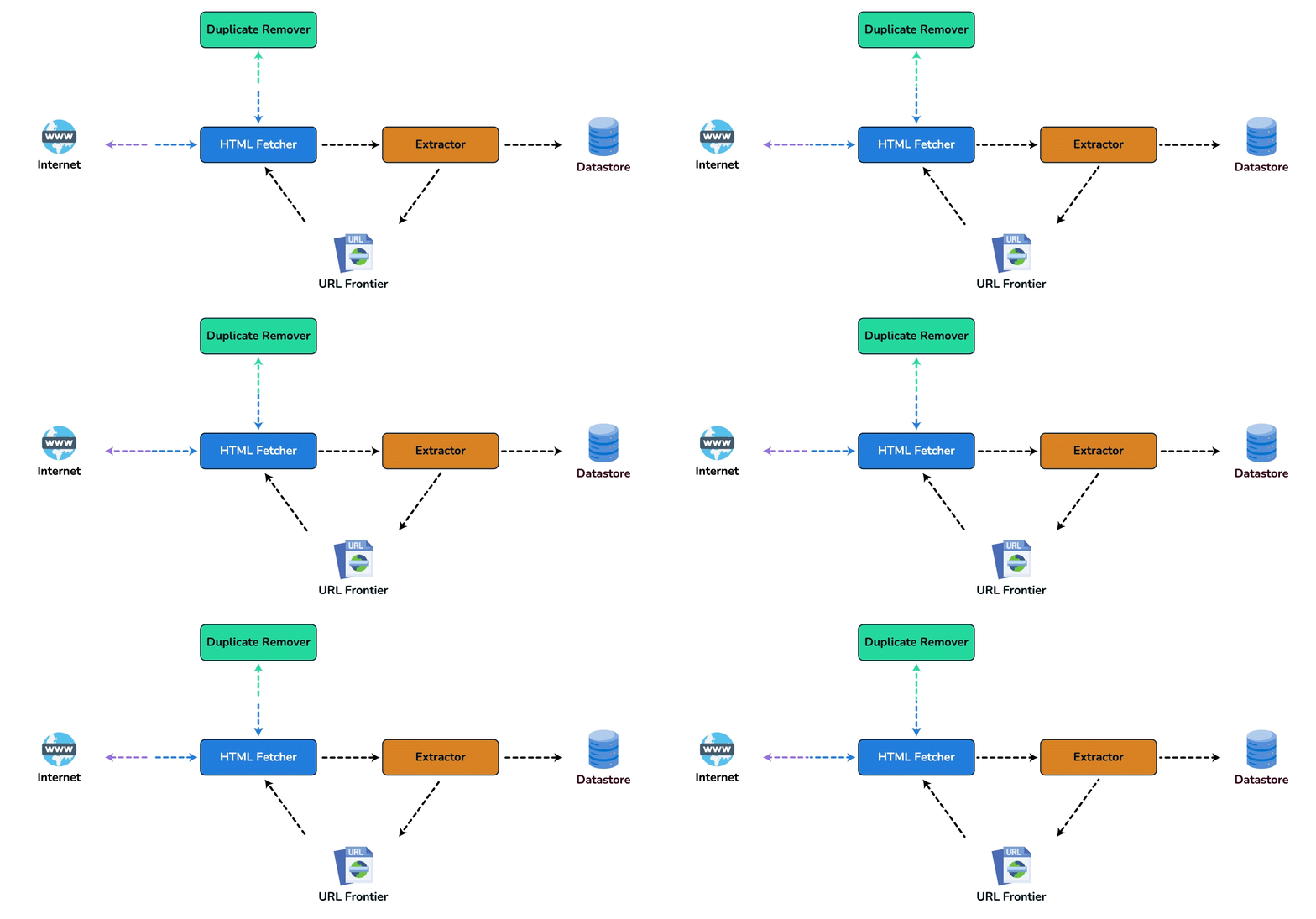
A bare minimum crawler needs at least these components:
1. URL frontier: To store the list of URLs to download and also prioritize which URLs should be crawled first.
2. HTML Fetcher: To retrieve a web page from the server.
3. Extractor: To extract links from HTML documents.
4. Duplicate Eliminator: To make sure the same content is not extracted twice unintentionally.
5. Datastore: To store retrieved pages, URLs, and other metadata.
6. Detailed Component Design
Let's assume our crawler is running on one server and all the crawling is done by multiple working threads where each working thread performs all the steps needed to download and process a document in a loop.
The first step of this loop is to remove an absolute URL from the shared URL frontier for downloading. An absolute URL begins with a scheme (e.g., “HTTP”) which identifies the network protocol that should be used to download it. We can implement these protocols in a modular way for extensibility, so that later if our crawler needs to support more protocols, it can be easily done. Based on the URL’s scheme, the worker calls the appropriate protocol module to download the document. After downloading, the document is placed into a Document Input Stream (DIS). Putting documents into DIS will enable other modules to re-read the document multiple times.
Once the document has been written to the DIS, the worker thread invokes the dedupe test to determine whether this document (associated with a different URL) has been seen before. If so, the document is not processed any further and the worker thread removes the next URL from the frontier.
Next, our crawler needs to process the downloaded document. Each document can have a different MIME type like HTML page, Image, Video, etc. We can implement these MIME schemes in a modular way, so that later if our crawler needs to support more types, we can easily implement them. Based on the downloaded document’s MIME type, the worker invokes the process method of each processing module associated with that MIME type.
Furthermore, our HTML processing module will extract all links from the page. Each link is converted into an absolute URL and tested against a user-supplied URL filter to determine if it should be downloaded. If the URL passes the filter, the worker performs the URL-seen test, which checks if the URL has been seen before, namely, if it is in the URL frontier or has already been downloaded. If the URL is new, it is added to the frontier.
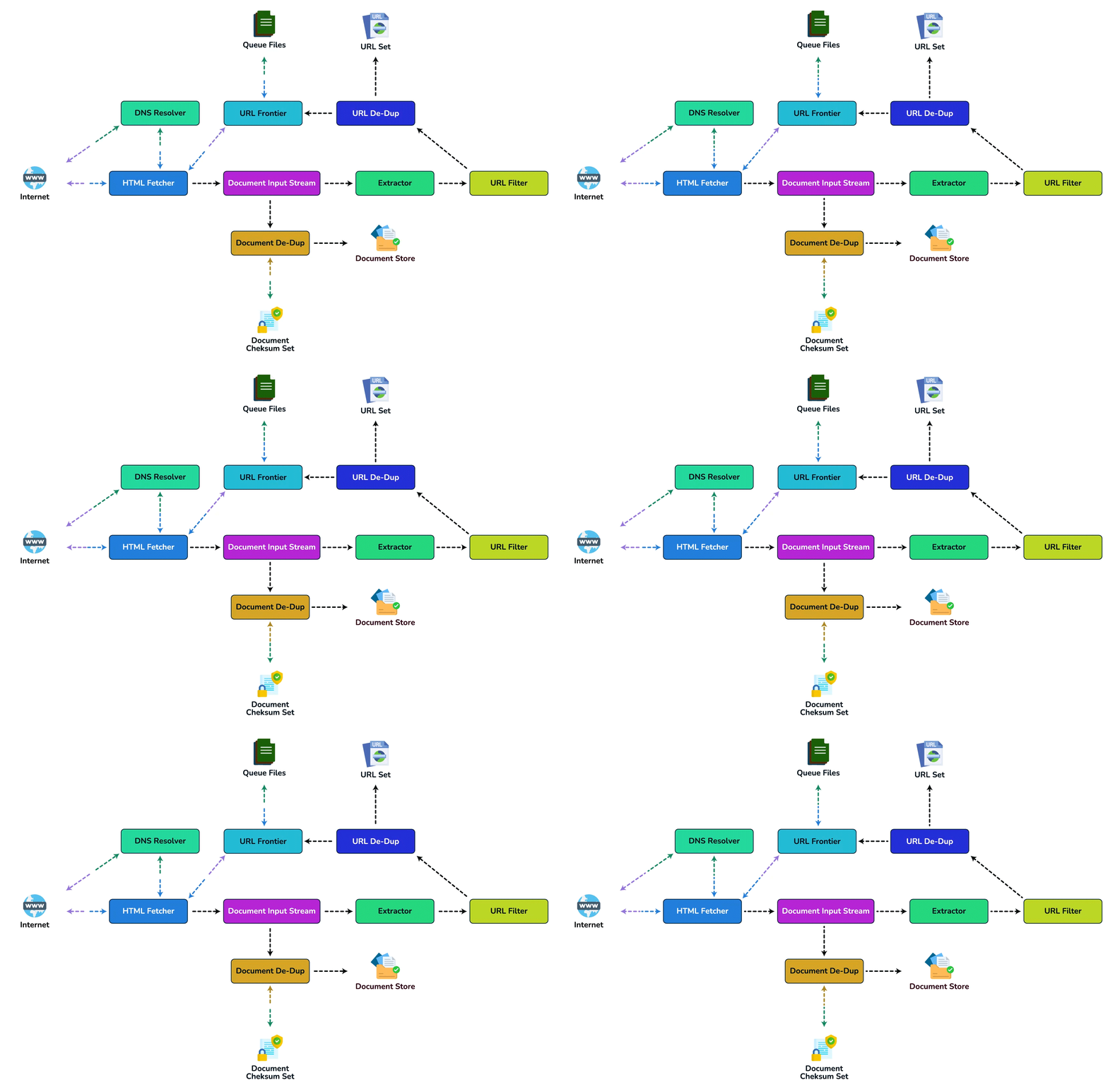
Let's discuss these components one by one, and see how they can be distributed onto multiple machines:
1. The URL frontier: The URL frontier is the data structure that contains all the URLs that remain to be downloaded. We can crawl by performing a breadth-first traversal of the Web, starting from the pages in the seed set. Such traversals are easily implemented by using a FIFO queue.
Since we'll be having a huge list of URLs to crawl, we can distribute our URL frontier into multiple servers. Let's assume on each server we have multiple worker threads performing the crawling tasks. To ensure politeness constraints can be enforced locally without expensive distributed locks, our partitioning hash function maps the canonical hostname of each URL (rather than the URL itself) to a crawl server: hash(hostname) % num_servers. This guarantees that all URLs belonging to a single domain land on the same physical crawl server.
Following politeness requirements must be kept in mind while designing a distributed URL frontier:
- Our crawler should not overload a server by downloading a lot of pages from it.
- We should not have multiple machines connecting a web server.
To implement this politeness constraint, each crawl server maintains a collection of host-specific FIFO sub-queues. When a URL is assigned to a server, it is placed in the sub-queue corresponding to its canonical hostname. Within the server, hostnames are mapped to specific worker threads (e.g. hash(hostname) % num_threads). Since all URLs for a given domain are routed to a single server and processed by a designated worker thread on that server, we guarantee that at most one connection is open to any web server at a time, with a sleep interval enforced between consecutive requests to prevent overloading the target site.
How big will our URL frontier be? The size would be in the hundreds of millions of URLs. Hence, we need to store our URLs on a disk. We can implement our queues in such a way that they have separate buffers for enqueuing and dequeuing. Enqueue buffer, once filled, will be dumped to the disk, whereas dequeue buffer will keep a cache of URLs that need to be visited; it can periodically read from disk to fill the buffer.
2. The fetcher module: The purpose of a fetcher module is to download the document corresponding to a given URL using the appropriate network protocol like HTTP. As discussed above, webmasters create robot.txt to make certain parts of their websites off-limits for the crawler. To avoid downloading this file on every request, our crawler's HTTP protocol module can maintain a fixed-sized cache mapping host-names to their robot's exclusion rules.
3. Document input stream: Our crawler's design enables the same document to be processed by multiple processing modules. To avoid downloading a document multiple times, we cache the document locally using an abstraction called a Document Input Stream (DIS).
A DIS is an input stream that caches the entire contents of the document read from the internet. It also provides methods to re-read the document. The DIS can cache small documents (64 KB or less) entirely in memory, while larger documents can be temporarily written to a backing file.
Each worker thread has an associated DIS, which it reuses from document to document. After extracting a URL from the frontier, the worker passes that URL to the relevant protocol module, which initializes the DIS from a network connection to contain the document’s contents. The worker then passes the DIS to all relevant processing modules.
4. Document Dedupe test: Many documents on the Web are available under multiple, different URLs. There are also many cases in which documents are mirrored on various servers. Both of these effects will cause any Web crawler to download the same document multiple times. To prevent the processing of a document more than once, we perform a dedupe test on each document to remove duplication.
To perform this test, we can calculate a 64-bit checksum of every processed document and store it in a database. For every new document, we can compare its checksum to all the previously calculated checksums to see the document has been seen before. For the checksum itself, use a 64-bit fingerprint — a fast non-cryptographic hash like xxHash64 or FNV-1a, or MD5/SHA truncated to 64 bits (cryptographic strength buys nothing for dedupe) — so the 8-bytes-per-document sizing below matches the algorithm.
How big would the checksum store be? If the whole purpose of our checksum store is to do dedupe, then we just need to keep a unique set containing checksums of all previously processed document. Considering 15 billion distinct web pages, we would need:
Although this can fit into a modern-day server's memory, if we don't have enough memory available, we can keep smaller LRU based cache on each server with everything backed by persistent storage. The dedupe test first checks if the checksum is present in the cache. If not, it has to check if the checksum resides in the back storage. If the checksum is found, we will ignore the document. Otherwise, it will be added to the cache and back storage.
5. URL filters: The URL filtering mechanism provides a customizable way to control the set of URLs that are downloaded. This is used to block websites so that our crawler can ignore them. Before adding each URL to the frontier, the worker thread consults the user-supplied URL filter. We can define filters to restrict URLs by domain, prefix, or protocol type.
6. Domain name resolution: Before contacting a Web server, a Web crawler must use the Domain Name Service (DNS) to map the Web server’s hostname into an IP address. DNS name resolution will be a big bottleneck for our crawlers given the huge number of URLs we will be working with. To avoid repeated requests, we can start caching DNS results by building our local DNS server.
7. URL dedupe test: While extracting links, any Web crawler will encounter multiple links to the same document. To avoid downloading and processing a document multiple times, a URL dedupe test must be performed on each extracted link before adding it to the URL frontier.
To perform the URL dedupe test, we can store all the URLs seen by our crawler in canonical form in a database. To save space, we do not store the textual representation of each URL in the URL set, but rather a fixed-sized checksum.
To reduce the number of operations on the database store, we can keep an in-memory cache of popular URLs on each host shared by all threads. The reason to have this cache is that links to some URLs are quite common, so caching the popular ones in memory will lead to a high in-memory hit rate.
How much storage we would need for URL's store? If the whole purpose of our checksum is to do URL dedupe, then we just need to keep a unique set containing checksums of all previously seen URLs. Considering 15 billion distinct URLs and 8 bytes for checksum, we would need:
The same honesty the bloom-filter discussion below gets applies here: 64-bit fingerprints admit a few birthday collisions at this scale (expected ≈ n²/265 ≈ 6 for 15B URLs), each of which silently marks a never-seen URL as seen and skips it forever. That handful is acceptable for crawling; use 128-bit fingerprints if it is not.
Can we use bloom filters for deduping?
Bloom filters are a probabilistic data structure for set membership testing that may yield false positives. A large bit vector represents the set. An element is added to the set by computing n hash functions of the element and setting the corresponding bits. An element is deemed to be in the set if the bits at all 'n' of the element’s hash locations are set. Hence, a document may incorrectly be deemed to be in the set, but false negatives are not possible.
The disadvantage of using a bloom filter for the URL seen test is that each false positive will cause the URL not to be added to the frontier and, therefore, the document will never be downloaded. The chance of a false positive can be reduced by making the bit vector larger.
8. Checkpointing: A crawl of the entire Web takes weeks to complete. To guard against failures, our crawler can write regular snapshots of its state to the disk. An interrupted or aborted crawl can easily be restarted from the latest checkpoint.
7. Fault Tolerance
We place crawl servers on a consistent-hash ring keyed by canonical hostname — the same key used for politeness earlier (hash(hostname)), not the full URL. That way all URLs for a given web host still land on one crawl server after rebalance, so host-level rate limits stay local. Consistent hashing helps when a crawl server dies: only the hostnames that hashed to the dead node move to their neighbors; you do not scatter a single website across the fleet.
Never hash the full URL for server assignment. URL-keyed hashing would put a.com/page1 and a.com/page2 on different machines and re-break the politeness invariant (multiple servers connecting to the same origin).
All our crawling servers will be performing regular checkpointing and storing their FIFO queues to disks. If a server goes down, we can replace it. Meanwhile, hostname-keyed consistent hashing shifts only the affected host ranges to other servers.
8. Data Partitioning
Our crawler will be dealing with three kinds of data: 1) URLs to visit 2) URL checksums for dedupe 3) Document checksums for dedupe.
Since we are distributing work by hostname, we co-locate each host’s frontier queues, seen-URL checksums, and document checksums on the crawl server that owns that hostname on the ring. When a server is overloaded or fails, only hostnames that rehash to other nodes move — whole hosts move together, not individual URL paths.
Each host will perform checkpointing periodically and dump a snapshot of all the data it is holding onto a remote server. This will ensure that if a server dies down another server can replace it by taking its data from the last snapshot.
9. Crawler Traps
There are many crawler traps, spam sites, and cloaked content. A crawler trap is a URL or set of URLs that cause a crawler to crawl indefinitely. Some crawler traps are unintentional. For example, a symbolic link within a file system can create a cycle. Other crawler traps are introduced intentionally. For example, people have written traps that dynamically generate an infinite Web of documents. The motivations behind such traps vary. Anti-spam traps are designed to catch crawlers used by spammers looking for email addresses, while other sites use traps to catch search engine crawlers to boost their search ratings.
Mitigations: bound the crawl with a maximum path depth, canonicalize URLs and cap the number of distinct query parameters (dynamically generated calendar/pagination URLs are the classic infinite trap), and detect repetitive path patterns (e.g. /a/a/a/…) so a single host cannot consume unbounded crawl budget.
10. Production Realities: What Breaks at Scale
The component design above is structurally correct, but a real crawler spends most of its engineering budget on failure modes and operational edges. The following are the ones that dominate interviews and on-call:
- The DNS bottleneck. Resolving hostnames for millions of seed domains can become the limiting factor before network or CPU. A production crawler runs a local, caching DNS resolver and keeps a warm cache of host-to-IP mappings with TTLs. Fetching
robots.txtonce per host and caching its rules with an expiry is equally important; otherwise a large fraction of HTTP requests are wasted on re-reading exclusion files. - Politeness is per-host rate limiting, not just queue ordering. Mapping each hostname to one worker thread is a teaching simplification. In practice a crawler maintains a per-host token bucket (e.g., one fetch every N seconds, with backoff on errors) and a separate host-level queue so that no single slow site clogs the global frontier. The key invariant is: the crawler decides when to hit a host, not the arrival order of URLs.
- Exact deduplication is not enough. A 64-bit checksum catches identical bytes, but the web is full of near-duplicate pages (boilerplate templates with one changed sentence, printer-friendly versions, mobile variants). Large crawlers use shingling or simhash to cluster near-duplicates and choose one canonical copy, reducing index bloat by an order of magnitude.
- The frontier is a priority queue, not a FIFO. Not every discovered URL is equally valuable. URLs are scored by PageRank, change frequency, recency, and site importance so that high-value pages are refetched quickly and spam is deprioritized. A pure FIFO wastes crawl budget on low-value corners of the web.
- Failures are normal and must be budgeted. Machines die, networks partition, hosts return 5xx, and TCP connections hang. A robust crawler checkpoints frontier state and in-progress fetches to durable storage, retries with exponential backoff and jitter, and treats non-2xx responses as first-class outcomes rather than exceptions. Hostname-keyed consistent hashing helps redistribute load on node loss, but only if the frontier and dedupe stores are themselves replicated or checkpointed — and the rehash key remains the hostname so politeness is preserved.
- Freshness vs. coverage is the core trade-off. Re-crawling everything continuously is infeasible. The scheduler optimizes a freshness objective: frequently changing pages (news, social) are recrawled often; stable pages (static docs) are recrawled rarely. This is the same resource-allocation problem the crawl capacity estimate has to justify.
When this full design is overkill: for a site-internal or single-domain crawl of a few thousand pages, a distributed frontier, consistent-hash ring, and simhash pipeline are unjustified — an off-the-shelf wget --mirror or a scrapy spider with a politeness delay is enough. The distributed architecture only pays for itself once you cross roughly a single machine's frontier/dedupe memory (order 10^8 URLs) or need per-host rate limiting across many workers. (And no scale of design licenses ignoring robots.txt or a site's ToS.)
Sources: Managing Gigabytes (Witten, Moffat, Bell) for index-scale deduplication and crawling; Google’s SRE Book (Beyer, Jones, Petoff, Murphy) for rate limiting, retries, and error budgets; The Anatomy of a Large-Scale Search Engine (Brin & Page) for PageRank-driven prioritization and web-scale crawler architecture.
🤖 Don't fully get this? Learn it with Claude
Stuck on Designing a Web Crawler? Open Claude, copy a block below, and it'll teach you this exact concept — visually and interactively.
Build the mental picture, not memorization.
I just read a lesson on **Designing a Web Crawler** (System Design) and want to truly understand it. Explain Designing a Web Crawler from first principles using ONE vivid real-world analogy and a visual mental model — draw it as ASCII art or a clear step-by-step diagram — with a concrete example using real numbers. Then ask me one question to check I got the mental picture, and wait for my reply. If you're unsure or a claim isn't standard, say so and reason from first principles instead of guessing.
Socratic — adapts to where you're stuck.
Teach me **Designing a Web Crawler** interactively. Ask me ONE guiding question at a time, wait for my answer, and adapt to my confusion — build the idea with me step by step instead of explaining it all at once. If you're unsure or a claim isn't standard, say so and reason from first principles instead of guessing.
Active recall exposes what you missed.
Quiz me on **Designing a Web Crawler** with 5 questions, easy to tricky, ONE at a time. Tell me if each answer is right; at the end, explain clearly what I got wrong and why. If you're unsure or a claim isn't standard, say so and reason from first principles instead of guessing.
Intuition + hook + flashcards for long-term memory.
Help me remember **Designing a Web Crawler** for the long term: give the one-sentence intuition, a memorable hook/mnemonic, a tiny worked example, and 3 active-recall flashcards (Q -> A). If you're unsure or a claim isn't standard, say so and reason from first principles instead of guessing.