medium Design Google Calendar
Let's design a calendar service similar to Google Calendar that lets millions of users schedule meetings and events. In essence, this service lets users create events, invite others, and reserve resources (like meeting rooms) just as one would write plans on a shared calendar. Key entities in the system include:
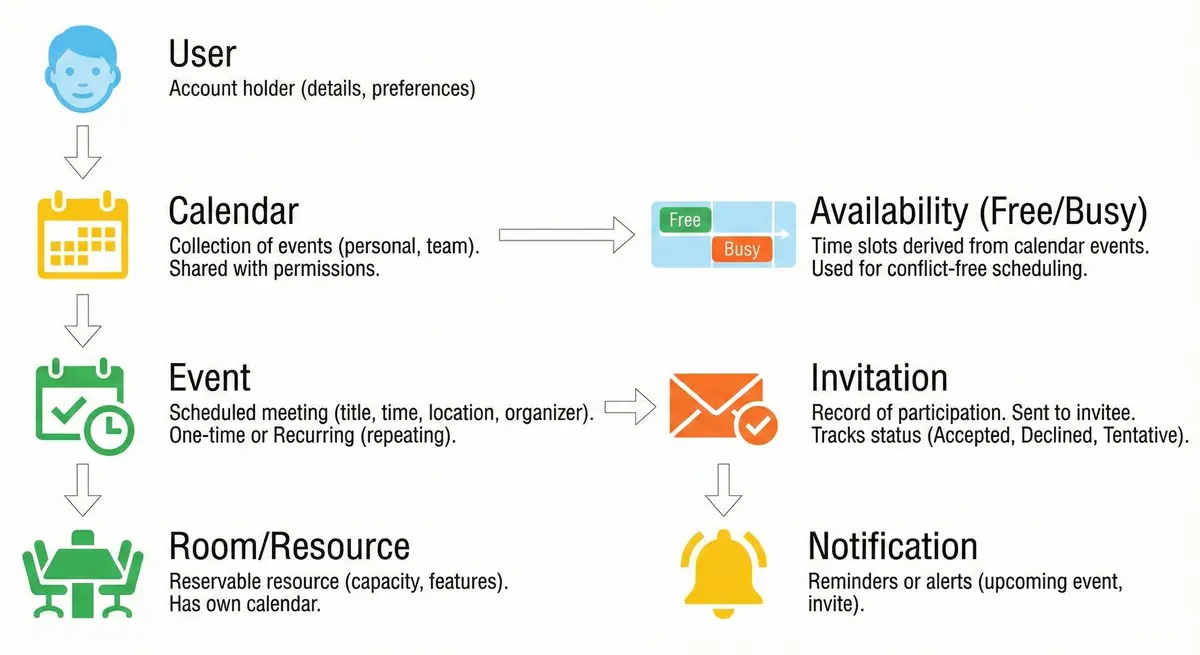
- User – an account holder with personal details and preferences (e.g., name, time zone). Each user owns one or more calendars where their events reside.
- Event – a scheduled meeting or appointment with a title, time span, location (possibly a meeting room), and an organizer. Events may be one-time or recurring (repeating).
- Calendar – a collection of events for a user or group (e.g., personal calendar, team calendar). Calendars can be shared with permissions (view or edit) for collaboration.
- Invitation – a record of a user’s participation in an event. If someone is invited to an event, an invitation is sent to their calendar, and they can accept or decline. The invitation tracks each invitee’s response status (accepted/declined/tentative).
- Room/Resource – a reservable resource like a conference room. Each room has attributes (capacity, equipment features) and its own calendar of bookings. Users can search for available rooms when scheduling events.
- Availability (Free/Busy) – a representation of time slots when a user (or room) is free or busy. This is derived from their calendar events and is used to help schedule meetings without conflicts. The system must quickly compute who is available at a given time.
- Notification: Reminders or alerts related to events (e.g,. an upcoming event reminder or an email invite). These ensure users are notified of event invites and upcoming meetings.
Analogy: If we compare to a real-world scenario, think of a personal assistant managing a physical planner. The assistant keeps track of each person’s schedule (Users and their Calendars), writes down meeting details (Events), sends out invites and tracks RSVPs (Invitations), finds an appropriate meeting room (Rooms), and checks everyone’s free/busy slots to avoid double-bookings (Availability). Our goal is to design an online service that performs all these tasks at internet scale (hundreds of millions of users).
Functional Requirements
The core features of the calendar service must cover common scheduling tasks:
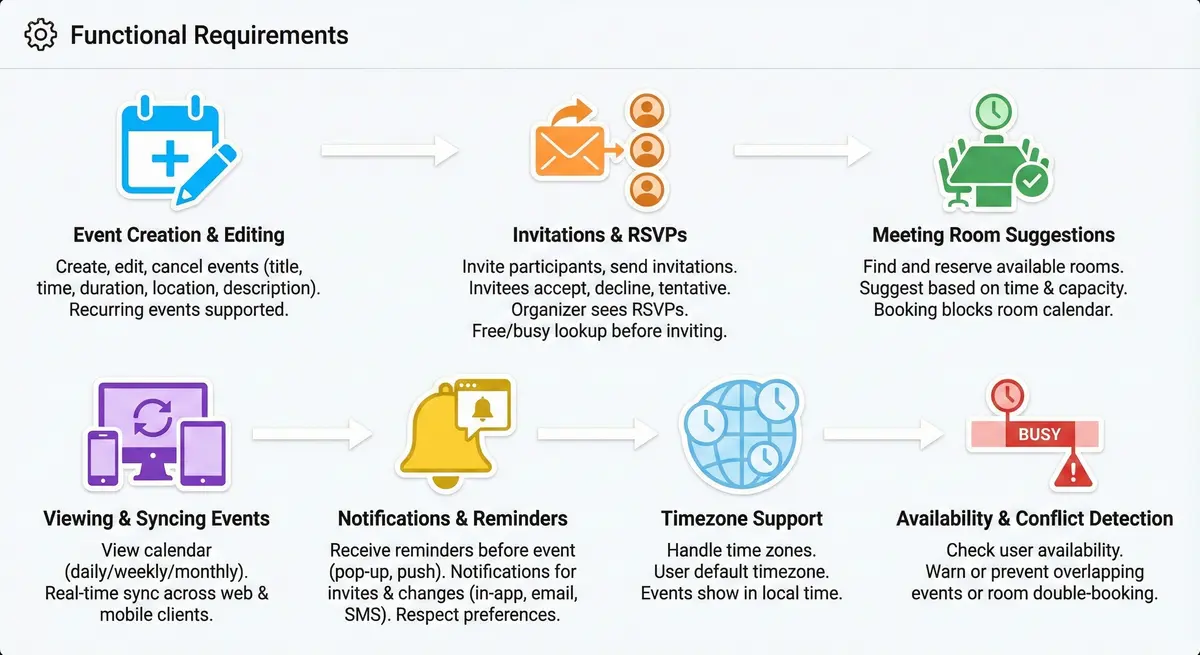
- Event Creation & Editing: Users can create new events on their calendar, providing details like title, time, duration, location (or room), description, etc. They can later edit event details or cancel the event. Recurring events should be supported (daily, weekly, custom recurrences, etc.).
- Invitations & RSVPs: Users can invite other participants to events. Invitees should receive invitations and be able to accept, decline, or mark them as tentative. The organizer should see the responses (RSVPs). Before inviting, it should be possible to check if invitees are free at the proposed time (free/busy lookup). Handling invites includes updating all attendees’ calendars and keeping each participant’s status.
- Meeting Room Suggestions: The system helps find and reserve an available meeting room for an event. When creating a meeting, it can suggest rooms that are free at that time and can accommodate the number of attendees (based on capacity). Booking a room will block that room’s calendar to avoid conflicts.
- Viewing & Syncing Events: Users can view their calendar in various views (daily/weekly/monthly) and see all their scheduled events. Calendars must sync across web and mobile clients in real-time, so that creating or updating an event on one device updates the others quickly.
- Notifications & Reminders: Users should receive reminders before an event starts (e.g., pop-up or push notification 10 minutes before) and notifications for invites or changes. Notifications can be delivered via multiple channels (in-app, push, email, or SMS for important alerts), respecting user preferences.
- Timezone Support: The system must handle time zones gracefully. Users can set their default timezone and create events in specific timezones. Events involving people in different locales should correctly translate to each user’s local time when viewed.
- Availability & Conflict Detection: The system should allow checking a user’s availability (free or busy) for a given time range to help schedule meetings. If a user tries to create overlapping events or double-book a room, the system should either warn or prevent the conflict.
Non-Functional Requirements
This service is global and mission-critical, so it must meet strict non-functional criteria:
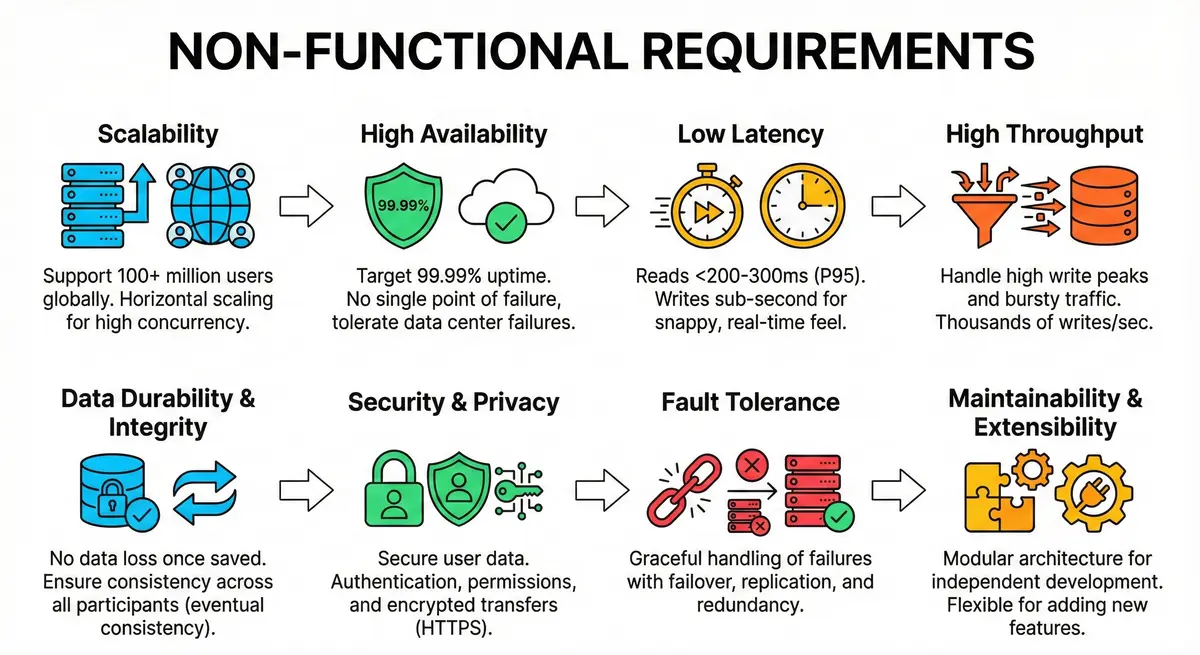
- Scalability: Support 100+ million users globally from day one. The design should handle millions of concurrent users and scale horizontally as usage grows. Both web and mobile clients worldwide will be using the service.
- High Availability: Target at least 99.99% availability (around only a few minutes of downtime per month). Users expect the calendar to be up virtually all the time, as it’s used for important scheduling. The system should tolerate data center failures and continue running (no single point of failure).
- Low Latency: Common operations (viewing a calendar, fetching events) should be very fast – ideally under ~200–300ms for reads at the 95th percentile. Writing or updating events should also be snappy (sub-second), so that the UI feels real-time.
- High Throughput: The system must handle high write peaks, especially at common scheduling times (e.g., morning hours). It should sustain heavy event creation rates and bursty traffic. We expect spikes of thousands of event writes per second during peak hours.
- Data Durability and Integrity: Calendar data (events, invites) must be stored durably. No data (events) should be lost once confirmed saved – durability is paramount. The system should also ensure consistency: events and invites eventually reflect the same truth for all participants. (For instance, if an event is updated or cancelled, all attendees’ views should get updated.) Some slight delay is acceptable, but the system should converge toward a consistent state (an eventual consistency model for distributed updates).
- Security & Privacy: (Implied) User data should be secure. Only authorized users can see or modify a calendar. Proper authentication and permissions are required, though we assume an external authentication system (such as Google sign-in) for user login. Data transfers should be encrypted (HTTPS).
- Fault Tolerance: The design should handle server or network failures gracefully. Components should have failover mechanisms (e.g., if a service instance goes down, others take over). Use techniques like replication, redundancy, and auto-recovery to avoid data loss or downtime.
- Maintainability & Extensibility: The architecture should be modular (e.g., separate services for events, notifications, etc.) to allow independent development and upgrades. It should also be flexible enough to add new features (such as integrating video conference links or AI scheduling assistants) without a complete overhaul.
Before diving into design, we estimate the scale to guide our choices:
Summary:
- About 100M users. 10–20M active daily. Peak use can reach tens of millions.
- Up to 50M new events per day. Hundreds of writes per second on average. A few thousand at peak.
- Reads dominate. Roughly 100–200M reads per day. Around ten times more reads than writes.
- Events add ~50 GB per day and ~20 TB per year. Long term storage and pruning are needed.
- Peak load of a few thousand writes/sec and 5–10k reads/sec, so we need sharding, caching, and load balancing.
Details:
- User Base: Assume 100 million active users. Not all will use the calendar daily; suppose around 10–20% (10–20 million) are daily active users who open the calendar or get notifications each day. Peak concurrent users might be tens of millions globally. This is a very large-scale system by any measure.
- Event Volume: Let’s estimate how many events might be created or updated. If 10% of users create events on a given day and each such active user schedules ~5 events on average, that’s about 50 million new events per day. This is on the higher end; even a more conservative estimate (say 10 million events/day) is huge. For 50M events/day, that’s roughly ~600 events/second on average, with peaks potentially several times higher (a peak of 2,000–5,000 events/sec during busy hours). Over a year, 50M/day leads to ~18 billion events. Each event may generate additional write operations (invitations, RSVP updates), so write throughput must handle bursts.
- Read Operations: Reads (viewing calendars, checking availability) will far exceed writes. Each daily active user might view their calendar a few times a day, resulting in ~100–200 million read requests per day across the user base (e.g. ~2 reads/user/day for 50M users). That’s on the order of 1,000–2,000 reads/second average, with higher bursts. Additionally, real-time sync (push updates) can reduce the need for clients to poll frequently, but initial loads and some polling will happen. We should design for a read-to-write ratio of possibly around 10:1 or more.
- Storage Needs: Storing events persistently requires significant space. If each event with its metadata and invite list is about ~1 KB in size (just an estimate for a basic event record), 50 million events/day would consume ~50 GB of storage per day. Over one year that’s on the order of 20 TB of data per year just for events. In practice, events with long descriptions or many attendees can be larger, and we also store user info, room info, indexes, etc., but we will compress or partition data as needed. We must plan for petabyte-scale storage over years or prune older data if necessary.
- Bandwidth: Each event or calendar view response might be a few KB (especially if returning a list of events). So serving, say, 100M reads/day at a few KB each implies hundreds of GBs of data transfer per day. This is manageable at the cloud infrastructure level but underscores the need for efficient data encoding and possibly compression for responses.
- QPS (Queries Per Second): Summarizing the above, we might expect on the order of few thousands of writes/sec and maybe 5–10k reads/sec at peak globally. This necessitates load balancing and distribution across many servers. The system’s design should comfortably handle these magnitudes with room to grow (e.g., 10× growth to billions of events per day).
These estimations guide us to choose a distributed, scalable architecture with careful consideration for database sharding, caching, and load balancing.
We will use a REST API. We assume HTTPS for security.
1. Create Event
- Method:
POST /v1/events - Body:
{ "title": "Team Sync", "start_time": "2023-10-27T10:00:00Z", "end_time": "2023-10-27T11:00:00Z", "attendees": ["userA_id", "userB_id"], "recurrence_rule": "..." } - Response:
201 Created(returns the newevent_id).
2. Get Calendar View
- Method:
GET /v1/events - Params:
user_id,time_min,time_max(e.g., fetch one month range). - Response: JSON list of event objects.
3. Update Event
- Method:
PUT /v1/events/{event_id} - Body: Updated fields (e.g., changed time or new attendees).
- Response:
200 OK.
4. RSVP to Event
- Method:
POST /v1/events/{event_id}/rsvp - Body:
{ "user_id": "...", "status": "ACCEPTED" }(Status can be ACCEPTED, DECLINED, TENTATIVE). - Response:
200 OK.
At a high level, the calendar service will use a globally distributed microservices architecture. This means the system is composed of several specialized services that work together, deployed across multiple data centers around the world.
Architecture Overview
Clients (web browsers or mobile apps) connect to our service through a load-balanced API gateway. The gateway routes API calls (like “create event” or “fetch calendar events”) to the appropriate backend service. The core backend services include an Event Service (which handles event and invite logic), an Availability/Scheduling Service (for checking calendars and suggesting open slots or rooms), and a Notification Service (for sending out emails, push notifications, etc.). Data is stored in a Calendar Database which is optimized for fast writes and reads of event data. A high-level request path might look like:
Clients → Load Balancing → Service Layer → Data Stores:
-
Clients: Various clients (web app, iOS/Android apps, third-party API integrations) communicate over HTTPS using REST/GraphQL APIs. Clients may also maintain a streaming channel (e.g. WebSocket) for real-time updates (so that calendar changes push instantly to the UI).
-
API Gateway & Load Balancer: The client sends a request (e.g. to create or view events). A global load balancer uses the user’s region or DNS routing to send the request to the nearest server cluster. The API Gateway handles authentication, routing, and rate limiting, then forwards the request to the appropriate service instance.
-
Service Layer (Microservices): The core logic is split into several microservices, each responsible for a subset of functionality. This modularity allows each to scale and be optimized independently. Key services include:
ServiceResponsibility User Service Manages user accounts, profiles, and preferences (e.g., time zone settings). Handles authentication (or integrates with an auth system) and keeps track of which calendars belong to each user. Calendar Service Manages calendars and availability. Provides APIs to fetch a user's calendar view (combining events from various calendars the user has access to) and to query free/busy times for a set of users. It may maintain an Availability index (precomputed free/busy data) to quickly answer availability queries. Event Service Handles event creation, updates, and deletion. This service enforces scheduling rules (no conflicts) and updates the data store. It also triggers notifications or downstream updates (e.g., informing the Calendar Service or Availability index of changes). The Event service is essentially the source of truth for event data and business logic (invites, conflict checks, recurring event expansion). Availability (Scheduling) Engine This component (could be a separate microservice or part of the Event Service) is responsible for computing availability and suggestions. It answers queries like “Is user X free at 3pm?” or “Find a common 30-minute slot next week when 5 people and a room are all available.” It maintains efficient ways to lookup free/busy information, such as by scanning event calendars or using precomputed indexes of busy times. It also manages the list of meeting rooms (with their capacity and schedules) and can quickly find an open room for a given time slot. This might involve an in-memory search or a specialized index (e.g., a calendar search service). Invitation/Notification Service (Could be split into two) Manages sending out invitations and notifications. When an event with invitees is created or changed, this service ensures each invitee is notified (via email, push notification, etc.) and tracks their RSVP responses. It may use an email service or push notification gateways. Room (Resource) Service Manages conference rooms or other resources. Stores room details (name, location, capacity, equipment) and their booking schedule (which can be treated like a special calendar for each room). Provides APIs to search for available rooms given time and capacity requirements. These services communicate with each other via well-defined APIs. For example, the Event Service might call the Notification Service (or emit an event to a message queue) when a new meeting is scheduled, so that notifications are sent. Services may be deployed redundantly in multiple regions. We will ensure idempotency in service APIs where appropriate (e.g., retrying an invite notification shouldn’t send duplicates if it already succeeded).

-
Data Storage Layer: Underlying these services, we have databases and caches. The data is partitioned and replicated globally:
- A primary database for storing structured data like users, events, invitations, and room info. Given the consistency requirements, a relational database is appropriate for core data. We can use a distributed SQL database that supports multi-region replication (for example, Google Spanner or CockroachDB) to get strong consistency and high availability, or we could shard a traditional SQL database by user ranges. Google’s actual system uses a mix of SQL and NoSQL: a SQL store for structured event data (users, events, invites) and NoSQL for other data. Our design could similarly employ a sharded SQL cluster for events and user data (ensuring transactions and ACID properties for event creation and updates) and a NoSQL store for less critical data such as logs or very large datasets like historical free/busy timelines.
- A caching layer to offload frequent reads. We can use an in-memory cache (like Redis or Memcached) in each region to store recently accessed data: e.g. the result of a user’s calendar query, or the list of upcoming events for a user. Caching can drastically reduce read latency for common queries. We might also cache computed availability (free/busy) for sets of users for short periods.
- Message Queue: An asynchronous messaging system (like Kafka or RabbitMQ) is used to decouple events from processing that can be done out-of-band. For example, when an event is created, the Event Service writes the event to the DB and publishes a message to a “event_created” topic. The Notification Service and Calendar Service can consume that message to send invites and update availability data, respectively. Using a queue ensures that spikes in load can be smoothed out and that each subsystem can process events on its own pace without slowing the user’s request.
- CDN for Static Content: Although not core to the calendar logic, we should note that static assets (HTML/JS/CSS of the web client, or images, etc.) would be served via a Content Delivery Network. This ensures UI loads quickly worldwide. (The CDN is outside the core application, but contributes to the overall performance perceived by users.)
Each component is replicated across multiple data centers. For instance, we might have data centers in Americas, Europe, and Asia; each has a full set of microservice instances and caching, while databases use cross-dc replication. Users connect to their nearest region, but if they schedule a meeting with someone in another region, the system’s backend services communicate over the network to coordinate (ensuring both users see the updated event).
Request Flow Example: To illustrate, consider the flow for creating a new event with invitees and a room: The client (user) fills in event details and hits “Save.” The request goes to the API Gateway, which forwards it to the Event Service. The Event Service first checks availability: it calls the Availability Engine to ensure the organizer, attendees, and desired room are free at that time. If free, the Event Service writes the new event into the Calendar DB (this might involve multiple writes – one for the event and entries for each attendee’s calendar or a transaction in a SQL DB). After saving, it produces messages to a queue for each invitee. The Notification Service picks up those messages and sends out invite notifications (e.g., an email to each invited user with the event details). The response goes back to the client confirming the event is created. Within a few seconds (or instantly, if using push), each invitee’s client device gets an update that a new event invite has appeared on their calendar. This end-to-end flow involves multiple components working in concert, as described above.
The following schema defines a SQL-compatible relational database for a calendar system. It supports multiple user calendars, event scheduling (including recurring events with exceptions), invitations/RSVPs, resource booking (rooms), and sharing with permissions, while handling time zones and notifications for reminders.
Each table is outlined below with its columns, data types, and descriptions:
Users
Stores user account information. Each user can own calendars and receive event invitations.
| Field Name | Data Type | Description |
|---|---|---|
| user_id | INT (PK) | Primary key, unique user identifier (auto-increment). |
| username | VARCHAR(150) | User’s username or display name (unique, not null). |
VARCHAR(255) | User’s email address (unique, not null). | |
| password_hash | VARCHAR(255) | Hashed password for authentication (not null). |
| default_timezone | VARCHAR(50) | User’s preferred time zone (e.g. America/Los_Angeles). |
Calendars
Each calendar belongs to a user (the owner). Users can have multiple calendars (e.g. personal, work). Calendars can be shared with other users with specific permissions.
| Field Name | Data Type | Description |
|---|---|---|
| calendar_id | INT (PK) | Primary key, unique calendar identifier (auto-increment). |
| user_id | INT (FK) | Owner of the calendar. References Users.user_id (not null). |
| name | VARCHAR(100) | Calendar name (e.g. "Work Calendar") (not null). |
| description | TEXT | Optional description of the calendar (notes or purpose). |
| timezone | VARCHAR(50) | Default time zone for events in this calendar (e.g. UTC or IANA zone name) (not null). |
| is_primary | BOOLEAN | Whether this is the user’s primary/default calendar (not null, default FALSE). |
Foreign Keys: user_id → Users(user_id). Each calendar’s timezone can default to user’s preference; events can override timezone as needed.
Events
Stores individual events. Each event is associated with a calendar. Supports one-time events and recurring events. Times are stored in UTC with a specified timezone for correct local scheduling. An event may have an associated room reservation and may involve multiple attendees (invitations).
| Field Name | Data Type | Description |
|---|---|---|
| event_id | INT (PK) | Primary key, unique event identifier (auto-increment). |
| calendar_id | INT (FK) | Calendar that the event belongs to. References Calendars.calendar_id (not null). |
| title | VARCHAR(200) | Title or summary of the event (not null). |
| description | TEXT | Detailed description/notes for the event (optional). |
| start_time | TIMESTAMP | Start date and time of the event in UTC (not null). |
| end_time | TIMESTAMP | End date and time of the event in UTC (not null). |
| timezone | VARCHAR(50) | Time zone of the event’s start/end time (e.g. America/New_York). Used for correct display and recurrence calculations. |
| is_all_day | BOOLEAN | Indicates an all-day event (TRUE if the event has no specific time, just a date). |
| location | VARCHAR(255) | Text location or address of the event (optional). |
| room_id | INT (FK) | If set, references a Rooms.room_id for a reserved meeting room (nullable). |
| is_recurring | BOOLEAN | TRUE if this event is a recurring series (has a recurrence rule). Default FALSE. |
| recurrence_rule_id | INT (FK) | If the event is recurring, foreign key to Event_recurrence_rules.recurrence_rule_id (NULL if one-time event). |
| status | VARCHAR(20) | Status of the event (e.g. 'confirmed', 'tentative', 'cancelled'). Default 'confirmed'. |
Foreign Keys: calendar_id → Calendars(calendar_id), room_id → Rooms(room_id), recurrence_rule_id → Event_recurrence_rules(recurrence_rule_id).
Notes: The combination of start_time, end_time, and room_id should be checked to prevent double-booking a room (no overlapping events for the same room). Event times are stored in UTC; the timezone field preserves the original time zone context of the event for display and for computing recurring instances across DST or zone changes. For all-day events, times might be stored normalized (e.g., midnight to midnight) and is_all_day = TRUE. The status field can use an ENUM or check constraint to allow only valid values.
Event Recurrence Rules
Defines recurring event patterns. Each recurring event (series) has one recurrence rule describing how it repeats. This allows infinite or long-term repetition without storing every occurrence, for scalability. If an event is non-recurring, it will not have an entry here.
| Field Name | Data Type | Description |
|---|---|---|
| recurrence_rule_id | INT (PK) | Primary key, unique recurrence rule identifier (auto-increment). |
| event_id | INT (FK) | Event that this recurrence rule applies to. References Events.event_id (not null, unique). |
| frequency | VARCHAR(20) | Recurrence frequency (e.g. 'DAILY', 'WEEKLY', 'MONTHLY', 'YEARLY'). |
| interval | INT | Interval for the frequency (e.g. 2 = every 2nd week). Default 1 (every frequency period). |
| days_of_week | VARCHAR(20) | If weekly recurrence, which days of week it occurs (e.g. 'MON,WED,FRI'). Null/unused for other frequencies. |
| day_of_month | INT | If monthly recurrence on a specific day, 1-31 for the day of month (or negative for reverse count, e.g. -1 = last day). Null if not applicable. |
| month_of_year | INT | If yearly recurrence on specific month (1-12). Null if not applicable or for other frequencies. |
| end_date | DATE | Date on which the recurrence ends (no occurrences after this date). NULL if the series has no specific end date. |
| occurrence_count | INT | Total number of occurrences for this event series (if it ends after a fixed count). NULL if not limited by count. |
Foreign Key: event_id → Events(event_id) (each recurring event has one rule).
Notes: The rule can express common patterns. For example, a weekly event every Monday and Wednesday would have frequency='WEEKLY', interval=1, days_of_week='MON,WED'. A monthly event on the 15th of each month would use frequency='MONTHLY', day_of_month=15. An event that repeats yearly every March 10 would use frequency='YEARLY', month_of_year=3, day_of_month=10. Either end_date or occurrence_count (or neither) can be set to define when the series stops (if both are NULL, the series is effectively unbounded). This table allows the application to compute upcoming occurrences on the fly, rather than storing each occurrence, which greatly improves scalability for long-recurring events. (Complex recurrence rules beyond these fields can also be stored as a text rule or handled by business logic if needed.)
Event Exceptions
Handles modifications or cancellations of specific occurrences in a recurring event series. When a particular occurrence of a recurring event is changed or skipped, an exception record is created. This prevents that occurrence from following the normal recurrence pattern and optionally links to a modified event instance. This table ensures that recurring events can have custom edits or deletions for specific dates.
| Field Name | Data Type | Description |
|---|---|---|
| event_exception_id | INT (PK) | Primary key, unique exception record identifier (auto-increment). |
| event_id | INT (FK) | References the recurring Events.event_id that this exception pertains to (not null). |
| exception_date | TIMESTAMP | The date/time of the occurrence that is affected by the exception (in UTC, corresponds to what the series’ occurrence start would have been). |
| alternate_event_id | INT (FK) | If this occurrence was modified (rescheduled or edited), references the new Events.event_id that replaces this occurrence. NULL if the occurrence is simply canceled with no replacement. |
| is_cancelled | BOOLEAN | Indicator if the occurrence is cancelled (TRUE if this occurrence is skipped entirely). If an alternate_event_id is provided, the original occurrence is considered canceled/replaced by the alternate event (not null, default FALSE). |
| created_at | TIMESTAMP | Timestamp when this exception was recorded (default current). |
Foreign Keys: event_id → Events(event_id), alternate_event_id → Events(event_id).
Notes: For a recurring event series, this table lists any dates that deviate from the normal pattern. If an occurrence is cancelled, an entry is added with exception_date and is_cancelled = TRUE (and alternate_event_id NULL), so the system knows to skip that date. If an occurrence is modified (e.g. time or details changed for one instance), an exception entry is added with exception_date and an alternate_event_id pointing to a new event record that holds the details of that one-off occurrence (and is_cancelled can be FALSE or TRUE as a flag that the original recurrence instance is replaced). This approach (sometimes called an exclusion record with an alternate instance) allows editing one instance without affecting the entire series. Past occurrences that were part of a series could also be recorded here or as separate events if maintaining history, but typically the existence of an exception entry or alternate event is enough to know what happened for that occurrence.
Invitations
Tracks event invitations (attendees) and their RSVP status. This table links users to events they are invited to (other than the event owner). It supports managing responses like accepted or declined.
| Field Name | Data Type | Description |
|---|---|---|
| invitation_id | INT (PK) | Primary key, unique invitation identifier (auto-increment). |
| event_id | INT (FK) | Event to which the user is invited. References Events.event_id (not null). |
| user_id | INT (FK) | The invited user (attendee). References Users.user_id (not null). |
| status | VARCHAR(20) | Invitation status / RSVP ('pending' = invited no response, 'accepted', 'declined', 'tentative'). Default 'pending'. |
| responded_at | TIMESTAMP | Timestamp when the invitee responded (null if not responded yet). |
| created_at | TIMESTAMP | Timestamp when the invitation was sent/created (default current). |
Foreign Keys: event_id → Events(event_id), user_id → Users(user_id).
Notes: There is one record per invitee per event. The combination (event_id, user_id) should be unique to avoid duplicate invites to the same user. The event’s owner/organizer is typically the calendar’s user and doesn’t need an invite entry (by definition they are hosting). The status field can be managed via an ENUM or set of allowed values. This table makes it easy to query who is invited to an event and their responses. If an invitee accepts an invitation, the event would appear on their calendar view (through their association in this table, or the system could create a copy on their calendar — but here we assume a single event record with invites). Invitation statuses can be updated as users respond (with responded_at set accordingly).
Rooms
Represents meeting rooms or resources that can be reserved for events. This table stores details of rooms and is referenced by events that book a room. It helps manage resource scheduling (e.g., conference rooms to avoid double-booking).
| Field Name | Data Type | Description |
|---|---|---|
| room_id | INT (PK) | Primary key, unique room identifier (auto-increment). |
| name | VARCHAR(100) | Name of the room (e.g. "Conference Room A") (not null, possibly unique per location). |
| location | VARCHAR(255) | Location details (e.g. office/building name or address of the room). |
| capacity | INT | Capacity of the room (number of people it can accommodate). |
| is_available | BOOLEAN | Availability status of the room (TRUE if available for booking, FALSE if out of service). Default TRUE. |
| created_at | TIMESTAMP | Timestamp when the room was added to the system (default current). |
| updated_at | TIMESTAMP | Timestamp of last update to room info (e.g., capacity or status change). |
Notes: This table is used in conjunction with Events.room_id. When creating or updating an event with a room, the system should ensure the chosen room is available and not already booked at that time. While the database cannot enforce non-overlapping reservations by itself (because that’s a temporal constraint), an application-level check or a database trigger can be used to prevent overlapping events for the same room_id. For convenience, frequent queries might index the name or (location, name) for quick lookup of rooms, and events may be queried by room_id to find schedules for a room.
Notification Queue
Stores scheduled notifications (email/SMS reminders, event alerts, etc.) to be sent to users. This can be used by a background job to send out reminders for upcoming events or invitation emails, ensuring timely notifications.
| Field Name | Data Type | Description |
|---|---|---|
| notification_id | INT (PK) | Primary key, unique notification entry (auto-increment). |
| user_id | INT (FK) | User who should receive the notification. References Users.user_id. |
| event_id | INT (FK) | Related event for the notification (if applicable, e.g. event reminder). References Events.event_id. |
| notify_time | TIMESTAMP | The date and time when the notification should be sent (UTC). |
| method | VARCHAR(20) | Notification method (e.g. 'email', 'sms', 'popup'). |
| status | VARCHAR(20) | Delivery status of the notification ('pending', 'sent', 'failed'). Default 'pending'. |
| created_at | TIMESTAMP | Timestamp when the notification was queued (default current). |
| sent_at | TIMESTAMP | Timestamp when the notification was sent (null until delivered). |
Foreign Keys: user_id → Users(user_id), event_id → Events(event_id).
Notes: This table is optional and would be populated when a user schedules a reminder or when an invitation needs to be emailed. For example, if an event has a 30-minute reminder set, a row is added with notify_time = 30 minutes before event start. A background service would query for status='pending' notifications where notify_time is due or past, send the notification via the specified method, then update status to 'sent' and set sent_at. Indexes on notify_time and status would help efficiently find due notifications. This design decouples sending logic from the main tables and helps scale the notification delivery.
Shared Calendar Access (ACLs)
Manages sharing of calendars between users through Access Control Lists. Each entry grants a user certain access rights to a calendar (other than their own). This allows calendars to be shared read-only or with edit permissions.
| Field Name | Data Type | Description |
|---|---|---|
| share_id | INT (PK) | Primary key, unique share/permission record (auto-increment). |
| calendar_id | INT (FK) | Calendar that is shared. References Calendars.calendar_id (not null). |
| user_id | INT (FK) | User who is granted access to the calendar. References Users.user_id (not null). |
| access_level | VARCHAR(20) | Access level granted (e.g. 'owner', 'editor', 'viewer' or 'read'/ 'write'). Defines permissions (owner/full control, edit rights, or view-only). |
| granted_at | TIMESTAMP | Timestamp when access was granted (default current). |
Foreign Keys: calendar_id → Calendars(calendar_id), user_id → Users(user_id).
Notes: The combination (calendar_id, user_id) should be unique (a user should have at most one access entry per calendar). The access_level can be implemented as an ENUM or a set of allowed strings (for example: 'viewer' = read-only, 'editor' = read/write, 'owner' = manages sharing and events). By default, the calendar’s user_id is the owner (with implicit full access); other users can have additional entries here if the calendar is shared with them. This table makes it easy to query which users can see or edit a given calendar. For instance, if a calendar is public to an organization, many entries could grant 'viewer' access. Proper indexing on calendar_id (and potentially user_id) helps quickly check permissions when a user tries to view or modify a calendar or its events.
Design Considerations: This schema uses normalized tables to capture different aspects of a calendar system. By separating recurring event rules and exceptions, the design avoids storing large numbers of duplicate event rows for each occurrence, ensuring scalability for long or indefinite recurring events. Instead, occurrences can be generated on the fly using the rule, and specific changes are applied via exceptions. All date/time fields are handled carefully with time zones: storing timestamps in UTC for consistency and storing the relevant time zone where needed to display events at correct local times. Foreign keys enforce referential integrity (e.g., an event’s calendar must exist, an invitation’s event and user must exist, etc.), and cascading deletes could be used as appropriate (for example, deleting a calendar could optionally delete its events and related invites). Indexes (not explicitly listed above) would be added on key fields such as primary keys (automatically indexed), foreign keys (calendar_id, user_id, etc.), and time fields used in lookups (e.g., an index on Events (calendar_id, start_time) to quickly find a user’s events in a date range). This ensures queries like “fetch all events for user X’s calendars in the next week” or “find if room Y is free at time Z” are efficient. The schema supports core Google Calendar–like functionality and can be extended with additional features (such as event reminders preferences, calendar colors, etc.) as needed, while maintaining clarity and normalization in the design.
Storage Choice: We have a few options for implementing the above data model at scale. A common approach is to use a relational database (SQL) for these tables to ensure consistency (ACID transactions can ensure an event and all its invite rows are saved together). We would then shard this database by user or by event ID to handle scale (more on sharding later). Alternatively, a distributed NoSQL store (like Google’s Spanner or Apache Cassandra) can hold events keyed by user_id for horizontal scale. In practice, a hybrid approach could make sense: use a SQL DB for core data but partitioned by user range or geographic region, and use NoSQL/ElasticSearch for features like full-text search of events or quick free/busy queries. The key is to avoid any single monolithic DB for all 100M users – instead, distribute the data. For instance, partitioning by user_id ensures all of a user’s events reside in the same shard, which makes retrieving a user’s calendar efficient and allows geographic localization of data. We also replicate data across regions for reliability. We might store each event once and have attendees query it, or store a copy of the event per user to make reads local – the design can go either way depending on consistency needs (storing copies per user means updates fan-out, storing one event means cross-user access on reads). A balanced design is to store one primary copy (under the organizer’s shard) and pointers for attendees, or use a distributed transaction to insert event records into each attendee’s shard at creation time (ensuring each user’s calendar has the event). This duplication speeds up reads at the cost of more complex writes (we’d need to update all copies on changes, possibly via asynchronous means).
Data Partitioning: Each of these tables will be large (especially Events and Invitations). We cannot keep all user events in one database instance. We will likely shard these tables by user or by some key. A common approach is to shard events by the organizer’s user_id (so all events created by a user go to the same shard), or by calendar_id. This way, when a user loads their calendar, the system mostly needs to pull data from one shard (for that user’s events and invites). We may need cross-shard queries for multi-user free/busy checks, which can be handled by aggregating results from relevant shards or by using a separate Availability service.
In this section, we will dig deeper into how each component handles the core features (event lifecycle, invitations, room booking, etc.).
Event Lifecycle Management
Managing events involves creating new events, updating them, handling recurring events, and deleting/cancelling events. It also involves the invite/response workflow. Here’s how the system handles these:
-
Event Creation (Scheduling a Meeting): When a user creates an event, the Event Service performs several steps:
- Validation & Conflict Check: It checks that the input data is valid (times, etc.) and optionally ensures the event doesn’t conflict with an existing event in the user’s calendar (unless double-booking is allowed). If the user added other attendees or selected a room, the service uses the Availability Engine to verify those people and the room are free at the chosen time. If there’s a conflict (someone is busy or the room is taken), it returns an error or suggests alternatives (e.g., different time or another room).
- Event Persistence: Once validated, the service creates a new event entry in the database. It generates a unique
event_id(e.g., a UUID or a combination of shard ID and an auto-increment). It writes the event data to the Events table (on the appropriate shard). If using a SQL database, this might be a transaction that also inserts invitee rows in the Invitations table. If using an eventually consistent store, it might first write the event, then separately fan out invitations. Either way, each invitee will have an entry indicating they have a new invitation. - Invite Notifications: After saving, the Event Service enqueues messages for each invited user (except perhaps the organizer themself). The Notification Service will send out invitations – often via email (with an .ics calendar attachment) and via push notification to any of the invitee’s active devices. This notifies them in real-time that a new event is awaiting their response.
- Room Booking: If a room was specified, the system marks that room as booked at that time. This could mean creating an entry in the Room’s calendar (essentially treating the room as an attendee) or updating a room schedule. The booking is done atomically with event creation to avoid race conditions (we wouldn’t want two events booking the same room simultaneously). If two users happen to try booking the last available room at the same time, one transaction will succeed and the other will detect the room is now busy and fail or need to suggest a different room.
The result of event creation is that the organizer’s calendar now has the event (marked maybe as busy time), each invitee’s calendar shows a tentative event (awaiting their action), and the room’s calendar shows it reserved. All these entries are linked to the same event object, so they stay in sync on updates. The system’s response confirms creation, and clients will soon reflect the new event (often via push update as well as the immediate response).
-
Invitations and RSVP Handling: Invitees will respond to invitations in their own client (accept, decline, etc.). When an invitee responds, the client sends an update (e.g. “User X accepted event Y”). The Event Service updates the Invitations table for that event (setting the status to Accepted and noting the response timestamp). It may also increment a count of accepted vs declined for quick viewing. If the attendee accepted, their calendar entry might now be marked confirmed; if declined, they might choose to remove it from their view. The service could send a notification to the organizer (or update the event data) so the organizer sees that response (e.g., “Alice accepted”). This invite response update needs to be propagated to all relevant views (the organizer’s list of attendees should show Alice as accepted now). Typically, this is a lightweight write that is easy to handle. For large meetings, a pattern to reduce load is to not notify all attendees of each response (could get noisy), just update the organizer’s copy and each individual’s status. The system could allow each user to see who’s coming by checking the event’s attendee list on demand. Consistency: Because multiple people are involved, we lean towards eventual consistency for invitations – for instance, if an invitee in a different region responds, the organizer’s view might update a few seconds later once the data replicates or a push notification is delivered. We ensure no data is lost (durable storage), but slight delays in reflecting the latest RSVP to everyone are acceptable in exchange for performance.
-
Event Updates: When the organizer (or someone with edit rights) updates an event’s details (time change, adding/removing attendees, changing the room, etc.), the system needs to propagate this to all participants. The update flow is similar to creation: the Event Service writes the updated fields to the event record (and possibly marks the old instance as changed or keeps a history of changes). Then it notifies attendees of the changes. For example, if the time changed, it might send an update notification: “Meeting moved to 4pm.” On the backend, we might treat this as a new version of the event. We could include a version number or timestamp in the event record for concurrency control. If an invitee had declined the original invite, we still notify them of the change in case they might attend the new time. Handling updates to recurring events can be complex – e.g., changing “all future events” in a series versus one occurrence (we handle recurring specifics below). Importantly, updates must be atomic relative to the event data: all users should eventually see the same updated details. During the update, we might lock the event or use a compare-and-swap with version to avoid race conditions (if two editors try to modify at once). In case of conflict (two people edit at once), one update might win (based on timestamp or an organizer’s changes overriding attendees’ changes if attendees can edit some fields) – we’ll discuss conflict resolution later, but often the latest edit wins policy is used. Once updated, caches are invalidated and new data is served on subsequent reads. Attendees get a push notification or email about the changes.
-
Recurring Events Management: Recurring (repeating) events pose special challenges. We have to support events that repeat daily, weekly, monthly, etc., possibly indefinitely. Storing every occurrence as separate events would be extremely inefficient (and potentially infinite for no end date). Instead, we use a recurrence rule approach:
- We store a base event with a recurrence rule (e.g., “repeats every Monday until Dec 31, 2025”). This base event acts like a template. We do not pre-create all occurrences in the DB.
- When a client requests to view events, the service will generate the occurrences on the fly for the relevant date range. For example, if you open your calendar for next week, the service sees you have an event with a weekly rule and will compute the specific dates (e.g. 7th June, 14th June, etc.) that fall into the view. It can return those as if they were normal events. This computation can be done in memory or via a helper function using the rule.
- If the user needs to modify one occurrence or cancel one instance, we create an exception record. For example, if a meeting on one particular date is cancelled or moved, we store an override for that date (like “the event on 2025-06-14 is cancelled” or “moved to 4pm just for that day”). These exceptions ensure we don’t show an event on that date or adjust it accordingly. Exceptions can be stored in a separate table referencing the recurring event ID and the date of exception.
- This way, recurring events are managed by storing one record plus any deviations. It saves space and avoids heavy writes. A background job might generate the next X occurrences for quick querying if needed (some systems generate a rolling window of occurrences, say a year ahead, and prune behind, to allow searching occurrences in the DB).
- When editing recurring events, the system will ask if the change applies to one occurrence or the entire series (or series going forward). If it’s the entire series, we update the rule or base event. If it’s a single occurrence, we create an exception (or separate that one into a standalone event if completely changed). We ensure that past events remain unchanged in history (changes to a series usually don’t retroactively alter past instances once they’ve occurred, per typical calendar behavior).
- Overall, the data model for recurrence might include fields for recurrence pattern and a link to a “series Id”, plus an exceptions table. This design allows infinite or long-running recurring events without blowing up storage, at the cost of on-the-fly computation.
-
Event Cancellation/Deletion: When an organizer deletes an event (or cancels a meeting), the system will remove it from all participants’ calendars. Implementation-wise, we could soft-delete (mark as cancelled) in the DB to keep a record, or hard delete the records. Typically, we mark it cancelled and maybe keep it for a while for reference or in case of undo. All invitees are notified of cancellation (e.g., “Meeting at 3pm has been cancelled”). If this is a recurring event, we ask if they’re cancelling one occurrence or the whole series. That is handled accordingly (an exception if one instance, or removal of all future instances). The room booking, if any, is freed up. We again propagate notifications and update the data consistently.
Availability and Meeting Room Suggestions
One of the key features is helping users schedule meetings at a time and place that works for everyone. This is handled by the Availability Engine and related logic:
-
Free/Busy Calculation: Each user (and each room) can be considered to have a free/busy schedule – periods when they are busy (have events) and free gaps in between. The system can calculate free/busy information by looking at a user’s events for a range. For instance, to find if Alice is free from 2-3pm, we check if any event on Alice’s calendar overlaps that interval. Doing this on the fly for many users could be expensive, so we optimize it. We maintain indexes on events by time; for example, an event table indexed by start_time and end_time can quickly retrieve events in a given range. If using a relational DB, a query like “SELECT events WHERE user_id = X AND start_time < query_end AND end_time > query_start” gives events that overlap a interval. If none are returned, the user is free. We may also precompute each user’s busy slots for the next few days into an in-memory structure for very fast answers (e.g., Interval Tree: A data structure optimized for querying overlapping intervals). Some systems periodically compute “free/busy blocks” for each user and store that summary separately (especially if integrating with external systems). For our design, a well-indexed event store per user may suffice, potentially cached.
-
Finding Common Free Time: When scheduling with multiple attendees, the engine needs to find a time where everyone is free. A naive approach is to get each person’s busy slots and then find an intersection of free intervals. If there are N attendees, we intersect N lists of busy times to find a gap. This can be done in memory fairly quickly if each has a small number of events in the range. For many people with busy calendars, this could be heavier, but typically N isn’t huge (meetings of 5-10 people). We can optimize by prioritizing likely slots (during work hours, etc.). The Availability Engine might also use a search approach: iterate through time slots in the desired range (say the next week) and check each for availability of all. But an efficient intersection of intervals is usually enough.
-
Room Availability: Rooms are treated similar to users in terms of availability. To suggest available meeting rooms, we consider the meeting time (or possible times) and the required capacity/location. The flow might be: user picks a time and attendees, and asks for a room suggestion. The system knows how many people (attendees count) and maybe the preferred location (e.g., “office location = London”). The Room database filters rooms that meet criteria (capacity >= number of people, and correct location or equipment if needed). For those candidate rooms, we check each room’s calendar for that time slot. The first few that are free can be suggested. Because there may be many rooms, we likely index rooms by building and capacity, and we might also maintain a quick lookup of next free slot for each room. However, simply querying each candidate room’s events in that time range is fine if the number of candidate rooms is reasonable. If there are hundreds of rooms, we can optimize by maintaining an inverted index of times -> free rooms. For example, each room could publish its free slots to an index that can be searched. But that might be over-engineering; often querying sequentially is acceptable given typical constraints (like specifying a building or floor).
-
Caching Free/Busy Data: To reduce repetitive computation, the service can cache recent free/busy results. For example, if you are repeatedly scheduling with the same team, their free/busy for today might be cached. We must invalidate these caches on any new event that affects availability (e.g., someone just booked a slot we thought was free). We can also push free/busy updates via the Notification Service to the cache if a user’s schedule changes. This ensures room suggestions and availability queries use up-to-date info.
-
Conflict Prevention: The system itself should prevent obvious conflicts: if a user tries to accept two overlapping events, it should at least warn them or mark one as conflicting. For rooms, the system must enforce exclusive booking – this is handled by transactions or row locks when inserting a room booking. On the UI side, highlighting conflicts on the calendar view helps users manage their availability.

Notification and Reminder Delivery
The Notification Service ensures users are kept informed of invites and upcoming events. Key points in this component:
-
Invitation Notifications: As described earlier, when a new event with invitees is created, notifications are sent. Typically, an email invitation is sent to each external email address with the event details and links to respond. Internally (in-app), the user’s calendar view will show a new invite, and a push notification can alert them on their phone. We integrate with email servers (SMTP or services like SendGrid) for email delivery and with mobile push services (APNs for iOS, FCM for Android) for device notifications. The content includes event info and options to respond.
-
Reminders: Users often set reminders (default or custom) for events (e.g., a notification 10 minutes before start). The Notification Service can schedule these. Implementation: when an event is created or when a user adds a reminder, the service calculates the reminder time (event start minus 10m) and either stores this in a scheduler or uses a distributed task scheduler (like a cron service or delayed job queue). At the appropriate time, a task will fire to send the reminder (again via push notification, email, or even SMS depending on user settings). To scale this for millions of events, we might use a message queue where messages are delayed until the reminder time, or a time-wheel scheduler service. Many systems also simply calculate upcoming reminders every minute: e.g., every minute look at events starting in 10 minutes and send notifications. With efficient indexing by start_time, we can fetch events in [now+9min, now+11min] and process them.
-
Updates/Cancellations: Notifications are also used for event updates (e.g., “Meeting time changed”) and cancellations (“Meeting cancelled”). The service listens for these events (from the queue or event service) and sends out appropriate messages to attendees.
-
Real-Time Updates: In addition to explicit notifications, our system supports real-time sync. We might use WebSockets or long polling from the client to get instant updates. When an event is created or updated, the Event Service can immediately push that update to all clients currently viewing that calendar (through a publish/subscribe system). For mobile, we often rely on push notifications as a trigger for the app to fetch new data (to save battery). Web clients might use a WebSocket connection to receive events. This ensures, for example, if two users are looking at a shared calendar and one adds an event, the other sees it appear within a second.
The Notification system is crucial for a “real-time feel” and to keep users engaged and informed without requiring them to constantly refresh.
Timezone Handling
Timezone support is a critical aspect of a global calendar. The challenges are: storing times in a consistent format, displaying in the user’s local timezone, and handling daylight savings changes.
- Standard Storage (UTC): The system will store all event timestamps in a canonical form, typically UTC. For example, if an event is created for 3:00 PM Pacific Time, which is 22:00 UTC, we store 22:00 UTC in the database along with a note that the event’s timezone is "America/Los_Angeles". Storing in UTC avoids ambiguity and makes comparisons easier. The event record can have a timezone field or offset for reference (especially important for recurring events, where “every day at 9 AM Eastern” needs to respect DST changes – storing the timezone ID allows correct generation of occurrences).
- User Timezone Preferences: Each user’s profile stores their current timezone (which they can change if they travel). When an event is displayed to a user, the client or server will convert the UTC time to that user’s timezone. For invites, each attendee effectively sees the event in their own local time. For example, a meeting stored at 22:00 UTC with timezone info might show as 3:00 PM for a Pacific user and 6:00 PM for an Eastern user, automatically adjusted.
- Daylight Savings and Shifts: By storing the timezone ID (e.g., "Europe/London") with events or with recurrence rules, the system can handle daylight savings. E.g., a recurring meeting at 9 AM London time will shift in UTC when DST changes, but because we know it’s "Europe/London", we generate correct times. We rely on a timezone library (like IANA tz database) to calculate offsets for future dates, as DST rules can change over years.
- Scheduling Across Timezones: If someone in New York schedules a meeting at 5 PM their time with a colleague in India, the colleague should see it as say 2:30 AM their time (perhaps not ideal – the availability system should consider work hours!). The system can optionally assist by showing the organizer what the local time for invitees will be, to avoid scheduling at odd hours. That kind of feature might require knowledge of user’s locale or working hour preferences.
- Edge Cases: If a user travels and updates their timezone, existing events created in the old timezone remain at their scheduled absolute time (e.g., a 9 AM meeting in NY will show as 6 AM if the user flies to California, because it’s still 9 AM Eastern event). This is expected behavior. We just ensure new events are created with the correct timezone context.
- Backend Processing: All backend scheduling (like reminders) operate in absolute times (UTC timestamps). So a reminder at “10 minutes before 9 AM Eastern” is actually “10 minutes before 14:00 UTC” (if DST off) or 13:00 UTC (if DST on, depending on date). We calculate that and store the UTC trigger time. This way, the notification system doesn’t need to deal with timezones – it just uses UTC.
In summary, timezone support means storing timezone metadata and always converting to/from UTC on input/output. It’s essential for a global user base to have correct times.
Additional Considerations
- Security & Permissions: We should note that calendars can be private or shared. In enterprise settings, you might allow viewing someone’s free/busy but not details. Our design could incorporate an access control check in the Event Service: e.g., only organizers or attendees can see event details, others might only see that you’re “busy.” This requires permission checks per event. We could extend the data model with a visibility setting or have separate “free/busy” lookup services that don’t reveal content.
- API Design: The system would expose RESTful or gRPC APIs like
POST /eventsto create events,GET /users/{id}/events?range=thisweekto fetch events,PUT /events/{id}to update,POST /events/{id}/invitees/{userid}/rsvpto respond, etc. These should be designed to be idempotent where appropriate (especially creation – clients might retry a create call, and we should not duplicate the event if it was already processed; using an idempotency key or returning the existing event if a duplicate request arrives is important). - Idempotency: To elaborate, for any operation (like creating an event) the client or gateway could attach a unique request ID. If the server sees the same ID again, it knows it’s a retry of the same operation and can avoid creating a duplicate. This is handled at the API gateway or application layer by storing recent request IDs (perhaps in a Redis with short TTL) or using database natural idempotency (like if the client can suggest an event ID, the second attempt will violate primary key and we detect it). Ensuring idempotent behavior makes the system robust to network retries and prevents double-booking from duplicate requests.
Example Schema (Simplified)
To tie it together, here is a simplified schema snippet showing some tables (for illustration):
Users Table (Users):
| user_id (PK) | name | timezone | |
|---|---|---|---|
| 101 | Alice Chen | alice@xyz.com | America/Los_Angeles |
| 102 | Bob Singh | bob@xyz.com | Europe/London |
Calendars Table (Calendars):
| calendar_id (PK) | owner_id (FK Users) | name | visibility |
|---|---|---|---|
| 201 | 101 | Alice - Work | private |
| 202 | 101 | Alice - Personal | private |
| 203 | 102 | Bob - Work | private |
| 3001 | (null, resource) | Conf Room A | public (resource) |
Events Table (Events):
| event_id (PK) | calendar_id (FK) | title | start_time (UTC) | end_time (UTC) | organizer_id | room_id (FK Room) | recurrence_rule | status |
|---|---|---|---|---|---|---|---|---|
| 5001 | 201 | Team Meeting | 2025-05-20T16:00Z | 2025-05-20T17:00Z | 101 (Alice) | 3001 (Conf Room A) | FREQ=WEEKLY; BYDAY=TU | confirmed |
| 5002 | 203 | Client Call | 2025-05-21T09:00Z | 2025-05-21T09:30Z | 102 (Bob) | NULL | NULL | confirmed |
(Event 5001 is a weekly team meeting every Tuesday at 9am PDT by Alice, reserving Conf Room A. Event 5002 is a one-time call by Bob.)
Invitations Table (Invitations):
| invite_id (PK) | event_id (FK Events) | invitee_id (FK Users) | response_status |
|---|---|---|---|
| 9001 | 5001 | 101 (Alice - organizer) | accepted |
| 9002 | 5001 | 102 (Bob) | pending |
| 9003 | 5001 | 103 (Charlie) | pending |
| 9004 | 5002 | 102 (Bob - organizer) | accepted |
| 9005 | 5002 | 101 (Alice) | accepted |
(Invitations: Event 5001 has Alice, Bob, Charlie; Alice’s own invite can be considered accepted automatically. Event 5002 has Bob and Alice.)
Rooms Table (Rooms):
| room_id (PK) | name | location | capacity | features |
|---|---|---|---|---|
| 3001 | Conf Room A | 1st Floor, Bldg 5 | 10 | ["Projector","VC"] |
| 3002 | Conf Room B | 1st Floor, Bldg 5 | 4 | ["Whiteboard"] |
(Rooms can optionally also have an associated calendar or be tied via events.room_id for bookings.)
This schema allows us to retrieve a user’s events by looking at events where their calendar_id = user’s calendar OR events where they appear in Invitations as invitee. We would likely create a view or a combined query to get “all events for user X” as those they organized (in their calendar) plus those they were invited to.
Now that we have covered data and core logic, we can turn to how we will scale and meet the performance targets.
Designing for 100M+ users globally requires careful strategies in data distribution, caching, and fault tolerance. Below are the key strategies we employ to ensure the system scales and performs well:
-
Sharding and Data Partitioning: We will partition the database to handle the load. A common strategy is to shard data by user_id or calendar_id. For example, all events (and related invites) for users in a certain ID range or with a hash of user_id go to a particular database shard. This ensures queries for a single user’s data hit only one shard. Additionally, we might geo-partition such that users from Europe are on shards in EU data centers, US users in US, etc., to reduce latency. Events that involve multiple users across shards will either be duplicated or accessed via distributed queries, but we can mitigate that by the design (e.g., writing a copy of the event to each attendee’s shard so that reading doesn’t cross shards). Sharding by user is straightforward and also aligns with caching by user. For rooms, we can treat rooms like users or have separate shards for resources. We will also have replication: each shard will have a primary for writes and replicas for reads (and failover). This leader-follower model means we can scale reads horizontally by adding replicas. The application servers can read from a local replica (for up-to-date or slightly lagged data) and send writes to the primary. In case a primary fails, a replica is promoted (with minimal downtime, to maintain availability). This replication also helps distribute read load and achieve our <300ms latency goal, as reads can be served from a nearby replica.
-
Caching Layer: Caching is essential for performance given read-heavy usage. We will use Redis or Memcached to cache frequently accessed data in memory:
- Cache each user’s upcoming events list (say events in the next day or week) so that viewing the calendar doesn’t always hit the database. The Calendar Service can populate this cache when changes occur.
- Cache free/busy results for a set of users for short periods. E.g., if Alice just checked Bob’s and Charlie’s availability for 10am, cache that result for a minute or two – if she tries another time soon after, some data might be reused.
- We must handle cache invalidation carefully. When an event changes, any cached data related to that event’s users or room must be invalidated or updated. Using messages, the Calendar Service can purge/update cache entries for those users. For consistency, it’s often simpler to use short TTLs on cache entries (e.g., 1 minute) so that stale data isn’t long-lived, combined with explicit invalidation on writes.
- Also, keep in mind user’s clients might cache data on the front-end (e.g., a web app might already have the day’s events loaded), which is why push updates are helpful to update the UI cache.
-
Load Balancing and Horizontal Scaling: All our stateless services (API Gateway, Event Service, Availability Service, Notification workers) will be scaled out horizontally. A load balancer cluster will distribute incoming requests among dozens or hundreds of server instances. The balancing can account for user locality (route to nearest region) and capacity. If traffic increases, we deploy more instances to handle it (auto-scaling). The services themselves are stateless or store minimal session state, so any instance can handle any request (with sticky sessions not required, except perhaps WebSockets which might use sticky sessions or a message broker to distribute events to the correct user connection). We also separate concerns: e.g., we could scale out the Availability Engine separately from the main Event Service if that part becomes CPU intensive, by running it as its own service cluster. This modular scaling ensures one type of load (say heavy scheduling queries) doesn’t starve others (normal event reads). Also, writing is separated from notification sending via the queue, so the Notification Service can be scaled independently (more workers added if email backlog grows, etc.). In essence, every component runs on multiple servers for both throughput and fault tolerance (if one dies, others handle its load).
-
Consistency Model (Strong vs Eventual): Within a single user’s view of their calendar, we want strong consistency – when they add or change an event, it should immediately reflect on their next read (which is easy if it’s the same primary database or same cache being updated). However, across multiple users, we relax to eventual consistency for practicality. For example, if User A (in US East) invites User B (in Europe), the event might be created in A’s region and then replicated to B’s region. There could be a small delay before B’s region knows about it. We ensure that eventually (usually within seconds) B’s calendar in Europe has the event. This is acceptable as long as the delay is short and bounded. We use techniques like distributed messaging or multi-region database replication to propagate updates. If absolute consistency is needed (e.g., both users open the calendar at exactly the same second after creation), we might have the read miss on B’s side and fallback to fetch from A’s master or simply have B’s client long-poll and get the update a moment later. We prefer an event-driven eventual consistency: updates to events or invites generate events in our system that fan out to all interested parties (through the queue or pub-sub), ensuring everyone gets the update. This avoids global transactions which would be too slow for 99.99% of cases. For conflict resolution, if two updates happen (rare since usually one organizer controls event details), the system might use a last-write-wins rule or designate the organizer’s changes as authoritative. We also protect consistency by using idempotency and locks where needed: e.g., only one invite response from a user is applied (others ignored), and using a version number on events so that if an update is based on stale data, it’s rejected with a conflict error – the client can then refetch and apply again. This optimistic concurrency control prevents lost updates. In summary, strong consistency is kept for single-user operations, and eventual consistency (with thoughtful design) is used for multi-user propagation, which is a common trade-off in distributed systems.
-
Idempotent Operations: To support retries and guarantee exactly-once effects, our APIs and internal handlers are designed to be idempotent. For instance, creating the same event twice (due to a retry or duplicate click) should result in only one stored event. We achieve this by using a unique request identifier or client-generated event IDs. The server can check if an event with that client ID already exists and if so, return it instead of creating a duplicate. Similarly, if our Notification Service gets the same message twice (maybe a glitch causes duplication), it should detect it has already sent those invites. This might be done by tracking a message ID in a short-term store. Idempotency removes the risk of double-booking and inconsistency from network retries, which is vital given the distributed nature and the at-least-once delivery of our messaging system.
-
Asynchronous Processing & Queues: We heavily use message queues to decouple components and to handle spikes. For example, when 10,000 events are scheduled at 9:00 AM (perhaps an entire company starting stand-up meetings), we don’t want to send 10,000 emails synchronously in those request threads. Instead, we enqueue them and process as fast as possible in the background. Queues like Kafka can handle huge throughput and ensure ordered, reliable delivery of events. The Notification workers can scale and consume at whatever rate the email/push systems can handle. This smoothing via queuing helps maintain low latency for user actions (the user isn’t waiting on email sending) and provides resilience (if the email service is slow, our main flow is unaffected, and the messages will eventually go through). We also use asynchronous tasks for things like generating free/busy cache updates, computing suggestions that aren’t needed immediately, and cleaning up old events or sending follow-up reminders. By designing many parts to be async, we achieve better throughput and user experience.
-
Performance Tuning (Indexes & Queries): To meet the <300ms read latency, we ensure that common queries are optimized. We add indexes on event start_time and user_id so that fetching a user’s events for a given day or time range is fast. We might use composite indexes (user_id, start_time) since a very frequent operation is “get all events for user X between date A and B” (for rendering a calendar view). Similarly for room schedules, index by room_id and time. These indexes prevent full table scans. We also carefully design queries for checking availability (possibly using a union of conditions or range queries that use the indexes). Additionally, if some queries are too slow in SQL due to scale, we can introduce a specialized data store – e.g., an in-memory schedule table or using a search engine like ElasticSearch to query time ranges effectively. We will also implement pagination or time-based slicing for large result sets (if a user has thousands of events, we fetch in chunks or only the relevant window). All of this is to ensure the system responds quickly even under heavy load.
-
Global Deployment (Geo-Distribution): To serve a global user base, we deploy our service in multiple regions (e.g. North America, Europe, Asia). Each region has a cluster of our services and local database shards. We use global DNS load balancing to route users to their nearest region by default. Data replication across regions ensures that if an event involves users from different continents, the data is eventually consistent globally. In some cases, we might pick a “home region” for each user’s data (based on where they signed up or their org’s preference) and always store their primary calendar in that region’s database. Cross-region invites are handled by remote calls or replication. This deployment strategy reduces latency (most operations hit local servers) and provides redundancy (if one region goes down, users could be failed over to another region with some delay in data). We also utilize CDNs for static content (like the web app’s JavaScript, or images) so that loading the application interface is fast everywhere. The combination of local processing and global data sync gives the user a seamless experience.
-
Failure and Recovery: We strive for 99.99% uptime through redundancy. Every critical component is redundant: multiple app servers behind load balancers (so one can fail and others carry on), databases with replication (so a standby can become primary if needed), and multiple instances of services like the Availability Engine. We implement health checks and failover automation. For example, if a database shard’s primary goes down, the system elects a replica to be new primary, and the app servers automatically retry queries on the new primary. We also use circuit breakers in the services – if a dependent service is down (say the notification queue is unresponsive), the Event Service might temporarily disable certain features or degrade gracefully rather than hang. Data backups are taken (with 20TB/year of new data, we likely use incremental backups and have a disaster recovery plan to restore data in a new cluster if an entire region fails catastrophically). By containing failures and having fallback procedures, we ensure high availability. Additionally, we can deploy updates gradually (using canary releases) to avoid full outages from buggy deployments.
-
Monitoring and Scaling: To maintain performance, we will monitor key metrics (throughput, latency, error rates). Automated scaling can add more servers when QPS rises. We’ll also do capacity planning – e.g., if we anticipate a spike (like New Year’s or a global event scheduling spike), we pre-provision extra resources. We enforce rate limiting on APIs to protect against abuse or accidental floods (one user or integration shouldn’t overwhelm the system). This ensures fairness and stability under load.
-
Mobile Synchronization & Offline Support: Mobile clients often store a local cache of recent events so that the calendar can be viewed offline. When connectivity is restored, the app syncs with the server. To handle this, our system provides sync endpoints that give incremental updates (for example, “give me all changes since timestamp X”). We maintain change logs as mentioned; the mobile app can ask for deltas and we use the log or versioning to return what changed (new events, updated events, deleted events). Conflict resolution in offline scenarios is important: if a user edits an event offline and meanwhile that event was changed by someone else, when the user comes online we have a conflict. Typically, the server will detect the event version mismatch and could either reject the offline edit (forcing the user to review the conflict) or auto-merge by choosing one change over the other. A pragmatic approach is to apply last-write-wins at the field level if possible or at whole event level otherwise. For example, if the title was changed offline but the time was changed by someone else online, we could accept both changes (update title and time) since they don’t conflict on the same field. But if both changed the time, we have to pick one – usually the one with later timestamp, and inform the user of a conflict. This is a complex area, but since the question asks for it, we ensure our design mentions a strategy. We also use mobile push notifications to immediately sync critical changes, so conflicts are minimized (the user would ideally get the update before they try offline edit, if they were online recently).
By applying all these strategies – sharding, caching, load balancing, eventual consistency with fast convergence, idempotent operations, and robust failover – our calendar service can achieve massive scale while delivering a fast and reliable user experience. We have essentially a web-scale, real-time collaborative system that provides the backbone for users to manage their time effectively. With this design, the service will be ready to support hundreds of millions of users scheduling billions of events, across the globe, with the performance and reliability expected of a top-tier calendar platform.
🤖 Don't fully get this? Learn it with Claude
Stuck on Design Google Calendar? Open Claude, copy a block below, and it'll teach you this exact concept — visually and interactively.
Progressively stronger hints — you still solve it.
I'm working on the problem **Design Google Calendar** (System Design). Give me a HINT LADDER: start with the tiniest nudge, then wait. Only reveal the next, stronger hint when I ask. Do NOT show the full solution unless I type 'show solution'. Keep me doing the thinking. If you're unsure or a claim isn't standard, say so and reason from first principles instead of guessing.
See the technique, not just code.
Explain the optimal approach to **Design Google Calendar** with a VISUAL walkthrough: trace it on a small concrete example using ASCII art / a step-by-step diagram, narrate what changes each step, then give time & space complexity with a one-line derivation. If you're unsure or a claim isn't standard, say so and reason from first principles instead of guessing.
Catch bugs, edge cases, sub-optimality.
I'll paste my solution to **Design Google Calendar**. Review it for correctness, missed edge cases, and time/space complexity, then coach me toward the optimal — don't just rewrite it. Ask me to paste my code now. If you're unsure or a claim isn't standard, say so and reason from first principles instead of guessing.
Lock in recognition with look-alikes.
Give me 2 problems that use the SAME underlying pattern as **Design Google Calendar**. For each, let me attempt first, then review my answer and name the trigger signal that reveals the pattern. If you're unsure or a claim isn't standard, say so and reason from first principles instead of guessing.