medium Designing Code Judging System
Step 1: System Definition
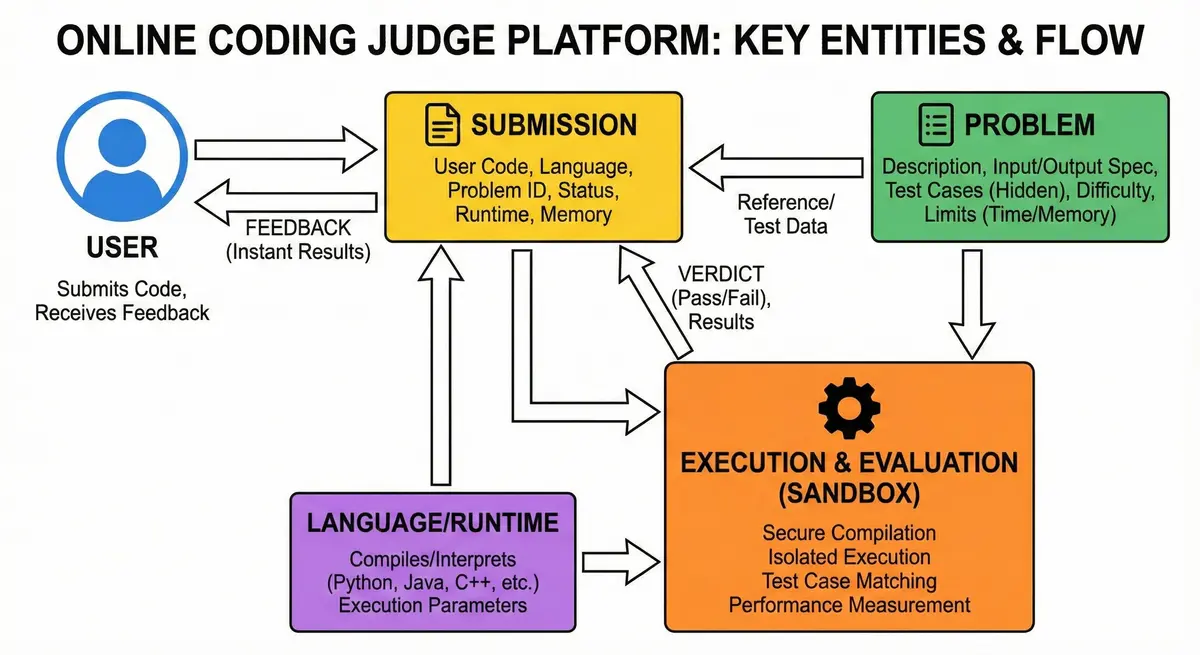
An online coding judge platform (similar to LeetCode) is a web-based system where users solve programming problems by writing code and receiving automated feedback. The primary purpose is to evaluate user-submitted code against predefined test cases in a secure, controlled environment and return the results quickly. Key entities in this system include:
- Problem – A coding challenge with a description, input/output specification, and a set of test cases (with expected outputs). It also has metadata like difficulty, time/memory limits, etc.
- Submission – A solution attempt by a user, consisting of the user’s code, the chosen programming language, the problem it’s for, and the execution results (e.g., pass/fail status, runtime, memory used).
- User – The person submitting solutions (for design simplicity, we assume users are authenticated and have basic profile info, though user management is not the focus here).
- Language/Runtime – The programming language environments supported by the system (Python, Java, JavaScript, C++, Go, C#). Each language has a compiler or interpreter and may have specific execution parameters.
In summary, this system enables millions of users to practice coding problems and get instant verdicts on their solutions in various programming languages, while ensuring each submission runs safely in isolation.
Step 2. Requirements Analysis
Functional Requirements
-
Problem Catalog & Details: Users can browse a list of coding problems and view individual problem details (description, input/output format, constraints, example cases).
-
Code Submission: Users can write and submit code for a chosen problem in multiple programming languages (e.g., Python, Java, C++, JavaScript, Go, C#). The system must accept the code, associate it with the problem and user, and queue it for evaluation.
-
Code Execution & Evaluation: The system compiles the code if needed (for compiled languages) and runs it against the problem’s test cases. It enforces runtime limits (time per test) and memory limits during execution. The execution for a single submission’s test cases will be sequential (no parallelization of test cases for a submission), but the system will handle many different user submissions concurrently.
-
Result Feedback: Within a few seconds of submission, the user receives feedback. The feedback includes whether the solution passed all tests or failed (with error type: e.g., compilation error, wrong answer on a specific test, time limit exceeded, memory exceeded, runtime error). Ideally, results are delivered in near “real-time” (e.g,. ~3–4 seconds) for a smooth user experience.
-
Competitive Programming Features: There should be support for timed contests:
- Ability to create contests with a set of problems and a fixed duration.
- Leaderboards: During a contest, the system tracks each participant’s score (for example, number of problems solved and time taken) and provides a live leaderboard that updates as submissions are judged. Users can view rankings in real-time or near real-time.
- Rankings and Metrics: After contests, results are stored (who solved how many, rankings). The system may also have global ranking or user skill level metric based on contest performance or number of problems solved.
-
Additional Features: (Optional scope) Users should be able to see their submission history and problem discussion or editorial. In a contest scenario, the system should handle scoring and ranking users, but the core design will focus on the submission judge functionality.
Non-Functional Requirements
- Scalability: The system must accommodate millions of users and a high volume of submissions. It should scale horizontally to handle spikes in traffic (e.g., many users submitting simultaneously during contests). Adding more servers should increase capacity without a major redesign.
- Performance: Fast response is critical. The end-to-end feedback for a submission should typically be within 3-4 seconds under normal load (including queueing, compilation, and execution). The system should be designed to minimize latency (through efficient job dispatch and execution) so users experience “instant” feedback.
- High Availability: Prioritize availability over strong consistency in design. The service should be reliable and fault-tolerant, with no single point of failure – even under heavy load or if components fail, the system continues to handle submissions (possibly with minimal delay). Aim for minimal downtime so users around the world can access it 24/7.
- Security & Isolation: User-submitted code is untrusted and must run in a sandboxed environment to prevent any malicious activity. The system should ensure one user’s code cannot access other users’ data or the host system. Enforce strict isolation (e.g., using containers or VMs) with restrictions on runtime, memory, file access, and external network access. This includes preventing malicious behaviors like infinite loops, fork bombs, or attempts to exploit the judge system.
- Resource Constraints Enforcement: The judge must enforce per-submission resource limits. This means limiting CPU time (to handle infinite loops or long computations), limiting memory usage, and possibly disk I/O or file size if applicable. If code exceeds these limits, it should be terminated and marked as failed (e.g,. Time Limit Exceeded or Memory Exceeded).
- Concurrency: The system should support many concurrent users. Multiple submissions will be processed in parallel (on different workers), so the design must handle concurrent execution safely. However, within a single submission’s execution, test cases run one after another.
- Maintainability & Extensibility: It should be easy to add new programming languages or update compilers. The design should be modular (each component handling a clear responsibility) so that future enhancements (like new features or scaling out components) can be done with minimal impact on the whole system. Logging and monitoring are also important for maintaining the system and quickly diagnosing issues.
- Consistency: Strong consistency is not as critical for all parts (for example, a slight delay in updating a submission status in a replicated database is acceptable as long as the user eventually sees the correct result). However, the correctness of judging results must be accurate. We prefer eventual consistency in distributed components if it improves availability and performance.
Step 3. Capacity Estimation
To design for “web-scale,” we estimate the expected load and data volumes:
-
User Base: Assume on the order of 5–10 million registered users (globally). On a normal day, hundreds of thousands of users are active. Peak concurrent usage (e.g., during a popular contest or daily peak hours) might be tens of thousands of users interacting with the system simultaneously.
-
Problem Catalog: ~5,000 coding problems in the database. Each problem includes a description (a few KB of text) and a set of test cases. Test cases could be stored as input/output files or records – assume on average 50-80 test cases per problem. If each test file is, say, 50KB on average (some are small, some could be a few MB for heavy problems), the storage for all test data might be on the order of tens of GB. This is manageable with modern storage and can be optimized with compression if needed.
-
Submission Volume: If even 10% of active users submit code on a given day, and each submits a few solutions, we might see on the order of 100,000–500,000 submissions per day. During peak times or contests, the system might experience spikes of a few hundred submissions per second. For example, in a contest with 100k participants, there could be a surge where thousands of submissions arrive within a minute or two (e.g., near contest end). The design must handle bursts – ~500+ submissions/second at peak – by scaling out the execution workers and queueing jobs without overwhelming the system.
-
Data Storage Needs: Each submission record (storing code, result, etc.) is relatively small (a few KB textual code + metadata). However, over time, the total number of submissions can accumulate to tens of millions. For instance, if 1 million users each made 100 submissions over time, that’s 100 million records. Storing 100 million submissions at a few KB each might require on the order of hundreds of GB of storage. We should plan the database/storage solution to handle this growth (through sharding or archiving old records as needed).
-
Leaderboard Requests: In contests, users might frequently refresh the leaderboard. If 100k users are in a contest and the UI polls the leaderboard every 5 seconds, that’s 20k requests per second just for leaderboard data at peak. We must handle this read load efficiently (likely via caching or pushing updates). Outside contests, leaderboard requests are infrequent (or nonexistent except contest scenarios), so this is a special bursty load.
-
Bandwidth: Code submissions and responses are small (kilobytes), so network bandwidth is not a huge bottleneck. More significant is the internal data transfer, such as sending test input to execution environments and returning output. Even that is typically not large (most coding challenge inputs/outputs are text and at most a few MB). However, with many concurrent submissions, we must ensure network and I/O paths (to databases or storage) can handle concurrent reads of test cases and writes of results. Using efficient binary formats for large test files and possibly CDN or caching for static content (like problem descriptions or images in problem statements) will help reduce load on the core system.
These estimations guide us in designing a system that can scale horizontally. We anticipate needing dozens of application servers and a scalable cluster of worker machines for code execution to handle peak loads, along with a high-capacity database or a partitioned data store to hold problems and submissions.
The system will adopt a distributed, modular architecture with clear separation of concerns. At a high level, it consists of the following major components:
1. Client Interface (Presentation Layer): The user interface (web browser or mobile app) provides problem listings, problem detail pages with an editor, and views for results and leaderboards. When a user writes code and hits “Run” or “Submit,” the client will send an HTTP request (or WebSocket message) to the backend. For example, a POST request to submit code for a problem. The client might then display a loading indicator while waiting for results. (We will use an asynchronous pattern: the client gets a submission token and polls for result, but from the user’s perspective, it’s still a quick turnaround.)
2. API Gateway and Load Balancer: All incoming requests go through a load balancer (e.g., Nginx, AWS ELB) or API Gateway. This ensures requests are distributed across multiple instances of our API servers and can also handle concerns like SSL termination and rate limiting. We might deploy API servers in multiple regions or availability zones for reliability. The API Gateway can also handle authentication tokens (verifying user identity) before forwarding requests.
3. API Servers / Backend Services: These are the stateless application servers that implement the REST (or GraphQL) API endpoints. We could structure them as microservices or as a single monolithic backend that internally calls modules. Given the scale, a microservices approach is beneficial to scale and develop independently. Key backend services include:
- Problem Service: Provides endpoints like
GET /problems(with pagination) to list problems, andGET /problems/{id}to fetch a specific problem’s details (description, examples, etc.). It reads from the Problem Database. This service can be scaled out to handle many read requests, and results can be cached since problem data changes rarely. - Submission Service: Handles submission creation and result retrieval. For a submission request (
POST /submit), this service will:- Validate the request (user logged in, problem exists, language supported).
- Create a submission entry in the database with status “pending”.
- Place a job into the Submission Queue (message queue) containing the submission details (submission ID, user, problem, selected language, the code, etc.).
- Return a response to the client. If synchronous, it might wait briefly for execution to finish; more typically, it returns immediately with a submission ID or token, and the client will use a separate endpoint to fetch the result. (Either way, the actual code execution is not done by this thread, it’s offloaded to the queue to not block the API service.)
- For result fetching, a
GET /submission/{id}can retrieve the submission status/result from the database (showing “pending” if not done yet).
- Code Execution Service: This is a logical service responsible for consuming tasks from the queue and executing code. In practice, this will not be a single service but a fleet of worker processes (see below in the detailed design). The API server (Submission Service) and the Code Execution service communicate via the queue. The Execution service will update the database with results when done. We separate this to allow it to scale and to isolate heavy compute from the API servers.
- Contest Service / Leaderboard Service: Provides endpoints for contest-related features. For example:
GET /contests/{id}/leaderboardto retrieve the current leaderboard (top N users or the user’s rank, etc.).- Possibly endpoints to start or manage contests (admin side). This service will gather data from submissions (via the database or a cache). Because generating a leaderboard can be intensive, it leverages a caching mechanism or pre-computed ranking (discussed later). The Contest service ensures the scoreboard data is kept up-to-date and can handle queries like pagination on the leaderboard.
All these services should be stateless (they don’t keep session info in memory between requests). State (like user sessions, submission data, etc.) is stored in databases or caches, so any instance can serve any request. This allows horizontal scaling by simply adding more instances behind the load balancer.
4. Cache Layer: To improve read performance and reduce load on databases, an in-memory cache (e.g., Redis or Memcached) can be used. Frequently accessed data like the list of problems, problem details, or even recently fetched test cases can be cached. This is especially useful for hot contests where many users request the same problem data simultaneously. Additionally, caching recent submission results or statuses might help if users poll frequently for updates.

Data Flow: A typical request flow for code execution is:
- Submit Phase: A user submits code from the frontend. The Submission Service receives the submission, assigns it an ID, and stores a record (status = “pending”) in the submissions table. It then publishes a message to the Submission Queue with details (submission ID, problem ID, language, etc.). The user is immediately informed that the submission was received (the frontend might start polling for result using the submission ID).
- Execution Phase: A Code Execution worker subscribed to the queue picks up the job. It uses the problem ID to fetch the problem’s test cases (from the database or a file store). It then launches a sandbox environment (e.g., a Docker container or a secure process jail) for the submission. Inside the sandbox, the worker prepares the source code: if it’s a compiled language (C++, Java, Go, C#), it invokes the compiler (capturing compilation errors if any); for interpreted languages (Python, JavaScript), it may skip straight to execution or do a syntax check. After a successful compile, the worker runs the program against each test case input sequentially, enforcing the time and memory limits for each run. The output from the code is compared with the expected output for each test. If any test fails (wrong output, time limit exceeded, etc.), the worker can decide to stop further testing (typically, judges stop at the first failing test to save time). It then marks the submission’s result (e.g., “Wrong Answer on test 3” or “Time Limit Exceeded on test 7” or “Accepted” if all passed). Throughout this process, the worker monitors execution time and memory.
- Result Phase: The worker updates the submission record in the database with the result status, runtime, and memory usage stats, and possibly the output or error message if needed (e.g., for compile errors or runtime errors, the error message is saved for the user to view). The worker may also push the result to a lightweight notification service or cache to immediately inform the waiting frontend. The frontend either receives a push notification or more commonly, the next time it polls the
getSubmissionStatusAPI, it will see the updated result. The user’s interface then displays the outcome (and any error details). The entire cycle typically completes within a few seconds, thanks to the parallelism and efficiency of the components.
This architecture is asynchronous and decoupled, which is key to scaling. The API servers (Submission Service) never execute code directly (they remain responsive to handle user interactions), and the heavy lifting is done by the background worker cluster. The use of a queue and separate workers adds a slight complexity (and a tiny delay in handing off jobs), but it dramatically improves reliability and throughput. If the submission rate spikes, jobs will queue up and workers will work through them; the system can auto-scale workers if the queue grows. If a worker machine crashes mid-execution, the job message can be re-queued or picked up by another worker (ensuring no submission is lost). This design also isolates failures – a crash in a sandbox or worker doesn’t bring down the main site. We also ensure components (API, queue, workers, DB) can be distributed across multiple servers and zones for high availability.
Step 5. Data Storage and Indexing
Problem Data: Problems can be stored in a database optimized for read performance. A NoSQL document store (like DynamoDB or MongoDB) is a good choice to store problem statements along with an array of test cases. Each problem entry contains fields like id, title, description, difficulty, allowed languages, and a list of test cases (each with input and expected output). This schema allows retrieving everything needed to evaluate that problem in one go. We index the id (primary key) and perhaps attributes like difficulty or tags to support filtering (e.g., list all easy problems). Because problem data changes rarely, we can also leverage caching and CDN distribution (for static content like images in problem descriptions). A search service (like Elasticsearch) could be added if we need text search on problems, but that’s optional.
Submission Data: Submissions (attempts by users) are stored for record-keeping, debugging, and features like user submission history or leaderboards. Each submission record includes userId, problemId, timestamp, code (or a reference to stored code), selected language, and the result (status, time used, memory used, etc.). This can be stored in a relational database (which makes querying easy, e.g., “find all submissions of user X for problem Y”). We need indexes on userId and problemId for retrieval. The volume of submission data can be high (imagine millions of submissions), so partitioning will be needed. We can partition by problem or by time (e.g., archive old submissions) to keep tables manageable. For global deployment, a single distributed database (e.g., CockroachDB or Cosmos DB) could keep submissions in sync worldwide, or we could isolate submissions per region and aggregate as needed. Consistency isn’t as critical for submissions except in competitions where a centralized leaderboard is needed (in that case, we ensure all regions report to one leaderboard service).
Test Cases Storage: Large test input/output files (for big problems) might be stored in an object storage (like S3 or HDFS) rather than in the database, with the problem entry containing pointers. This way, the execution engines can stream test files directly. We should store expected outputs securely (not exposed to users) to compare results. To speed up judging, these test cases could be cached on the execution servers or in a distributed filesystem accessible by all worker nodes.
Indexing & Search: We ensure quick lookup of problems by ID (primary key access) – this is straightforward. If we need to list problems by difficulty or tag, we can design queries or secondary indexes for that. For submissions, indexing by user enables showing “my submissions” quickly. Index by problem+status could help generate stats (like how many users solved it), though that’s optional.
Caching Layer: We use a fast in-memory cache for hot data. For example, when a problem is requested, cache it so subsequent requests (perhaps by other users opening the same problem) hit the cache. Similarly, cache the list of problems for the homepage. The cache can also store recently used test cases to avoid reading from disk repeatedly.
Step 6. Detailed Component Design
a. Submission Queue (Message Queue)
A critical component for decoupling is the queue that sits between the Submission service and the Code Execution workers. When a user submits code, the request is turned into a job message that is placed onto a queue (for example, RabbitMQ, Kafka, AWS SQS, etc.). The job message includes all information needed to run the code: submission ID, code, language, problem ID (to fetch test cases), and maybe the input test files or a reference to them.
Why a queue? Because execution can take a couple of seconds, and we don’t want the web server to be tied up waiting. The queue also buffers load – if there’s a spike of submissions, they queue up and workers consume as fast as possible. The queue ensures reliable delivery (e.g., if a worker crashes after taking a job, the job can be retried by another worker). For scale, we can have multiple queue instances or topics:
- Possibly separate queues per language or per priority. For example, maybe we have a high-priority queue for contest submissions vs. a normal queue for practice, to ensure contest feedback is fastest. Or separate by language if certain languages tasks are heavier, but generally a unified queue with workers able to handle all is simpler.
- The queue system should support a high throughput (hundreds of messages/sec) and allow multiple consumers.

b. Code Execution Engine Design
The Code Execution Engine is the heart of the judge system – it safely runs user code and produces results. Key aspects of its design include the execution sandbox, handling multiple languages, enforcing limits, and scaling out workers.
Sandbox Environment: We use containerization to sandbox code. Each submission is executed inside a container that isolates it from other processes and the host system. Containers are much lighter weight than full virtual machines, allowing fast startup and teardown while still providing a secure isolation (shared OS kernel but process-level isolation). We will prepare container images for each supported language runtime. For example:
- A Python image with Python installed and the judge runner script.
- A C++ image with GCC, with pre-installed common libraries.
- A Java image with JDK. Each image also contains a small program or script to execute the user’s code against given input and capture output.
The sandbox will be configured with:
- Resource Limits: e.g., using
cgroupsvia Docker: CPU time quota (to ensure the process cannot exceed the time limit), memory limit (so it gets OOM-killed if exceeding, preventing swapping or impacting host), possibly disk quota (though ideally the code isn’t writing large files). - Disabled Networking: The container will run with network access off (or in a separate network namespace with no external connectivity).
- Read-only file system: The code file and input can be mounted read-only. If the code needs to write output, we’ll capture it via stdout/stderr or allow writing to a temp directory that is wiped after. This prevents the code from tampering with system files.
- Non-privileged user: Inside the container, run as a non-root user account to limit privileges further (so even if they break out of the code process, they have minimal rights in container).
Job Processing: Each worker machine runs a service that constantly polls the job queue. When it receives a submission job, it processes it as follows:
- Fetch Data: It may need to fetch the problem’s test cases and expected outputs. We can optimize this by caching frequently used test cases locally. Each worker can have a cache (in-memory or on disk) keyed by ProblemID. If not present, it will query the Problem DB or a distributed cache to get the test cases. Since the set of problems is finite and not extremely large, workers could even pre-fetch all test cases for all problems in memory (a few GB at most) if memory allows, to make execution faster.
- Spin up Container: Use Docker (or another container runtime) to run the code. There are two approaches:
- One-container-per-job: Launch a new container instance for this submission, with the appropriate language image, passing the code to it. This could involve writing the user code to a file in a shared volume or sending it as
stdinto the container’s entrypoint. The container then compiles/runs the code. - Persistent Containers: Alternatively, keep a pool of warm containers or sandboxes. For example, each worker might have one container per language always running, and for each submission it injects the code into that container to execute. However, managing state reset between runs is tricky (you’d need to clean any file changes, memory, processes). It’s often simpler to start a fresh container for each submission to ensure a clean state, at the cost of a small startup latency (~100-200ms typically for a container launch with a pre-pulled image).
- We can mitigate container startup overhead by reusing the image (which stays cached on the host) and possibly using fast storage. Also, since many code runs are short (<< 3s), the container startup becomes a significant portion; hence we might experiment with keeping containers alive. But for security and simplicity, assume one container per submission that ends when execution is done.
- One-container-per-job: Launch a new container instance for this submission, with the appropriate language image, passing the code to it. This could involve writing the user code to a file in a shared volume or sending it as
- Compilation: Inside the container, the first step is compiling the code if the language is compiled (C++, Java, etc.). The container’s script will attempt to compile and capture any compiler errors. If compilation fails, we skip running test cases. The compiler error output is truncated if huge and returned to the user.
- We should set a compilation time limit as well (perhaps part of the overall 3s, or maybe separate like 3s for compile and 3s for run). In practice, most solutions compile quickly; if someone submits a ridiculously large code that compiles slowly, we might treat that as exceeding time.
- The compilation occurs inside the sandbox too, so even malicious code trying to abuse the compiler is contained.
- Execution of Tests: We have a list of test inputs (and expected outputs). The container will run the user program on each test. This could be done by repeatedly invoking the program for each input file (which resets state each time) or by feeding all tests sequentially to a single run of the program. Most competitive judges run each test separately to isolate them and stop on the first failure (also to measure per-test time). We will:
- For each test case: feed input to the program (for example, if the program reads from standard input, we pipe the input in; if the problem requires reading from file, the container script might place the input in a known file path).
- Read the program’s output and compare with expected output. Use an exact match or allow minor differences based on problem spec (e.g. whitespace tolerance if specified).
- If output doesn’t match, mark the result as “Wrong Answer” and record which test failed. Abort further testing to save time.
- If the program hasn’t terminated by the time limit, force-kill it (Time Limit Exceeded).
- If it crashes (segfault, runtime exception), capture that (Runtime Error).
- If it passes the test, move to the next.
- We count the execution time and memory usage. If multiple tests, we may take the maximum time or sum, depending on how we define runtime to user (usually either total or worst-case time).
- If all tests pass, result = Accepted.
- Result Handling: The worker collects the outcome. For an accepted solution, we might store the total runtime and memory used. For a failure, we store the failure type and perhaps the message (like “Wrong answer on test 7” or the stderr output for a runtime error or compile error).
- Update Data Stores: The worker then updates the system with the results:
- Update the Submissions DB: Mark that the submission is now completed, with fields like status=“Done”, verdict (“AC”/“WA”/“TLE”/etc.), runtime, etc. This makes the result durable and accessible.
- Remove or acknowledge the message on the queue (so it’s not retried). If using a system like RabbitMQ, the message is consumed; if using Kafka, we commit the offset.
- The worker can now pick up the next job from the queue and repeat.
Concurrency and Scaling in Execution Engine: We will run many workers in parallel. Each worker can also be multi-threaded or handle multiple jobs if the machine has multiple cores:
- E.g. a machine with 8 cores might run 4 containers in parallel, each pinned to 2 cores or just share (with cgroup limits). Or simpler, we run 8 single-threaded worker processes on that machine, each running one job at a time.
- We ensure that the number of simultaneous containers doesn’t overload the machine beyond its CPU/RAM capacity.
- If queue length grows, auto-scaler triggers adding more worker instances (if on cloud, spin up more VMs or containers to handle backlog).
- We also keep spare capacity for sudden spikes (maybe always keep some workers idle so a burst can be handled immediately without waiting for scale-up).
Handling Failures in Execution: If something goes wrong during execution (e.g., the container runtime hangs or the worker itself crashes), we need resilience:
- The queue system should be configured so that a job is only marked done when the worker explicitly acknowledges completion. If the worker dies or fails to ack, the message should be re-queued to be picked by another worker after a timeout. For example, with RabbitMQ, the message remains unacknowledged and can be requeued; with cloud queues like SQS, you get a visibility timeout.
- The workers should be stateless (they rely only on the message to do work), so retrying on another worker is fine. However, we must be careful that if a job actually was running and say the user code is infinite loop, we don’t want multiple workers to all pick it and run concurrently. So proper queue semantics (no duplicate delivery unless failed) is important.
- We should log failures of the system (not user failure, but if our container manager fails etc.) for ops team to investigate.
Language Support: Adding a new language means:
- Create a container image for that language with the compiler/interpreter installed and our standard run script.
- Update the Submission service to accept the new language and route jobs accordingly.
- That’s it; the workers just launch the appropriate container as specified in the job.
Optimizations for Speed: To meet the 3-second end-to-end target consistently:
- Use fast SSDs for any disk operations (like writing code file, accessing test files). In-memory where possible.
- Keep images small and already pulled on workers to minimize startup cost.
- Reuse container environment if we can: e.g., keep the container process alive for a short time so if the same user submits again quickly, maybe reuse (though this is a micro-optimization and complex to manage safely).
- Parallelize test execution if a problem has many test cases and the code is slow but multi-core capable. This is tricky because typical solutions aren’t written to run tests in parallel, but we as the judge could run multiple instances of the user’s code on different test files simultaneously if the language runtime supports it (not commonly done, but possible for speed). In most cases, we won’t do this due to complexity and risk of confusing results.
- Limit overhead in communication: the worker should ideally be on the same network or data center as the database to update results quickly (low latency between worker and DB). Also, transmitting the code and results are minor overheads (few KB).
c. Leaderboard and Ranking Mechanism
The contest leaderboard has its own logic:
-
We define how to score: typically, score = number of problems solved, and tie-break by total time penalty (or earliest finish time). For simplicity, assume each solved problem gives one point and tie-break by sum of submission times (or first solve times). The exact scoring formula will dictate what we store in the sorted set.
-
Data Model: In the main persistent database, we could have a ContestParticipation table: (ContestID, UserID, problemsSolved, totalTime, rank, etc.). But this can be computed from submissions; we might not store it explicitly except for final results.
-
Instead, we rely on the submissions table (with ContestID) to compute standings dynamically or via cache:
- A user is considered to have solved a problem if there is at least one Accepted submission for that problem by that user within the contest time.
- To generate a leaderboard, one would query “all accepted submissions for contest X” and aggregate by user. But doing that on the fly is heavy.
- So, we use an incremental update approach: Every time a submission is judged, update that user’s score if it’s the first AC for that problem.
- We might maintain a separate table or cache of which problems each user has solved in the contest:
- e.g. a key in Redis like
contest:{cid}:solved:{uid}storing a set of problem IDs solved by that user. - Or simply check in DB for an existing AC for that user/problem (but that’s a DB hit).
- e.g. a key in Redis like
-
Leaderboard / Ranking Updates: When a contest is ongoing, every time a user solves a problem, we need to update their score. This can be handled in a few ways:
- On-the-fly Query: (Not scalable for large contests) – query the submissions DB each time a user requests the leaderboard. This would overload the DB.
- Cache and Polling: Update an in-memory cache of the leaderboard periodically (e.g. every 30 seconds) from the DB. This reduces DB load but isn’t real-time.
- Real-time Updates (Best): Use a fast in-memory structure updated on each submission. We will maintain a Redis Sorted Set for each contest’s leaderboard, keyed by contest id. When a submission is judged, if it’s correct and the user’s score changes, we update the sorted set with the new score for that user (e.g.
ZADD leaderboard:contest123 user123 score=5if they solved their 5th problem). Retrieving the top N is then a matter of a quick sorted set range query. This gives near-instant leaderboard updates with minimal overhead on the main database. We still also record in the main DB that the user solved that problem at time T (for official record and tie-breaking). - The client will poll the leaderboard API every few seconds (say, 5 seconds) to get updates. A 5-second polling interval is a good balance for “real-time” feel without overwhelming the server with too frequent requests. (In an alternate design, we could push updates via WebSocket to all clients, but that’s complex and for 100k users could be heavy. The polling + Redis approach is simpler and scales well.)
-
We should ensure the leaderboard stays consistent with actual submissions:
- If a submission update fails to update Redis (say, Redis was temporarily down), we might miss a score. We could have a background process that periodically recomputes the leaderboard from the DB to reconcile differences (maybe after a contest or during off-peak).
- During the contest, small inconsistencies might be acceptable for a short time (though ideally not). We can also design the Submission Service to update the database and Redis in a transaction-like way: e.g., update DB first, then update Redis. If Redis fails, it could retry or at least log an error for manual fix.
- Because Redis is not the source of truth (the DB is), we could always recompute final results at contest end from the DB to be absolutely sure.
-
Global Rankings (if any): If we want an overall user ranking (like LeetCode has user contest rating or points), that’s another layer. We could maintain user rating as a separate service, updated after contests. We won’t detail that here as it’s beyond system performance – suffice to say it could be done offline after contest and stored in user profile.
In summary, the leaderboard mechanism uses real-time updates to an in-memory cache for speed, combined with reliable storage in a database for permanent record. This ensures efficient retrieval even under heavy load of many users refreshing the standings.
d. Trade-offs and Alternatives
In architecture decisions, we made certain trade-offs:
- We chose containers over VMs or direct execution. VMs (or using a heavy hypervisor for each run) would give stronger isolation, but at a much higher cost and startup time (seconds to boot each VM). That wouldn’t meet our latency goal. Running code directly on the host (with maybe just process isolation) is faster, but extremely dangerous and prone to one run affecting others. Containers are a middle ground: fast and reasonably secure if configured properly, making them the optimal choice for our use-case.
- We considered synchronous vs asynchronous submission handling. Synchronous (user waits on the HTTP response until code is done) simplifies client (no polling needed). But it ties up a connection/ thread on the server for potentially seconds, and if many concurrent submissions, you’d exhaust server resources. Also, if the code runs slightly over 3s, the HTTP request might time out. By going asynchronous (immediate response with token, then polling), we free the web servers quickly and can handle more load. The slight complexity on client side is manageable (LeetCode and others do this – you see a loading spinner and the result appears).
- For leaderboard updates, we opted for a caching + polling strategy rather than true push via WebSockets. WebSockets could push updates instantly and avoid polling overhead, but maintaining thousands of simultaneous WebSocket connections and broadcasting updates to all when any change occurs can be heavy (requires a pub-sub system and stateful connection tracking). Polling each client every 5s is actually not too bad when using a lightweight cache lookup, and it simplifies the design. The trade-off is a 0-5s delay in seeing an update, which is acceptable.
- Data consistency vs availability: In some parts (like updating both DB and cache), we choose eventual consistency for performance. For example, if Redis update is a fraction of a second behind the DB write, the user might not see their solve on the leaderboard for a second – that’s fine. We prioritize availability and performance over strict immediate consistency in that scenario. However, core data like submission results we keep consistent (the source of truth is the DB).
- One database vs multiple: We split data into multiple databases mainly for performance isolation. This adds complexity (multiple DBMS to manage), but ensures that, say, a heavy write load on submissions doesn’t slow down reads of problem data. If we tried to use one single monolithic database for everything, scaling to meet the writes and reads together would be tough and could become a single point of contention. By using the right type of database for each (relational for structured data and relationships, NoSQL or key-value for read-heavy data like problems, test cases, etc.), we get the best of each.
In conclusion, the design uses a combination of distributed systems techniques: asynchronous processing via queues, horizontal scaling of stateless services, in-memory caching for hot data, and containerization for isolation and scalability of execution. This architecture can efficiently handle high concurrency and provide fast feedback to users, while maintaining security and reliability. By addressing each requirement with appropriate technology and considering future growth (horizontal scaling, sharding) and failures (redundancy, fault tolerance), the system will be robust and performant for a large user base similar to LeetCode.
🤖 Don't fully get this? Learn it with Claude
Stuck on Designing Code Judging System? Open Claude, copy a block below, and it'll teach you this exact concept — visually and interactively.
Progressively stronger hints — you still solve it.
I'm working on the problem **Designing Code Judging System** (System Design). Give me a HINT LADDER: start with the tiniest nudge, then wait. Only reveal the next, stronger hint when I ask. Do NOT show the full solution unless I type 'show solution'. Keep me doing the thinking. If you're unsure or a claim isn't standard, say so and reason from first principles instead of guessing.
See the technique, not just code.
Explain the optimal approach to **Designing Code Judging System** with a VISUAL walkthrough: trace it on a small concrete example using ASCII art / a step-by-step diagram, narrate what changes each step, then give time & space complexity with a one-line derivation. If you're unsure or a claim isn't standard, say so and reason from first principles instead of guessing.
Catch bugs, edge cases, sub-optimality.
I'll paste my solution to **Designing Code Judging System**. Review it for correctness, missed edge cases, and time/space complexity, then coach me toward the optimal — don't just rewrite it. Ask me to paste my code now. If you're unsure or a claim isn't standard, say so and reason from first principles instead of guessing.
Lock in recognition with look-alikes.
Give me 2 problems that use the SAME underlying pattern as **Designing Code Judging System**. For each, let me attempt first, then review my answer and name the trigger signal that reveals the pattern. If you're unsure or a claim isn't standard, say so and reason from first principles instead of guessing.