medium Designing Google News

Let's design a news aggregator similar to Google News. This system will collect news articles from many external sources (newspapers, news channels, blogs, etc.) and present them to users in one consolidated feed. The goal is to deliver a personalized, near-real-time news feed based on each user’s preferences such as subscribed channels, categories (like politics, sports, tech), or particular entities (e.g. a celebrity, sports team, or artist). The system should support both pull (user refreshing a feed) and push (notifications for new articles) delivery modes, ensuring users quickly see breaking news or updates in their subscribed topics. We aim to achieve this at web-scale, meaning the design must accommodate hundreds of millions of users and very high data throughput, all while maintaining low latency and high availability.
Entities and Concepts
- News Article: A news item fetched from a source. Includes metadata like title, content snippet, URL, publication time, source name, category tags, and possibly a unique ID or hash. This is the core content that will be delivered to users’ feeds.
- News Source: An external publisher or feed producing articles. It could be a news website, RSS/Atom feed, or an API. Each source has attributes like source name, URL or feed endpoint, and categories it produces (e.g. CNN – categories: politics, world, sports). The aggregator tracks thousands of such sources globally (Google News, for example, tracks over 50,000 sources worldwide).
- Category: A predefined topic classification (Politics, Sports, Technology, Entertainment, etc.). Each article may belong to one or more categories. Categories help organize content and allow users to subscribe to broad topics.
- Entity/Keyword: A specific person, organization, or keyword of interest (e.g. “Taylor Swift”, “NASA”). Users may subscribe to these to get all news mentioning that entity. The system may perform entity recognition on articles to tag them with relevant names/keywords for matching subscriptions.
- User Profile: Represents a user of the system. Stores user’s preferences and subscriptions (which sources, categories, or entities they follow). Also includes info needed for push notifications (e.g. device tokens or WebSocket session info) and possibly reading history for future enhancements (like recommendations).
- Subscription: A relationship between a user and a content filter (source, category, or entity). This can be represented as (User, Topic) pairs. A user can have multiple subscriptions. For example, User123 subscribes to {“BBC News” (source), “Sports” (category), “NASA” (entity)}.
- User Feed: The personalized timeline of news articles for a user, aggregated from all the user’s subscriptions. This feed is updated in near real-time – whenever a subscribed source/category/entity publishes a new article, it should appear in the feed (and possibly trigger a push notification). The feed typically shows the latest N articles (with maybe headlines, snippet, and source info) sorted by time or relevance.
- Feed Update Event: When a new article is ingested that matches a user’s subscriptions, that is essentially an event that could trigger a push notification or at least marks that the user’s feed has a new item. The system needs to handle these events efficiently, especially if an article is relevant to millions of subscribers.
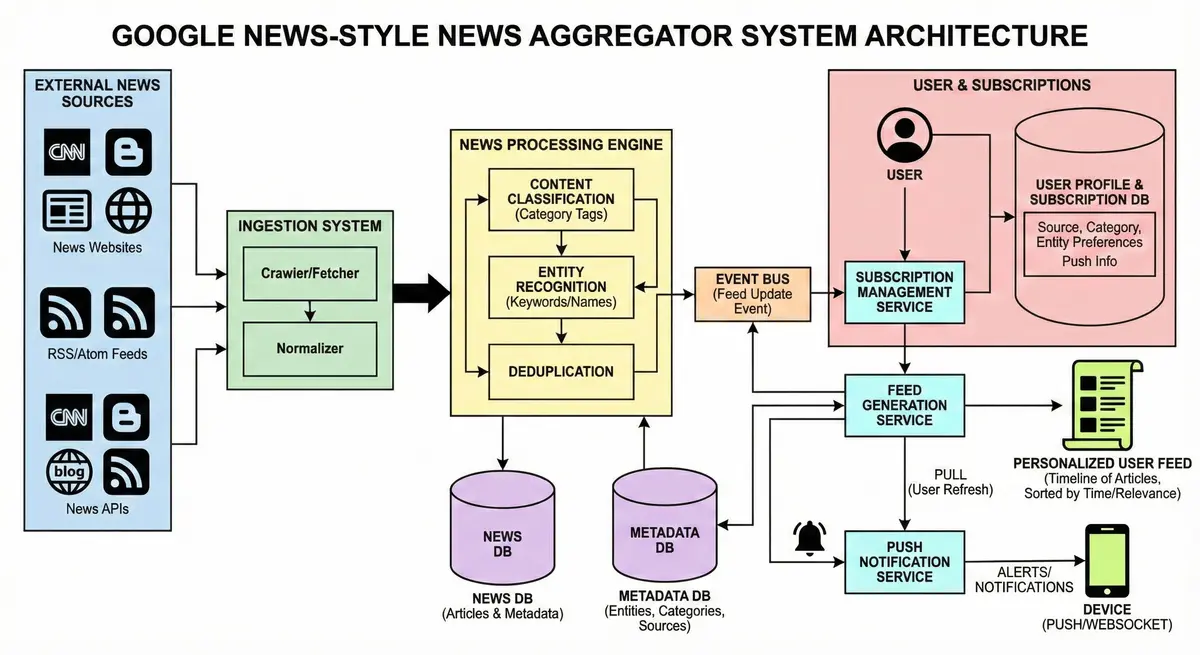
Example Scenario: A user subscribes to “Tech” category and “Apple Inc.” entity. When Apple releases a new product and various news sources publish articles about it, the aggregator ingests those articles, classifies them as “Tech” and tags “Apple Inc.” as an entity. The system will then deliver these to the user’s feed. If push is enabled, the user might get a notification on their phone saying “New article: Apple launches X” within seconds of publication.
2.1 Functional Requirements
-
User Subscription Management: Users can select and manage the topics they follow. This includes subscribing to news channels/sources (e.g. CNN, BBC), categories (topics like Politics, Sports, Tech), or specific entities/keywords (e.g. “Olympics 2024”, a favorite artist). They should also be able to unsubscribe or modify preferences easily.
-
Content Ingestion: The system continuously gathers news articles from external sources. It should support multiple ingestion methods – e.g. consuming RSS/Atom feeds, calling publisher APIs, and web crawling for sites without feeds. This ingestion must be robust and near real-time: new content from sources should be fetched within seconds if possible.
-
Normalization & Deduplication: Ingested articles from different sources need to be normalized (unified format for title, body, timestamp, etc.) and checked for duplicates. The system should detect if multiple sources publish the same article (e.g., syndicated content or news agency feeds reposted) and avoid duplicating it in user feeds. Duplicate detection might use checksums or comparing titles/content.
-
Categorization & Tagging: The system must categorize each article (assign to one or more categories like politics, sports, etc.) and possibly tag it with entities (people, places, organizations) mentioned. This can leverage NLP/ML – for example, using a text classification model or keyword matching to identify the article’s topic. Accurate categorization ensures users see relevant content for their subscriptions.
-
Feed Generation (Pull): Users should be able to open the app/website and retrieve their personalized feed on demand. The feed should contain recent articles matching their subscriptions, ordered by time (and possibly some ranking of importance). The system should support efficient queries like “get latest N articles for user X’s subscribed topics” and merge results from multiple subscriptions (e.g., if user follows both a source and a category).
-
Real-Time Updates & Notifications (Push): The system must push out updates to users when new articles arrive in their subscriptions. This involves two parts:
- In-App Updates: If the user is currently online (has the app open or website connected via WebSocket), the system should deliver new articles in real-time (e.g. via a WebSocket or Server-Sent Events) so that the feed updates live. For example, a banner “New story available” or automatically prepending the new article to the feed.
- Push Notifications: If the user is offline or has background notifications enabled, the system should send a push notification for breaking news or new articles in their interests. This could be done via mobile push services (APNS for iOS, FCM for Android) or web push. Users might configure what warrants a push (perhaps only “important” news or everything).
-
Content Delivery and Linking: For each feed item, the system shows a snippet (title, short summary, image thumbnail) and links out to the original source. On clicking, the user is taken to either an in-app browser or directly to the publisher’s page (possibly via a cached version, e.g. Google AMP for speed). The aggregator itself does not host full articles (to respect content ownership), but may cache some content for performance.
-
Search Functionality: Allow users to search the news database for articles by keywords, with results filtered by relevance or date. (While not the core “feed” feature, search enhances usability of the aggregator.)
-
Multi-Platform Access: Provide APIs or frontends for web, iOS, and Android so users worldwide can access the service. Consistency is needed: a user’s subscriptions and read articles should sync across devices (requiring centralized storage of user data).
-
Localization and Multi-Language (Optional Extension): Though not explicitly required, a global news service should support content in multiple languages and allow filtering by locale. (Google News, for instance, supports dozens of regional editions, but for our design we focus on the core aggregation mechanics.)
2.2 Non-Functional Requirements
-
Scalability: The system must handle web-scale traffic and data volume. This includes millions of users and a high rate of incoming news. We expect potentially billions of feed update events per day in aggregate. The design should be horizontally scalable – able to add servers/nodes to handle growth in users or data. Both read and write paths should scale. (For context, large social/news feeds have on the order of hundreds of millions to billions of users.)
-
Performance: Feeds should feel real-time. The end-to-end latency from a news article being published by a source to it appearing in interested users’ feeds should be only a few seconds. An often-cited target is under 5 seconds for a new post to propagate to followers. From the user’s perspective, pulling up their news feed should be fast – ideally under 500 ms for the request to return. Low latency is important for a good UX.
-
Availability & Reliability: The service should be highly available (24/7). Users should almost never see an outage when trying to get their news. We prefer an AP (Availability over consistency) approach in CAP terms for feed data, tolerating slightly stale data rather than an unavailable system. The system must tolerate failures (server crashes, network issues) without total downtime. Multi-region deployment and redundancy are considerations for both latency and failover.
-
Eventual Consistency (vs Strong): We prefer eventual consistency in exchange for high availability and performance. Slightly stale data is acceptable in the news feed (e.g. an article count or a minor update may lag a few seconds). The system will be distributed, and we choose to show something quickly rather than waiting for perfect consistency across all nodes. (For example, a newly published article might appear on some users’ feeds moments before others if there’s propagation delay, which is acceptable.) This trades strict consistency for responsiveness.
-
Throughput Requirements: Both ingestion and feed delivery involve high throughput:
- Ingestion/write: We might ingest on the order of hundreds of thousands of articles per day (discussed in capacity estimate below). The system must handle bursts of incoming articles (for example, major news events causing many sources to publish simultaneously).
- Feed read: Every user may fetch their feed multiple times a day. At millions of users, this is hundreds of millions of read operations per day. The design should handle these reads efficiently, largely via caching and precomputation to avoid query bursts overwhelming databases.
-
Storage: The design should efficiently store a large corpus of articles and feed data. Data partitioning and indexing are important for managing this scale. We should be able to store at least months or years of news history (for search or analytics) without performance degradation.
-
Security and Privacy: Only authorized users should access their personalized feed (standard auth). Additionally, since the scope is English-only news, we don’t have multi-language complexities, but we should ensure our ingestion doesn’t accidentally bring in non-English content or we filter it out.
-
Extensibility & Maintainability: The architecture should be modular so that features like new recommendation algorithms or additional languages can be added in the future. Similarly, it should be manageable by ops teams, with proper monitoring/logging.
-
Legal and Ethical Considerations: (Not a core technical requirement, but worth noting) As an aggregator, the system must respect copyright (only show snippets as allowed, link back to sources) and possibly comply with content usage agreements. It should also handle inappropriate content filtering if required (though since content comes from trusted news sources, this is less of an issue than in user-generated content platforms).
With requirements established, we can now estimate the scale in concrete terms to guide design decisions.
Before designing the architecture, it’s important to gauge the scale of data and traffic the system must handle. Below are rough capacity estimates for a large-scale news aggregator:
Aspect | Estimate (assumption) |
|---|---|
| Daily Active Users (DAU) | ~10 million global DAUs (order of millions). |
| Peak Concurrent Users | On the order of hundreds of thousands concurrently (spread globally). Peak traffic likely during morning/evening news hours in each region. |
| Feed Requests (QPS) | ~1,000–5,000 queries/sec (globally) during peak. Each active user might refresh or scroll their feed multiple times per day. For example, 10M users * ~5 feed refreshes/day = 50M fetches/day (≈580 QPS average; peaks higher). |
| Push Notifications | Potential bursts of millions of notifications for major breaking news. E.g., a global breaking story might trigger a push to 1M+ users. The system’s notification service must fan out to many devices efficiently (likely via OS push services in batches). |
| New Articles Ingested | 50,000 – 100,000 articles per day (estimated). Google News, for example, aggregates content from 20,000+ publishers. If each publisher posts several articles daily, the ingestion rate could average ~1 article per second, with peaks during news events. |
| Max Ingestion Throughput | During breaking news bursts, the system may see spikes (e.g. hundreds of articles per minute across sources). The ingestion pipeline should handle thousands of articles per hour. |
| Data Storage (Articles) | Storing full content for millions of articles. Assuming ~100K articles/day, that’s ~36 million/year. If an article record (metadata + text) averages 5 KB, one year of news is ~180 GB. For safety, plan for terabytes of storage over years (including media). Older articles might be archived to colder storage after 1-2 months (Google News, e.g., focuses on ~44 days). |
| Data Storage (Users) | With 10M users, storing profiles, preferences, and feed pointers is required. If each user record is small (a few KB including subscription lists), that’s on the order of tens of GB for user data. |
| Subscription Graph | Each user might subscribe to, say, 10-20 topics/authors on average. That’s ~100M subscription relationships. Storing this in a database or cache is feasible (hundreds of millions of rows). Hot topics (like “World News”) might have millions of followers, which is crucial for fan-out considerations. |
| Read/Write Ratio | The system is read-heavy. For each article ingested (write), there are many feed reads. Write QPS (ingestion) might be ~1-5 QPS average, whereas read QPS (feed fetches, search queries) is in the thousands. This justifies heavy caching for reads. |
Implications: The high read volume and global distribution mean we need robust caching and a content delivery network. The large number of subscriptions suggests that a naive approach of immediately pushing every new article to every follower could overwhelm the system (especially for topics with millions of followers). We will need to design an efficient fan-out/fan-in mechanism and possibly limit how we propagate updates for very popular content (see Hybrid push/pull in Section 6). The storage estimates show that text content is manageable, but media (images/videos) should be offloaded to cloud storage or CDNs. Additionally, the system’s databases must be sharded or clustered to handle the volume of data and traffic.
At a high level, our news aggregator is composed of two main pipelines that work in tandem:
- Content Ingestion & Processing Pipeline – Responsible for collecting articles from external sources, processing them (normalize, deduplicate, categorize), and storing them in a content repository. This pipeline ensures we have a clean, up-to-date collection of news articles with metadata.
- Feed Generation & Delivery Pipeline – Responsible for delivering the right content to each user. It takes the processed articles plus the user’s subscription info to produce a personalized feed. It supports on-demand fetch (pull) and real-time push notifications. It includes services for subscription management, feed assembly, and notification dispatch.
Major Components Overview:
1. Ingestion Layer (Content Collection): External news sources feed into the system through a scalable ingestion framework:
-
RSS/Feed Fetcher: A service that polls RSS/Atom feeds of news sites for new articles.
-
Web Crawler/Scraper: A crawler that visits websites (for sources without feeds or for extracting the full article content). It can parse HTML to extract headline, body, etc. using rules or machine learning.
-
Third-Party News APIs: Integrations with providers like NewsAPI or Google News API for sources that expose their content via JSON/XML APIs.
-
We maintain a list of “seeds” or source URLs that the crawler and fetchers use. These could be feed URLs, site maps, or even other aggregators (for example, seeds like Reddit or Hacker News can be used to find content).
-
The ingestion system is distributed: multiple crawler instances can run in parallel, partitioned by source or region. An Orchestrator service (scheduler) manages crawl frequency and ensures we don’t overload source sites or violate API rate limits.
-
New Article Event Stream: As articles are fetched, each new article is packaged into a message/event (containing its content and metadata). These events are published to a message queue or stream (e.g. an Apache Kafka topic). This decouples upstream crawling from downstream processing – ensuring that bursts of incoming articles can be buffered and processed asynchronously. The event includes data like article ID, source, timestamp, title, content snippet, etc.

2. Processing & Storage Layer: A set of backend services consume the article events from the queue and perform processing:
-
Content Parser & Normalizer: Cleans up the raw data. For example, ensures we have a consistent format (fields for title, author, publication time, etc.). It might strip HTML, encode characters properly, etc.
-
Deduplication Service: Checks if the article (or an extremely similar one) was already seen recently. This could be done by computing a hash or fingerprint of the content (or using similarity detection). If it’s a duplicate, we might drop it or mark it as part of the same story cluster.
-
Categorization Service: Assigns category tags (and possibly sub-topics) to the article. This might use a machine learning model (trained on news text) or simpler keyword rules. For example, an article containing “football, NFL, score” likely gets category Sports. We also detect if it’s local to some region (e.g. mentions of a city).
-
Indexing & Storage: The processed article is then stored in our databases:
-
A content database stores the article records. We may use a combination of storage technologies:
- A NoSQL document store or wide-column DB (like Cassandra or DynamoDB) to store the raw article info and allow fast key-value access by article ID or queries by category+time. Cassandra is a good choice here for high write throughput and tunable consistency.
- A full-text search index (like Elasticsearch or Vespa) to enable text queries and complex filtering (e.g. search by keywords, or fetching top N latest in “Tech” quickly). The search index can store the necessary fields and inverted indices for article text.
- Optionally, a relational database (SQL) for structured metadata if needed (though for mainly feed content, NoSQL/Elastic might suffice). For instance, user data might live in SQL but article data might not.
-
The search index is updated with the new article document, making it queryable within seconds. This index can later be used to fetch relevant articles for user feeds (by category or keyword).
-
-
Media Storage: If we need to handle images or videos, those might be downloaded to a storage service (like AWS S3 or a CDN) rather than stored in the DB. We typically store just the URL or reference in the article record.
At the end of processing, the system has persisted the new article and tagged it appropriately. Now it’s ready to be delivered to users who want such content.
3. Feed Delivery Layer (Personalization & Distribution): This is the heart of how we get relevant content to users.
-
User Preferences Store: We maintain a database of each user’s subscriptions and profile. This could be a relational DB (like MySQL/PostgreSQL) storing user profiles and the list of topics they follow, or a fast key-value store if we need to retrieve it very frequently. For example, a table mapping user → [list of category IDs, source IDs, topics] or a graph database if relationships were complex (friends, etc., though here it’s simpler).
-
Feed Generation Service: This service is responsible for compiling the list of relevant news for a user. There are two primary strategies to generate feeds:
-
Pull model (on-demand query, a.k.a fan-out-on-read): Each time a user requests their feed, the service queries the content store for the latest articles matching that user’s interests. For example:
- Lookup the user’s subscribed topics (e.g. Politics, and CNN, and “Climate Change”).
- For each interest, query the index or database for recent articles in that category or from that source.
- Merge all those articles, sort by recency or by a ranking score, then trim to the top N for display.
- Return that list to the client.
This approach ensures on-the-fly freshness but can be expensive at scale (many queries per feed and high latency if a user has many follows). We will mitigate that with caching and precomputation.
-
Push model (precomputed feed, a.k.a fan-out-on-write): New articles are proactively pushed into users’ feed storage as they arrive. That is, when an article is processed, the system determines which users should see it and immediately updates a stored feed timeline for those users. For example, a Feed Fan-out Service listening to the article event stream takes each new article and looks up all users following its category or source, then inserts an entry into each of those users’ feed data (e.g., in a Cassandra table partitioned by user). This makes retrieval very fast (just read a pre-built list) at the cost of many write operations up front.
-
Hybrid approach: In practice, we will use a mix of both to handle the “viral news” problem. For content with a smaller audience (niche topics or local news followed by relatively few users), a push model is efficient and ensures those users get the content instantly. For content that would require huge fan-out (e.g. general news that almost everyone sees), a pure push would be millions of writes at once – instead we can fall back to pull for those or use a shared feed. For instance, maintain a global or per-category feed that all users can read from for broad topics, rather than copying into each user’s feed. This idea aligns with using a hybrid fan-out model: push-based for normal or low-fanout updates, and pull-based for extremely high fan-out cases. In other words, push to hundreds or thousands of targets, but don’t push to 50 million – let those be fetched.
-
-
Feed Storage and Caching: To support the above, we likely maintain:
- A User Feed Cache/Store: This could be an in-memory cache (like Redis) or a Cassandra-style wide-column store containing precomputed feed entries for each user (sorted by time or score). This is updated by the push model. The NewsFeed service first checks here when a feed is requested.
- A Category-wise Cache: For the pull model, we can maintain hot lists of recent articles per category or topic in a fast store. E.g., the latest 100 Politics articles in a sorted set in Redis. This way, assembling a user’s feed is a matter of pulling from a handful of these precomputed category lists (and then merging).
- Multi-level Caching: We want to leverage caching at multiple levels to reduce latency. At the client side, the app may cache the last feed it saw. CDNs or edge caches might cache common API responses (though personalized feeds are hard to cache globally, except maybe for logged-out generic content). On the server, we can use an in-memory cache for recently accessed feeds or articles. For example, if user A and user B have very similar interests, the system might reuse some results.
-
Ranking & Personalization Engine: Simply merging by timestamp isn’t always ideal; we incorporate a ranking step:
-
The ranking component takes the set of candidate articles for a user (from their followed categories) and scores or orders them. Factors could include:
- Recency – newer is generally higher.
- Source priority – perhaps user reads some sources more often, boost those.
- Content popularity – if an article is trending (many users clicking it) maybe rank it higher for others.
- Personal behavior – e.g., if user frequently clicks “Tech” articles but rarely clicks “Sports” even though they follow both, the tech ones may be ranked on top.
- Diversity – ensure a mix of categories if user has many, rather than 10 politics articles in a row.
-
The ranking can be a simpler heuristic or a machine-learned model. In early stages, we might implement a weighted scoring (like weight = w1freshness + w2sourceQuality + w3*predictedInterest).
-
This engine might run as part of feed assembly or as a separate service. If separate, the feed service would call it with the candidate list and get back a sorted list.
-
Real-time signals: If we track in real-time which stories are receiving a lot of engagement, those signals can feed into ranking (for example, to boost a breaking news that’s clearly very important). This is akin to how Google News might rank “Top stories” using an importance metric.
-
-
Notification/Push Service: For delivering push updates, a notification service will subscribe to new article events or feed updates. It will determine if an article warrants a push notification (perhaps user has “alerts enabled” for that topic, or it’s breaking news flagged by the system). It then sends the notification via the appropriate channel:
- Mobile app users: through Apple APNS or Google FCM (the service prepares the payload and uses those APIs, which handle device delivery at scale).
- Web users: possibly via Web Push API or, if the user is currently on the site, via a WebSocket/SSE connection to the client.
- Email could be another channel (for daily digests, etc.), though that’s not real-time.
The Notification service needs to be careful to not spam; it might apply rules (e.g., don’t send more than X pushes per user per hour, aggregate multiple new articles into one notification if appropriate).
-
Real-Time Update to Clients: If a user has the app open, we don’t want them to have to pull-to-refresh to see new items. We can keep a persistent connection (WebSocket or Server-Sent Events stream). The feed service (or a dedicated real-time server) can push a message like “new article in your feed” to the client, which then either fetches it or we send the article data directly over the socket. This gives a live feed feel.
-
API Gateway and Application Servers: All user interactions (feed fetch requests, search queries, etc.) go through a layer of API servers:
- These are stateless servers (could be Node.js/Express, Java/Spring, Go, etc.) behind a load balancer. They handle authentication, validate requests, then call the appropriate backend services (feed service, search service, user profile service, etc.).
- For example, a
GET /feedrequest hits an API server, which authenticates the user, then calls the Feed Generation Service (which may in turn query caches/DB). The API server then formats the response (JSON) and returns it. - Similarly, a
POST /subscribewould go to a User Pref service to add a subscription and likely trigger a recomputation or warm-up of that user’s feed. - This layer also integrates with CDNs for static content: e.g., image URLs in articles might be served via a CDN domain. The API can provide these URLs (perhaps pointing to a cached copy on the CDN if we do that to ensure faster image loads).
-
Search Service: We will have an endpoint for searching past news by keywords, powered by the search index (Elasticsearch query, for instance). This is a separate path from the feed, but uses the same indexed data.
Data Flow Summary: When a news article is published by a source, our ingestion layer picks it up (within seconds or minutes), processes it, and stores it. This triggers updates: the feed service (push component) may update many user feeds or relevant caches, and the notification service may alert users. When a user opens their app (pull), the feed service quickly retrieves a personalized list (either from the precomputed feed or by querying recent content) and returns it. The user sees a timeline of articles and can click through to read one (likely fetched from cache or the source). If a new article arrives while they’re browsing, a live update or notification can appear.
This high-level design is modular: each component (crawling, processing, feed assembly, notifications) can be scaled independently.
Article Data: Each news article can be represented by a data object with fields like: article_id, title, content_snippet, url, source_id, publish_time, category, keywords, image_url, etc. We might also store a vector for content (if doing recommendations) or flags (trending, breaking, etc.).
-
We will assign a globally unique
article_id(could be a hash of the URL or an auto-generated ID like a Snowflake ID). This acts as the key for storing and referencing the article. -
For storage, a NoSQL/document database is ideal for high write volume and flexible schema (news from different sources might have slightly different metadata). Cassandra is a strong candidate because it can handle heavy writes and globally distribute data. Cassandra’s wide-column model allows using a composite key like (category, publish_time) or (source, publish_time) to quickly query recent articles in a category, for example. It also offers tunable consistency, which we’d set to eventual for high availability.
-
We might create multiple query tables (denormalized views) in Cassandra for different access patterns:
ArticlesByIDtable: key = article_id, columns = full article data (to fetch an article by ID).ArticlesByCategorytable: partition key = category, clustering by publish_time desc, storing say last N days of articles for that category. This allows pulling recent items per category very fast.ArticlesBySourcesimilarly if needed.- (Cassandra is cheap on write, so writing an article into several tables for different indexes is fine.)
-
Each write will be replicated to multiple nodes (with a replication factor, ensuring durability).
-
-
In addition, an Elasticsearch index is used for full-text search and maybe complex aggregations. Each article is indexed by text content and tagged with fields like category, source, time. This allows:
- Searching by keywords (for a search feature or to find “related articles”).
- Running queries like “give me the newest 50 articles where category = Sports AND user interest vector matches” etc., if we go that route for personalized querying.
- Elastic can serve as our fallback for assembling feeds if needed (it can handle filtered queries sorted by time, though a specialized store like Cassandra might be faster for simple key lookups).
-
We also consider using an in-memory data store like Redis for certain datasets:
- Redis could hold a rolling set of latest article IDs per category (like a lightweight feed) to support quick pull merges.
- Redis could also cache recently accessed articles or results of popular queries (to offload repeated reads from Cassandra/Elastic).
User Data: Each user has a profile with preferences. Likely stored in a relational database (since user data is relatively smaller scale and needs ACID for things like password info, etc.). We can have tables:
Usertable: user_id, name, email, etc.UserPreferencestable: user_id → list of subscriptions (could be a normalized separate row per subscription, or a JSON blob, depending on query needs).- Alternatively, storing subscriptions in a key-value store might be easier for the feed service to fetch quickly. Even caching the user’s interests in memory is an option for performance (since that data is small and changes infrequently).
- If we had social relationships (friends/followers) we might use a graph DB like Neo4j, but here it’s not needed; the follow relationships are just user-to-topic, which is simpler.
To support fan-out (push model), we need efficient lookup of “which users are subscribed to X category or source.” This is essentially the inverse mapping of UserPreferences:
-
We could maintain in memory a map of category → set of user_ids who follow it. But for millions of users, storing huge sets can be memory heavy (though each individual category might have millions; maybe manageable if sharded).
-
Another approach: on a new article in category C, perform a distributed query on UserPreferences (like an index on category) – not efficient if very large.
-
More feasible: Use a pub-sub mechanism – e.g., maintain a Kafka topic per category that users subscribe to (via consumer groups). But having a million consumers on one topic is impractical. Instead, what we can do is partition the feed update process by user segments:
- One design is to use a distributed task queue: For each new article, the fan-out service fetches the list of subscribers (maybe from a cached mapping or a database query) and then enqueues a task for each (or for batches of users) to add the article to their feed. This can be done in parallel by many worker threads or machines.
- Because direct fan-out to millions is heavy, we’d likely restrict it: push to at most some threshold (like the first 10k users) then rely on pull for the rest. For extremely popular categories, maybe we simply mark something in a global store and let user pulls find it.
-
Per-user Feed Store: If we do push, we need a place to store each user’s feed entries. A natural choice is a Cassandra table like:
CREATE TABLE UserFeed (user_id, time_uuid, article_id, PRIMARY KEY (user_id, time_uuid));Here
time_uuid(time-based UUID) or timestamp as clustering key ensures results are sorted by recency. When a new article arrives for user, we insert it. To get the feed, we doSELECT article_id FROM UserFeed WHERE user_id = X ORDER BY time_uuid DESC LIMIT 50;. This is a single-row read (very fast, since all of that user’s feed items are stored contiguously on one node, given Cassandra’s partitioning by user_id).- This table will naturally be sharded by user_id across Cassandra nodes, distributing the storage and write load. For 100M users, if evenly distributed, each node handles a manageable subset of users.
- Writes: Each new article could lead to many writes in UserFeed (one per user). Cassandra can handle many writes per second, but we have to be mindful of hotspots (e.g., if 1 million users all follow category “World”, an article in that category triggers 1M inserts in a short time – we’d likely throttle or split that load among workers and cluster nodes).
- We can also apply eventual consistency on these writes. It’s okay if not all replicas have the feed update instantly, as long as one replica (for the local region) does for quick reads, and others catch up. Cassandra’s design suits this with tunable CL (Consistency Level).
-
Search Index (Elasticsearch):
- Index name: “articles”. Documents contain fields:
id, title, body, categories, source, publish_time, popularity_score, …. - We can also index a composite field for “topic cluster” if we cluster articles by story (so that a search can retrieve one representative per cluster).
- Elastic will allow us to implement things like “related articles” by moreLikeThis queries, and possibly can be leveraged for certain feed queries (though high QPS on Elastic can be expensive; we might reserve it for explicit search or offline analysis).
- Index name: “articles”. Documents contain fields:
Summary of storage tech and purpose:
- Cassandra (NoSQL): Primary store for feeds and possibly articles (optimized for high writes and key-based reads).
- Elasticsearch (Search): Secondary store for text search and complex querying.
- Relational DB (SQL): Store user accounts and subscriptions (strong consistency for user data).
- Redis/Memcache: Caching layer for quick data retrieval (user session data, hot feed data, etc.).
- Blob storage (S3/Cloud Storage + CDN): Store images or videos and serve via CDN for efficiency.
6.1 News Ingestion and Deduplication Pipeline
Overview: The content ingestion subsystem is essentially the “web crawler” and parser for the aggregator. Its job is to gather fresh articles from all the external sources continuously and robustly.
-
Source Discovery & Administration: The system maintains a catalog of sources – RSS feed URLs, API endpoints, sitemaps, etc. An admin interface can add new sources or categories. This metadata (mapping of publishers to feed URLs, categories, and possibly crawling schedules) is stored in a configuration DB. Administrators can map each feed to a category or region (e.g., “NYTimes Technology RSS” -> category Tech, region USA).
-
Fetching (Crawlers): A fleet of crawler services continuously checks each source for updates. For RSS feeds and APIs, this might be a periodic poll. For example, each RSS URL could be polled every few minutes (frequency might depend on publisher’s update rate). To reduce redundant fetching, a Feed Manager can check the HTTP headers (last-modified or use etags) or compute a hash of the feed to see if it changed. For sites without RSS, web scrapers parse HTML pages or use sitemaps. The crawlers push any newly found article reference into the pipeline:
- Each new article (identified by URL or ID) results in a message (e.g. JSON containing the URL and possibly partial info) being published to the crawl queue (or directly to the processing queue if simpler). The system uses a Bloom filter cache to quickly check if a URL was seen before, avoiding duplicate crawling of the same article. This in-memory bloom filter (or a distributed cache of recent URLs) prevents re-processing content and saves database lookups.
-
Content Retrieval: For each new article URL enqueued, a worker (let’s call it Article Fetcher) retrieves the full content. This might involve fetching the HTML page or calling a content API. The raw content (HTML, images, etc.) is saved to a Raw Content Blob Store temporarily. Storing raw HTML is useful for parsing and also as a backup (and for legal/archive purposes).

-
Parsing & Extraction: The Content Parser workers take the raw content and extract structured data: title, body text, author (if available), publish time, media URLs. This step may use HTML parsing libraries or publisher-specific rules (since not all sites follow the same format). It cleans the content (removing HTML tags, ads, etc.) to get a clean text. The parser also uses the categorization logic (possibly invoking an NLP classifier or simply using the source’s known category from the RSS feed). The result is a structured article object ready to store.
-
Deduplication and Merge: After parsing, as an extra safety, the system can double-check if a very similar article already exists (e.g., sometimes two sources might post the same news agency text). A content hash or similarity check can be done. True duplicates are discarded or merged (maybe incrementing a count of sources). In most cases, the earlier URL-based dedup suffices.
-
Storing Processed Article: The structured article is stored in the Article Database/Index. This is a critical write path. The storage operation includes indexing the article by keywords (for search) and by category. It also writes the mapping of article to its content blob (if full content is stored separately). If using Elastic, for example, this is an index write; if using a SQL/NoSQL, it’s an insert. We also update any necessary secondary indexes (like a reverse index for search terms or a time-sorted list for the category).
-
Publishing New-Article Event: Once an article is stored, an event is published on an internal New Article Pub/Sub topic (e.g. Kafka topic). This event contains the article ID and metadata (category, maybe a short summary). This is used to notify other parts of the system (feed generator, cache updater, notifications). The event could be consumed by:
- Feed update service (to handle fan-out).
- Search indexer (if not done synchronously, one could index via a consumer).
- Analytics (e.g. to count new article in trending).
- We have essentially a pipeline as described: crawl -> parse -> store -> notify.
-
Third-Party API Ingestion: In cases where we use an external news API (that might provide bulk news, e.g. “give me latest 100 news in Tech”), the flow is a bit different: a scheduler calls the API, gets a batch of articles, then for each article we go through steps of dedup, parse (the data might already be structured from the API), and store. This can bypass some crawling steps.
This pipeline must be fault-tolerant. Using message queues ensures if a component fails, messages aren’t lost but can be retried. We should have idempotency in parsing and storing (if the same message is processed twice, ensure we don’t duplicate the article in DB – using the URL or an external ID as a unique key helps).
6.2 Real-Time Feed Generation Engine (Pull & Push)
Feed Assembly: When it’s time to deliver content to a user, we need to gather all relevant articles for that user’s interests and sort them. There are two primary approaches to assemble the feed:
-
Pull Model (On-Demand Query): Each time a user opens their feed, query the Article store for the latest articles in each of that user’s subscribed categories/sources. For example, if Alice follows “Tech” and “BBC News”, we would query: get the N most recent Tech articles + N most recent BBC articles, etc. Then merge those results by timestamp or score. This ensures up-to-the-minute freshness, and we do computation only when needed. However, it can be heavy if many users refresh simultaneously, and merging multiple lists for each request can be expensive. Caching can mitigate repeated queries.
-
Push Model (Precomputed Feed): As new articles arrive, immediately determine which users should see it and insert it into their feed data. This is often done with a Fan-out service. For example, when article X in “Tech” is stored, the system finds all userIDs following “Tech” (which could be millions) and for each, inserts a reference to article X in their feed sorted list (maybe kept in Redis or a feed store). This approach provides very fast read (just read pre-made feed) and easily supports push notifications (we know exactly who should get the article). But it is potentially expensive to fan-out writes if a topic is very popular (write amplification).
Given our scale, we likely use a hybrid approach:
- Use push (fan-out) for moderately followed entities (e.g., a niche author with 5,000 followers – pushing to 5k users is fine and ensures instant delivery).
- Use pull (fan-in) for extremely high-followed channels (e.g., “World News” with millions of followers – instead of pushing to 5 million users, we mark the channel as one that clients should pull or fetch from a central timeline). In practice, we might maintain a central timeline for each popular topic and not copy it to all users. Users will then fetch from that timeline when needed.
- This hybrid model is seen in large feed systems: push for normal cases, and special-case the “celebrity” or high-fanout cases with pull. For our news aggregator, many categories like “Breaking News” or top publisher channels could qualify for pull-based handling to avoid huge fan-out blasts.
Ranking/Personalization: Once we have the candidate articles for a user (from either method), we need to rank them. A basic ranking algorithm could be:
- Freshness: Newer articles generally rank higher (especially for news).
- Subscription Priority: Perhaps the user’s explicitly followed topics or publishers get prominence. If the user follows “Tech” and “World” but has shown more interest in Tech, weight those higher.
- User Behavior: Incorporate the user’s reading history. If the user often clicks certain topics or authors, boost similar incoming articles. If they always skip sports, maybe lower those in mixed feeds.
- Global Popularity/Trending: If an article is getting a lot of attention (views or external trending), it might be boosted even if it’s not strictly within the user’s usual interest – for serendipity and to highlight important news (e.g. major breaking news might be shown to everyone).
- Diversity: Ensure the feed isn’t too one-dimensional. Might include a mix of categories if the user follows multiple, rather than all from one publisher.
- Paid or Sponsored Content: (If applicable, though not in requirements) ensure any sponsored news is appropriately inserted.
This ranking can be implemented via a scoring function. For example: score = w1*Recency + w2*PersonalInterest + w3*GlobalTrending, where weights tune what matters. In advanced systems, a machine learning model (trained on past engagement) could predict the probability of the user clicking each candidate, and rank by that. But that requires collecting interaction data and retraining models – an advanced extension.
Personalization Pipeline: To support the above, we’d include:
- A Feature Store of user features (e.g. topics of interest distribution) and article features (category, maybe an embedding of content).
- If doing ML ranking, an offline training job (using user click data to train a model).
- An online prediction service that given a user and article can compute a relevance score.
For this design, it suffices to mention the concept; implementing it fully is complex. The system can start with simple heuristics and evolve to ML-based ranking as data grows.
Feed Update Mechanism: When using push model, the feed assembly happens continuously. For example, upon a new article event: fetch the list of subscribers, for each update their feed data (maybe push the article ID onto a sorted feed list). This could be done by a Feed Update Service that consumes the article event queue. For efficiency, this service might chunk the fan-out: e.g. retrieve 1000 subscriber IDs at a time and do bulk insertions, etc. Using in-memory data structures or fast caches is key to handle high fan-out.
6.3 Push Notifications & Real-Time Updates
The system supports two forms of pushing updates to users:
- In-App real-time updates: Using WebSocket/SSE. The Real-Time Feed Update Service (from Section 4) keeps a connection to each online client. It needs a publish/subscribe mechanism on the backend. A possible design is using a Pub/Sub broker (like Redis Pub/Sub or dedicated realtime servers) where each user (or each topic) has a channel. When a new article arrives, the service either publishes it to a topic channel (e.g. “Tech” channel), and the server will then relay that to all connected users subscribed to Tech. This can happen within a second or two of the article’s arrival. The client app then either refreshes the feed or inserts the new item UI notification.
- Mobile Push Notifications: These are done via platform push services (APNs for iOS, FCM for Android). The Notification Service component takes events (likely the same new article events, but filtered by importance or user settings) and calls the push API with the message. For example, for breaking news, it might send a title and short description as the notification. We might limit push notifications to only critical categories or user-opt-in choices, since too many pushes can annoy users. The service should have a datastore of device tokens per user and which types of notifications they want, and handle delivery receipts or failures (removing invalid tokens, etc.). Given possibly millions of pushes for a huge event, we consider using batch sending and also perhaps a third-party service for large-scale push.
Both real-time updates and push notifications need to be robust – if a user’s device is offline, the push is queued by the OS; if our service is temporarily down, we might lose some realtime messages (which is acceptable, as the user can still pull manually). We ensure that on reconnect the client will do a full sync.
6.4 APIs for Frontend/Mobile Clients
The system will expose a set of APIs (or GraphQL endpoints) for client applications to interact with. We should design these APIs to be efficient and secure, and consider the high QPS they will face.
Key APIs and their design:
-
Feed Retrieval API:
GET /feed?user_id=XYZ(assuming auth token is provided to identify user). This endpoint triggers the feed generation for that user. We may allow query params like?after=lastSeenIdfor pagination or polling new items. The response is typically JSON containing a list of articles with their metadata (id, title, source, category, publish_time, snippet, image_url, etc.). We might also include a flag if an article was read before or not (if tracking reads).- We should design this to be cache-friendly if possible. If a user’s feed doesn’t change between requests, the response could be cached at the edge. One trick: incorporate a timestamp or version. E.g.
GET /feed?user=123&lastUpdate=timestampwhere the server can quickly return “304 Not Modified” or an empty result if no new items after that timestamp. This reduces data sent when nothing changed. - This API should be very fast. We’ll likely have it served by a cluster of Feed Delivery Service instances behind a load balancer. These instances are stateless (they rely on the content store and caches), which allows horizontal scaling easily. Use of caching (CDN or in-memory) can offload repetitive requests.
- We should design this to be cache-friendly if possible. If a user’s feed doesn’t change between requests, the response could be cached at the edge. One trick: incorporate a timestamp or version. E.g.
-
Subscription Management APIs:
GET /subscriptions?user=XYZ– to retrieve the list of current subs (for settings page).POST /subscribe(with user and topic info) – to add a new subscription. This will result in updating the database and potentially sending a message to update any live connection (so that the user starts getting content from that topic immediately). After adding, maybe fetch new content from that topic to show.POST /unsubscribesimilarly. These should verify the topic is valid (e.g., the source or category exists or if it’s an entity, record it).- Possibly an API to list available categories or trending entities to subscribe to.
-
Notifications/WebSocket Endpoint: For push, if using WebSockets, the client will connect to something like
wss://news.example.com/realtimeafter authenticating. The server then upgrades to a persistent connection. Through that, the server can send messages like{type: "NEW_ARTICLE", article: {id:123,...}}to the client when appropriate. We might not detail the protocol too much, but essentially an open channel.- If not using raw WebSocket, we might use server-sent events (SSE) via an endpoint like
/livefeedthat streams events. - Mobile apps would use native push; they register their device token via an API
POST /devicesor something, linking user to device token so that the push service knows where to send.
- If not using raw WebSocket, we might use server-sent events (SSE) via an endpoint like
-
Content Access API: Possibly an endpoint to get full content or a proxy to open the article. But since we link out, we may not need to serve the content ourselves except maybe to serve cached images or AMP pages. If we do cache images, an endpoint or CDN path like
https://cdn.news.example.com/images/{image_id}.jpgwould be used – backed by a CDN.- We might also have an API for searching news if user types a query, leveraging our search index (but search is not a main focus here).
-
Performance considerations: The feed API is the highest volume. We'll use techniques like JSON compression, and only sending needed fields. Also maybe allow the API to exclude content for articles that were already seen (so incremental updates are smaller).
- We should also secure the API: all calls require authentication (e.g., an OAuth token or session token), especially to prevent abuse (someone pulling other’s feeds or massive scraping).
- Rate limiting: Implement rate limiting on feed refresh to avoid a scenario where a single user or malicious actor spams requests and overloads the system (we might allow, say, a few requests per second at most, which is plenty for normal usage).
6.5 Example Data Flows
To illustrate, here are a couple of concrete scenarios with our design:
-
New Article Flow (Push to Feed): A “Tech” category article is published:
-
Crawler fetches it from the source’s RSS feed.
-
Processing pipeline normalizes, classifies it as
category=Tech. -
Article is stored in DB and index. A message is published: “NewArticle {id:123, category:Tech, ...}”.
-
Feed fan-out service receives this. It checks how many users follow “Tech.” Suppose 5 million users do. Our policy says that’s a broad category (very high fan-out), so instead of writing to all 5M feeds, it might:
- Write this article to a global “Tech feed” cache and perhaps to the top few thousand users who absolutely must see it (this detail depends on strategy; an alternative is pushing to all – we’ll consider performance).
- For demonstration, let’s assume we push to all for now: It retrieves the list of 5M user IDs (from a cached mapping or a query partitioned by user segments) and enqueues write tasks in batches.
-
Thousands of worker threads across the Feed Generation Service cluster each take a batch (say 10k users each) and perform batched inserts to the UserFeed table for those users.
-
Simultaneously, the Notification service sees this is “Tech” and maybe none of these users specifically asked for Tech notifications (unless it’s flagged breaking). So it might do nothing. If it were flagged “breaking” and Tech, it might send an alert to those who wanted any Tech breaking news.
-
Within a couple seconds, most user feeds are updated in the database.
-
Any users currently connected who follow Tech: the real-time service pushes them a “new article” event.
-
A user opens their app 10 seconds later and pulls the feed: the API server calls the feed service, which fetches from the user’s feed entries in Cassandra – the new Tech article (ID 123) is there, along with other recent ones, sorted by time.
-
The service fetches the article metadata (title, etc.) either from a cache or DB (by article_id) to populate the feed item. Returns JSON to the client. The user sees the new Tech article in their feed.
-
-
User Pulls Feed (Pull model use-case): Imagine another user follows “Local News” for San Francisco and “Sports”. If “Local_SF” category isn’t too high volume, we likely push those. But let’s say in the last hour, 100 new Local SF articles and 200 Sports articles arrived.
- When this user opens the app, the feed service could retrieve that user’s last 50 feed items from
UserFeed. If we pushed both categories, those items are already there sorted by time. - If we didn’t push Sports because it’s too broad, then the user’s feed might only have some local news in it from push. The feed service would notice “user follows Sports but we have not precomputed those.” It would then query the global Sports feed (or ArticlesByCategory for Sports) for the last X items since the user’s last visit.
- It then merges those with the local ones, sorts by time/rank, and returns them.
- This is more complicated, so we’d likely precompute for most cases. The hybrid logic is complex but doable: the system must mark which categories each user feed is fully covering and which are not.
- When this user opens the app, the feed service could retrieve that user’s last 50 feed items from
-
Search Query: The user searches “Olympics”. The API server directs this to the search service (Elastic) which returns relevant recent articles (which might be across categories). This doesn’t directly affect feed but uses the same data store.
Designing for web-scale involves applying many techniques to handle high load and ensure reliability. Here we highlight the key strategies and justify our choices:
-
Sharding and Data Partitioning: All our major data is partitioned to spread load:
- We partition news articles across database nodes (Cassandra automatically partitions by primary key; using article_id or category as part of key ensures distribution). This allows writing many articles per second across the cluster.
- User-specific data (feeds, preferences) is partitioned by user ID. Thus, operations for different users naturally go to different shards. There’s no central hot spot for feed reads or writes. This is crucial given potentially 1000s of requests/sec spread across users.
- The search index can be sharded by time or by document ID and scaled horizontally; queries will be distributed.
- Ingestion tasks are partitioned by source to multiple crawler instances so no single machine handles all sources.
-
Caching at Multiple Levels: We extensively use caching to achieve low latency:
-
At the client side (browser/app), we can cache previously loaded feed data and only fetch updates (saving server calls).
-
CDN caching is used for static assets (images, scripts) and possibly for some API endpoints that are not user-specific (like a general headlines feed).
-
Edge caching and reverse proxies could cache common API responses. However, since feeds are personalized, this is limited. But if we have any popular public feeds (like “top news for country X”), those can be cached.
-
Service-layer caching: Within our backend, we cache frequently accessed data:
- Recent articles by category (as discussed, in Redis).
- User preference data (so we don’t hit DB every time).
- Completed feed results for a short time (to quickly serve repeated requests).
- We also use in-memory caches within each service instance for ultra-fast access to hot items (with proper invalidation or short TTL).
-
Multi-tier caching ensures that by the time we hit the primary database, we’ve avoided as many queries as possible.
-
-
Asynchronous Processing and Queues: By decoupling components with queues (Kafka), we make the system resilient to spikes. If a sudden surge of news hits, the ingestion queue will buffer it and workers will process as fast as they can – if slightly delayed, that’s acceptable. This prevents overload and crashing. Similarly, for fan-out, we can queue user feed updates. Async processing allows us to handle tasks in parallel and retry if needed without blocking the user-facing parts.
-
Eventual Consistency & Relaxed Constraints: We deliberately allow stale data in exchange for performance. For example, we don’t use distributed transactions between services. Each part does its best effort. The system doesn’t wait for confirmation that every user’s feed got updated before proceeding – it’s fire-and-forget for a lot of the fan-out. This improves throughput dramatically. As noted, a known trade-off is some users might temporarily not see something, but we compensate with pull mechanisms. By prioritizing availability, the service remains responsive even under partial failures.
-
Horizontal Scaling of Services: Every stateless service (API servers, feed generators, processing workers) can be cloned and load-balanced. If traffic increases, we add more instances behind the LB. For stateful components (databases, Kafka), we add nodes to the cluster and partition more – Cassandra and Elastic both scale this way. We ensure to monitor load and have auto-scaling rules where possible (like automatically add crawler instances if backlog grows, etc.).
-
Load Balancing and Failover: We use load balancers at entry points (user requests distributed across many API servers). Also, Kafka and Cassandra handle their own load distribution among nodes. If a node fails, clients (with driver libraries) will automatically route to other nodes. We should design with no single point of failure – e.g., multiple Kafka brokers, multiple Cassandra replicas, multiple web servers. Use health checks to detect failures and remove them from rotation.
-
High Availability Datastores: Cassandra is inherently designed for HA, replicating data across nodes and across data centers, so it can tolerate node failures without downtime. We would configure maybe replication factor 3 per data center. Elastic can be set up with primary and replica shards too. For the user relational DB, we can run a primary-replica setup with automatic failover to a replica if the primary fails (or use a distributed SQL like CockroachDB for multi-region writes if needed). The idea is to avoid any downtime in data access.
-
Throughput Optimization for Feed Fan-out: The push model could be the heaviest part. To optimize:
- We batch database writes. Instead of inserting one feed entry at a time, aggregate a batch of, say, 100 or 1000 inserts and send in one go. Cassandra, for instance, supports batch writes (though with caution). Batched writes reduce overhead per item.
- Use multi-threading and parallelism: The fan-out service will run on many machines, and within each, use multiple threads to handle different segments of user IDs simultaneously.
- If using Kafka for distribution: we could publish one message per new article per user, but that’s millions of messages for a big story. Instead, we might publish one message per new article (with metadata), and have consumer groups partitioned by user segments. This still ends up in processing per user. Instead, we might skip Kafka at that stage and directly use a custom fan-out dispatcher to write to DB (to avoid the overhead of producing millions of Kafka messages).
- The hybrid approach again mitigates load by not doing push for the worst cases. That drastically cuts the peak load. The “celebrity” scenario (viral story) is handled by pull which spreads the cost over time and only for users who actually check their feed.
- We also consider TTL (time-to-live) on feed entries: to keep the UserFeed table from growing indefinitely, we could expire entries older than X days, since typically we only show recent news. This keeps storage usage bounded per user and improves cache locality.
-
Precomputation and Background Jobs: We precompute anything expensive offline if possible. For example:
- We could precompute daily or hourly trending scores for topics (so that ranking doesn’t have to calculate popularity on the fly – it can just read a cached trend score).
- We might periodically rebuild a user’s “interest profile” (e.g., which categories they engage with most) and store a profile vector, which the feed ranker can use quickly.
- Generate “recommended for you” stories in advance during low-traffic times (maybe as a separate section).
- These reduce online computation needed at request time.
-
Content Delivery Network (CDN): All images and videos in articles will be served through a CDN. We might even cache article pages (if we host a reader mode) on CDN. This offloads bandwidth from our servers and gives faster response to users globally. We just need to ensure to refresh cache for images if needed (most images won’t change).
-
Security and Rate Limiting: From a performance perspective, we also guard against misuse. We will implement rate limiting on API usage to prevent a single user or client from spamming the system with requests that could degrade performance. Also, bots or scrapers trying to crawl our aggregator might be served cached results or blocked, so they don’t overload us.
-
Monitoring and Auto-Scaling: We set up metrics and alerts. If CPU or queue length or DB latency crosses thresholds, automated systems add more instances or trigger failovers. This dynamic scaling ensures we meet demand surges (e.g., big news event causing more user traffic and more ingestion load simultaneously). We also have fallbacks – e.g., if the feed service is ever overwhelmed, we could degrade gracefully by temporarily serving a simpler feed (maybe just top news) to all users rather than personalized, just to handle the moment – but that’s an extreme measure.
Trade-offs discussion: In our design, we traded some consistency and complexity for performance:
- We maintain possibly duplicated data (the same article ID might be stored in many user feeds and multiple DB tables). This denormalization costs storage and potential slight inconsistency (if we needed to remove/update an article, we’d have to purge many entries). We accept that cost to gain read speed. Storage is cheaper than compute at this scale.
- The push model complexity: We chose a hybrid model to avoid extremes. Pure push (fan-out-on-write) gives lowest read latency (feeds are ready) but can be wasteful (writing items for users who might not log in before those items are old) and heavy for broad fan-out. Pure pull (fan-out-on-read) saves writes but at scale gives high read latency and DB load. The hybrid tries to balance it, but is more complex to implement. This complexity is justified by the need to handle “followed by millions” scenarios efficiently.
- We emphasize availability: data is duplicated and eventually consistent, meaning in rare cases users might see slightly outdated info. We deem this acceptable for news (a 5-second or even 30-second delay in a story appearing is usually fine; we’re not doing financial transactions). This allows us to avoid distributed locks or serial processing, massively improving throughput.
- Our system will likely use more hardware (many servers) to achieve these goals. That’s expected at web-scale. We assume the cost is acceptable for a service of this user base. We also keep it somewhat efficient by using appropriate technologies (Cassandra/Redis for speed, etc.) and not over-computing on the fly.
In conclusion, this design leverages a pipeline architecture, distributed data stores, caching, and careful choice of push vs pull to meet the requirements. It should be able to deliver personalized news to users in near real-time (a few seconds latency) even under high load, with eventual consistency ensuring the system remains robust and available. The architecture is modular and scalable, much like those of large-scale social feed and aggregator systems in production today, and reflects best practices a senior engineer would apply to such a problem.
🤖 Don't fully get this? Learn it with Claude
Stuck on Designing Google News? Open Claude, copy a block below, and it'll teach you this exact concept — visually and interactively.
Progressively stronger hints — you still solve it.
I'm working on the problem **Designing Google News** (System Design). Give me a HINT LADDER: start with the tiniest nudge, then wait. Only reveal the next, stronger hint when I ask. Do NOT show the full solution unless I type 'show solution'. Keep me doing the thinking. If you're unsure or a claim isn't standard, say so and reason from first principles instead of guessing.
See the technique, not just code.
Explain the optimal approach to **Designing Google News** with a VISUAL walkthrough: trace it on a small concrete example using ASCII art / a step-by-step diagram, narrate what changes each step, then give time & space complexity with a one-line derivation. If you're unsure or a claim isn't standard, say so and reason from first principles instead of guessing.
Catch bugs, edge cases, sub-optimality.
I'll paste my solution to **Designing Google News**. Review it for correctness, missed edge cases, and time/space complexity, then coach me toward the optimal — don't just rewrite it. Ask me to paste my code now. If you're unsure or a claim isn't standard, say so and reason from first principles instead of guessing.
Lock in recognition with look-alikes.
Give me 2 problems that use the SAME underlying pattern as **Designing Google News**. For each, let me attempt first, then review my answer and name the trigger signal that reveals the pattern. If you're unsure or a claim isn't standard, say so and reason from first principles instead of guessing.