System Design Example
Instagram behind an API Gateway
Instagram is a good lens for the API Gateway pattern: millions of users, dozens of independent services, one front door. Think of the platform as a city and the gateway as its main gate — every client request (iOS, Android, web) enters there, gets checked, and is routed to the right neighbourhood.
A gateway typically owns five cross-cutting jobs so the individual services don't each reimplement them:
- Routing — send each request to the correct microservice.
- Aggregation — call several services and merge their responses into one payload for the client.
- AuthN / AuthZ — verify identity (usually a JWT) and check permissions once, at the edge.
- Rate limiting — cap how many requests a client may make per window.
- Load balancing, logging & monitoring — spread traffic across instances and give you one place to observe traffic.
The services behind it are the usual Instagram cast: User Management (profiles, follows), Photo Upload & Processing (store, filter, resize), Feed (build the timeline), Notification, Search, and Comment.
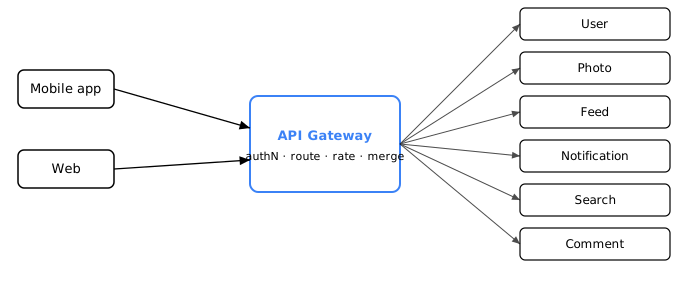
Two request flows
Uploading a photo (single downstream call)
- The app sends the photo to the gateway.
- The gateway authenticates the user and checks upload permission.
- It routes the request to the Photo Upload & Processing service.
- Photo processes the image and replies to the gateway.
- The gateway returns a confirmation to the app.
Viewing the feed (parallel fan-out + aggregation)
- The app requests the home screen.
- The gateway authenticates the user and applies the rate check.
- It fans out in parallel to Feed (recent posts) and Notification (new alerts).
- It merges both responses.
- It sends one consolidated payload back to the app.
The feed flow is the interesting one — it exercises fan-out, aggregation, and a critical-path bottleneck, so let's trace it with real numbers.
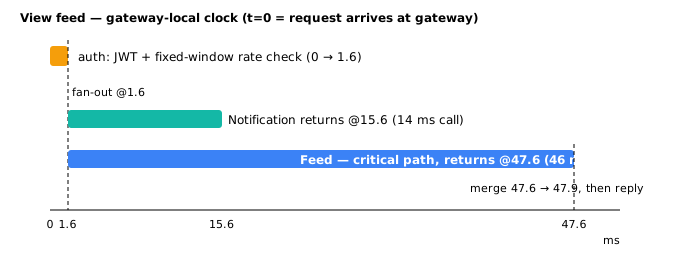
Trace 1 — viewing the feed, measured
All timestamps below are on the gateway-local clock: t=0 is the moment the request lands at the gateway, and the two ~15 ms client↔gateway network legs are accounted separately at the end. (Every figure is one consistent wall-clock-from-t=0, not a mix of durations and absolute times.)
| t (ms) | Event |
|---|---|
| 0.0 | Request received at gateway |
| 0.0 → 1.6 | Authenticate: validate JWT + fixed-window rate check (Redis INCR + TTL) |
| 1.6 | Fan-out: parallel calls to Feed and Notification |
| 15.6 | Notification returns (14 ms call: 1.6 + 14) |
| 47.6 | Feed returns (46 ms call: 1.6 + 46) — the critical path |
| 47.6 → 47.9 | Aggregate / merge both responses (0.3 ms) |
| 47.9 | Consolidated response leaves the gateway |
Feed dominates: because the two calls run in parallel, total downstream time is max(14, 46) = 46 ms, not their sum. Add the two ~15 ms network legs and the client perceives ≈ 15 + 47.9 + 15 = 78 ms.
That rate check is a fixed-window counter — not a token bucket
It's tempting to call INCR + TTL a "token bucket," but it isn't. What actually happens: INCR a key like rl:{user}:{window} and set a TTL equal to the window length; reject once the counter passes the limit. That is a fixed-window counter. It's cheap (one round trip) but has two well-known quirks:
- Hard reset at each window boundary — the count snaps back to zero.
- Boundary bursts — a client can spend its full quota in the last instant of one window and again in the first instant of the next, briefly pushing up to ~2× the limit.
A true token bucket is a different algorithm. It stores a token count plus a refill rate and a last-refill timestamp (typically a Redis Lua script, or a GCRA implementation), refills tokens steadily over time, and allows bursts only up to the bucket's capacity while enforcing a smooth long-run rate. So: same goal, different burst semantics — don't label INCR+TTL a token bucket in a design doc.
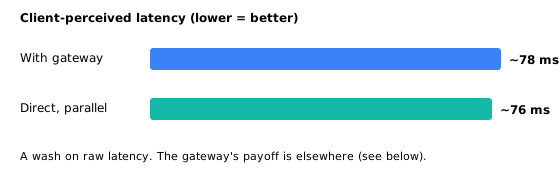
Does the gateway make it faster? Be honest.
An earlier draft of this page sold a ~2× latency win ("~120 ms without gateway vs ~61 ms with"). Both numbers were misleading, so here is the corrected accounting.
With gateway (client-perceived): 15 ms out + 1.6 ms auth + 46 ms parallel wait (Feed dominates) + 0.3 ms merge + 15 ms back ≈ 78 ms. The old "~61 ms" counted only the return leg (46.3 gateway-clock + 15 ms) and silently dropped the outbound client→gateway hop — that was wrong.
Without gateway, done right: a client can fire the Feed and Notification calls itself, in parallel. Perceived time is then max(Feed round trip, Notif round trip) = max(76, 44) = 76 ms. The "120 ms" baseline assumed the client made the two calls sequentially — a strawman; nothing forces a client to serialize independent calls.
So on raw latency it's ~78 ms with the gateway vs ~76 ms without — effectively a tie. The gateway does not cut latency here. Its real, defensible wins are:
- Auth once, at the edge — not re-validated by every service the client would otherwise call directly.
- One round trip / one TLS handshake from the client, instead of N connections to N services.
- A thin client — the app doesn't orchestrate the fan-out or merge; the gateway does.
- Hidden internal topology — services can move, split, or be renamed without breaking clients.
- Centralized rate limiting, logging, and monitoring — one enforcement and observability point.
Pitch the gateway on coupling, security surface, and operability — not on a latency number it doesn't actually deliver.
Failure modes: the gateway is a new SPOF
Centralizing everything in one place buys consistency, but it also creates a single choke point. If the gateway goes down, every client call fails, even though the microservices behind it are healthy. You must run gateway instances behind their own load balancer with health checks, auto-scaling, and graceful failover — never a single gateway process.
The gateway also concentrates risk in subtler ways:
- Mis-routing or mis-configuration — a bad route rule can send traffic to the wrong service or into a black hole. Deploy gateway config with the same canary discipline you use for services: validate rules, shadow-test changes, and keep a fast rollback.
- Rate-limit false positives — a mis-tuned limit rejects legitimate traffic. Expose per-client, per-route rejection metrics and alert when rejections spike.
- Downstream amplification — fan-out means one client request becomes many internal calls. If a downstream service is slow, the gateway can exhaust its own connection pool and cascade. Protect each outbound route with timeouts, circuit breakers, and bounded retries (see the resilience pages).
- Auth at the edge — if the JWT validation path is slow or the signing key rotation breaks, every request is rejected. Monitor auth latency and error rate separately from business traffic.
On-call signal: alert on gateway p99 latency, 5xx rate, connection-pool saturation, and the percentage of requests rejected by rate limiting. A gateway problem usually shows up as all routes degrading at once — that pattern is your cue to look at the edge, not the services.
Where this goes next: BFF
One gateway serving every client eventually strains: the web app wants 25 fields per feed item for a wide desktop layout, while the mobile app wants a trimmed 6 and can't afford the extra bytes on a cellular link. A single shared aggregation endpoint is forced to over-serve one client or under-serve another. The Backend for Frontend (BFF) pattern answers this by giving each client type its own tailored gateway — that is the subject of the next lesson.
Hostile design-review table
| Slice | First bottleneck under load | Rejected alternative | Trade-off paid |
|---|---|---|---|
| Home feed aggregation | Feed service p99 (critical path of fan-out); gateway pool if Feed hangs without timeout | Client calls Feed + Notification directly with no edge policy | Gateway SPOF + ops; ~latency wash vs smart client |
| Photo upload | Upload bandwidth / processing queue — not the gateway | Expose Photo service on the public internet | Larger attack surface without edge auth/rate limit |
| Edge rate limit | Redis for fixed-window counters; false rejects if mis-tuned | Per-service rate limits only | Central policy vs multi-layer complexity |
| Partial fan-out failure | Notification down while Feed OK | Fail entire home screen if any child fails | Prefer partial response + degraded UI; document timeouts per leg |
When NOT to put a gateway in the path: internal service-to-service mesh traffic that already has mTLS and policy; a single public service with one client; latency-critical paths where the extra hop and ops tax dominate the coupling win. Prefer BFF when client shapes diverge, not a mega-gateway that encodes every screen forever.
Drill ladder
- Q: Fan-out to Feed (46 ms) and Notification (14 ms) in parallel — total downstream wait? A: max = 46 ms, not 60 ms.
- Q: Defend gateway without claiming 2× latency. A: Auth once, one TLS session, thin client, topology hiding, central rate limit/observability.
- Q: Notification times out at 50 ms budget; Feed returns. Correct UX? A: Return feed with empty/partial notifications — do not fail the whole request unless product requires both.
- Q: All routes 5xx at once — where first? A: Edge/gateway (auth, config, pool), not a single backend.
Source
Adapted from the API Gateway and Backend-for-Frontend patterns as described by Chris Richardson (microservices.io, Microservices Patterns, Manning). Rate-limiting specifics — fixed-window counters vs. token bucket and GCRA — follow standard references from the Redis rate-limiting documentation and Stripe's engineering write-ups on rate limiters. Latency figures are illustrative and internally consistent, not measured from production Instagram.
🤖 Don't fully get this? Learn it with Claude
Stuck on System Design Example? Open Claude, copy a block below, and it'll teach you this exact concept — visually and interactively.
Build the mental picture, not memorization.
I just read a lesson on **System Design Example** (System Design) and want to truly understand it. Explain System Design Example from first principles using ONE vivid real-world analogy and a visual mental model — draw it as ASCII art or a clear step-by-step diagram — with a concrete example using real numbers. Then ask me one question to check I got the mental picture, and wait for my reply. If you're unsure or a claim isn't standard, say so and reason from first principles instead of guessing.
Socratic — adapts to where you're stuck.
Teach me **System Design Example** interactively. Ask me ONE guiding question at a time, wait for my answer, and adapt to my confusion — build the idea with me step by step instead of explaining it all at once. If you're unsure or a claim isn't standard, say so and reason from first principles instead of guessing.
Active recall exposes what you missed.
Quiz me on **System Design Example** with 5 questions, easy to tricky, ONE at a time. Tell me if each answer is right; at the end, explain clearly what I got wrong and why. If you're unsure or a claim isn't standard, say so and reason from first principles instead of guessing.
Intuition + hook + flashcards for long-term memory.
Help me remember **System Design Example** for the long term: give the one-sentence intuition, a memorable hook/mnemonic, a tiny worked example, and 3 active-recall flashcards (Q -> A). If you're unsure or a claim isn't standard, say so and reason from first principles instead of guessing.