The Problem Traditional Backend Models
A traditional backend exposes one general-purpose API that returns the same response shape to every client, so the payload is inevitably sized for the most demanding consumer — and every leaner client (mobile, watch, TV) then pays to download, decompress, and parse fields it will never render. The Backends-for-Frontends (BFF) pattern exists to break that coupling; to see why it is worth the extra moving parts, you first have to see the cost of the one-size-fits-all API concretely, in bytes and milliseconds.
The mechanism: one contract, many clients
When a single API serves desktop web, an iOS app, and a smart-TV app, its response schema is a union of everything any client might need. A change to satisfy one client (add a field) enlarges the payload for all of them; a change to shrink it for mobile risks breaking desktop. The backend cannot specialise because it has no idea who is calling — it only knows the endpoint. The result is a payload optimised for nobody: too fat for mobile, and often still requiring extra round-trips for desktop.
Worked example: over-fetching, field by field
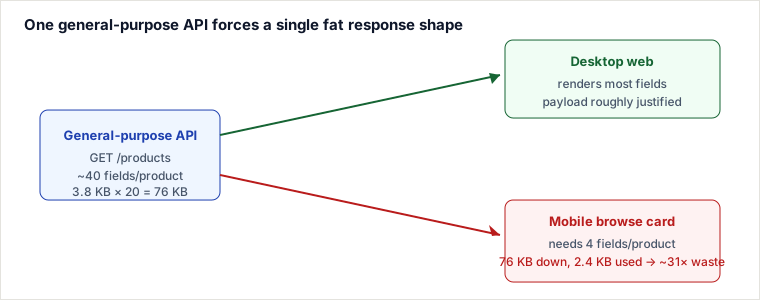
Take an e-commerce catalogue. The mobile browse screen shows a grid of cards; each card renders exactly four fields. The same GET /products endpoint that feeds the rich desktop product page also feeds this grid, so mobile receives the full object:
// what the API returns per product (~3,800 bytes)
{
  "id": 84213, "sku": "HM-AERON-B-GR",
  "name": "Aeron Ergonomic Office Chair",
  "description": "620-char marketing copy...",
  "price": 1395.00, "listPrice": 1595.00, "currency": "USD",
  "thumbnailUrl": "https://cdn.shop.com/p/84213/t.webp",
  "images": [ /* 8 full-res URLs, ~480 B */ ],
  "specs": { /* 12 attributes, ~700 B */ },
  "rating": { "avg":4.7, "count":2831, "latest":[ /*3 reviews, ~900 B*/ ] },
  "inventory": { "warehouses":[ /* ~400 B */ ] },
  "seo": { /* title, metaDescription, canonical, ~300 B */ }
}

// what the mobile card actually uses (~120 bytes)
{ "id":84213, "name":"Aeron Ergonomic Office Chair",
"thumbnailUrl":"https://cdn.shop.com/p/84213/t.webp", "price":1395.00 }| Metric | One-size-fits-all API | What the mobile card needs |
|---|---|---|
| Fields per product | ~40 | 4 |
| Bytes per product | ~3,800 | ~120 |
| 20-product page (raw) | 76 KB | 2.4 KB |
| After gzip | ~19 KB | ~0.9 KB |
| Transfer on slow 3G (~50 KB/s) | ~1.5 s | ~0.05 s |
| Over-fetch ratio | — | ~31× raw, ~21× gzipped |
Note the compression ratios differ: the fat payload compresses ~75% because repeated keys and prose are highly redundant, while the tiny 2.4 KB payload only compresses ~60% — gzip's dictionary and framing overhead are proportionally larger on small bodies. Compression narrows the gap (~31× → ~21×) but never closes it.
The bytes on the wire are only half the cost. The mobile JS engine must still JSON.parse all 20 fat objects — allocating strings for every description, specs, and embedded review it immediately throws away. That deserialisation burns CPU on a battery-powered device and creates garbage-collection pressure that shows up as scroll jank, even though the visible result is four fields per card.
The flip side: chattiness and under-fetching
The same rigid contract that over-serves mobile often under-serves rich screens. A desktop product page that needs the product plus its seller profile plus shipping estimates must call /products/84213, then /sellers/91, then /shipping?zip=… — three sequential round-trips, each paying full latency, because no single endpoint composes exactly that view. So one general-purpose API manages to be simultaneously too fat (mobile) and too chatty (desktop): it is tuned to the endpoint, never to the screen.
Codebase and scaling coupling
Because all client logic lives in one service, client-specific concerns tangle together: a payload tweak for the iOS 3.2 release sits in the same handler as desktop pagination. And you scale at the wrong granularity — a mobile push notification spiking the browse endpoint forces you to scale the entire monolith, including the desktop-only checkout and admin paths that were perfectly healthy.
Pitfalls
- "Gzip makes over-fetching free." Compression shrinks the wire cost but not the parse/allocate cost on the client, and highly-repetitive fat objects still leave a ~21× gap. It hides the problem in your Chrome DevTools on desktop, not on a mid-range Android phone.
- Optional-field creep. Teams paper over the union-schema problem with
?include=reviews,specsflags. Every client passes a different combination, the endpoint's response type becomes untestable, and caching fragments across query-string permutations. - Versioning to specialise. Spinning up
/v2/productsfor mobile duplicates business logic across versions; the two drift, and a pricing bug gets fixed in one but not the other. - Measuring the wrong percentile. Median payload looks fine; the p95 user on a congested cell network is the one abandoning the app. Over-fetch damage lives in the tail.
- Embedded aggregates that explode. Convenience fields like embedded
latest reviewsorwarehousesturn a list endpoint into an accidental fan-out query on the backend — the payload bloat has a matching database cost.
Fixing it: BFF vs the named alternatives
The over-fetching/chattiness problem has several standard cures. They are not interchangeable — each trades a different cost.
| Approach | How it trims the payload | You gain | It costs |
|---|---|---|---|
| BFF (one backend per client type) | Server tailors the exact response shape and composes multiple downstream calls per screen | Optimal payload & one round-trip per view; client teams own their contract; independent scaling | N extra deployables to build, secure, and operate; logic can duplicate across BFFs |
| GraphQL | Client declares the fields it wants; server returns exactly that tree | No new backend per client; solves over- and under-fetching in one round-trip | Query-cost/complexity control, caching (no simple URL cache), and N+1 resolver traps become your problem |
Sparse fieldsets (REST ?fields=id,name,price, JSON:API) | Client whitelists fields on the existing endpoint | Cheapest change — no new service, no new query language | Only kills over-fetching, not chattiness; cache keys fragment per field combo; server still composes nothing |
How a senior engineer decides
- Choose sparse fieldsets when the shapes differ only by which fields, clients are few, and you want the smallest possible change to an existing REST API.
- Prefer GraphQL when many clients want wildly different, deeply nested slices of the same graph and you can invest in query-cost limits, persisted queries, and dataloaders. It shifts shaping to the client.
- Choose a BFF when each client type has a stable, distinct experience, needs server-side composition/orchestration of several services per screen, and you want each client team to own and deploy its edge independently. It shifts shaping to a client-specific server. BFF and GraphQL also compose — a common real-world shape is a GraphQL server acting as the mobile BFF.
Takeaways
- A single general-purpose API is tuned to the endpoint, never to the screen, so it over-serves lean clients and under-serves rich ones at the same time.
- Over-fetching costs bytes and client CPU/GC — measure both, and measure them at p95 on a real mid-range device, not on your desktop.
- Sparse fieldsets, GraphQL, and BFF are the three standard cures; pick by who should own the response shape — the endpoint, the client query, or a client-specific server.
- Reach for a BFF when experiences are distinct and need server-side composition; reach for GraphQL when clients need arbitrary, varied slices of one graph.
Re-authored and deepened for this guide. Sources: Phil Calçado, "The Back-end for Front-end Pattern (BFF)"; Sam Newman, Building Microservices (2nd ed.), ch. on API gateways & BFF; the Netflix API re-architecture write-ups (Daniel Jacobson) on device-specific APIs; the GraphQL specification (over/under-fetching motivation); and the JSON:API specification on sparse fieldsets. Byte and latency figures are illustrative estimates for a representative catalogue payload.
🤖 Don't fully get this? Learn it with Claude
Stuck on The Problem Traditional Backend Models? Open Claude, copy a block below, and it'll teach you this exact concept — visually and interactively.
Build the mental picture, not memorization.
I just read a lesson on **The Problem Traditional Backend Models** (System Design) and want to truly understand it. Explain The Problem Traditional Backend Models from first principles using ONE vivid real-world analogy and a visual mental model — draw it as ASCII art or a clear step-by-step diagram — with a concrete example using real numbers. Then ask me one question to check I got the mental picture, and wait for my reply. If you're unsure or a claim isn't standard, say so and reason from first principles instead of guessing.
Socratic — adapts to where you're stuck.
Teach me **The Problem Traditional Backend Models** interactively. Ask me ONE guiding question at a time, wait for my answer, and adapt to my confusion — build the idea with me step by step instead of explaining it all at once. If you're unsure or a claim isn't standard, say so and reason from first principles instead of guessing.
Active recall exposes what you missed.
Quiz me on **The Problem Traditional Backend Models** with 5 questions, easy to tricky, ONE at a time. Tell me if each answer is right; at the end, explain clearly what I got wrong and why. If you're unsure or a claim isn't standard, say so and reason from first principles instead of guessing.
Intuition + hook + flashcards for long-term memory.
Help me remember **The Problem Traditional Backend Models** for the long term: give the one-sentence intuition, a memorable hook/mnemonic, a tiny worked example, and 3 active-recall flashcards (Q -> A). If you're unsure or a claim isn't standard, say so and reason from first principles instead of guessing.