What Is Negative Caching and When Should You Cache 404 or Empty Results
Negative caching works by storing the outcome of a failed lookup — a 404, a 410, or an empty result set — under the same key you would use for a hit, so the next identical request is answered from memory in microseconds and the origin is never touched until a short TTL expires or a write event evicts the entry.
Ordinary caching only remembers successes, so every request for something that does not exist is a guaranteed cache miss that falls through to the database or upstream service. If a missing key is requested repeatedly — a deleted URL that crawlers keep hitting, a user ID that a retry loop keeps polling — that stream of misses lands on your most expensive tier over and over. Negative caching turns "there is nothing here" into a first-class cached value, converting those repeated misses into cheap hits.
The mechanism, step by step
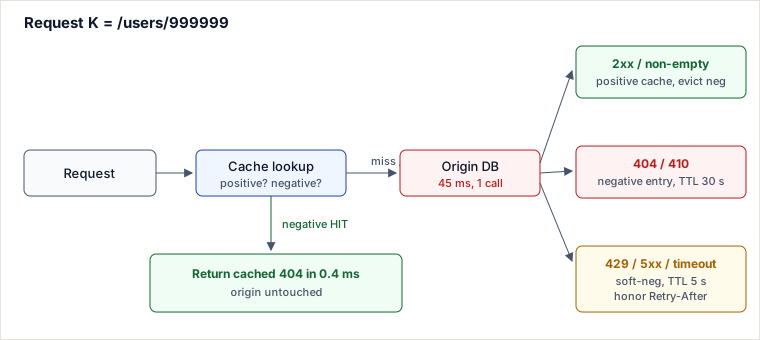
On every request for key K, the cache is consulted for either a positive or a negative entry. A live negative entry short-circuits the whole request; otherwise the origin is called once and its answer is classified before being written back:
- Look up
Kin the cache (one keyspace holds both positive and negative entries). - Live negative hit → return the cached failure immediately; origin is not called.
- Miss or expired → call the origin exactly once.
- Classify the result and write it back: a success becomes a positive entry (and evicts any negative one); a permanent absence becomes a negative entry with a short TTL; a temporary error becomes an even shorter-lived soft negative that honors
Retry-After. - On a later create/update that makes
Kvalid, actively evict the negative entry rather than waiting for its TTL.
A worked trace with real values
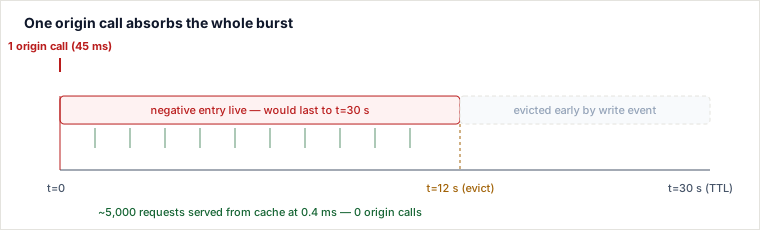
Suppose a retry loop and a swarm of crawlers all hammer GET /users/999999, a record that does not exist. The origin lookup costs 45 ms; a cache hit costs 0.4 ms; the negative TTL is 30 s. At t = 12 s an admin actually creates that user, which fires an eviction. Here is what the cache and origin see:
| Time | Event | Cache state for K | Origin call? | Latency |
|---|---|---|---|---|
| 0.000 s | 1st request | empty → miss | yes (returns 404) | 45 ms |
| 0.000 s | classify 404 | write NEG, TTL 30 s | — | — |
| 0.02–11.9 s | ~5,000 more requests | NEG live → hit | no (all 5,000) | 0.4 ms each |
| 12.000 s | admin creates user 999999 | active evict of NEG | — | — |
| 12.05 s | next request | empty → miss | yes (returns 200) | 45 ms |
| 12.05 s | classify 200 | write POS | — | — |
Without negative caching those ~5,000 requests are 5,000 origin calls at 45 ms each — about 225 seconds of database time spent proving the same thing 5,000 times. With it, the origin is touched twice: once to learn the 404 and once to learn the row now exists. The eviction at t = 12 s is what keeps the answer correct: had you waited for the TTL, users would see "not found" for up to 18 more seconds after the record existed.
Classifying the origin's answer
The single most important design decision is which failures you are allowed to cache and for how long. Conflating a permanent absence with a transient error is how negative caching turns a 30-second blip into a self-inflicted outage.
| Class | Example | Cache it? | Typical TTL | Reason |
|---|---|---|---|---|
| Success | 200, non-empty rows | Positive entry | minutes–hours | The real value; evicts any negative twin. |
| Permanent absence | 404, 410, "no such key" | Negative entry | seconds–minutes | The thing genuinely does not exist yet. |
| Temporary failure | 429, 500, 503, timeout | Soft negative, sparingly | a few seconds, or Retry-After | Acts as a throttle during an incident; must expire fast or you cache your own outage. |
Never cache a plain 500 the way you cache a 404. A 404 means "no data"; a 500 means "I could not tell you right now" — those must be retried, not memorized.
Where this shows up in production
- DNS NXDOMAIN. Resolvers cache "this domain does not exist" per RFC 2308, bounded by the SOA record. Common values are up to 3600 s, but registries deliberately keep it short — often 900 s — so a freshly registered or reinstated domain resolves quickly instead of being invisible for an hour.
- CDN 404s. Google Cloud CDN caches 404 responses for 120 s by default, configurable per status code (e.g. 404 for 60 s, 410 for 120 s). When The Onion enabled 404 caching at the edge, bots hammering dead links stopped reaching the origin: roughly a 66% drop in bandwidth and a 50% drop in web-server load, because more than half their server time had been spent serving 404s to crawlers.
- Empty query results. Facebook's cache library CacheLib caches empty result sets on purpose: not caching them would leave every lookup for absent data as a permanent miss and drag the overall hit ratio down. The expensive part is often proving nothing matches, so the empty answer is worth memorizing.
Pitfalls
- Stale absence after a create. The classic bug: an item is added, but a live negative entry keeps returning 404 until its TTL lapses. Fix it by making the write path evict the negative key (as in the trace at
t = 12 s), not by shortening the TTL to paper over it. - Caching your own outage. Treating a 500/503 like a 404 with a multi-minute TTL means that after the backend recovers, clients keep getting the cached error. Soft negatives must be measured in single-digit seconds and should respect
Retry-After. - Unbounded negative keyspace. An attacker (or a buggy client) enumerating random non-existent IDs can fill your cache with millions of one-shot negative entries, evicting hot positive data. Cap negative-entry memory separately, or gate cache admission behind an existence filter.
- Silent-failure confusion. Ops teams debug a "fixed" system that still returns 404s because nobody documented that negatives are cached or how to purge them. Undocumented negative caching is a hidden anti-pattern.
- Empty vs. error ambiguity. "Zero rows" from a healthy query is cacheable; "zero rows" because the query timed out and returned early is not. If your data layer collapses both into an empty list, you will cache failures as absences.
When to use it, when not to, and against what
Reach for negative caching when the same missing keys are requested repeatedly over time, the origin lookup for a miss is expensive (a deep query, a fan-out to several services, a slow upstream), and a bounded staleness window on "not found" is acceptable. Link rot behind a CDN, absent-user lookups in a microservice mesh, and NXDOMAIN in DNS all fit this shape.
Avoid it (or keep TTLs in the low seconds) when the resource could appear at any moment and clients must see it instantly, or when the "failure" is a transient error rather than a genuine absence.
Trade-offs vs. named alternatives
- Bloom filter (probabilistic existence filter — the next lesson). A Bloom filter answers "is this key definitely absent?" in a few bits per key with no per-key TTL bookkeeping, and it shrugs off keyspace-enumeration attacks that would blow up a negative cache. What it costs: it can only reject misses (it has false positives, never false negatives), it does not store the actual 404 body or headers, and deletions are awkward (you need a counting variant or periodic rebuilds). Choose negative caching when the set of missing keys is modest and you want to return a real cached response fast; prefer a Bloom filter when the keyspace is enormous and you mainly want a cheap, memory-tiny gate that stops non-existent keys before they reach the DB. In practice they compose: the Bloom filter guards admission, the negative cache serves the actual failure.
- Request coalescing / singleflight (positive-only cache). This deduplicates concurrent in-flight misses so N simultaneous requests trigger one origin call, then all share the result. What it costs: it does nothing for requests that arrive after the first one completes — the very next request is a fresh miss again. Choose negative caching when misses are spread across time (crawlers over minutes); prefer singleflight when the danger is a synchronous thundering herd on a single key and you cannot tolerate serving even a briefly stale absence. The two are complementary: singleflight collapses the herd, the negative entry then covers the trailing stream.
Takeaways
- Negative caching stores failures (404/410/empty) under the lookup key so repeated misses become microsecond hits instead of origin calls — most valuable when the same absent key is requested many times and the miss is expensive.
- Classify before you cache: permanent absence gets a short TTL, transient errors get a very short soft-negative TTL and honor
Retry-After, and a plain 500 is retried, not memorized. - Correctness lives on the write path: evict the negative entry when the item is created; do not rely on TTL alone.
- Bound the negative keyspace and document the behavior — an unbounded or invisible negative cache becomes an eviction attack surface and a "why is it still 404?" support nightmare.
L0 · Negative caching stores the outcome of a failed lookup under the same key as a hit, so repeated misses become microsecond cache hits until TTL expiry or write-triggered eviction.
L1 · ① Concurrency — "they ask": "Writer creates the row and fires the eviction. A concurrent reader had already started an origin call that returned 404 before the write. What happens when its classify-and-write-negative step lands after the eviction?"
Trap: "The eviction already ran, so we're fine — TTL is just a backstop."
Bar: A stale-writer race resurrects the negative entry: the reordered write re-inserts NEG after the evict, so the just-created row goes invisible again until TTL. Fix: fence writes with a version/generation check (CAS) so a classify carrying an older version can't overwrite a newer state — evict-on-write alone isn't race-safe. connects-to
L2 · ② Failure — "they ask": "Origin starts throwing 503s under load. Someone caches it exactly like a 404 with the normal 30 s TTL. What breaks?"
Trap: "Good — fewer origin calls means less load while it recovers."
Bar: That extends the outage past recovery: every client keeps getting the cached 503 for the full TTL window even after origin is healthy again. Soft negatives must be a distinct class with a single-digit-second TTL, honoring Retry-After, never the same policy as a permanent-absence 404. connects-to
L3 · ③ Scale — "they ask": "At 100x traffic, a hot missing key's negative entry expires and 10,000 clients land on it within the same 50 ms window. What happens?"
Trap: "It's fine — they're each just a 45 ms origin call."
Bar: That's a stampede: 10,000 simultaneous misses with no cached state all fall through to origin at once. Fix with single-flight/request coalescing — one in-flight origin call per key, everyone else waits on it — which composes with negative caching: singleflight collapses the herd, the negative entry then covers the trailing stream. connects-to
L4 · ④ Time/Lifecycle — "they ask": "You set a flat 30 s TTL fleet-wide and bulk-warm the cache after a deploy. What goes wrong at the boundary?"
Trap: "Flat TTL is simpler to reason about than jittered TTLs."
Bar: A synchronized warm means every negative entry expires at the same instant, producing a periodic stampede every 30 s exactly at the TTL boundary. Fix with TTL jitter (TTL ± random delta) so expirations spread out — same technique as positive-entry TTL jitter — and keep the base TTL short enough that create-after-negative isn't masked for long. connects-to
L5 · ⑤ Adversary/Edge — "they ask": "An attacker enumerates /users/1 through /users/2^31, all non-existent. What happens to your cache?"
Trap: "More cached negatives just means more cheap hits — negative caching is inherently safe here."
Bar: It's a keyspace-enumeration attack: millions of one-shot negative entries evict hot positive data (an eviction-based DoS) while the origin still absorbs one real call per unique fake key. Fix by capping negative-entry memory in its own pool, or gating admission behind a Bloom filter so only keys the filter says "maybe exists" get a negative-cache slot. connects-to
The floor keeps dropping: staff+ perturbation beyond L5 — origin is multi-region with replica lag: us-east's read returns 404 and caches NEG while the create has already landed and is visible in us-west. Do you cache negatives per-region, and what reconciles the two answers before a client bounces between regions and sees the record flicker in and out of existence?
Self-locate: died at L1 → mid-level; L4+ → staff signal.
Facing any new concept? Hit it with the six: concurrent? failing? at 100×? over time? adversarial? worth the cost? — that's the interviewer's whole playbook.
Re-authored and deepened for this guide. Sources: RFC 2308 (Negative Caching of DNS Queries) for NXDOMAIN TTL semantics; Google Cloud CDN documentation on negative caching defaults (120 s for 404) and per-status TTL policies; Facebook's CacheLib engineering writeups on caching empty query results to protect hit ratio; the widely cited The Onion case study on edge-caching 404s (~66% bandwidth and ~50% server-load reduction); and DesignGurus system-design notes on caching and cache-invalidation strategies. Worked-example figures are illustrative.
🤖 Don't fully get this? Learn it with Claude
Stuck on What Is Negative Caching and When Should You Cache 404 or Empty Results? Open Claude, copy a block below, and it'll teach you this exact concept — visually and interactively.
Build the mental picture, not memorization.
I just read a lesson on **What Is Negative Caching and When Should You Cache 404 or Empty Results** (System Design) and want to truly understand it. Explain What Is Negative Caching and When Should You Cache 404 or Empty Results from first principles using ONE vivid real-world analogy and a visual mental model — draw it as ASCII art or a clear step-by-step diagram — with a concrete example using real numbers. Then ask me one question to check I got the mental picture, and wait for my reply. If you're unsure or a claim isn't standard, say so and reason from first principles instead of guessing.
Socratic — adapts to where you're stuck.
Teach me **What Is Negative Caching and When Should You Cache 404 or Empty Results** interactively. Ask me ONE guiding question at a time, wait for my answer, and adapt to my confusion — build the idea with me step by step instead of explaining it all at once. If you're unsure or a claim isn't standard, say so and reason from first principles instead of guessing.
Active recall exposes what you missed.
Quiz me on **What Is Negative Caching and When Should You Cache 404 or Empty Results** with 5 questions, easy to tricky, ONE at a time. Tell me if each answer is right; at the end, explain clearly what I got wrong and why. If you're unsure or a claim isn't standard, say so and reason from first principles instead of guessing.
Intuition + hook + flashcards for long-term memory.
Help me remember **What Is Negative Caching and When Should You Cache 404 or Empty Results** for the long term: give the one-sentence intuition, a memorable hook/mnemonic, a tiny worked example, and 3 active-recall flashcards (Q -> A). If you're unsure or a claim isn't standard, say so and reason from first principles instead of guessing.