How Can a Bloom Filter Reduce Cache or Database Load
A Bloom filter replaces the expensive question "is key K in this set?" with a cheap one answered entirely in memory: it hashes K with k independent functions into positions in a bit array, and if any of those bits is 0 the key was provably never inserted (every insert would have set all k bits), so the caller can skip the cache or disk read that a real lookup would cost. Because bits are shared across keys it can only ever answer "definitely absent" or "probably present" — there are no false negatives, only tunable false positives — and that asymmetry is exactly what lets it shield a slow backing store from the flood of requests for things that do not exist.
The three operations
- Build. Allocate m bits, all 0, and pick k hash functions (in practice two hashes combined as
h_i = h1 + i*h2 mod m— Kirsch–Mitzenmacher double hashing — is enough). - Insert(K). Compute the k positions and set those bits to 1. Bits are never cleared, so inserts commute and are idempotent.
- Query(K). Compute the same k positions. If any bit is 0 → absent (skip the backend). If all are 1 → maybe (fall through to the real lookup).
Query and insert are O(k) — a fixed handful of hash-and-bit operations that does not grow with the number of stored keys, so it is O(1) for any fixed target error rate.
A traced example (m=16, k=3)
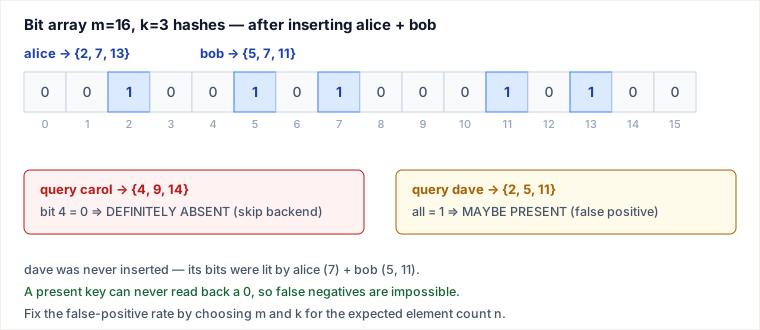
Take a 16-bit array and three hash functions. We insert two keys, then run two queries — one that is correctly rejected and one that is a false positive, so you can see the mechanism actually fail.
| Step | Key | Hash positions | Effect on bit array |
|---|---|---|---|
| insert | alice | 2, 7, 13 | set bits 2, 7, 13 → 1 |
| insert | bob | 5, 7, 11 | set bits 5, 11 → 1 (bit 7 already 1) |
| Array is now 1 at positions {2, 5, 7, 11, 13}, 0 everywhere else. | |||
| query | carol | 4, 9, 14 | bit 4 = 0 → DEFINITELY ABSENT — no backend call |
| query | dave | 2, 5, 11 | all three = 1 → MAYBE PRESENT |
dave was never inserted, yet its three positions were coincidentally lit by alice and bob. That is a false positive: the filter says "maybe", we pay for one real lookup, the backend returns "not found", and the answer is still correct — we just did not save work that time. There is no arrangement of inserts that could make a present key answer "absent", which is why false negatives are impossible.
Sizing: the one formula worth memorizing
For a filter holding n elements in m bits with k hashes, the false-positive probability is p ≈ (1 − e^(−kn/m))^k. Minimizing it gives the two design equations engineers actually use:
- Optimal hash count:
k = (m/n) · ln 2. - Bits per element for a target p:
m/n = −ln(p) / (ln 2)² ≈ 1.44 · log₂(1/p).
Plug in p = 0.01: m/n = 4.605 / 0.4805 ≈ 9.6 bits/element and k ≈ 9.6 × 0.693 ≈ 6.6 → 7. So 100 million valid keys need only ~115 MB and 7 hash probes to reject 99% of bogus lookups — versus tens of gigabytes to hold the keys themselves. Halving p costs only ~1.44 extra bits per element, so 0.1% is ~14.4 bits, 0.01% is ~19.2 bits: error shrinks geometrically for linear memory.
Where it actually cuts load
- Cache-penetration gatekeeper. Put a filter of all valid keys in front of the cache. A request for a non-existent id (typo, scraper, or attacker spraying random ids) is rejected in memory before it can fall through cache → database as a "miss storm". The DB only sees ids that plausibly exist.
- One-hit-wonder suppression (Akamai). CDNs found ~75% of objects are requested exactly once. By recording a URL in a Bloom filter on first sight and caching only on the second request, Akamai cut cache disk writes by roughly half and freed space for content that gets reused.
- LSM-tree SSTable skipping. Google Bigtable, Apache Cassandra, ScyllaDB, and Apache HBase attach a Bloom filter to each on-disk SSTable so a read for an absent key skips disk seeks into files that cannot contain it — the single biggest read-path win for point lookups on missing keys. (PostgreSQL does not use SSTable-style internal filters; it offers Bloom only as an optional
bloomindex access-method extension you must explicitly create.)
Pitfalls
- Undersizing silently degrades to useless. The FPP formula assumes you sized m for the real n. Insert 5× the planned elements and the array saturates toward all-1s; the filter answers "maybe" for almost everything and stops filtering — while still costing you a lookup on every query. Always size for peak n, and monitor the fill ratio.
- Standard filters cannot delete. Clearing a bit on delete would corrupt every other key that shares it (re-introducing false negatives). If the valid-key set shrinks — orders cancelled, users deleted — a plain Bloom filter goes stale. You must periodically rebuild it, or use a counting Bloom filter (4× space) / cuckoo filter that supports deletion.
- Staleness on a growing set. A new signup's key isn't in the filter until the next rebuild, so a legitimate request is wrongly rejected — a real false negative at the system level even though the structure itself has none. Add new keys to a live filter immediately (inserts are safe); only deletions force a rebuild.
- Weak or correlated hashes wreck the math. The FPP assumes independent, uniform hashes. Using one hash and shifting, or a hash with poor avalanche on structured keys (sequential ids), clusters bits and inflates false positives far above the formula. Use double hashing over a strong hash (e.g. MurmurHash/xxHash).
- You still need the real lookup on a positive. "Maybe" is not "yes." Code paths that treat a Bloom hit as membership will serve wrong data. The filter only lets you skip work on a negative.
- Concurrency & distribution. A shared mutable bit array needs atomic OR on inserts under concurrency; and a per-shard filter shipped to clients is a snapshot — it drifts from the shard's true contents between refreshes.
When to use it — and when not to
Reach for a Bloom filter when membership is the bottleneck and negatives dominate: the underlying lookup is expensive (disk seek, network hop, cold cache), a large fraction of queries are for keys that don't exist, the exact key set is too big to hold in RAM, and a rare unnecessary lookup is harmless. The classic signal is a "does this exist?" check guarding a slow store under adversarial or long-tail traffic.
Trade-offs vs named alternatives:
- vs. an exact hash set / hash index. A hash set gives zero false positives and supports deletion and iteration, but stores full keys — often 10–50× the memory. Choose the Bloom filter when the set is huge and you can absorb a secondary check; prefer an exact set when the set fits in memory cheaply, false positives are unacceptable (auth, billing, correctness-critical), or you must enumerate/delete keys freely.
- vs. a Cuckoo filter. Cuckoo filters support deletion and counting, have better cache locality (one or two buckets per lookup vs. k scattered probes), and are slightly more space-efficient below ~1% FPP. The cost: inserts can fail once the table nears its load factor (~95%), forcing a resize, and the implementation is more complex. Choose Bloom when the set is append-mostly and you want dead-simple, resize-free inserts; prefer Cuckoo when you need deletions or a bounded, count-aware structure.
- vs. a Counting Bloom filter. Adds deletion by replacing bits with small counters, at ~4× the memory. Use it only when you genuinely need removals and cuckoo's insert-failure semantics don't fit.
- vs. no filter at all. If your data set is small, memory is plentiful, or nearly every query is a hit (few negatives to reject), the filter is pure overhead and indirection — skip it.
Crisp rule: choose a Bloom filter to cheaply reject the impossible before touching a slow store; prefer an exact set when it fits in memory or correctness forbids false positives, and a cuckoo/counting filter when you must delete.
Takeaways
- The whole value is the asymmetry: "absent" is certain, "present" is a maybe — so it can safely eliminate backend work on negatives but never confirm a positive.
- Sizing is a one-liner: ~9.6 bits/element per 1% FPP, and each further ~1.44 bits per element roughly halves the error — cheap accuracy, but only if you size for the real n.
- Its two structural limits — no deletion and degradation when saturated — drive the alternative choice: cuckoo/counting filters for deletes, rebuilds for shrinking sets.
- In production it lives on the hot path as an SSTable gate (Cassandra/HBase/Bigtable), a cache-penetration shield, and a one-hit-wonder suppressor — always as a fast "don't bother" in front of something slow.
L0 · a bit can only tell you "definitely absent" or "maybe present" — never "definitely present"
L1 · ⑤ Adversary/Edge — "an attacker sprays random non-existent ids at your API; the filter returns a hit on one — now what?"
Trap: "A Bloom hit means the key exists, so skip the real lookup."
Bar: a 0 bit is proof of absence (every insert would have set all k bits, so a 0 could never have been inserted), but a hit is only "maybe" — shared bits let unrelated keys light up the same positions, so the real lookup still runs; the filter only removes work on the negative side, which is exactly what defeats a cache-penetration flood of made-up ids. connects-to: negative caching
L2 · ④ Time/Lifecycle — "six months in, the key set grew 5× past what you sized for — still trust the 1% number?"
Trap: "Just keep inserting; we never remove keys, so the false-positive rate can't get worse."
Bar: m/n was fixed for the n you sized at, so overshooting it pushes real load-factor up and the measured FP rate climbs toward the array saturating all-1s; there is no "top up," you must resize or rebuild for the new n and monitor fill ratio as a leading indicator. connects-to: benefits & limitations
L3 · ① Concurrency — "many app threads insert into the same shared bit array — do you need a lock?"
Trap: "Bits only ever flip 0→1, so unsynchronized writes are safe."
Bar: setting a bit is a read-modify-write on the underlying word (byte/uint64), so two threads flipping different bits in the same word can race and one update gets lost without an atomic OR/CAS per word; queries stay lock-free since a stale 1 is still a correct "maybe," only writes need the atomic op. connects-to: sizing, concurrency & adversarial FPR
L4 · ③ Scale — "this filter now gates 10,000 LSM SSTables on one node — is per-file p=1% still fine?"
Trap: "1% per file is fine no matter how many files back a key's range."
Bar: a negative read that touches s candidate files pays roughly 1−(1−p)^s chance of an unnecessary seek, so thousands of files at 1% each turn "rare" false positives into "almost every query eats one"; compaction/leveling must bound how many files a key can land in, and per-file p has to shrink as the file count grows. connects-to: B-tree vs LSM-tree storage engines
L5 · ⑥ Cost/Simplicity — "keys get deleted now — just clear their bits on delete?"
Trap: "Insert set the bits, so delete just unsets the same ones."
Bar: bits are shared across many keys, so clearing one key's bit can flip a bit a still-live key depends on — a real false negative, not just noise; a plain Bloom filter cannot delete, so use a counting Bloom filter (~4× space, per-bit counters), a periodic full rebuild, or switch to a cuckoo filter for true O(1) deletion at some added implementation cost. connects-to: variants & extensions (counting, cuckoo)
The floor keeps dropping: staff+ perturbation beyond L5 — "the attacker knows your hash functions and crafts inputs that all land on the same k bits" — an unkeyed or weak hash turns the filter's uniform-random assumption into an algorithmic-complexity attack that forces near-100% false positives on demand; the fix is a keyed/seeded hash (e.g. SipHash) the attacker can't predict.
Self-locate: died at L1 → mid-level; L4+ → staff signal.
Facing any new concept? Hit it with the six: concurrent? failing? at 100×? over time? adversarial? worth the cost? — that's the interviewer's whole playbook.
Re-authored and deepened for this guide. Sources: Burton H. Bloom, "Space/Time Trade-offs in Hash Coding with Allowable Errors" (CACM, 1970); Broder & Mitzenmacher, "Network Applications of Bloom Filters: A Survey" (2004); Kirsch & Mitzenmacher, "Less Hashing, Same Performance: Building a Better Bloom Filter" (2006); Fan, Andersen, Kaminsky & Mitzenmacher, "Cuckoo Filter: Practically Better Than Bloom" (CoNEXT 2014); Maggs & Sitaraman, "Algorithmic Nuggets in Content Delivery" (ACM SIGCOMM CCR, 2015) for the Akamai one-hit-wonder result; and the Apache Cassandra, Apache HBase, Google Bigtable, and PostgreSQL (bloom index extension) documentation.
🤖 Don't fully get this? Learn it with Claude
Stuck on How Can a Bloom Filter Reduce Cache or Database Load? Open Claude, copy a block below, and it'll teach you this exact concept — visually and interactively.
Build the mental picture, not memorization.
I just read a lesson on **How Can a Bloom Filter Reduce Cache or Database Load** (System Design) and want to truly understand it. Explain How Can a Bloom Filter Reduce Cache or Database Load from first principles using ONE vivid real-world analogy and a visual mental model — draw it as ASCII art or a clear step-by-step diagram — with a concrete example using real numbers. Then ask me one question to check I got the mental picture, and wait for my reply. If you're unsure or a claim isn't standard, say so and reason from first principles instead of guessing.
Socratic — adapts to where you're stuck.
Teach me **How Can a Bloom Filter Reduce Cache or Database Load** interactively. Ask me ONE guiding question at a time, wait for my answer, and adapt to my confusion — build the idea with me step by step instead of explaining it all at once. If you're unsure or a claim isn't standard, say so and reason from first principles instead of guessing.
Active recall exposes what you missed.
Quiz me on **How Can a Bloom Filter Reduce Cache or Database Load** with 5 questions, easy to tricky, ONE at a time. Tell me if each answer is right; at the end, explain clearly what I got wrong and why. If you're unsure or a claim isn't standard, say so and reason from first principles instead of guessing.
Intuition + hook + flashcards for long-term memory.
Help me remember **How Can a Bloom Filter Reduce Cache or Database Load** for the long term: give the one-sentence intuition, a memorable hook/mnemonic, a tiny worked example, and 3 active-recall flashcards (Q -> A). If you're unsure or a claim isn't standard, say so and reason from first principles instead of guessing.