What Is the Outbox Pattern, and How Does Change Data Capture CDC Work at a High Level
The Outbox pattern is a microservice design strategy that stores events in an “outbox” table within the same database transaction as a business operation to ensure reliable, atomic event publishing, and Change Data Capture (CDC) is a technique that non-intrusively monitors database transaction logs to detect and propagate data changes (inserts, updates, deletes) to other systems or event streams in real time.
Understanding the Outbox Pattern
The Outbox Pattern is used in distributed systems (especially microservices) to solve the dual-write problem, the challenge of updating a database and sending a message or event at the same time.
In a typical scenario, a service might save some data to its database (e.g. a new order record) and also publish an event (e.g. “order placed”) to a message broker.
Doing these two actions separately can lead to inconsistencies if one succeeds and the other fails (for example, the database transaction commits but the event is never sent, or vice versa).
Traditional distributed transactions (like two-phase commit) spanning the DB and message broker are often not available or desirable.
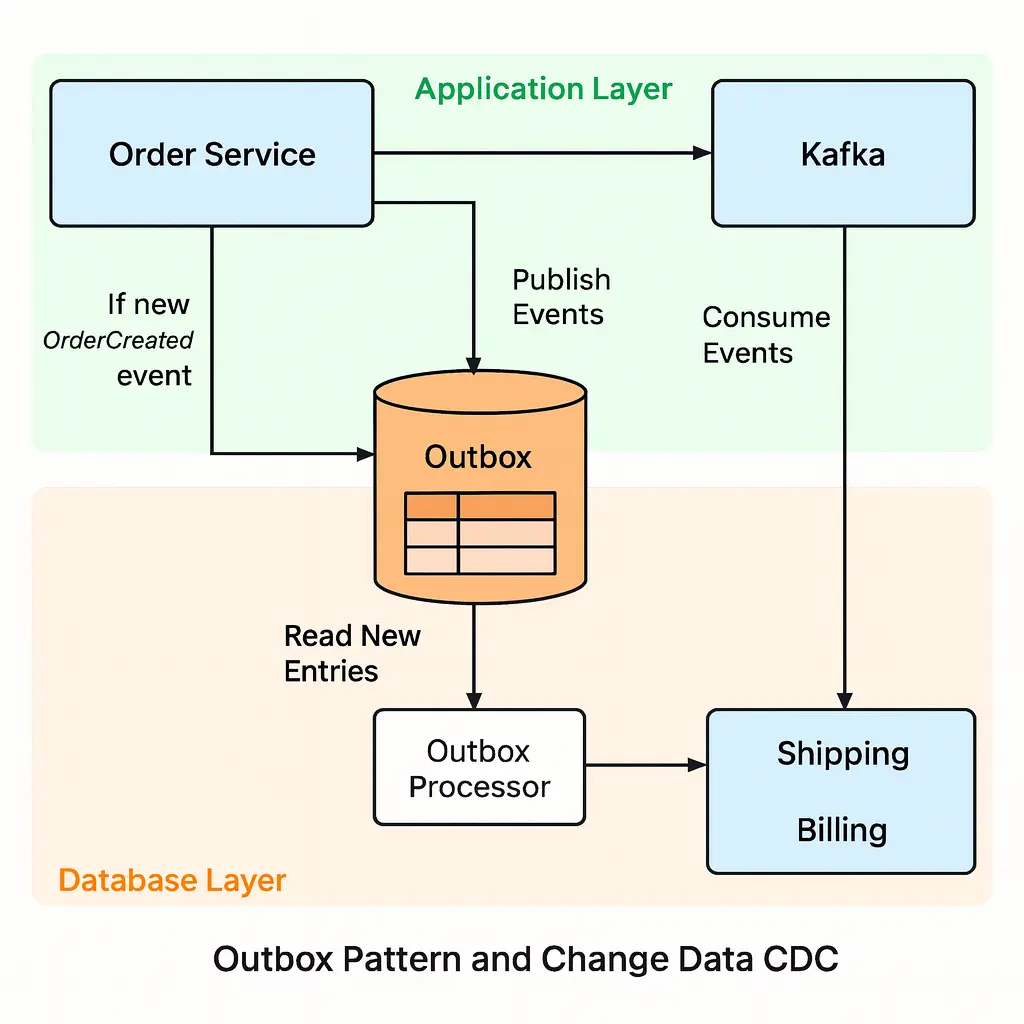
The outbox pattern addresses this by making the message part of the database transaction: the service writes the event to an outbox table in the same commit as the business data, thereby ensuring that either both are persisted or neither is (atomicity).
Once the transaction commits, a separate process (sometimes called an outbox relay or publisher) will read the new entries from the outbox table and publish them to the message broker (e.g. Kafka, RabbitMQ) outside of the main transaction.
This way, the service only had to write to one place (its database) during request processing, and the responsibility of delivering the event is delegated to another component that can retry as needed.
The outbox pattern guarantees that if the database update succeeded, the event is not lost. It’s sitting in the outbox waiting to be delivered. It also preserves event ordering by using the database commit order (events are stored and sent in the same order as the transactions).
Why Is This Important?
The outbox pattern enables reliable, eventually consistent inter-service communication without tight coupling. It ensures that other services can be notified of changes safely and consistently.
For example, consider an e-commerce system: when an Order Service places a new order, it needs to inform the Inventory Service and Shipping Service.
With the outbox approach, the Order Service would save the new order in its database and also record an “OrderPlaced” event in its outbox table. A background outbox publisher then reads this event and publishes it (e.g., to a Kafka topic).
The Inventory and Shipping services, by subscribing to that topic, get the event and can react (reserve stock, schedule shipment, etc.). This happens asynchronously, so the Order Service isn’t held up waiting for the other services, improving resilience and decoupling.
The outbox table also acts as a buffer, if the network or the broker is down, events stay in the DB until they can be delivered, preventing data loss.
Development Context
The outbox pattern is commonly used in microservices architectures that require data consistency between services. It’s particularly useful when you can’t use distributed transactions and want to avoid complex coordination.
By using the outbox, you achieve a form of eventual consistency: all services will eventually see the event after it’s published.
This pattern is seen as a straightforward way to ensure that “if the DB transaction commits, the event will definitely be sent out”.
Many frameworks and platforms support this pattern (for example, the Eventuate or Axon frameworks, or features like NServiceBus Outbox in .NET).
One implementation detail is how the outbox events get published: some systems use a polling publisher (periodically querying the table for new events), while others use transaction log tailing, essentially using CDC on the outbox table itself, to immediately capture new events from the database log.
The latter approach (using CDC under the hood) can be more efficient and ensure ordering, as the CDC tool (e.g. Debezium) reads the commit log for new outbox entries and pushes them to the broker in order.
Potential Drawbacks
Implementing the outbox pattern requires adding extra code or infrastructure to your service. The application must be modified to write to the outbox table, which means more code and maintenance.
There is also a performance cost. Each transaction is a bit heavier because it involves an additional insert into the outbox table.
The outbox relay process needs to be reliable; it should handle retries, avoid losing events, and usually mark events as processed (or delete them) once sent.
If not carefully designed, there’s a risk of sending duplicate messages (for instance, if the relay crashes after sending an event but before marking it sent).
Therefore, consumers of outbox events should be idempotent, i.e. able to handle duplicate events without issues.
Despite these considerations, the outbox pattern is seen as a “must-have” for reliable messaging in many microservice systems because it elegantly sidesteps the need for distributed transactions while keeping data in sync.
How Change Data Capture (CDC) Works
Change Data Capture (CDC) is a set of techniques or technologies for tracking and capturing changes in a database so that they can be used elsewhere.
In simpler terms, CDC lets you listen to your database and get a stream of all the inserts, updates, and deletes as they happen, without the application explicitly emitting events.
At a high level, CDC works by monitoring the database’s transaction log (the log every database maintains of changes) and extracting the committed changes. Those changes are then published as events into a message queue, log, or some downstream system. This approach is non-intrusive: the application making the database changes doesn’t need to be aware of CDC at all.
Typical CDC workflow (log-based CDC, which is the most common modern approach) can be summarized in a few steps:
-
Monitoring: A CDC tool or service attaches to the database’s transaction log and continuously monitors it for new transactions/changes.
-
Capture: When a data change occurs (e.g. a row is inserted, updated, or deleted), the CDC system detects this in the log (often in real time or near-real-time).
-
Transformation: The raw log record is transformed into an event or structured change record. For example, it might produce a JSON message like “Row X was inserted with these values” or “Order #123 status changed from ‘pending’ to ‘shipped’”.
-
Publishing: The change event is then delivered to an external system: often a message broker or streaming platform (like Apache Kafka, Pulsar, or AWS Kinesis), or even directly to another database or service. Consumers can then read these change events and respond accordingly.
Because CDC taps into the transaction log (or equivalent), it captures all changes including those made by other systems or tools (like direct DB scripts),nothing “sneaks past” the log.
Since it operates outside of the application, it doesn’t add load or complexity to the transaction that made the change. The overhead is on the side of reading the log, which is typically quite efficient.
This makes CDC great for scenarios like integrating legacy databases (where you cannot change the application code) into modern streaming systems.
As long as you have access to the DB’s logs or CDC feature, you can hook in a CDC tool without touching the app that uses the database.
A Simple Analogy
CDC is like having a audit clerk or observer attached to your database, who notes down every change in a ledger as they happen, and then passes those notes to others who might need them.
The application itself just does its normal reads/writes to the database; the CDC “observer” will catch those writes and whisper them to interested listeners elsewhere.
In practice, there are a few ways to implement CDC:
-
Log-based CDC (preferred): As described, read the DB’s transaction log (e.g. MySQL binlog, PostgreSQL WAL, MongoDB Oplog). Tools like Debezium, Oracle GoldenGate, SQL Server CDC, and many cloud database replication services use this method. It has minimal impact and can capture changes with low latency.
-
Trigger-based CDC: Define triggers on tables that on every change write to a change table or send a notification. This can capture changes, but it adds overhead to the DB and logic into the DB schema.
-
Polling (timestamp-based) CDC: Periodically query tables for “what changed since last check” (maybe using a last_updated timestamp or a high-water mark). This is simpler but can miss changes between polls or put load on the DB.
Modern systems mostly use log-based CDC because it’s reliable and low-latency. You won’t miss changes because every committed change is in the log, and you get them in the exact order they were committed.
Why Use CDC?
CDC allows you to replicate or stream data changes for a variety of use cases without modifying existing applications.
For example, suppose you have a monolithic application with a database, and you want to build a new microservice that reacts to certain data changes, or you want to maintain a real-time backup / read model / cache / search index.
Instead of modifying the monolith to emit events, you can use CDC to capture changes and forward them to the new system.
Common use cases include: synchronizing a database to a data warehouse or analytics system in real-time (for up-to-date reporting), updating a search index or cache when data changes, building audit logs of all changes, or feeding a stream of events to microservices to build an event-driven architecture out of an existing database.
CDC is a key part of data integration pipelines and event-driven microservices when you want to ensure multiple systems have the latest data without tight coupling.
Example Scenario
Imagine a Customer database where an update to a customer’s address should propagate to several other systems (billing, shipping, marketing analytics).
With CDC, you can capture that update from the DB log and push an “Customer Updated” event to a message broker.
All downstream services interested in customer data can consume that event and update their own stores.
The original application that made the update doesn’t even know this happened, it just updated the DB as usual. Another scenario: you have a legacy order management database and you want to maintain a separate ElasticSearch index for searching orders.
Using CDC (via a tool like Debezium), every new order or order update in the DB can be immediately sent to a Kafka topic, from which a connector or consumer updates the ElasticSearch index. This provides near real-time sync without writing custom data export code.
Considerations
While powerful, CDC comes with its own challenges. It introduces additional moving parts, infrastructure like Kafka, Kafka Connect or other CDC services to deploy and manage.
The CDC process operates asynchronously, which means there is a slight delay between a change in the source database and the event reaching the consumer; this is usually small (milliseconds to seconds) but it means consumers see data in an eventually consistent manner.
Also, CDC events are derived from low-level data changes, which means they might lack business context.
For instance, a CDC event might tell you “field X changed from 0 to 1” but not why it changed or whether that implies a certain business event. The consuming side might need to interpret raw changes and sometimes join with other data to understand the full picture. Despite these issues, CDC is extremely useful for integrating systems and building real-time data pipelines, especially when you can’t alter the original application or when you want a unified stream of changes from across many tables or services.
Check out key design patterns.
Outbox vs. CDC (When to Use Which)
Both the outbox pattern and CDC are mechanisms to reliably propagate data changes to other parts of a system, but they approach the problem from different angles.
They are not mutually exclusive. In fact, they can complement each other, but understanding their differences will help in choosing the right approach for a given context.
-
Intrusiveness and Effort: The outbox pattern requires you to modify the application code and database design (adding an outbox table and logic to write to it) and to deploy a publisher component. CDC, on the other hand, requires no changes to the application’s code or schema (in log-based CDC; in trigger-based CDC you do add triggers). This makes CDC attractive for legacy systems or third-party databases where you cannot easily add new code. If you’re designing a brand-new service though, adding an outbox isn’t too hard and gives you more control over the content of events.
-
Consistency and Timing: With an outbox, the event is recorded as part of the same transaction as the business data, giving strong consistency. You won’t get an event about something that didn’t get committed, and consumers can trust that if an event exists, the corresponding data is in the source service’s DB. CDC is asynchronous by nature; there’s a tiny window where the data is committed but not yet delivered as an event. In practice the delay is usually very small, but it means CDC is eventually consistent. Consumers might see the change a moment after it happens, not instantly. Also, in complex scenarios with many concurrent transactions, CDC systems do their best to preserve the commit order, but if events from different tables or partitions are processed, exact global ordering isn’t guaranteed like it is when using a single outbox table per service.
-
Event Context and Schema: With the outbox approach, developers have full control over the event content. You can create rich, high-level events (like “OrderPlaced” with all relevant info and even denormalized data or computed values) because the application knows the business context and can populate the outbox record accordingly. CDC events, in contrast, are typically low-level row changes, basically reflecting the columns before/after change. They might need further processing to become business-level events. For example, CDC might tell you a status column changed to “shipped”, whereas an outbox could have directly recorded an “OrderShipped” event with order details and maybe who triggered it. If capturing intent and context is important, outbox events have an advantage.
-
Tooling and Complexity: CDC often relies on an ecosystem of tools (like Debezium, Maxwell, Oracle GoldenGate, etc.) and infrastructure (Kafka or equivalent). Operating these requires some expertise, and there can be configuration complexity (ensuring connectors are running, handling schema changes in the DB, etc.). The outbox pattern might seem simpler (just a table and a small service or scheduled job polling it), but at scale, that polling or relay logic must be robust. If using a polling mechanism, you need to tune the polling interval, handle transactions properly, etc. If using a transaction log tailing (CDC) to implement the outbox relay, you essentially end up using CDC anyway (but focused on just the outbox table). In fact, many organizations implement the outbox pattern via CDC: the application writes to an outbox table, and a Debezium connector is configured to watch that table’s changes and publish events, avoiding a custom polling process.
-
Use Cases Fit: As a rule of thumb, use the Outbox Pattern for new applications or services where you need absolute consistency and control over events, especially in microservices that participate in workflows or sagas. It’s great when you’re already touching that codebase and can add the outbox logic, and when losing an event or delivering it out-of-order is not acceptable. Use CDC for integrating existing systems or when you need to capture a broad range of changes across a database for downstream uses (analytics, caches, multiple consumers) and you either cannot or prefer not to alter the original application. For instance, if you have a monolithic database that multiple apps write to, CDC can emit a unified stream of all changes; adding outbox logic to every app would be impractical. On the other hand, a brand-new microservice that manages critical data might implement an outbox to emit high-level domain events reliably.
-
Combining both: It’s not an either/or choice in every case. Sometimes you can hybridize these patterns. A common approach is to use the outbox pattern in the service (for critical events with full business context) and then use a CDC tool to read from that outbox table and broadcast events. This way, the application stays simple (just writing to the table) and you leverage robust CDC pipelines for distribution. Another hybrid strategy is to use outbox pattern for certain services or tables (where strong consistency is vital) and plain CDC for others (less critical or where you don’t want to change the app). Both patterns aim to ensure data stays in sync across services, so you can choose the mix that best fits your system’s needs.
🤖 Don't fully get this? Learn it with Claude
Stuck on What Is the Outbox Pattern, and How Does Change Data Capture CDC Work at a High Level? Open Claude, copy a block below, and it'll teach you this exact concept — visually and interactively.
Build the mental picture, not memorization.
I just read a lesson on **What Is the Outbox Pattern, and How Does Change Data Capture CDC Work at a High Level** (System Design) and want to truly understand it. Explain What Is the Outbox Pattern, and How Does Change Data Capture CDC Work at a High Level from first principles using ONE vivid real-world analogy and a visual mental model — draw it as ASCII art or a clear step-by-step diagram — with a concrete example using real numbers. Then ask me one question to check I got the mental picture, and wait for my reply. If you're unsure or a claim isn't standard, say so and reason from first principles instead of guessing.
Socratic — adapts to where you're stuck.
Teach me **What Is the Outbox Pattern, and How Does Change Data Capture CDC Work at a High Level** interactively. Ask me ONE guiding question at a time, wait for my answer, and adapt to my confusion — build the idea with me step by step instead of explaining it all at once. If you're unsure or a claim isn't standard, say so and reason from first principles instead of guessing.
Active recall exposes what you missed.
Quiz me on **What Is the Outbox Pattern, and How Does Change Data Capture CDC Work at a High Level** with 5 questions, easy to tricky, ONE at a time. Tell me if each answer is right; at the end, explain clearly what I got wrong and why. If you're unsure or a claim isn't standard, say so and reason from first principles instead of guessing.
Intuition + hook + flashcards for long-term memory.
Help me remember **What Is the Outbox Pattern, and How Does Change Data Capture CDC Work at a High Level** for the long term: give the one-sentence intuition, a memorable hook/mnemonic, a tiny worked example, and 3 active-recall flashcards (Q -> A). If you're unsure or a claim isn't standard, say so and reason from first principles instead of guessing.