What are the Main API Pagination Strategies offset, cursor, keyset, and When Should I Use Each
The three main API pagination strategies are offset pagination, cursor-based pagination, and keyset pagination, each suited for different scenarios (offset for simple page numbering, cursor for dynamic data feeds, and keyset for high-performance on large sorted data).
In other words, offset uses numeric page indices, cursor uses a pointer/token to the last retrieved item, and keyset (seek method) uses a specific field value (like an ID or timestamp) to determine the next page.
Choosing the right method depends on data size, how frequently the data changes, and whether users need to jump to specific pages.
Understanding API Pagination and Its Importance
Pagination is the practice of dividing a large set of results into smaller “pages” that clients can request one at a time.
This is critical for performance and usability: it reduces payload size (so responses load faster) and protects the backend from heavy queries by only fetching a limited number of records per request.
A well-designed pagination scheme also improves the developer experience by making API responses predictable and easier to navigate (often providing metadata like total count or next-page links).
The three common pagination patterns, offset, cursor, and keyset have unique trade-offs in simplicity, performance, and consistency.
Below, we explore each strategy and when to use it.
Offset-Based Pagination (Page Number Pagination)
Offset pagination (aka page-based pagination) is the simplest and most traditional approach. The client requests a specific page or offset index, and the server returns results starting from that position.
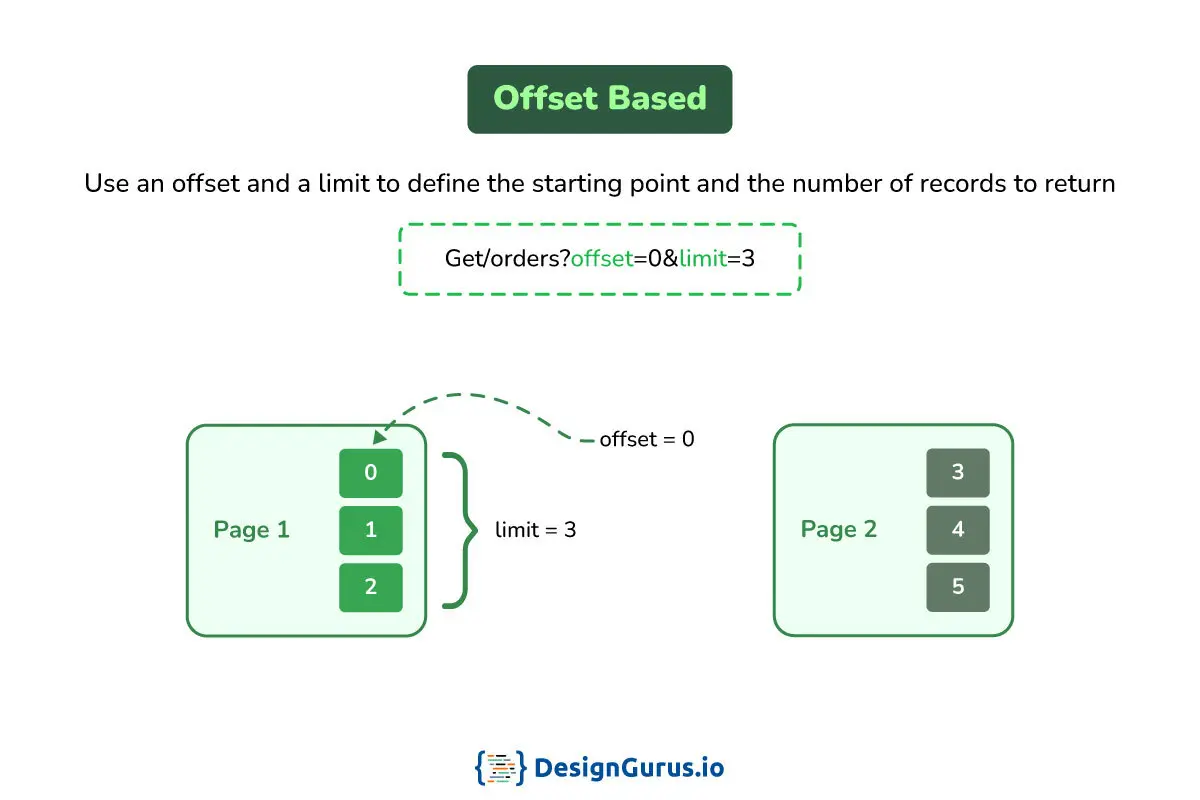
For example, GET /items?limit=10&offset=20 would retrieve items 21–30 (assuming offset starts at 0), effectively the 3rd page of results if each page has 10 items.
This method maps cleanly to user-visible page numbers.
-
How it Works: The server uses the offset to skip N rows in the database and then returns the next set of results based on the
limit(often implemented with SQLLIMIT ... OFFSET ...). It’s easy to implement and supports random page access. Users or developers can jump directly to page 5 or page 10, which is useful in UIs like admin dashboards or search results. Many APIs also return the total count of items and page links (or ahas_nextflag) so clients know how many pages exist and can navigate accordingly. -
When to Use Offset Pagination: Use offset pagination for small or moderate-sized datasets or whenever users need direct page jumps and a total count of results. It’s ideal for static or slow-changing data, reporting interfaces, or admin panels where the ability to say “Go to page 45” is important. Because it’s intuitive (just page numbers) and widely supported, it’s often the default choice for simple applications.
-
Drawbacks: Offset pagination can become inefficient at scale. As the offset grows, the database must scan and skip a large number of rows, leading to poor performance on very large datasets. For example, fetching page 50000 means the database skips 49999 pages of data, which is slow. Moreover, offset paging is sensitive to data changes. If new records are inserted or deleted while a user is paging, results can shift, causing duplicates or missing items (the “page drift” problem). For instance, an item seen at the end of page 2 might appear again on page 3 if new data pushed it down, confusing the user. In summary, offset pagination is simple but “performance degrades with higher offsets” and it’s “prone to duplicates/missing entries on inserts/deletes” in live data.
Cursor-Based Pagination (Token or Cursor Pagination)
Cursor pagination uses a pointer (cursor) to keep track of your position in the dataset, rather than a page number.
The server provides an opaque cursor (often a string token) in each response, which the client sends back to request the next page.
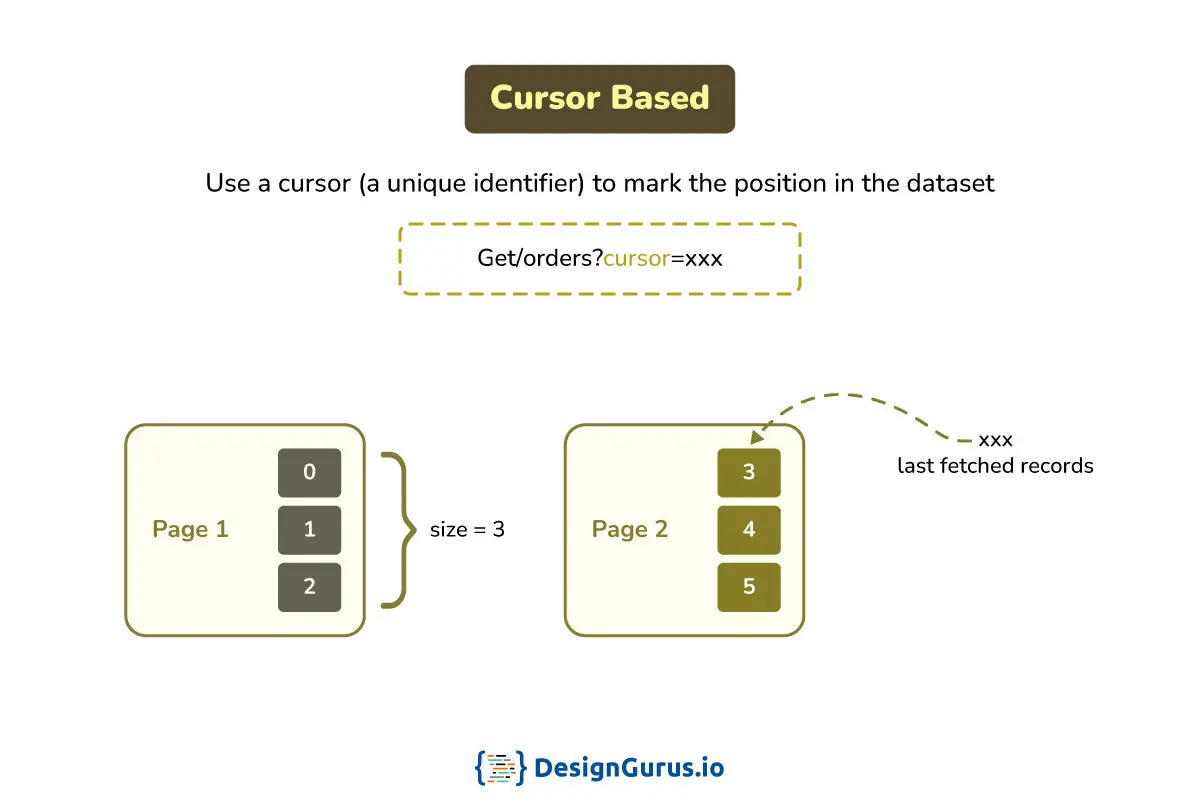
For example, a response might include "next_cursor": "aBcDeFg123" and the client’s next request would be GET /items?limit=10&cursor=aBcDeFg123 to get the following items.
Internally, this cursor corresponds to the last item seen in the previous page.
-
How it Works: Instead of skipping rows, the query uses the last retrieved record as a reference point. The cursor token typically encodes a unique identifier or a combination of sorting fields of the last item from the previous page. For instance, the cursor might include something like
{"created_at": "2025-01-01T12:00:00Z", "id": 123}encoded in base64. The server then queries for items after that timestamp or ID for the next page (e.g.,WHERE created_at < '2025-01-01T12:00:00Z' ORDER BY created_at DESC LIMIT 10). This way, new items added to the data won’t disturb the sequence – the cursor ensures consistent ordering even as new data arrives. Cursor pagination is thus great for real-time feeds or timeline data, because it prevents items from being skipped or duplicated when concurrent inserts happen. -
When to Use Cursor Pagination: Use cursor-based pagination for large, dynamic datasets where data might be added or updated frequently – for example, social media feeds, activity streams, or any infinite scroll interface. It shines when data consistency and performance are more important than random access to arbitrary page. Many public APIs and SaaS platforms prefer cursors for their stability and to keep clients from fiddling with internal IDs (the cursor token is opaque). If you don’t need to show “page X of Y” to the user, and just want a “Load more” functionality, cursor pagination is often the best choice.
-
Drawbacks: The main limitation is that cursor pagination does not allow jumping to an arbitrary page out of order. Clients must walk through pages sequentially using the cursor, which might be less convenient for UIs that need direct page access. Also, implementing cursor pagination requires a bit more work: you need to generate and handle the cursor tokens safely. Cursors should be treated as opaque values (often encrypted or signed) so that clients cannot tamper with them or infer sensitive info. There’s also a concern of stale cursors – if a record that a cursor points to gets deleted or expires, the cursor might become invalid. Good API design addresses this by either expiring cursors after some time or handling the error by returning a meaningful message or fallback. Despite these, the advantages in performance and consistency make cursors very popular for high-scale applications.
Keyset Pagination (Seek Method)
Keyset pagination is a specific type of cursor-based approach that uses the actual values of a sorted key (or keys) to fetch the next page, rather than an arbitrary token.
In essence, the last seen record’s key (like an ID or timestamp) serves as the “cursor.”
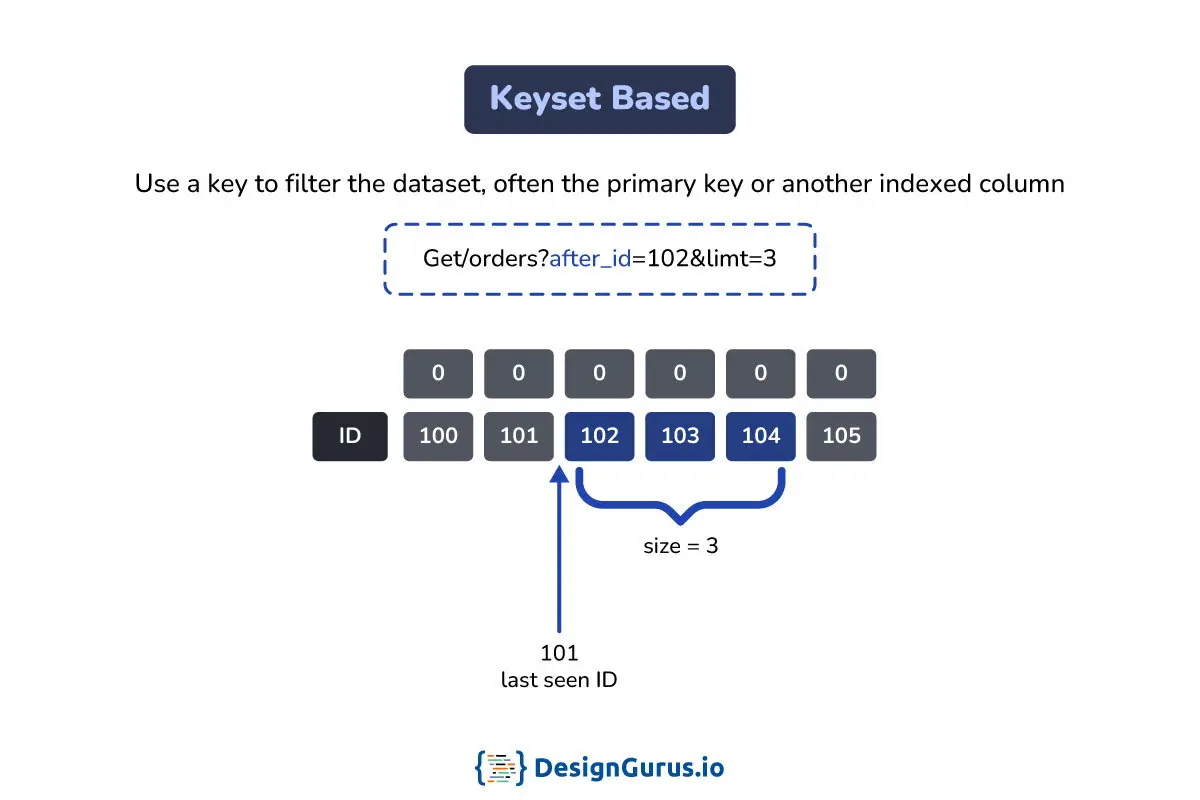
For example, if you’re sorting by ID, and the last item on page 1 has id = 50, then page 2 can be fetched with a query like WHERE id > 50 LIMIT 10 to get the next 10 items.
Keyset paging is often called the “seek method” because it lets the database seek directly to the position of the last key, using an index, instead of scanning offset rows.
-
How it Works: The client might provide the last seen key in the query (e.g.,
?last_id=50or it could be hidden behind an encoded cursor). The server then performs a query filtering by that key (or key tuple) to retrieve the next set. This approach requires a stable sort order and a unique, indexed key. A common pattern is to sort by a timestamp or ID; if the sort field isn’t guaranteed unique, the query can use a composite key (e.g., timestamp plus ID as tiebreaker) to avoid missing or duplicating records. Because the database uses an index range scan (WHERE key > last_key) instead of offset, performance remains consistent even as the dataset grows. Fetching the “1000th page” is as efficient as the first page in terms of query cost. -
When to Use Keyset Pagination: Keyset pagination is ideal for very large or real-time datasets where performance is critical and you don’t need random page jumps. It’s commonly used in high-scale applications like social networks, financial transaction logs, or endless scrolling lists of items. For example, a news feed showing latest posts can use the timestamp of the last post as a keyset cursor to load older posts quickly and in correct order. If you have millions of records and want to ensure the user can scroll or paginate without hitting performance issues, keyset is a great choice. It’s also very stable for evolving data. New records won’t cause page shifts, since they will appear in a predictable spot (usually at the beginning or end of the list depending on sort order). In fact, keyset pagination “makes the query index-friendly and consistent even if new rows are inserted during pagination”.
-
Drawbacks: The trade-off is flexibility. You typically cannot jump to an arbitrary page number with keyset pagination, similar to cursor approach (navigation is relative to the current position). Also, keyset only works if you have an appropriate sorted key. If your data doesn’t have a clear increasing unique field to paginate on, it can be tricky to implement. For multi-column or composite sorting requirements, keyset logic becomes more complex (you might need to include multiple fields in the cursor/condition). Additionally, providing a total count of results is not straightforward in pure keyset pagination (since you’re not counting all rows like offset does). In many cases, developers combine keyset for data retrieval with a secondary mechanism to estimate or fetch total counts only when needed.
Check out REST API interview questions.
Choosing the Right Pagination Strategy (When to Use Each)
Choosing between offset, cursor, and keyset pagination depends on your use case and priorities.
Here’s a quick guide to when each strategy makes sense:
-
Use Offset Pagination if your dataset is small or moderately sized, and you need simple implementation or random page access. It’s perfect for scenarios like admin dashboards, reports, or any interface showing page numbers and totals. For instance, an analytics UI or a product catalog might use offset so users can jump to page 5 or see “Page 5 of 50”. Choose offset when simplicity and page counts matter, and performance is a secondary concern.
-
Use Cursor Pagination if you have large, constantly changing data (e.g. social feeds, notifications, chat messages) where new items may be inserted often. It offers consistency and better performance for deep pagination on big lists. Cursor tokens are also useful for external or public APIs because they can be opaque and secure, ensuring clients only traverse via the provided cursors. For example, a third-party API for a platform might return a
next_cursorrather than exposing database IDs. Choose cursor when you need stability in a real-time feed or timeline and can sacrifice direct page-jumping in favor of efficiency and consistency. -
Use Keyset Pagination if you’re dealing with extremely large datasets or high-performance requirements, and your data can be sorted by a reliable key (like an auto-increment ID or timestamp). It’s great for infinite scroll scenarios and data that must be fetched with minimal latency even on the millionth record. Keyset is often the go-to for backend services iterating over huge tables or exporting data, because it can handle deep pagination without slowing down. Choose keyset when performance at scale is the top priority and you have a natural indexed ordering to leverage. (In fact, keyset is essentially a form of cursor pagination optimized for databases. Some implementations use keyset behind the scenes when you do cursor paging.)
It’s worth noting that these strategies are not mutually exclusive.
In practice, many systems use a combination: for example, an internal admin API might offer offset pagination with total counts, while a public-facing API for the same data uses cursor or keyset for efficiency.
The key is to align your choice with how the data is used.
Understanding these trade-offs early will help you design an API that scales well and provides a good user experience without needing a painful retrofit later.
The cost model, and hardening cursors
The reason to prefer keyset at scale is a concrete cost difference, not a style preference. On a 10-million-row table with page size 50, LIMIT 50 OFFSET 500000 makes the database walk and discard about 500,000 index entries before returning a single row — hundreds of milliseconds that grow linearly with depth — whereas the keyset form WHERE (created_at, id) > (?, ?) ORDER BY created_at, id LIMIT 50 is an index seek to the last-seen key, roughly a couple of milliseconds at any depth. The tell in production is p95 latency plotted against page number: a flat line means you are seeking, a rising slope means you are still offsetting.
Two practical points the happy path skips. Keyset needs a total order: if the sort column is not unique, append a unique tiebreaker (the primary key) to the cursor tuple — otherwise a duplicate value straddling a page boundary silently drops or repeats a row. And because a cursor encodes a seek position, treat it as untrusted input: sign it (for example with an HMAC) or encrypt it so a client cannot forge a cursor that seeks into data it should not reach or that triggers a pathological scan. Offset needs neither, which is part of why it survives on small admin UIs where "jump to page 7" and a total count matter more than deep-scan cost.
Drift, traced
Newest-first list, page size 3. Rows at t0 (newest to oldest): [J, I, H, G, F, E].
- Page 1 (
OFFSET 0 LIMIT 3) returns J, I, H. - Two new rows K, L arrive at the head. The list is now
[L, K, J, I, H, G, F, E]. - Page 2 (
OFFSET 3 LIMIT 3) skipsL, K, Jand returns I, H, G — the user sees I and H twice, and never notices K and L exist mid-scroll (they landed on a "page 1" the user already passed). With deletes, the same positional shift silently skips rows instead.
Now keyset on the identical data: page 1 ended at H, so page 2 is WHERE (created_at, id) < (H.created_at, H.id) ORDER BY created_at DESC, id DESC LIMIT 3, which returns G, F, E — no duplicate, no gap. Inserts at the head cannot shift the window, because the window is anchored to a row's key, not to a row count.
Drill ladder
L1: "Just make the cursor the last row's id — done, right?"
Trap: "id alone is enough; it's unique."
Bar: id alone only works when you are sorting by id. For a created_at sort you need the (created_at, id) tuple: if the sort column is non-unique, a duplicate timestamp straddling a page boundary silently drops or repeats a row — the tiebreaker is what restores a total order.
L2: "Why not expose last_id directly in the URL? It's simpler than an opaque token."
Trap: "Opaque cursors are just ceremony."
Bar: A raw key invites forging and enumeration and welds every client to your schema and sort key. An opaque, signed (HMAC) cursor keeps the seek position tamper-evident and lets you change sort keys or add tiebreakers later without breaking clients.
L3: "The product wants 'Page 7 of 50' and total counts — so keyset is out?"
Trap: "Total counts force offset pagination."
Bar: Serve an estimated or cached count (planner estimate, periodic COUNT(*)) alongside keyset pages; an exact COUNT(*) on every page re-scans exactly what keyset saved you. Reserve true offset paging for the small admin datasets where the scan cost is negligible.
🤖 Don't fully get this? Learn it with Claude
Stuck on What are the Main API Pagination Strategies offset, cursor, keyset, and When Should I Use Each? Open Claude, copy a block below, and it'll teach you this exact concept — visually and interactively.
Build the mental picture, not memorization.
I just read a lesson on **What are the Main API Pagination Strategies offset, cursor, keyset, and When Should I Use Each** (System Design) and want to truly understand it. Explain What are the Main API Pagination Strategies offset, cursor, keyset, and When Should I Use Each from first principles using ONE vivid real-world analogy and a visual mental model — draw it as ASCII art or a clear step-by-step diagram — with a concrete example using real numbers. Then ask me one question to check I got the mental picture, and wait for my reply. If you're unsure or a claim isn't standard, say so and reason from first principles instead of guessing.
Socratic — adapts to where you're stuck.
Teach me **What are the Main API Pagination Strategies offset, cursor, keyset, and When Should I Use Each** interactively. Ask me ONE guiding question at a time, wait for my answer, and adapt to my confusion — build the idea with me step by step instead of explaining it all at once. If you're unsure or a claim isn't standard, say so and reason from first principles instead of guessing.
Active recall exposes what you missed.
Quiz me on **What are the Main API Pagination Strategies offset, cursor, keyset, and When Should I Use Each** with 5 questions, easy to tricky, ONE at a time. Tell me if each answer is right; at the end, explain clearly what I got wrong and why. If you're unsure or a claim isn't standard, say so and reason from first principles instead of guessing.
Intuition + hook + flashcards for long-term memory.
Help me remember **What are the Main API Pagination Strategies offset, cursor, keyset, and When Should I Use Each** for the long term: give the one-sentence intuition, a memorable hook/mnemonic, a tiny worked example, and 3 active-recall flashcards (Q -> A). If you're unsure or a claim isn't standard, say so and reason from first principles instead of guessing.