What Are Windowing And Watermarking In Streaming Systems, In Simple Terms
Windowing in streaming systems means breaking a continuous flow of data into smaller time-based chunks called windows for processing, and watermarking is a technique that uses time markers to indicate when a window’s data is complete, helping handle late or out-of-order events.
What is Windowing in Streaming Systems?
Windowing is a method used in stream processing to partition an infinite data stream into finite, manageable segments called windows.
In simple terms, instead of treating a live data stream as one never-ending sequence, we slice it into short intervals (for example, every 1 minute or every 100 events) and treat each slice as a small batch of data.
This approach makes it possible to run calculations like counts, sums, or averages on streaming data; operations that would otherwise be impossible on an unbounded endless stream.
Why Is Windowing Important?
In real-time analytics, data keeps coming continuously, often at high volume and velocity.
Analyzing all incoming data as one giant set is impractical (and would never finish), so windowing breaks the stream into smaller windows that can be processed immediately.
For example, a website might use windowing to count page views per minute or per hour, rather than trying to count page views over an unending stream of events.
By confining computations to each window, systems can provide timely results (like “number of clicks in the last 5 minutes”) and update them as new windows roll over.
This yields real-time insights from streaming data, similar to how batch processing yields insights on static datasets.
Windowing essentially turns an unbounded stream into a series of bounded chunks, making techniques like aggregation and statistics feasible on streaming data.
How Windowing Works
Windows are often defined by time intervals, but they can also be defined by count (e.g. every 1000 events) or other criteria.
The most common approach is time-based windowing.
For instance, you could define a window that groups all events that occur within each 60-second period.
The system will collect events for 60 seconds, then at the end of that window, compute whatever metrics are needed (such as the total events, average value, etc.), then start a new window for the next 60 seconds, and so on.
This way, the stream is continuously broken into consecutive segments of 1 minute each, and you get rolling results every minute.
Common Types of Windows
In streaming systems, there are a few common window types that define how events are grouped:
-
Tumbling windows: These are fixed-length, non-overlapping windows that cover sequential time intervals. Each event belongs to exactly one tumbling window. For example, using a 5-minute tumbling window will group events into 5-minute blocks (0:00–0:05, 0:05–0:10, etc.), and each block is processed separately. Tumbling windows are like back-to-back segments with no gaps or overlaps, useful for periodic reporting (e.g. computing hourly metrics where each hour stands alone).
-
Sliding windows: These windows are fixed in size but can overlap in time. A sliding window “slides” by a smaller interval than its size, so windows share some events with neighboring windows. For instance, a 10-minute window that slides every 5 minutes will produce windows like 0:00–0:10, 0:05–0:15, 0:10–0:20, and so on, each covering 10 minutes but starting 5 minutes apart. In this case, an event at 0:07 falls into both the 0:00–0:10 and 0:05–0:15 windows. Sliding windows give a more continuous view of metrics over time (great for moving averages or trend monitoring).
-
Session windows: These windows are variable-length and based on periods of activity separated by inactivity. In a session window, events are grouped by user session or activity bursts rather than a strict fixed duration. The window remains open as long as events keep arriving within some idle gap threshold, and it closes when there’s a period of inactivity (no events) longer than the threshold. For example, for tracking user sessions on a website, a session window might close if a user is inactive for, say, 30 minutes, thereby grouping all actions in one visit into one window. Session windows are ideal for capturing user behavior sessions or any natural grouping where silence breaks one group from the next.
Each window type serves different use cases, but all share the goal of converting a stream into chunks that can be computed on.
By choosing an appropriate windowing strategy (tumbling for discrete periodic reports, sliding for continuous trends, session for user-oriented grouping, etc.), streaming systems can extract meaningful, timely information from endless data streams.
Check out common system design interview questions.
What is Watermarking in Streaming Systems?
In stream processing, watermarking is a mechanism to handle late-arriving or out-of-order events by marking a point in time as the threshold for waiting on data.
In simpler terms, a watermark is like a moving timestamp in the system that says: “I’ve seen all events up to this time, and any event that comes with a timestamp older than this is considered late.”
Watermarks help the system decide when to finalize the results for a window and output them, even if some events might still trickle in late.
This is crucial in streaming scenarios where events don’t always arrive in order, especially when using event timestamps.
Why Watermarking Is Needed
Unlike batch processing (where all data is present before computation), stream processing often uses event time (the time an event actually occurred) to group and order events, rather than the time the event was processed or received.
Events can arrive late or out of order due to network delays or system lags. For example, a user’s phone might go offline and send a sensor reading timestamped 12:03 only when it reconnects at 12:10. If we are windowing by event time (say, 12:00–12:05), that late event belongs to the 12:00–12:05 window even though it arrived at 12:10.
We need a strategy to decide how long the system should wait for late events before closing a window and producing results.
If we wait forever, results would be delayed indefinitely; if we don’t wait at all, we’d drop late data and potentially have incorrect results.
Watermarks provide a balanced solution: the system waits up to a certain point for late data, and the watermark signifies when that wait is over.
In practice, a watermark is often implemented as a time lag or grace period.
For example, a streaming job might define a watermark of 5 minutes for a window, meaning “hold the window open for 5 extra minutes to allow late data, then finalize it.”
If an event arrives after that grace period, it’s considered late data and will not be included in the already closed window result.
This mechanism ensures that most in-order and slightly late events are captured, while extremely late stragglers are handled separately (or discarded) to keep the pipeline timely.
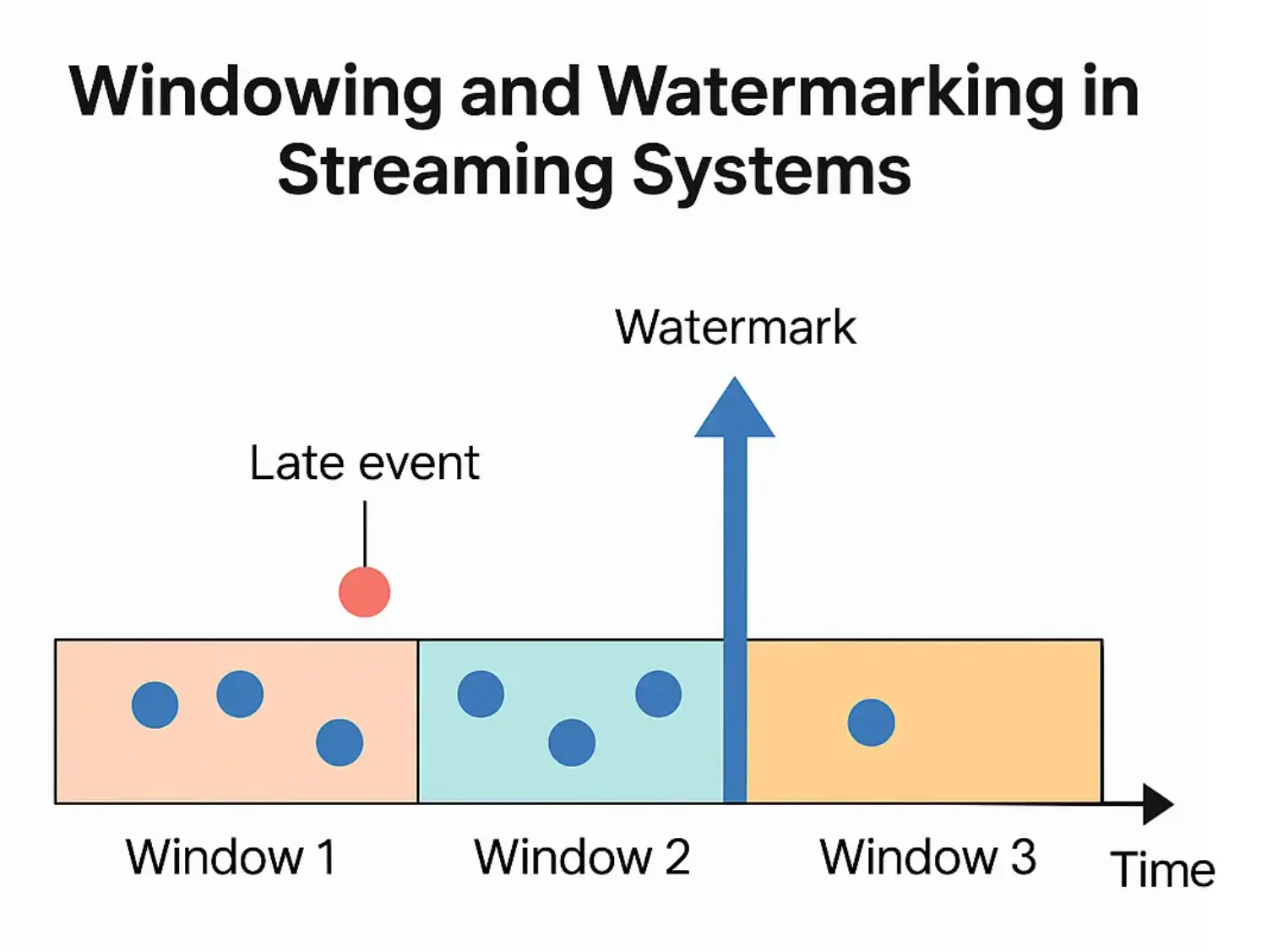
Illustration: A conceptual timeline showing how watermarks work. Events are grouped into time-based windows (boxes). The watermark (blue arrow) advances with the stream’s progress, always lagging behind the newest event timestamp by a fixed buffer.
In this example, the system uses the watermark to wait a bit for late events.
An event that arrives behind the current watermark (the red dot in an earlier window) is considered late and excluded from that window’s results.
The watermark thus acts as a cut-off point: once it passes the end of a window, the window is sealed and any event arriving with a timestamp earlier than that is too late to be included.
How Watermarking Works (Example)
Suppose we have a 5-minute tumbling window that should aggregate events by event time, and we set a watermark delay of 1 minute.
If one window spans 12:00–12:05, the system won’t immediately finalize results at 12:05. Instead, it will wait until 12:06 (i.e. 1 minute after window end — more precisely: until the watermark passes 12:05; see “How a watermark actually advances” below).
This extra minute is the watermark’s allowed lateness.
Events timestamped ≤12:05 that arrive in that grace period (up to 12:06) will still be counted in the 12:00–12:05 window.
At 12:06, the watermark tells the system that the 12:00–12:05 window can now be closed and emitted.
Any event timestamped in that window that comes after 12:06 is deemed late and will not alter the window’s result (it might be logged or handled in a special “late events” pipeline, depending on the system).
This watermark strategy ensures a balance between accuracy and timeliness.
By waiting a bit, we catch most delayed events and include them, improving accuracy.
But by not waiting indefinitely, we still produce output with minimal delay, preserving the real-time responsiveness of the system.
Each streaming engine often lets you configure the watermark delay (sometimes called allowed lateness or grace period).
For instance, in Apache Spark Structured Streaming you might set a watermark of 10 minutes on an event-time column, which means the engine will wait 10 minutes for late data before considering the window complete.
Events older than that threshold are treated as late, usually dropped or handled separately, because the results have already been published.
Watermarking is thus essential for correctness when using event-time windows, preventing unbounded waiting while still accounting for out-of-order arrivals.
Check out the System Design Guide.
Why Windowing and Watermarking Matter
Windowing and watermarking go hand-in-hand to enable reliable real-time stream processing:
-
Windowing provides the structure needed to process infinite streams, turning them into a series of finite computations. It allows calculations like rolling averages, totals per minute, or max values per hour on live data. Without windows, streaming analytics systems would either have unbounded memory usage or be unable to compute meaningful aggregates on the fly. Windows define when to cut off and aggregate the stream.
-
Watermarking adds robustness to windowing by handling the reality of imperfect data timing. In real-world streaming data, events might not arrive in order or on time. Watermarks introduce a time heuristic so the system knows how long to wait for late events and when to produce output confidently. This mechanism preserves result accuracy (by including late data that arrived within the wait period) and ensures result timeliness (by eventually emitting results even if some data never arrives). In essence, watermarking maintains the integrity of windowed results in the face of network delays, clock skews, or other timing issues, preventing both premature results and never-ending waits.
Many modern streaming data frameworks (such as Apache Flink, Apache Spark Structured Streaming, and Google Dataflow) implement windowing and watermarking as core features.
These concepts are crucial for use cases like real-time analytics dashboards, event monitoring, IoT sensor data processing, and fraud detection; anywhere you need to continuously analyze data that’s coming in live.
By using windowing and watermarking, such systems can compute real-time metrics (via windows) and still handle data that arrives late (via watermarks) in a graceful way.
The result is accurate streaming computations that closely reflect event-time reality while running in processing-time real-time.
Examples and Scenarios
To solidify the concepts, let’s walk through a simple scenario:
Imagine you run a website and want to track the number of user sign-ups in real-time.
You decide to use a window of 1 minute.
With windowing, the stream of sign-up events is broken into 1-minute windows – e.g., 10:00:00–10:00:59, then 10:01:00–10:01:59, and so on.
Every minute, you can calculate how many sign-ups happened and update a live dashboard. This gives a minute-by-minute view of user activity rather than waiting for a daily batch report.
Now, suppose a user actually signed up at 10:00:30 (within the first window), but due to a network hiccup the event didn’t reach your server until 10:02 (which is in the next window by processing time).
If you use event time (the actual sign-up time) for windows, that event should count toward the 10:00–10:01 window.
Watermarking comes into play by allowing a buffer – say you set a watermark to wait 2 minutes.
The system will hold the 10:00–10:01 window open until 10:03 before finalizing the count, to see if any late events arrive.
Indeed, the delayed sign-up at 10:02 still falls within that grace period, so it gets included in the correct window. At 10:03, the system closes the 10:00–10:01 window and reports its result.
Any sign-up events timestamped in that window that might arrive after 10:03 would be considered late and not counted in the window’s result (though you might log that it was late).
This way, windowing gave us the per-minute counts, and watermarking ensured the count was accurate despite an event arriving later than expected.
Summary
Windowing and watermarking together make stream processing both practical and reliable.
Windowing deals with the infinite nature of streams by chopping them into workable chunks, and watermarking deals with the uncertain timing of events by providing a rule for lateness.
For beginners, you can think of windowing as creating “time buckets” for your data, and watermarking as the rule for how long to keep each bucket open to catch stragglers.
With these concepts, streaming systems can deliver near real-time analytics without getting bogged down by late data or endless waits.
Going deeper: event time, watermarks in practice, and what breaks
The sections above give you the vocabulary. A production design also has to pick the clock that defines the window, know how the watermark is actually produced, and decide what to do with late data. The companion page Event-Time, Watermarks & Late Data explores this in full depth; the points below are the minimum you need to reason about it in a design review.
Event time vs. processing time vs. ingestion time
A window can be cut by three different clocks, and the choice is the single biggest correctness decision:
- Event time — the timestamp embedded in the event itself (e.g., the moment the sensor recorded the reading). It gives a reproducible, physically meaningful answer, but events arrive late and out of order, so you need watermark machinery to know when to close a window.
- Processing time — the wall-clock time when your processor observes the event. Windows close exactly on schedule and need no watermarks, but the result depends on network delay and pipeline backpressure. Replaying the same events through a slower pipeline can produce a different answer.
- Ingestion time — the time when the event enters the stream processor (e.g., the Kafka broker timestamp). It is easier to reason about than event time, but still vulnerable to reordering between the source and the broker.
Rule of thumb: use event time whenever the answer must be correct and reproducible (billing, analytics, ML features). Use processing time only for best-effort live gauges where freshness beats exactness.
How a watermark actually advances
The examples above spoke loosely of "waiting until 12:06" — in an event-time engine nothing waits on the wall clock; the window closes when the watermark (derived from the largest event time seen) passes the window end. If events stop arriving, the watermark stops advancing and the window stays open — which is why the idle-source pitfall below exists.
A watermark is not a timer; it is a running heuristic claim of the form "I have now seen every event with event time ≤ T." A simple generator tracks the maximum event time seen so far and subtracts an allowed-lateness bound:
maxEventTimeSeen = max(maxEventTimeSeen, event.eventTime)
watermark        = maxEventTimeSeen - allowedLatenessBound
// a window fires when: watermark >= window.endTime
When the stream has multiple partitions, the effective watermark is the minimum across all input partitions — it can only be as fresh as the slowest source. That minimum is also the root cause of the idle-source pitfall below.
Worked trace: a 5-minute window with a 2-minute watermark bound
Events arrive in this order (arrival order ≠ event-time order):
| Arrival time | Event time | Window | Watermark after this event | What happens |
|---|---|---|---|---|
| 10:01 | 10:01 | [10:00,10:05) | 09:59 | Window open; event added. |
| 10:03 | 10:02 | [10:00,10:05) | 10:00 | Window still open. |
| 10:06 | 10:04 | [10:00,10:05) | 10:02 | Window still open. |
| 10:08 | 10:07 | [10:05,10:10) | 10:05 | [10:00,10:05) closes and emits its aggregate. |
| 10:16 | 10:03 | [10:00,10:05) | 10:05 | Event time ≤ watermark ⇒ late. Dropped or sent to a side output. |
The 10:03 event genuinely belongs in [10:00,10:05), but it arrived after the watermark had already passed it. The watermark was wrong — a straggler was still in flight — which is the intrinsic cost of closing an unbounded stream with a finite bound.
Trade-offs: window type and watermark bound
| Decision | Option | You gain | You pay | When NOT to use |
|---|---|---|---|---|
| Window type | Tumbling | Clean, non-overlapping aggregates; easy to reason about. | Sharp boundaries can hide trends that straddle two windows. | When you need a moving average or continuous trend. |
| Sliding | Smooth metrics and moving averages. | Duplicate work and higher state, because events belong to multiple windows. | When per-window uniqueness matters or compute budget is tight. | |
| Session | Captures natural activity bursts (e.g., a user visit). | Variable window length makes aggregation and late-data handling more complex. | When events are sparse and sessions would be tiny or ill-defined. | |
| Watermark bound | Tight (small allowed lateness) | Low latency; results emitted quickly. | More events arrive after the window closes; data loss or frequent late corrections. | When real-world jitter (mobile offline, network retries) is larger than the bound. |
| Loose (large allowed lateness) | Fewer late events; more complete results. | Higher end-to-end latency and more window state held in memory. | When freshness is the dominant requirement (alerting, live dashboards). |
Production pitfalls
- Idle sources stall every downstream window. Because the merged watermark is the minimum across partitions, one quiet Kafka partition can freeze the watermark for the whole pipeline. Modern engines fix this with idleness detection that temporarily excludes a stalled source from the minimum.
- Side outputs, not silent drops. A late event should not vanish. Route it to a side output or a "late data" stream so operators can reconcile it instead of silently losing it.
- Non-atomic dedup on late corrections. If your sink re-emits a corrected window, make the update idempotent (e.g., overwrite by window key) so a second correction does not double-count.
- Confusing allowed lateness with watermark. Some engines (Flink) let you keep a window open for an extra grace period after the watermark passes its end. That is a second knob — watermark bounds latency, allowed lateness bounds how long you accept corrections.
When to pick what
Use event-time tumbling/sliding windows for dashboards, billing, and analytics where the answer must reflect reality, not arrival order. Use session windows for user-behavior and funnel analysis. Use processing-time windows only for rough live gauges. Tighten the watermark when freshness dominates; loosen it when completeness dominates and you can afford the memory. There is no universal "correct" bound — it is a latency-vs-completeness dial you set per pipeline.
Sources: Akidau et al., "The Dataflow Model" (VLDB 2015) — the original treatment of event-time windows, watermarks, and triggers; Akidau, Chernyak & Lax, Streaming Systems (O'Reilly, 2018) — watermark generation, idle sources, and side outputs; Apache Flink documentation on event time, watermarks, and allowed lateness; Kleppmann, Designing Data-Intensive Applications, ch. 11 (stream processing trade-offs).
🤖 Don't fully get this? Learn it with Claude
Stuck on What Are Windowing And Watermarking In Streaming Systems, In Simple Terms? Open Claude, copy a block below, and it'll teach you this exact concept — visually and interactively.
Build the mental picture, not memorization.
I just read a lesson on **What Are Windowing And Watermarking In Streaming Systems, In Simple Terms** (System Design) and want to truly understand it. Explain What Are Windowing And Watermarking In Streaming Systems, In Simple Terms from first principles using ONE vivid real-world analogy and a visual mental model — draw it as ASCII art or a clear step-by-step diagram — with a concrete example using real numbers. Then ask me one question to check I got the mental picture, and wait for my reply. If you're unsure or a claim isn't standard, say so and reason from first principles instead of guessing.
Socratic — adapts to where you're stuck.
Teach me **What Are Windowing And Watermarking In Streaming Systems, In Simple Terms** interactively. Ask me ONE guiding question at a time, wait for my answer, and adapt to my confusion — build the idea with me step by step instead of explaining it all at once. If you're unsure or a claim isn't standard, say so and reason from first principles instead of guessing.
Active recall exposes what you missed.
Quiz me on **What Are Windowing And Watermarking In Streaming Systems, In Simple Terms** with 5 questions, easy to tricky, ONE at a time. Tell me if each answer is right; at the end, explain clearly what I got wrong and why. If you're unsure or a claim isn't standard, say so and reason from first principles instead of guessing.
Intuition + hook + flashcards for long-term memory.
Help me remember **What Are Windowing And Watermarking In Streaming Systems, In Simple Terms** for the long term: give the one-sentence intuition, a memorable hook/mnemonic, a tiny worked example, and 3 active-recall flashcards (Q -> A). If you're unsure or a claim isn't standard, say so and reason from first principles instead of guessing.